Automated Document Data Extraction System: Transforming Documents into Digital Data | DOVA
Businesses handle a large volume of documents every day, including invoices, receipts, purchase orders, application forms, and contracts. While these documents contain vital information, extracting that data manually can consume valuable time and increase the risk of data entry errors.
Automated document data extraction systems enable organizations to convert information from documents into structured digital data that can be utilized within business applications. Instead of manually entering every data field, employees can leverage document processing technology to recognize text, identify relevant information, and prepare the data for subsequent processing stages.
Solutions like DOVA OCR enable businesses to overcome the limitations of standard text recognition by offering the ability to extract data from documents, classify them, verify information, and integrate with existing workflows.
What is an automated document data extraction system?
Automated Document Data Extraction is the process of identifying and collecting specific information from documents, minimizing the need for manual data entry.
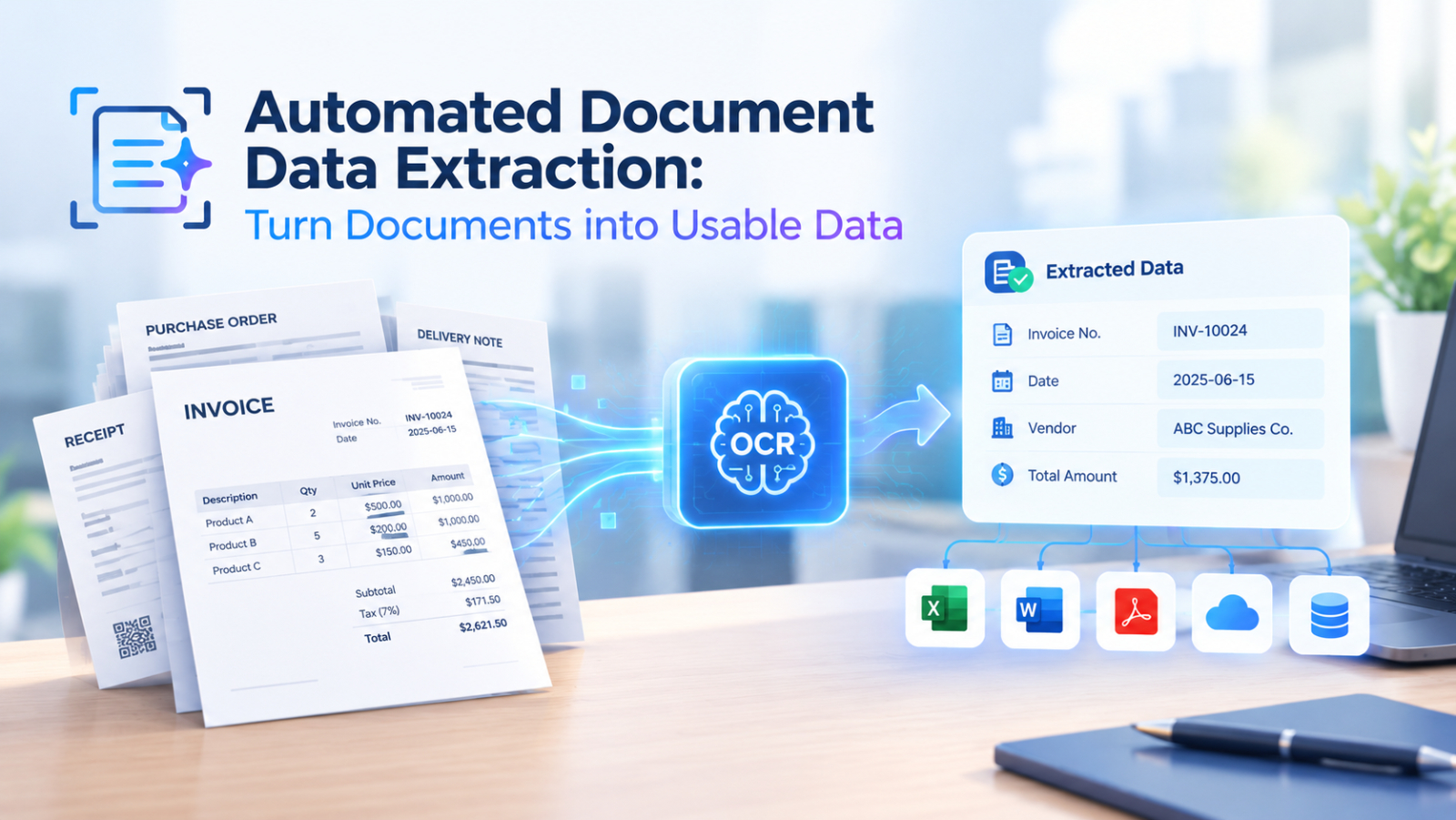
For example, when processing an invoice, a business might need information such as the vendor name, invoice number, document date, tax amount, and the total amount due. Instead of having an employee manually type in each piece of information, a data extraction system can recognize the content within the document and organize the required data fields into a structured format.
This technology typically integrates Optical Character Recognition (OCR), document classification, rules for data extraction, and validation processes.
The result is not merely a digital copy of the original document, but rather data that can be searched, verified, transferred, and effectively utilized for business operations.
How does an automated document data extraction system work?
In general, an automated document data extraction workflow consists of five steps.
- Gather documents.
Documents enter the process via scanning, file uploads, email attachments, or designated folders. The supported file formats depend on the software being used.
- Recognize text using OCR
OCR helps identify text within scanned documents, images, and other supported file types by converting printed content into text that can be read and processed by a computer—including content in Thai and English, which the system supports.
- Identify and extract key information
The system identifies information relevant to business processes, such as invoice numbers, dates, customer details, and amounts. The methods used to extract this data may vary depending on the document layout and the specific capabilities of each solution.
- Verify the accuracy of the extracted data
Extracted data can be verified against predefined rules or reviewed by staff. For example, a finance team might check the total amount on an invoice and confirm that all required fields are populated before approving the document.
- Submit data to the business system
Once verified, the data can be exported or transferred to spreadsheets, databases, accounting software, or other connected applications, eliminating the need for manual data entry between systems.
Key benefits of automated document data extraction systems
Reduce manual data entry
Employees spend less time reading documents and entering data into business applications. This benefit is particularly evident in organizations that process large volumes of invoices, receipts, and forms.
Increase data consistency
Structured data extraction organizes information into consistent, formatted fields. When combined with validation rules, the system helps identify missing data and potential errors before the information is passed on to the next stage of the process.
Accelerate document processing
Automating repetitive data retrieval tasks reduces processing time and allows employees to focus on reviewing exceptions, rather than having to manually enter every piece of data.
Makes accessing information more convenient.
Structured digital data is easier to search, browse, and reuse than data stored in paper documents or PDF files that consist solely of images.
Support business automation systems
When the extracted data can be integrated with existing applications, organizations can create more efficient workflows for accounting, procurement, administrative tasks, and document management.
However, automated systems cannot entirely eliminate errors. The accuracy of text recognition, the complexity of documents, and the requirements for data verification all continue to influence the reliability of the results.
Examples of business applications
Automated document data extraction systems can support operations across various departments and industries.
- Accounting and Finance: Extract vendor details, invoice numbers, dates, and amounts to support invoice processing and expense management.
- Purchase:Consolidate purchase order details and vendor information to reduce redundant data entry and facilitate document matching.
- Human Resources: Extract information from application forms and employee documents to simplify the human resource management process.
- Medical Administrative Tasks: แปลงข้อมูลจากแบบฟอร์มและบันทึกต่าง ๆ ให้เป็นข้อมูลดิจิทัล โดยมีการตรวจสอบความถูกต้องและปกป้องข้อมูลที่มีความอ่อนไหวอย่างเหมาะสม
- Document Management: Convert scanned contracts, reports, and historical documents into searchable digital content.
Selecting the most appropriate use case depends on the volume of documents, the required data fields, the document format, and the level of accuracy needed.
How does DOVA OCR support the automated extraction of data from documents?
DOVA OCR enables organizations to transform document content into digital data that is ready for use, through its OCR and document processing capabilities.
Extract structured data
DOVA OCR goes beyond simple text recognition; it also supports the extraction of relevant data from documents, helping to reduce the burden of manually transferring individual data fields into other systems.
Classify documents
Document classification helps organize incoming files by type, enabling businesses to manage invoices, forms, and other documents according to the workflows best suited to each category.
Verify the extracted data
DOVA OCR features data verification capabilities, allowing staff to review the information extracted by the system and identify potential errors before proceeding to the next step—a process that is especially critical for financial figures and other vital business data.
Connect with existing workflows
DOVA OCR supports various capabilities, such as exporting to CSV files, storing data in a database, and providing a RESTful API. Depending on your deployment requirements, these options can facilitate the integration of extracted data into existing business systems, thereby reducing the need for manual, repetitive data entry.
Increase operational efficiency
Integrating text recognition, data extraction, verification, and system connectivity enables businesses to create more consistent workflows—from the initial receipt of documents to the delivery of actionable, ready-to-use data.
The benefits gained depend on the quality of the documents, the design of the workflow, and the system integration requirements of each organization.
How to Choose the Right Document Data Extraction Solution
Before implementing an automated data extraction system, businesses should carefully assess their document processing needs.
Begin by identifying the types of documents that require the most manual effort to process. Then, test the solution using actual documents—including low-quality scans and files with varying layouts—while measuring the accuracy of key data fields.
In addition, you should consider whether the system supports both Thai and English, includes tools for data verification, integrates with your existing applications, meets security requirements, and has sufficient capacity to handle the expected volume of documents.
Conducting a pilot project serves as a way to measure processing time, data correction rates, and overall efficiency improvements before scaling the use of automation to other parts of the organization.
Summary
Automated document data extraction systems enable businesses to transform information contained within documents into structured data that can be searched, verified, and integrated into digital workflows. By reducing manual data entry and connecting extracted information to business applications, organizations can enhance efficiency and better manage document-intensive processes.
An effective automated document data extraction system should go beyond simple text recognition; it must be capable of identifying relevant data fields, supporting validation checks, and facilitating the transfer of data to the systems that require it.
DOVA OCR integrates document recognition with capabilities for data extraction, classification, verification, and system connectivity. To evaluate its suitability, businesses can assess DOVA OCR using their own actual documents and internal workflow requirements as a basis for decision-making.
Interested in Microsoft products and services? Send us a message here.
Explore our digital tools
If you are interested in implementing a knowledge management system in your organization, contact SeedKM for more information on enterprise knowledge management systems, or explore other products such as Jarviz for online timekeeping, OPTIMISTIC for workforce management. HRM-Payroll, Veracity for digital document signing, and CloudAccount for online accounting.
Read more articles about knowledge management systems and other management tools at Fusionsol Blog, IP Phone Blog, Chat Framework Blog, and OpenAI Blog.
New Gemini Tools For Educators: Empowering Teaching with AI
If you want to stay up-to-date with the latest technology and AI news, check out this website It's updated daily!
Fusionsol Blog in Vietnamese
- What is Microsoft 365?
- What is Copilot?What is Copilot?
- Sell Goods AI
- What is Power BI?
- What is Chatbot?
- What is cloud storage?
Related Articles
Frequently Asked Questions (FAQ)
What is Microsoft Copilot?
Microsoft Copilot is an AI-powered assistant feature that helps you work within Microsoft 365 apps like Word, Excel, PowerPoint, Outlook, and Teams by summarizing, writing, analyzing, and organizing information.
Which apps does Copilot work with?
Copilot currently supports Microsoft Word, Excel, PowerPoint, Outlook, Teams, OneNote, and others in the Microsoft 365 family.
Do I need an internet connection to use Copilot?
An internet connection is required as Copilot works with cloud-based AI models to provide accurate and up-to-date results.
How can I use Copilot to help me write documents or emails?
Users can type commands like “summarize report in one paragraph” or “write formal email response to client” and Copilot will generate the message accordingly.
Is Copilot safe for personal data?
Yes, Copilot is designed with security and privacy in mind. User data is never used to train AI models, and access rights are strictly controlled.