Microsoft Copilot is becoming an important AI assistant for businesses, helping employees write content, analyze information, conduct research, and complete complex tasks. However, as Microsoft continues expanding its AI capabilities, users may encounter different AI models, modes, and settings within the Copilot experience.
This raises an important question: Which option should you choose to get the best results?
The good news is that you do not need to understand every technical detail to use Copilot effectively. The most important thing is understanding your objective and selecting the appropriate capabilities for the task.
In this guide, we explore Microsoft Copilot AI models, explain the differences between models, modes, and reasoning effort, and provide practical recommendations for choosing the right configuration for everyday business activities.
Understanding AI Models, Modes, and Reasoning Effort
Before choosing the right Copilot configuration, it is helpful to understand three important concepts: AI models, modes, and reasoning effort.
Although they work together, each serves a different purpose.
AI Models: The Intelligence Behind Copilot
An AI model is the technology responsible for understanding prompts, processing information, and generating responses.
Different models can have different strengths. Some are designed to deliver responses quickly, while others may perform better when handling complex instructions, detailed analysis, or multi-step reasoning.
Microsoft Copilot provides access to different AI models depending on the Copilot experience, subscription, organizational settings, and geographical availability.
For business users, choosing an AI model is not necessarily about finding the most powerful option. It is about selecting a model that can complete a particular task effectively.
For example:
- Everyday questions: Use an appropriate general-purpose model for quick answers and simple explanations.
- Business analysis: Choose a model suited to handling complex information and analytical tasks.
- Research activities: Consider capabilities that support deeper research and comparison across multiple perspectives.
- Complex problem-solving: Use models and configurations that can handle more detailed instructions and reasoning.
Modes: How Copilot Approaches Your Task
While an AI model determines the underlying intelligence, a mode or experience determines how Copilot approaches a task.
Depending on the Copilot product, users may encounter different experiences designed for particular activities.
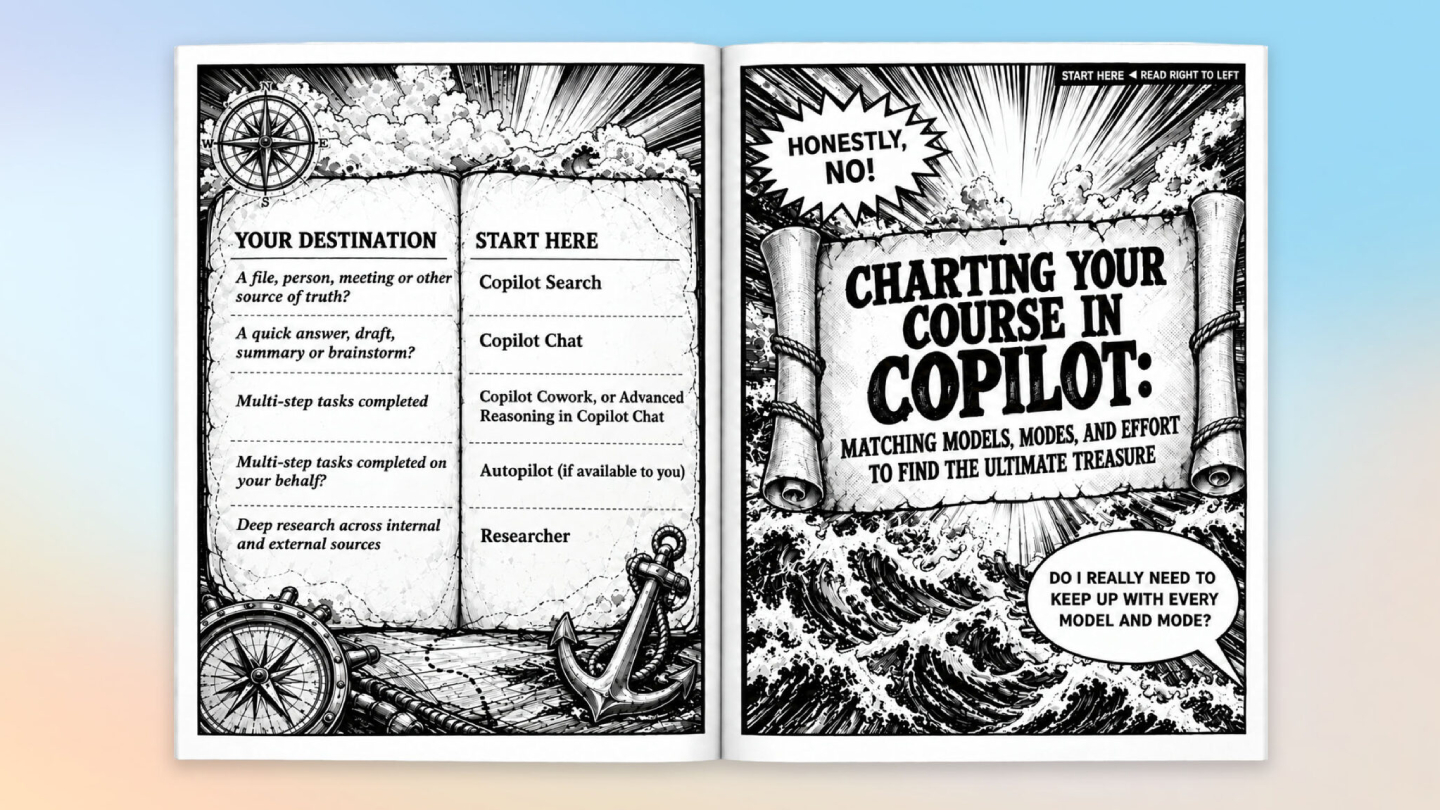
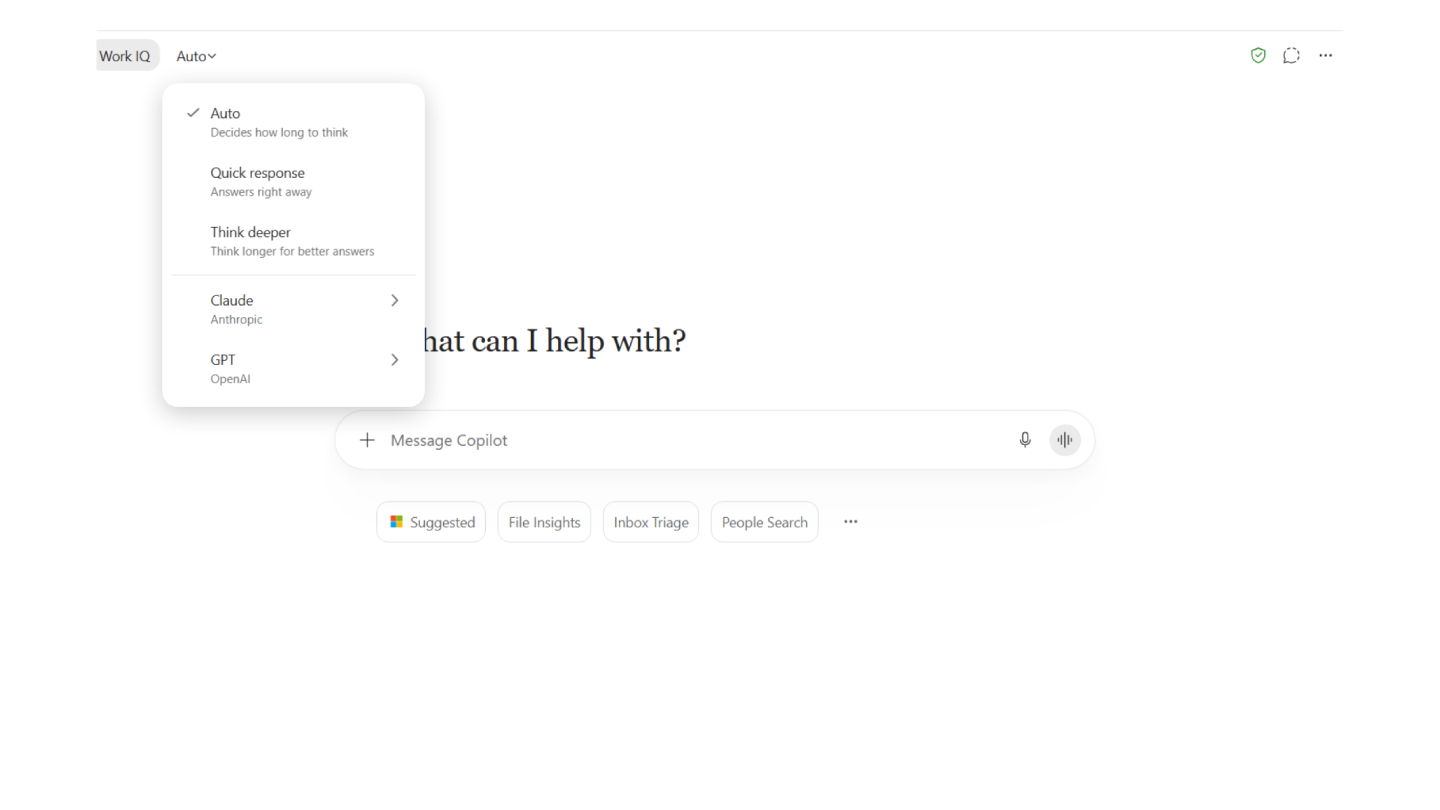
For example, Auto allows Copilot to select an appropriate model and mode automatically. Researcher provides a dedicated research experience, while Copilot Cowork supports more complex task execution.
The available options vary across Copilot experiences, so users should not expect every mode to appear in every Microsoft application.
Reasoning Effort: How Much Work Copilot Puts Into a Task
Reasoning effort refers to how much computational work is allocated to completing a task.
Some requests require only a straightforward response. Others involve multiple requirements, detailed analysis, or several steps before reaching a useful conclusion.
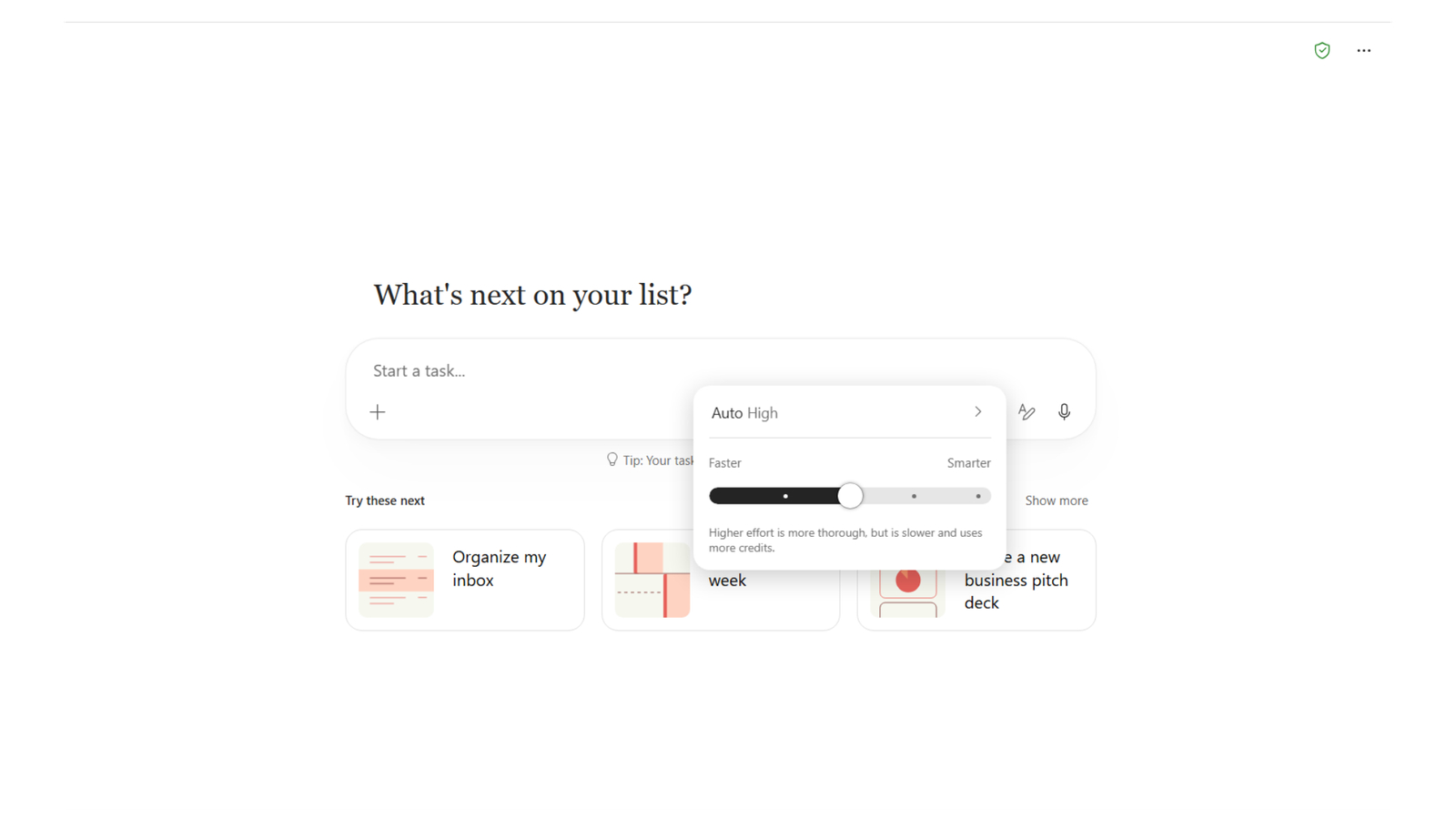
In Copilot Cowork, users can adjust reasoning effort through a slider with five options:
- Light
- Medium
- High
- Extra High
- Max
Medium is the default and recommended starting point for most tasks. Higher effort may produce more thorough results, but it can also increase processing time and credit consumption.
The key is to match the effort level to the complexity of the task rather than always selecting the maximum setting.
Comparing Microsoft Copilot AI Models, Modes, and Effort
Understanding the differences makes it easier to select the right configuration for different workplace requirements.
Component | Main purpose | Business Use |
AI Model | Determines the underlying AI capabilities | Writing, analysis, and problem-solving |
Auto Mode | Automatically selects an appropriate model and mode | Everyday questions and productivity |
Researcher | Supports dedicated research activities | Market research and information gathering |
Copilot Cowork | Supports more complex task execution | Multi-step business workflows |
Reasoning Effort | Adjusts the computational effort for a task in Cowork | Detailed analysis and complex assignments |
These options are not interchangeable. Models provide the intelligence, modes provide different working experiences, and reasoning effort controls how much work is allocated to certain tasks.
How to Choose the Right Copilot Configuration for Business Tasks?
The easiest way to choose the right configuration is to start with the desired outcome.
Instead of asking which AI model is the most powerful, consider what you want Copilot to accomplish.
For Everyday Productivity, Start With Auto
Auto is the default option in Microsoft Copilot and is suitable for most everyday activities.
It allows Copilot to select from the models and modes available in the current experience without requiring users to make manual selections.
Example business tasks:
- Drafting professional emails.
- Summarizing meeting discussions.
- Rewriting documents.
- Generating presentation outlines.
- Answering general workplace questions.
For example, an employee who wants to summarize a meeting document does not necessarily need to select a specialized model. Starting with Auto is usually sufficient.
For Complex Research, Use Researcher
Some business questions require more than a quick answer. They involve gathering information, evaluating different perspectives, and developing a structured report.
Microsoft Copilot Researcher provides a dedicated experience for research-oriented activities.
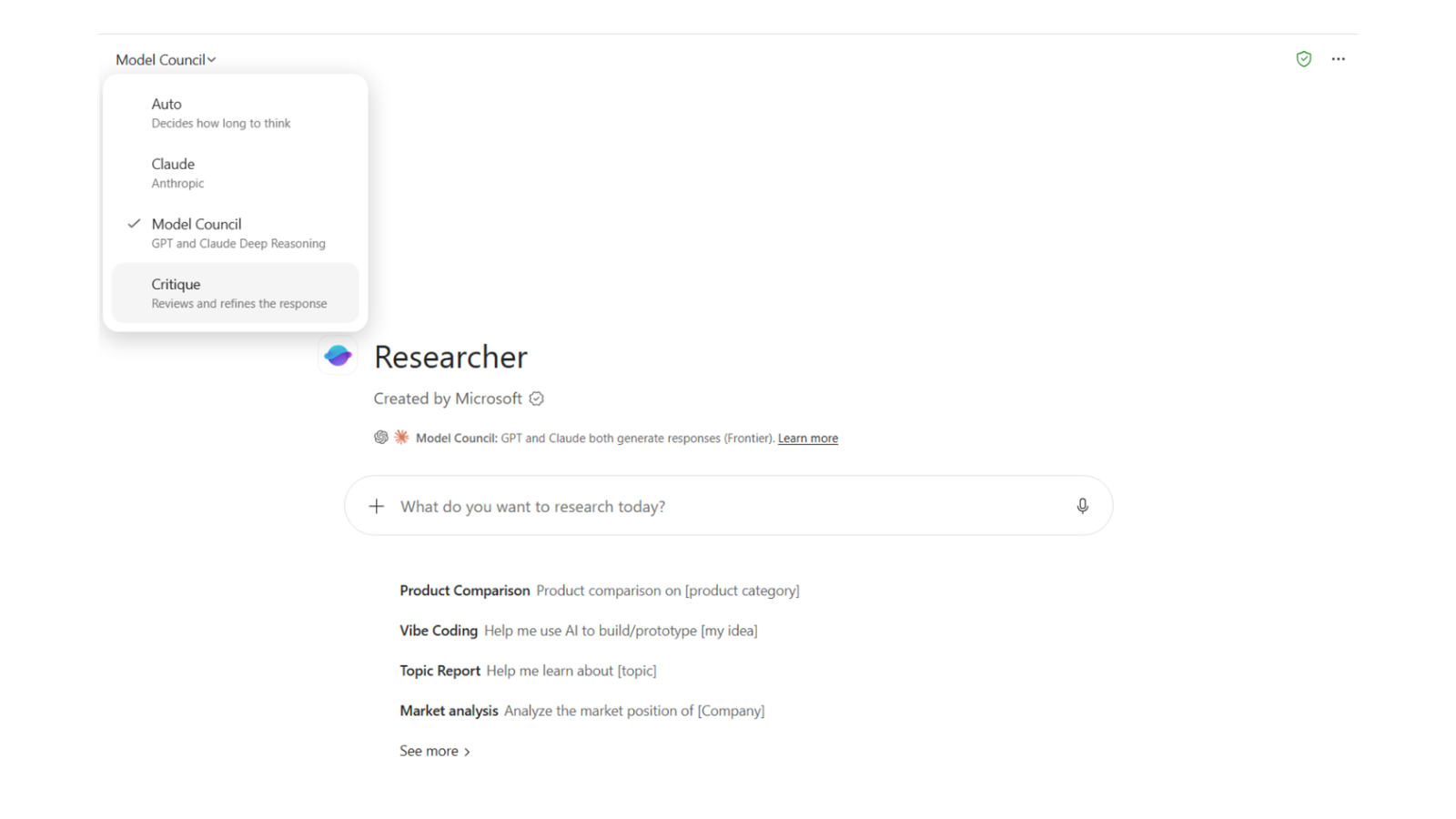
Microsoft also describes two options within Researcher: Model Council and Critique.
Model Council allows users to compare outputs from GPT and Claude models. This can help users identify where different models agree, disagree, or provide different perspectives.
Critique uses GPT to generate a report and Claude to review it.
These capabilities can be useful for more demanding research activities, such as:
- Evaluating business opportunities.
- Comparing market information.
- Reviewing strategic recommendations.
- Exploring different solutions to a business problem.
However, Model Council and Critique are currently available through Microsoft's Frontier program, and administrators must allow Anthropic models before users can access them.
For Complex Workflows, Consider Copilot Cowork
Some assignments involve multiple steps rather than a single question or response.
For these situations, Copilot Cowork offers an experience designed to handle more complex tasks.
For example, a manager may need to prepare a business performance report using multiple information sources. This involves gathering information, organizing findings, analyzing results, and producing a structured output.
In Copilot Cowork, users can also adjust the reasoning effort before running a task.
This provides greater flexibility when deciding how much computational effort should be allocated to an assignment.
Choosing the Right Reasoning Effort
Selecting the appropriate reasoning effort can help balance output quality, processing time, and resource consumption.
The following table provides practical guidance for using the available effort settings in Copilot Cowork.
Effort Level | Recommended use | example |
Light | Straightforward tasks | Simple information processing |
Medium | Normal business assignments | Preparing a business summary |
High | More demanding tasks | Analyzing multiple business requirements |
Extra High | Complex assignments | Detailed strategic analysis |
Max | Particularly demanding tasks | Extensive multi-step problem-solving |
These are practical recommendations rather than fixed Microsoft-defined task mappings. Actual results depend on the prompt, available information, and task complexity.
For most business activities, Medium is a sensible starting point. Increase the effort when the task requires deeper analysis or more comprehensive results.
Best Practices for Getting Better Results From Copilot
Choosing the right model is only part of the process. The quality of your instructions also has a significant impact on the results.
A useful prompting approach is to include five elements:
Goal + Audience + Format + Tone + Source Material
For example, instead of asking:
"Analyze our sales performance."
Provide more specific instructions:
"Analyze the attached quarterly sales report, identify the three best-performing products, highlight sales trends, and summarize the findings in a professional report for senior management."
This gives Copilot a clearer understanding of the expected outcome.
Other practical recommendations include:
- Start with Auto: Use the default configuration for everyday requests before experimenting with other options.
- Test familiar prompts: Compare different models using the same instructions to understand their response quality and style.
- Adjust when necessary: If the response does not meet expectations, consider switching models without restarting the conversation.
- Match effort to complexity: Avoid using maximum effort for simple tasks that do not require extensive analysis.
- Review important outputs: Always verify business-critical information, calculations, and recommendations before making decisions.

Summary
Choosing the right AI model, mode, and reasoning effort does not need to be complicated. The most effective approach is to understand your business objective first and then select the capabilities that best support it.
For everyday productivity, Auto is a practical starting point. For research activities, specialized Researcher capabilities can provide additional perspectives. For complex assignments, Copilot Cowork and its adjustable reasoning effort offer more flexibility.
By understanding how Microsoft Copilot AI models work together with different modes and effort settings, businesses can make better use of AI, improve employee productivity, and get more value from their Microsoft investment.
Looking to maximize Microsoft Copilot in your organization?
As a Microsoft Solutions Partner, Fusion Solution helps businesses explore, implement, and adopt Microsoft AI solutions. From Microsoft Copilot readiness assessments and implementation to employee training and workflow optimization, our team can help your organization identify the right AI capabilities and turn them into practical business value.
Contact Fusion Solution to discover how Microsoft Copilot can support your organization's digital transformation.