AI coding agents are becoming increasingly powerful, helping developers write code, manage repositories, and automate complex development tasks. However, these capabilities also introduce security concerns when attackers gain unauthorized access to the accounts connected to these tools.
On November 17, 2026, Microsoft Security Research published findings showing how device code phishing could be used to compromise AI coding agent workflows, using GitHub Copilot CLI as an example.
The research revealed that a single deceptive authentication approval could potentially expose private code repositories, development sessions, and even certain remote computer interactions.
What Is Device Code Authentication?
Device code authentication is a sign-in method commonly used by command-line applications, smart devices, and other tools that cannot easily display a traditional browser login.
Instead of entering credentials directly into an application, users receive a temporary code and enter it on a legitimate authentication website.
The typical process works as follows:
- An application requests authentication and displays a temporary code.
- The user opens the official verification website.
- The user enters the code and approves the sign-in.
- The application receives authorization to access permitted resources.
This method is convenient and widely supported. However, its security depends on users approving only authentication requests they initiated themselves.
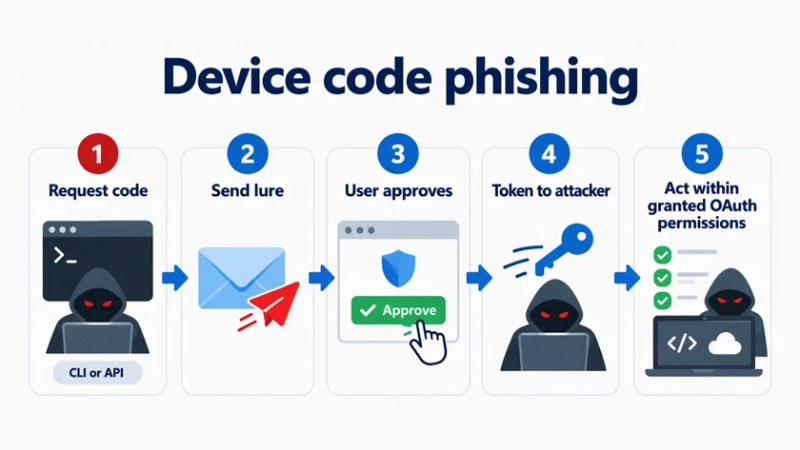
How Device Code Phishing Works
Device code phishing exploits the authentication process through social engineering rather than directly stealing passwords.
An attacker initiates an authentication request and tricks another person into approving it.
For example, a developer might receive a message claiming that their GitHub Copilot subscription requires verification. The message includes a device code and a link to GitHub's genuine authentication website.
Because the website is legitimate, the request may appear trustworthy.
However, the authentication was initiated by the attacker, not the developer.
Once the developer approves it, the attacker's application can receive an OAuth access token and operate within the permissions granted by the authorization.
The critical security issue is that a legitimate website does not necessarily mean a legitimate authentication request.
Why AI Coding Agents Introduce Additional Risks?
Traditional device code phishing often targets access to email accounts, cloud files, and other online services.
AI coding agents introduce additional concerns because they may have permission to interact with source code, execute commands, retain information, and access development environments.
Microsoft examined these risks using GitHub Copilot CLI in a controlled laboratory simulation.
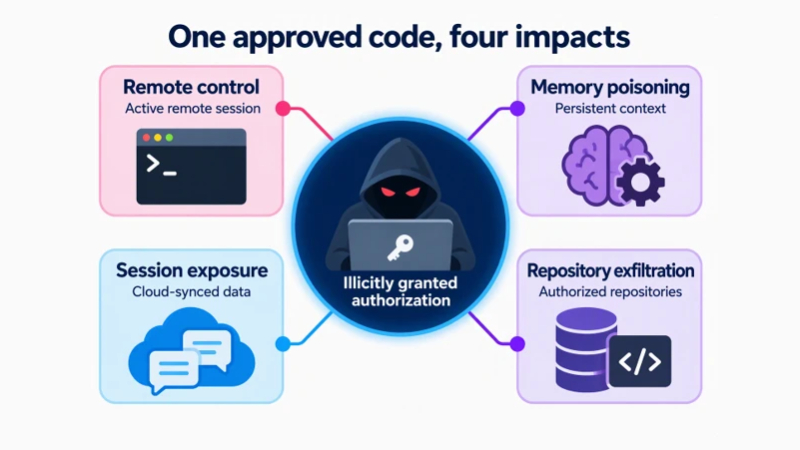
The researchers identified four possible consequences of a compromised authorization.
Unauthorized Control of Active Coding Sessions
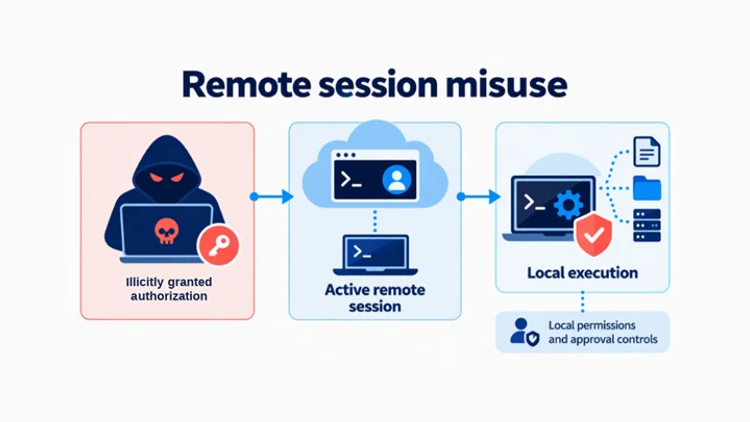
Some AI coding agents support remote interaction with active sessions.
In Microsoft's simulation, an attacker-controlled client could interact with a Copilot CLI session when remote control was enabled and organizational policies permitted it.
This allowed the agent to execute a command on the test computer, subject to local permissions and approval controls.
Importantly, this was not an unrestricted remote code execution vulnerability.
The scenario required an active, online session with remote control enabled. Existing permission restrictions still applied.
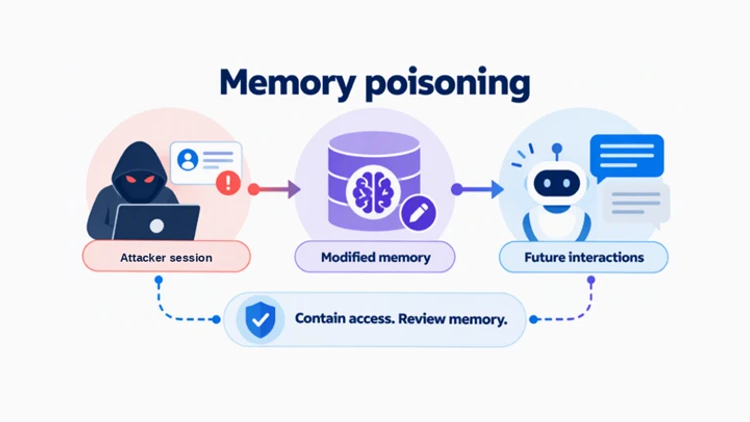
AI Memory Manipulation
Some coding agents can remember project information, development preferences, and other details across interactions.
Microsoft demonstrated that misleading information could be added to Copilot Memory after obtaining the necessary authorization.
If the agent later relies on that information, it could influence future responses or development decisions.
This creates a longer-term risk because incorrect or manipulated information may remain after the initial unauthorized interaction.
The impact depends on the agent's memory settings and whether the stored information is subsequently used.
Exposure of Previous Development Sessions
AI coding sessions may contain sensitive information, including code snippets, internal file paths, and technical discussions.
Where cloud session synchronization is enabled, an unauthorized client with appropriate access may be able to retrieve previously stored sessions.
Microsoft demonstrated this possibility in its test environment.
For organizations, exposure of development history could reveal confidential project information or provide additional context for future attacks.
Cloud session storage and remote session control are separate capabilities, however, and enabling synchronization does not automatically enable remote control.
Unauthorized Access to Private Repositories
A compromised authorization may also provide access to private GitHub repositories.
In Microsoft's simulation, the attacker-controlled client obtained access to repositories available to the affected test account.
The extent of access depended on the OAuth permissions requested and the user's existing repository privileges.
Potentially exposed information could include proprietary source code, configuration files, and infrastructure definitions.
This highlights why granting broad repository permissions can increase the consequences of a compromised account.
Are These Attacks Happening in the Real World?
Device code phishing is an established threat, and Microsoft has previously documented campaigns targeting cloud accounts.
However, the four Copilot CLI scenarios described in this research were demonstrated in a controlled laboratory environment.
Microsoft stated that it had not observed these specific AI coding agent outcomes being exploited in real-world attacks.
The findings illustrate how legitimate software capabilities could be misused following a successful phishing attempt, rather than confirming a newly discovered software vulnerability.
How Microsoft Defender Helps Detect These Threats
Microsoft developed detection capabilities that connect suspicious authentication activity with potential phishing attempts.
The detections examine signals associated with email and Microsoft Teams messages alongside GitHub OAuth activity.
For organizations using supported configurations, Microsoft Defender can help security teams identify suspicious authorizations that might otherwise resemble ordinary sign-ins.
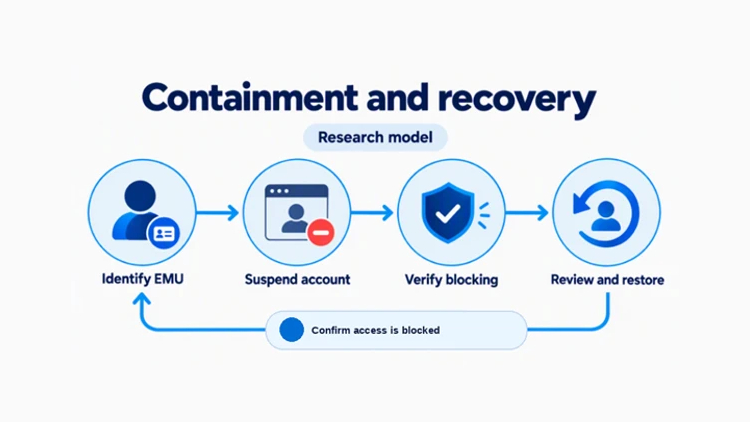
Microsoft also tested a response mechanism for GitHub Enterprise Managed Users that can suspend affected identities through the organization's identity provider.
These protections depend on the necessary integrations, telemetry, and security configurations being available.
How Developers and Organizations Can Reduce the Risk
Protecting AI coding agents requires a combination of user awareness, restricted permissions, and security monitoring.
The following practices can reduce exposure:
- Verify authentication requests: Enter device codes only when personally initiating a login. Never approve unexpected codes received through email or chat.
- Review OAuth permissions: Regularly inspect authorized GitHub applications and revoke unfamiliar or unnecessary access.
- Limit repository access: Give developers and connected applications only the permissions required for their responsibilities.
- Control remote session features: Disable unnecessary remote control functionality and review cloud session storage policies.
- Monitor AI memory: Review stored agent information and remove suspicious entries when memory features are enabled.
- Enable security monitoring: Use supported Microsoft Defender integrations to investigate suspicious GitHub authorization activity.
If a suspicious authorization has already been approved, security teams should promptly revoke it, investigate potentially affected repositories and sessions, and verify that unauthorized access has been blocked.
Summary
The risks of device code authentication become more significant when connected applications can access valuable development resources.
Microsoft's findings demonstrate how a single phishing approval could potentially affect AI coding sessions, stored memory, private repositories, and remote interactions.
The underlying authentication technology is not inherently malicious. The danger arises when users unknowingly authorize a request initiated by someone else.
As AI coding agents become more integrated into development workflows, organizations must treat authentication permissions and agent access as essential parts of their cybersecurity strategy.
The most important takeaway is simple: Never approve a device code authentication request unless you initiated it yourself.