As AI continues to reshape the modern workplace, new concepts like AI “coworkers” are becoming increasingly important. Copilot Cowork and Claude Cowork represent two different approaches to integrating AI into daily workflows—each offering unique strengths in productivity, collaboration, and automation.
This article explores how these two AI-powered assistants compare and which one may be better suited for your organization.
Copilot Cowork and Claude Cowork in Modern Work Environments
Both solutions aim to transform how work gets done by acting as intelligent collaborators rather than just tools. However, they differ in ecosystem integration, capabilities, and user experience.
What is Copilot Cowork?
Copilot Cowork เป็นการพัฒนาขั้นก้าวหน้าของ Copilot ที่ถูกออกแบบมาให้ก้าวข้ามจากการเป็นเพียงผู้ช่วยธรรมดา ไปสู่การเป็นส่วนหนึ่งของการทำงานอย่างแท้จริง ในขณะที่ Copilot แบบเดิมช่วยสร้างเนื้อหาหรือให้คำแนะนำ Copilot Cowork จะยกระดับไปอีกขั้น โดยทำหน้าที่เหมือนเพื่อนร่วมงานดิจิทัลที่สามารถลงมือทำงานแทนคุณได้
แทนที่จะเพียงตอบคำสั่ง Copilot Cowork สามารถวางแผนงาน ดำเนินการข้ามหลายแอป และทำงานแบบอัตโนมัติได้ตั้งแต่ต้นจนจบ อีกทั้งยังสามารถทำงานพร้อมกันในหลายเครื่องมือ ทำให้คุณสามารถโฟกัสที่ผลลัพธ์ของงานได้ โดยไม่ต้องจัดการรายละเอียดในแต่ละขั้นตอนด้วยตัวเอง
หากอธิบายให้เข้าใจง่าย ความแตกต่างคือ Copilot แบบเดิมช่วยให้คุณทำงานได้สำเร็จ ส่วน Copilot Cowork จะทำงานไปพร้อมกับคุณ—and ในหลายกรณีสามารถทำงานแทนคุณได้เลย
อะไรที่ทำให้ Copilot Cowork แตกต่างจาก Copilot แบบเดิม?
ความแตกต่างหลักระหว่าง Copilot Cowork และ Copilot แบบเดิมอยู่ที่ “การลงมือทำ” เทียบกับ “การช่วยแนะนำ” Copilot แบบดั้งเดิมถูกออกแบบมาเพื่อโต้ตอบกับคำสั่ง โดยช่วยสร้างเนื้อหาหรือให้คำแนะนำ ซึ่งส่วนใหญ่มักทำงานอยู่ภายในแอปเดียว แม้ว่าจะมีประโยชน์สำหรับการร่างข้อความหรือสรุปข้อมูล แต่ผู้ใช้งานยังคงต้องคอยกำหนดขั้นตอนและสลับไปมาระหว่างเครื่องมือต่าง ๆ เพื่อให้งานเสร็จสมบูรณ์
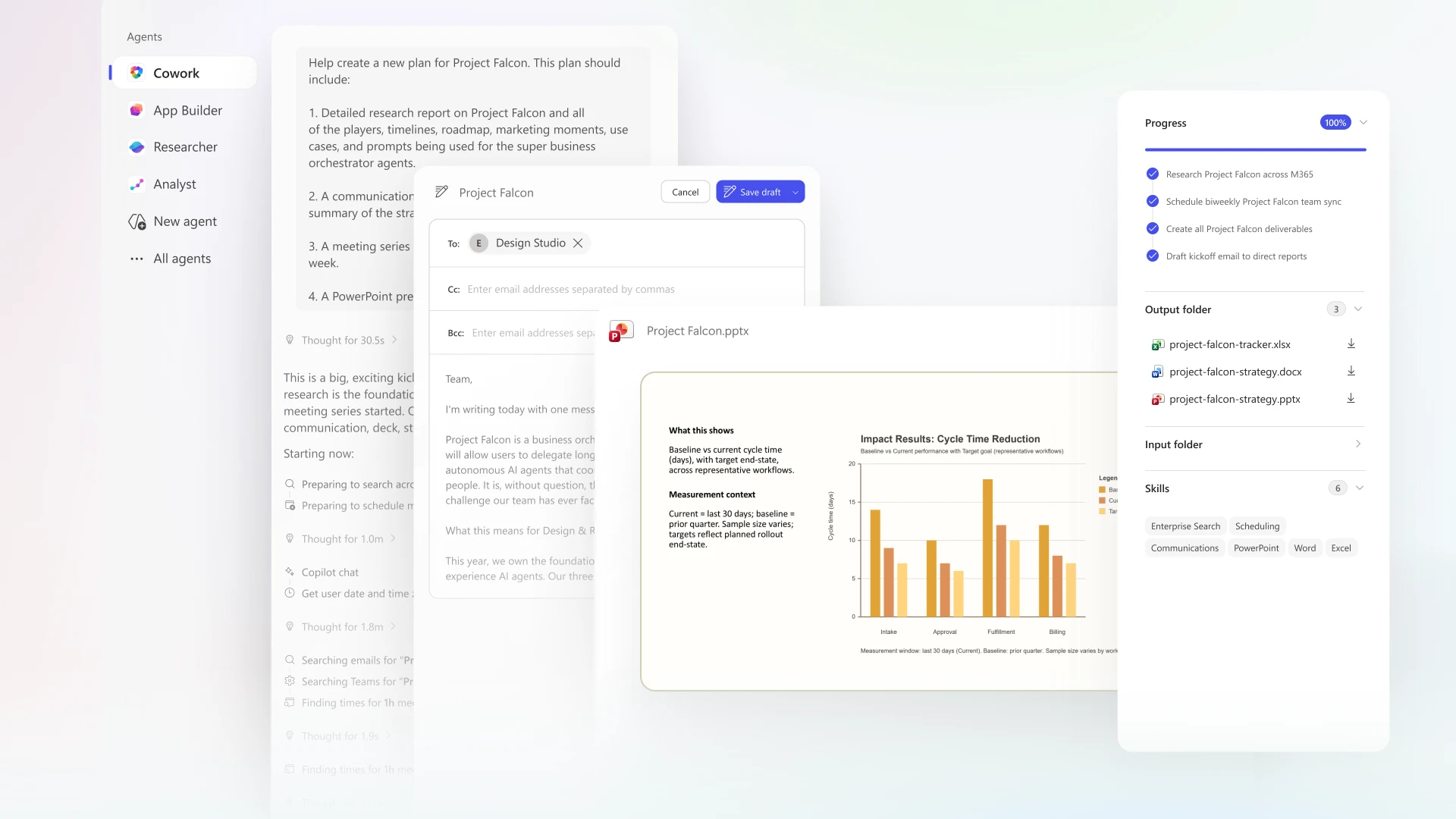
ในทางตรงกันข้าม Copilot Cowork ถูกพัฒนาขึ้นเพื่อก้าวไปอีกขั้น โดยสามารถดำเนินงานแบบหลายขั้นตอนและทำงานข้ามหลายแอปได้โดยอัตโนมัติ มันสามารถวางแผนเวิร์กโฟลว์ ดำเนินการตั้งแต่ต้นจนจบ และทำงานได้เหมือนเพื่อนร่วมงานดิจิทัลที่มีความเป็นอิสระ แทนที่จะหยุดอยู่แค่การสร้างเนื้อหา Copilot Cowork ยังสามารถทำขั้นตอนถัดไปให้จนบรรลุผลลัพธ์สุดท้ายของงานได้
ตัวอย่างง่าย ๆ ที่แสดงให้เห็นความแตกต่างนี้อย่างชัดเจนคือ เมื่อใช้ Copilot แบบเดิม หากคุณสั่งว่า “เขียนรายงาน” ระบบจะสร้างข้อความให้ แต่คุณยังต้องนำไปปรับแต่ง จัดรูปแบบ และส่งต่อด้วยตัวเอง แต่เมื่อใช้ Copilot Cowork หากคุณสั่งว่า “เตรียมตัวสำหรับการประชุมลูกค้า” ระบบจะเริ่มกระบวนการที่กว้างขึ้นทันที ไม่ว่าจะเป็นการค้นหาเอกสารที่เกี่ยวข้อง สรุปประเด็นสำคัญ สร้างสไลด์นำเสนอ และร่างอีเมล—all ภายในเวิร์กโฟลว์ที่เชื่อมต่อกันใน Microsoft 365 ความสามารถในการเปลี่ยนจาก “คำสั่ง” ไปสู่ “การลงมือทำจริง” นี้เองที่ทำให้ Copilot Cowork ทรงพลังอย่างมากในสถานการณ์ทางธุรกิจจริง
ความสามารถที่มาพร้อมในตัว (Built-in Skills)
Copilot Cowork มาพร้อมความสามารถในตัวที่ช่วยให้ทำงานได้อย่างราบรื่นกับเครื่องมือที่ใช้ในชีวิตประจำวัน ภายในแอปอย่าง Microsoft Word, Microsoft Excel, Microsoft PowerPoint, Microsoft Outlook และ Microsoft Teams มันสามารถสร้างเนื้อหา วิเคราะห์ข้อมูล จัดการการสื่อสาร และสนับสนุนการทำงานร่วมกันได้อย่างครบถ้วน
เนื่องจากความสามารถเหล่านี้ถูกฝังอยู่ภายในเครื่องมือที่คุณใช้อยู่แล้ว Copilot Cowork จึงสามารถทำงานข้ามงานและแอปต่าง ๆ ได้อย่างเป็นธรรมชาติ ทำให้เวิร์กโฟลว์ของคุณเชื่อมต่อกันมากขึ้น มีประสิทธิภาพมากขึ้น และสามารถทำงานแบบอัตโนมัติได้ดียิ่งขึ้น
สามารถทำได้ดังนี้:
การสร้างคอนเทนต์ (Content Creation)
- เขียนเอกสาร อีเมล และรายงาน
- ปรับปรุงและสรุปเนื้อหา
การวิเคราะห์ข้อมูล (Data Analysis)
- วิเคราะห์สเปรดชีต
- สร้างกราฟและ Insight
การสื่อสาร (Communication)
- ร่างข้อความและอีเมล
- สรุปการประชุมและแชท
การจัดการไฟล์ (File Intelligence)
- ค้นหาและสรุปไฟล์ใน
Microsoft OneDrive และ
Microsoft SharePoint
การทำงานอัตโนมัติ (Workflow Automation)
- รวมหลายงานให้เป็น Workflow เดียว
- ทำงานข้ามแอปอัตโนมัติ
ความสามารถเหล่านี้ทำให้ Copilot Cowork ทำหน้าที่เหมือน “เพื่อนร่วมทีม AI” ได้จริง
วิธีเริ่มต้นใช้งาน Copilot Cowork
ขั้นตอนที่ 1: Microsoft 365 Subscription
ในการเริ่มใช้งาน Copilot Cowork องค์กรของคุณจำเป็นต้องมี Microsoft 365 อยู่ก่อนแล้ว เช่น Business Standard, Business Premium หรือ E3/E5 แผนเหล่านี้จะให้คุณเข้าถึงแอปหลักอย่าง Word, Excel, PowerPoint, Outlook และ Teams ซึ่งเป็นพื้นฐานที่ Copilot Cowork ใช้ในการทำงาน หากไม่มีส่วนนี้ Copilot Cowork จะไม่สามารถใช้งานได้ นอกจากนี้ การเลือกพาร์ทเนอร์ที่เหมาะสมก็มีความสำคัญ การทำงานร่วมกับ Microsoft Partner ที่ได้รับการรับรองจะช่วยให้การติดตั้งและตั้งค่าระบบเป็นไปอย่างราบรื่น และเหมาะสมกับความต้องการของธุรกิจคุณ

ขั้นตอนที่ 2: Copilot Add-on License
Copilot Cowork ไม่ได้รวมมาใน Microsoft 365 โดยอัตโนมัติ จำเป็นต้องซื้อเพิ่มเติมในรูปแบบ Add-on ที่ชื่อว่า Copilot for Microsoft 365 โดยราคาสำหรับธุรกิจจะอยู่ที่ประมาณ $30 ต่อผู้ใช้ต่อเดือน (อาจแตกต่างกันตามภูมิภาคและข้อตกลงการใช้งาน) เมื่อเปิดใช้งาน Add-on นี้แล้ว ผู้ใช้งานจะสามารถเข้าถึงความสามารถของ Copilot ได้ในแอปต่าง ๆ และนำ AI มาใช้เพื่อเพิ่มประสิทธิภาพในการทำงานประจำวันได้อย่างเต็มที่
ขั้นตอนที่ 3: Business Account และความพร้อมของข้อมูล
การใช้งาน Copilot Cowork อย่างมีประสิทธิภาพ จำเป็นต้องใช้บัญชีองค์กร เช่น อีเมลบริษัทที่เชื่อมต่อกับ Microsoft 365 Tenant ที่มีการจัดการ เนื่องจากระบบต้องอาศัยบริบทและข้อมูลภายในองค์กร เช่น เอกสาร อีเมล การสนทนา และไฟล์ที่อยู่ใน OneDrive, SharePoint, Outlook และ Teams เพื่อสร้างผลลัพธ์ที่แม่นยำและตรงกับงานจริง ยิ่งข้อมูลภายในองค์กรมีการเชื่อมโยงและจัดระเบียบดีมากเท่าไร Copilot Cowork ก็จะยิ่งทำงานได้มีประสิทธิภาพมากขึ้นเท่านั้น
ขั้นตอนที่ 3: การตั้งค่าจากผู้ดูแลระบบ (Administrator Setup)
ก่อนที่ผู้ใช้งานจะสามารถเข้าถึง Copilot Cowork ได้ ผู้ดูแลระบบ (IT Admin) จำเป็นต้องตั้งค่าระบบให้เรียบร้อย ซึ่งรวมถึงการกำหนดสิทธิ์การใช้งาน Copilot ให้กับผู้ใช้ เปิดใช้งานฟีเจอร์ที่เกี่ยวข้อง และตั้งค่าการเข้าถึงข้อมูลตามนโยบายขององค์กร หากไม่มีการตั้งค่าส่วนนี้ ผู้ใช้อาจไม่สามารถเห็นหรือใช้งาน Copilot ได้ แม้ว่าจะมีการซื้อไลเซนส์แล้วก็ตาม การตั้งค่าที่ถูกต้องจึงเป็นสิ่งสำคัญเพื่อให้การใช้งานเป็นไปอย่างปลอดภัยและมีประสิทธิภาพ
ขั้นตอนที่ 4: เริ่มต้นใช้งานใน Microsoft 365
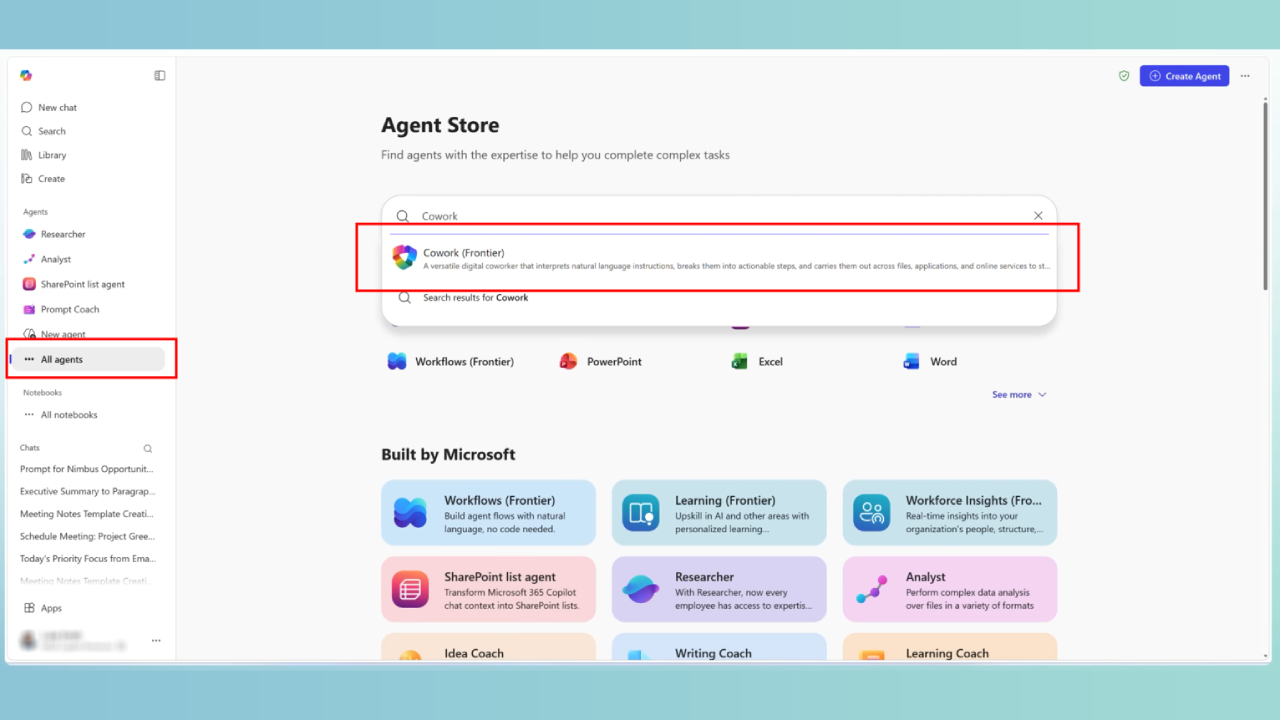
เมื่อทุกอย่างพร้อมแล้ว คุณสามารถเริ่มใช้งาน Copilot Cowork ได้ทันที โดยเข้าใช้งาน Microsoft 365 Copilot ผ่านเบราว์เซอร์ Outlook Teams หรือแอปเดสก์ท็อป จากนั้นไปที่เมนู Agents ค้นหา Copilot Cowork และกดเพิ่มหากเป็นการใช้งานครั้งแรก หลังจากเปิดใช้งานแล้ว ระบบจะพร้อมให้คุณใช้งานอย่างต่อเนื่อง ไม่ว่าจะเป็นการมอบหมายงาน สร้างเวิร์กโฟลว์อัตโนมัติ หรือทำงานร่วมกับ AI ได้อย่างราบรื่น
https://m365.cloud.microsoft/chat/agentstore?from=Homescreen
ราคา Copilot Cowork
Copilot Cowork เป็น Add-on ของ Microsoft 365
ราคาโดยทั่วไป:
- Approximately $30 per user per month.
สิ่งที่รวมอยู่:
- ใช้งาน Copilot ในแอป Microsoft 365
- ระบบ AI สำหรับ Automation และ Workflow
- การเชื่อมต่อกับข้อมูลขององค์กร
Note:
- ต้องมี Microsoft 365 อยู่แล้ว
- ราคาอาจแตกต่างตามภูมิภาคหรือพาร์ทเนอร์
- มักซื้อผ่านพาร์ทเนอร์หรือผู้จัดจำหน่าย Microsoft
Claude Cowork คืออะไร?
Claude Cowork คือผู้ช่วยการทำงานที่ขับเคลื่อนด้วย AI ซึ่งพัฒนาบนโมเดลของ Anthropic โดยมีความสามารถคล้ายกับเครื่องมือ AI อื่น ๆ ในการช่วยเขียน วิเคราะห์ และจัดการงานผ่านภาษาธรรมชาติ อย่างไรก็ตาม Claude Cowork ถูกออกแบบมาให้เน้นด้านการให้เหตุผลเชิงลึก (Deep Reasoning) ความสามารถในการเข้าใจบริบทที่ยาว (Long-context understanding) และการสร้างคำตอบที่ปลอดภัยและเชื่อถือได้มากกว่า แทนที่จะเพียงแค่สร้างคำตอบอย่างรวดเร็ว Claude Cowork ทำหน้าที่เสมือนผู้ร่วมงานดิจิทัลที่มีการคิดวิเคราะห์ ช่วยผู้ใช้ประมวลผลข้อมูลที่ซับซ้อนและสร้างผลงานที่มีคุณภาพสูง
อะไรทำให้ Claude Cowork แตกต่าง?
Claude Cowork มีแนวทางที่แตกต่างจากระบบ AI หลายตัว โดยให้ความสำคัญกับการคิดอย่างเป็นระบบและความแม่นยำ มากกว่าการทำงานอัตโนมัติ (Automation) เพียงอย่างเดียว จุดเด่นคือความสามารถในการจัดการคำสั่งที่ซับซ้อน เอกสารขนาดยาว และการวิเคราะห์เชิงลึก ทำให้เหมาะอย่างยิ่งสำหรับงานที่ต้องใช้การคิดอย่างรอบคอบ มากกว่าการตอบสนองอย่างรวดเร็ว
อีกหนึ่งจุดแข็งสำคัญคือความสามารถในการจัดการบริบทขนาดใหญ่ Claude สามารถประมวลผลเอกสารทั้งชุดหรือชุดข้อมูลขนาดใหญ่ได้ในครั้งเดียว ช่วยให้ผู้ใช้สามารถสรุป วิเคราะห์ และดึงข้อมูลเชิงลึกได้โดยไม่จำเป็นต้องแบ่งงานออกเป็นส่วนย่อย จึงเหมาะอย่างยิ่งสำหรับงานวิจัยหรือการทำงานที่ใช้ข้อมูลจำนวนมาก
นอกจากนี้ Claude Cowork ยังถูกพัฒนาขึ้นโดยให้ความสำคัญกับความปลอดภัยและความน่าเชื่อถือ โดย Anthropic มีเป้าหมายเพื่อลดข้อผิดพลาดและการสร้างข้อมูลที่ไม่ถูกต้อง (Hallucination) พร้อมทั้งควบคุมผลลัพธ์ได้ดียิ่งขึ้น ซึ่งมีความสำคัญอย่างมากในสภาพแวดล้อมระดับองค์กรหรือการทำงานแบบมืออาชีพที่ต้องการความถูกต้องและความไว้วางใจ
โดยรวมแล้ว Claude Cowork มีลักษณะการทำงานที่คล้าย “ที่ปรึกษาเชิงกลยุทธ์” มากกว่าผู้ปฏิบัติงาน แทนที่จะเน้นการทำงานอัตโนมัติ จะเน้นช่วยให้ผู้ใช้คิดได้ชัดเจนขึ้น จัดระเบียบความคิด และสนับสนุนการตัดสินใจ ทำให้เป็นเครื่องมือที่มีคุณค่าสำหรับงานที่ต้องการการวิเคราะห์ การวางแผน และการคิดอย่างเป็นระบบ
ความสามารถของ Claude Cowork
Claude Cowork มีความสามารถสูงในงานที่เกี่ยวข้องกับความรู้และเนื้อหาหลากหลายรูปแบบ สามารถช่วยด้านการเขียน เช่น การสร้างรายงาน อีเมล และเอกสาร พร้อมทั้งปรับปรุงความชัดเจน โทนภาษา และโครงสร้างของเนื้อหาให้เหมาะสมยิ่งขึ้น
เมื่อทำงานกับข้อมูลจำนวนมาก Claude สามารถสรุปไฟล์ขนาดยาว ดึงประเด็นสำคัญ และเปรียบเทียบเอกสารหลายฉบับเพื่อหาความแตกต่างหรือรูปแบบที่สำคัญได้อย่างมีประสิทธิภาพ
ในงานด้านการค้นคว้าและความรู้ Claude สามารถตอบคำถามที่ซับซ้อน รวมข้อมูลจากหลายแหล่ง และนำเสนอคำอธิบายในรูปแบบที่ชัดเจนและเป็นระบบ นอกจากนี้ยังมีประโยชน์ในงานด้านเทคนิค เช่น การเขียนโค้ด การตรวจสอบโค้ด อธิบายแนวคิดทางเทคนิค และช่วยแก้ไขหรือปรับปรุงสคริปต์ต่าง ๆ
นอกเหนือจากการทำงานตามคำสั่ง Claude Cowork ยังช่วยในการระดมความคิดและวางกลยุทธ์ โดยสามารถสร้างไอเดีย วางโครงแผนงาน และช่วยสนับสนุนการตัดสินใจ การผสานระหว่างการวิเคราะห์เชิงลึก การสร้างเนื้อหา และการช่วยคิดเชิงกลยุทธ์ ทำให้ Claude Cowork เป็นเครื่องมือที่มีคุณค่าสำหรับผู้ใช้งานที่ต้องการความลึก ความชัดเจน และข้อมูลเชิงลึกในการทำงาน
วิธีเริ่มต้นใช้งาน Claude Cowork
การเริ่มต้นใช้งาน Claude Cowork นั้นง่าย แต่แตกต่างจาก AI ทั่วไป เพราะต้องใช้ Claude Desktop
ขั้นตอนที่ 1: ติดตั้ง Claude Desktop
ดาวน์โหลดและติดตั้ง Claude Desktop บนคอมพิวเตอร์ (macOS หรือ Windows)
Claude Cowork ไม่ได้ทำงานบนเบราว์เซอร์ แต่ทำงานบนเครื่องของคุณโดยตรง ทำให้สามารถ:
- เข้าถึงไฟล์
- จัดการโฟลเดอร์
- ทำงานหลายขั้นตอน
ขั้นตอนที่ 2: สมัครแพ็กเกจแบบชำระเงิน
คุณต้องใช้แพ็กเกจ เช่น:
- Claude Pro
- Claude Team
- Claude Enterprise
แพ็กเกจฟรีมักไม่รองรับฟีเจอร์ Cowork
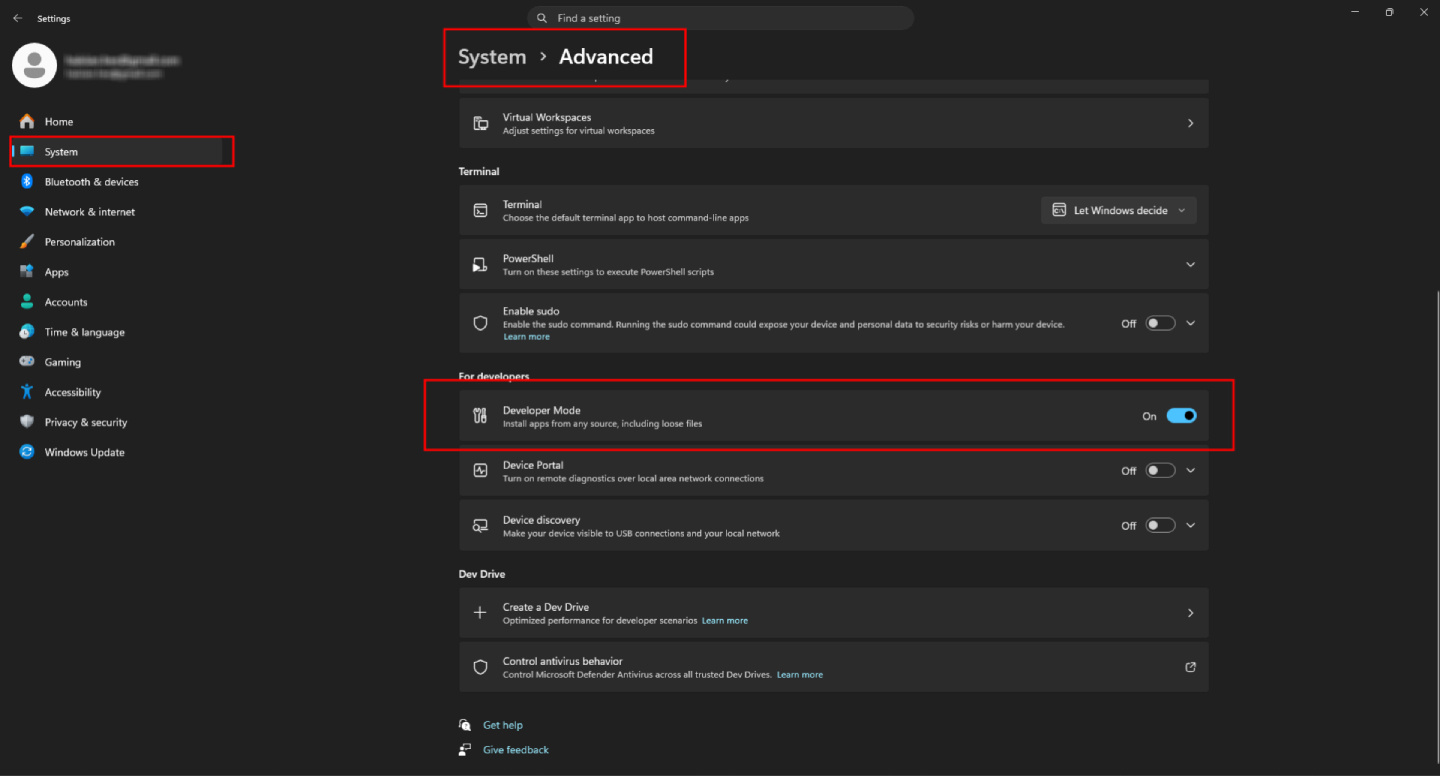
ขั้นตอนที่ 3: Developer Mode
ก่อนทำการติดตั้ง คุณต้องเปิดใช้งาน Developer Mode ก่อน:
- เปิด Settings
- ไปที่ System
- เลือก Advanced settings
- เลื่อนลงไปที่ Developer Mode
- คลิก Turn On
ขั้นตอนนี้จำเป็นเพื่อให้ระบบสามารถติดตั้งและรัน Claude Desktop ได้อย่างถูกต้อง
เมื่อเปิด Developer Mode แล้ว:
- เปิดไฟล์ติดตั้งที่ดาวน์โหลดมา
- ดำเนินการติดตั้งตามปกติ
- ทำตามคำแนะนำบนหน้าจอ
หลังจากติดตั้งเสร็จ คุณจะเห็นแอปพลิเคชัน Claude Desktop พร้อมใช้งาน
เพื่อให้มั่นใจว่าระบบทำงานได้อย่างถูกต้อง:
- รีสตาร์ทคอมพิวเตอร์หลังการติดตั้ง
การรีสตาร์ทจะช่วยให้สิทธิ์การเข้าถึงและการตั้งค่าระบบต่าง ๆ ถูกเปิดใช้งานอย่างสมบูรณ์
คุณสามารถใช้งานได้ เช่น:
- จัดการไฟล์
- Generate summaries
- ทำ Workflow
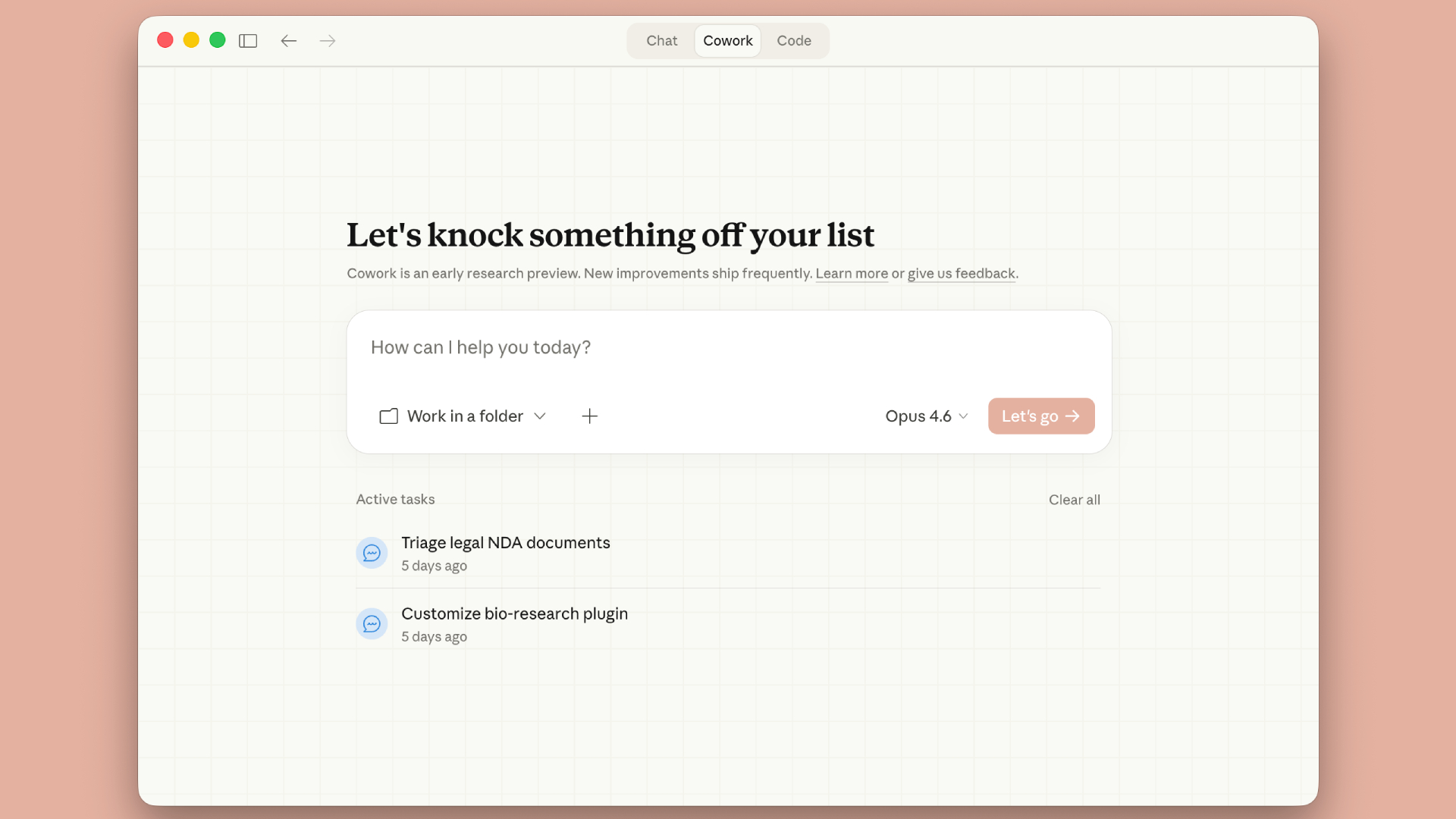
ขั้นตอนที่ 4: เปิดใช้งาน Cowork / Agent Mode
ใน Claude Desktop ให้เปิด:
- Cowork mode (หรือ agent/local mode ตามเวอร์ชัน)
เพื่อให้ Claude สามารถทำงานมากกว่าการแชท
ขั้นตอนที่ 5: กำหนด “เป้าหมาย” แทน Prompt
แทนที่จะถามคำถามสั้น ๆ ให้กำหนดงาน เช่น:
- “จัดระเบียบไฟล์ในโฟลเดอร์นี้”
- “สรุปเอกสารเหล่านี้และสร้างรายงาน”
- “วิเคราะห์ไฟล์และให้ Insight”
Claude Cowork จะ:
- แบ่งงานเป็นขั้นตอน
- ทำทีละขั้น
- บันทึกผลลัพธ์ลงในเครื่องของคุณ
ขั้นตอนที่ 6: ตรวจสอบและอนุมัติการทำงาน
เนื่องจากทำงานบนเครื่องของคุณ คุณสามารถ:
- อนุมัติหรือปฏิเสธการทำงาน
- หยุดหรือพักงาน
- ตรวจสอบผลลัพธ์ได้ตลอดเวลา
ขั้นตอนที่ 7: เปิดแอปไว้ตลอด
Claude Cowork ทำงานภายในแอป Desktop
ดังนั้น:
- หากปิดแอป → งานจะหยุด
- ยังไม่สามารถทำงานเบื้องหลังข้ามอุปกรณ์ได้เต็มรูปแบบ
ราคา Claude Cowork
ราคาของ Claude Cowork ขึ้นอยู่กับวิธีการใช้งาน
แพ็กเกจแบบชำระเงิน
ราคาโดยประมาณ (อาจแตกต่างตามภูมิภาค):
- Claude Pro: ประมาณ $20/เดือน ต่อผู้ใช้
- Claude Team / Enterprise: ราคาตามการตกลง
สิ่งที่ได้รับ:
- ขีดจำกัดการใช้งานที่สูงขึ้น
- เข้าถึงโมเดลขั้นสูง
- ประสิทธิภาพที่เร็วขึ้น
- สิทธิ์ใช้งานในช่วงเวลาที่มีผู้ใช้งานสูง
ราคาแบบ API (สำหรับนักพัฒนา)
หากใช้งานผ่าน API:
- คิดค่าบริการตามการใช้งาน (Token)
- ราคาแตกต่างตามโมเดลและปริมาณการใช้งาน
Key Differences Between Copilot Cowork and Claude Cowork
- Claude Cowork → ทำงานบนคอมพิวเตอร์ของคุณ (Local, ยืดหยุ่น, ส่วนบุคคล)
- Copilot Cowork → ทำงานภายใน Microsoft 365 (Cloud, มีโครงสร้าง, ระดับองค์กร)
แม้ว่าทั้งสองจะมีความสามารถด้าน AI ที่คล้ายกัน แต่บริบท การเข้าถึงข้อมูล และวัตถุประสงค์ในการใช้งานนั้นแตกต่างกันอย่างชัดเจน
ตารางเปรียบเทียบแบบละเอียด
Feature | Copilot Cowork | Claude Cowork |
ผู้พัฒนา | Microsoft (ร่วมกับ Anthropic) | Anthropic |
โมเดล AI หลัก | Claude + ระบบหลายโมเดล | Claude |
สภาพแวดล้อม | Cloud (Microsoft 365 tenant) | Local (Desktop app) |
ทำงานที่ไหน | ภายในแอป Microsoft 365 | บนคอมพิวเตอร์ของคุณ |
การเข้าถึงข้อมูล | Email, Teams, SharePoint, OneDrive | ไฟล์ในเครื่อง + เครื่องมือภายนอก |
การเชื่อมต่อแอป | ลึกใน Microsoft ecosystem | ยืดหยุ่น (เช่น Google Drive, Slack) |
รูปแบบ Workflow | Workflow ระดับองค์กร | Workflow ส่วนบุคคล / ข้ามเครื่องมือ |
Automation | ทำงานหลายขั้นตอนใน M365 | ทำงานหลายขั้นตอนในเครื่อง + ภายนอก |
Safety | ระดับองค์กร (Compliance, Governance) | ผู้ใช้ควบคุมเอง (ระดับไฟล์) |
ใช้งานข้ามอุปกรณ์ | ได้ (Cloud-based) | ไม่ได้ (ขึ้นกับ Desktop session) |
Suitable for | องค์กรที่ใช้ Microsoft 365 | ผู้ใช้เดี่ยว / ระบบที่ยืดหยุ่น |
โมเดลราคา | Add-on ของ Microsoft 365 | สมัครใช้งานแยก |
ใครควรเลือกใช้ Copilot Cowork?
Copilot Cowork เหมาะอย่างยิ่งสำหรับองค์กรที่ใช้งาน Microsoft 365 เป็นหลักอยู่แล้ว และต้องการเพิ่มประสิทธิภาพการทำงานภายในระบบที่รวมศูนย์ หากการทำงานประจำวันของคุณเกี่ยวข้องกับเครื่องมืออย่าง Outlook, Teams, Excel และ SharePoint เป็นหลัก Copilot Cowork จะช่วยยกระดับการทำงานโดยเชื่อมต่อแอปเหล่านี้เข้าด้วยกันเป็นเวิร์กโฟลว์เดียวอย่างมีประสิทธิภาพ
นอกจากนี้ ยังเหมาะสำหรับองค์กรที่ต้องการการควบคุมในระดับองค์กร เช่น ความปลอดภัย (Security), การปฏิบัติตามข้อกำหนด (Compliance), การกำกับดูแล (Governance) และการกำหนดสิทธิ์การเข้าถึงข้อมูลอย่างชัดเจน ในสภาพแวดล้อมแบบนี้ Copilot Cowork สามารถช่วยทำงานอัตโนมัติในระดับทีมได้ เช่น การเตรียมการประชุม การสร้างรายงาน และการทำงานร่วมกันข้ามแผนก จึงเหมาะอย่างมากสำหรับองค์กรขนาดใหญ่ ทีมงานที่มีโครงสร้างชัดเจน และองค์กรที่ใช้งาน Microsoft Ecosystem อย่างลึกซึ้ง
ใครควรเลือกใช้ Claude Cowork?
Claude Cowork เหมาะสำหรับผู้ใช้งานที่ต้องการความยืดหยุ่นในการทำงานมากกว่าในระบบเดียว โดยสามารถทำงานได้ดีในสภาพแวดล้อมที่ใช้เครื่องมือหลากหลาย เช่น Google Drive, Slack หรือไฟล์ในเครื่อง (Local files) ทำให้สามารถทำงานข้ามแพลตฟอร์มได้โดยไม่ต้องยึดติดกับระบบใดระบบหนึ่ง
เหมาะอย่างยิ่งสำหรับบุคคลหรือทีมขนาดเล็กที่ไม่ต้องการโครงสร้าง IT ที่ซับซ้อนหรือการควบคุมระดับองค์กรที่เข้มงวด สำหรับผู้ที่ต้องการควบคุมเวิร์กโฟลว์ด้วยตัวเอง และต้องการความสามารถด้านการวิเคราะห์และการให้เหตุผลที่แข็งแกร่ง Claude Cowork จะมอบประสบการณ์ที่ยืดหยุ่นมากกว่า โดยมีความโดดเด่นในงานด้านการค้นคว้า การประมวลผลเอกสาร และการแก้ปัญหาที่ซับซ้อน จึงเหมาะกับผู้ใช้งานระดับสูง นักวิเคราะห์ นักพัฒนา และฟรีแลนซ์ที่ให้ความสำคัญกับความยืดหยุ่นและการคิดเชิงลึก
สรุปการเลือกใช้งาน
ไม่มีเครื่องมือไหน “ดีกว่า” อย่างชัดเจน—มีแต่เครื่องมือที่ “เหมาะกับคุณมากกว่า”
- หากงานของคุณอยู่ใน Microsoft → Copilot Cowork คือคำตอบ
- หากงานของคุณยืดหยุ่น ไม่ยึดติดกับเครื่องมือ → Claude Cowork จะมีพลังมากกว่า
The Future of AI Coworkers
การเติบโตของเครื่องมืออย่าง Copilot Cowork และ Claude Cowork แสดงให้เห็นถึงแนวโน้มสำคัญ:
- AI จะกลายเป็น “ผู้ร่วมงาน” ไม่ใช่แค่เครื่องมือ
- ระบบจะเข้าใจบริบทของ Workflow มากขึ้น
- การผสาน Automation และการคิดวิเคราะห์เข้าด้วยกัน
หลายองค์กรอาจเลือกใช้ทั้งสองร่วมกัน เช่น:
- Copilot for execution and automation
- ใช้ Claude สำหรับการคิด วิเคราะห์ และวางแผ
Summary
Copilot Cowork and Claude Cowork each represent powerful but distinct approaches to AI in the workplace. One focuses on deep integration and productivity, while the other emphasizes reasoning and flexibility.
The right choice depends on your organization’s needs, existing tools, and the type of work you want AI to support. In many cases, combining both approaches may deliver the best results—bringing together execution and intelligence into a unified workflow.