Power BI Report Server
Power BI Report Server คือ การตั้ง Server ที่เป็น On Premise ให้เป็น Power BI Portal ที่สามารถ บริหารจัดการรายงานแล้วควบคุมสิทธิการเข้าถึงของ User โดยตัว Report Server จะทำหน้าที่แทน Power BI Portal ที่อยู่บน Cloud ได้
การใช้งานตัวเลือกที่เป็น Power BI Report Server อาจจะเกิดได้ในกรณีที่หน่วยงานไม่ต้องการเอาข้อมูลขึ้นไปไว้บน cloud และการใช้รูปแบบนี้ อาจจะมีอีกเหตุผลคือ ต้องการใช้ทรัพยากร Server ของหน่วยงานเอง เพราะสามารถจะควบคุมประสิทธิภาพได้ดีกว่าแบบ Cloud
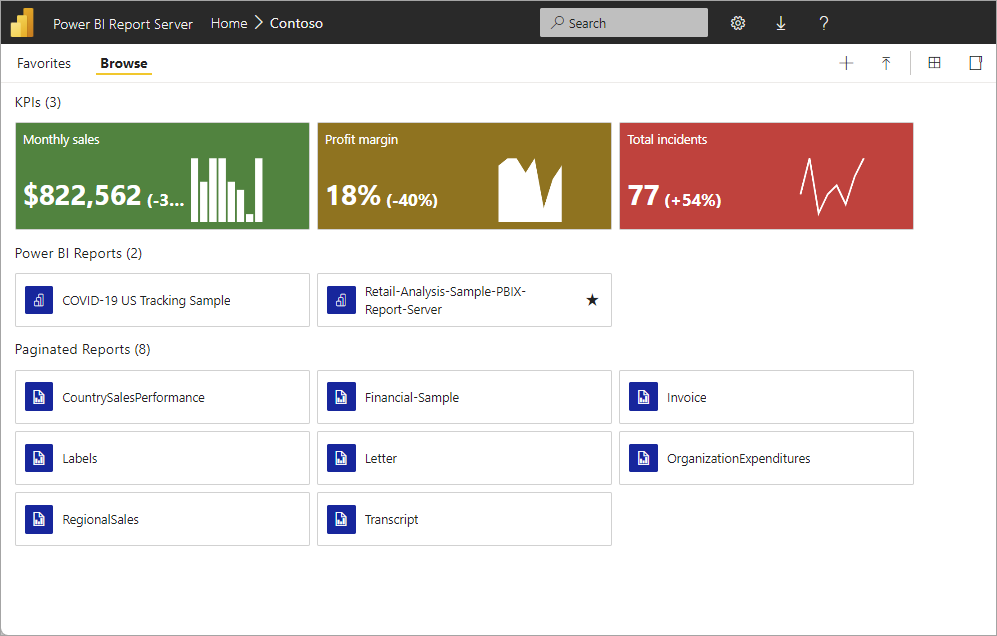
เปรียบเทียบ Power BI Report Server / Power BI service
| Features | Power BI Report Server | Power BI Service | Notes |
|---|---|---|---|
| Deployment | On-premises or hosted cloud | Cloud | Power BI Report Server can be deployed in Azure VMs (hosted cloud) if licensed through Power BI Premium or SQL Server Enterprise with Software Assurance |
| Source data | Cloud and/or on-premises | Cloud and/or on-premises | |
| License | Power BI Premium or SQL Server EE with Software Assurance (SA) | Power BI Pro and/or Power BI Premium | |
| Lifecycle | Modern lifecycle policy | Fully managed service | |
| Release cycle | Three times a year (January, May, September) | Once a month | Latest features and fixes come to Power BI Service first. A rollup of features from Power BI Desktop releases for the service comes to Power BI Report Server in each release; most other features are only meant for the Power BI service. |
| Create Power BI reports in Power BI Desktop | Yes | Yes | |
| Create Power BI reports in the browser | No | Yes | |
| Host and connect to Power BI shared datasets | No | Yes | Intro to datasets across workspaces |
| Gateway required | No | Yes for on-premises data sources | |
| Real-time streaming | No | Yes | Real-time streaming in Power BI |
| Dashboards | No | Yes | Dashboards in the Power BI service |
| Distribute group of reports using apps | No | Yes | Create and publish apps with dashboards and reports |
| Content packs | No | Yes | Organizational content packs: Introduction |
| Connect to services like Salesforce | Yes | Yes | Connect to the services you use with content packs in the Power BI service. In Power BI Report Server, use certified connectors to connect to services. See Power BI report data sources in Power BI Report Server for details. |
| Q&A | No | Yes | Q&A in the Power BI service and Power BI Desktop |
| Quick insights | No | Yes | Automatically generate data insights with Power BI |
| Analyze in Excel | No | Yes | Analyze in Excel |
| Paginated reports | Yes | Yes | Paginated reports are available in the Power BI service in preview in a Premium capacity |
| Power BI mobile apps | Yes | Yes | Power BI mobile apps overview |
| ARC GIS maps | No | Yes | ArcGIS maps in Power BI service and Power BI Desktop by Esri |
| Email subscriptions for Power BI reports | No | Yes | Subscribe yourself or others to a report or dashboard in the Power BI service |
| Email subscriptions for paginated reports | Yes | Yes | Subscribe yourself and others to paginated reports in the Power BI service |
| Data alerts | No | Yes | Data alerts in the Power BI service |
| Row-level security (RLS) | Yes | Yes | Available in both DirectQuery (data source) & Import mode Row-level security in the Power BI service Row-level security in Power BI Report Server |
| Full-screen mode | No | Yes | Full-screen mode in the Power BI service |
| Advanced Office 365 collaboration | No | Yes | Collaborate in a workspace with Office 365 |
| R visuals | No | Yes | Create R visuals in Power BI Desktop and publish them to the Power BI service. You can’t save Power BI reports with R visuals to Power BI Report Server. |
| Preview features | No | Yes | Opt in for Power BI service preview features |
| Power BI visuals | Yes | Yes | Power BI visuals |
| Composite models | No | Yes | |
| Power BI Desktop | Version optimized for Report Server, available for download with Report Server | Version optimized for Power BI Service, available from the Windows Store |