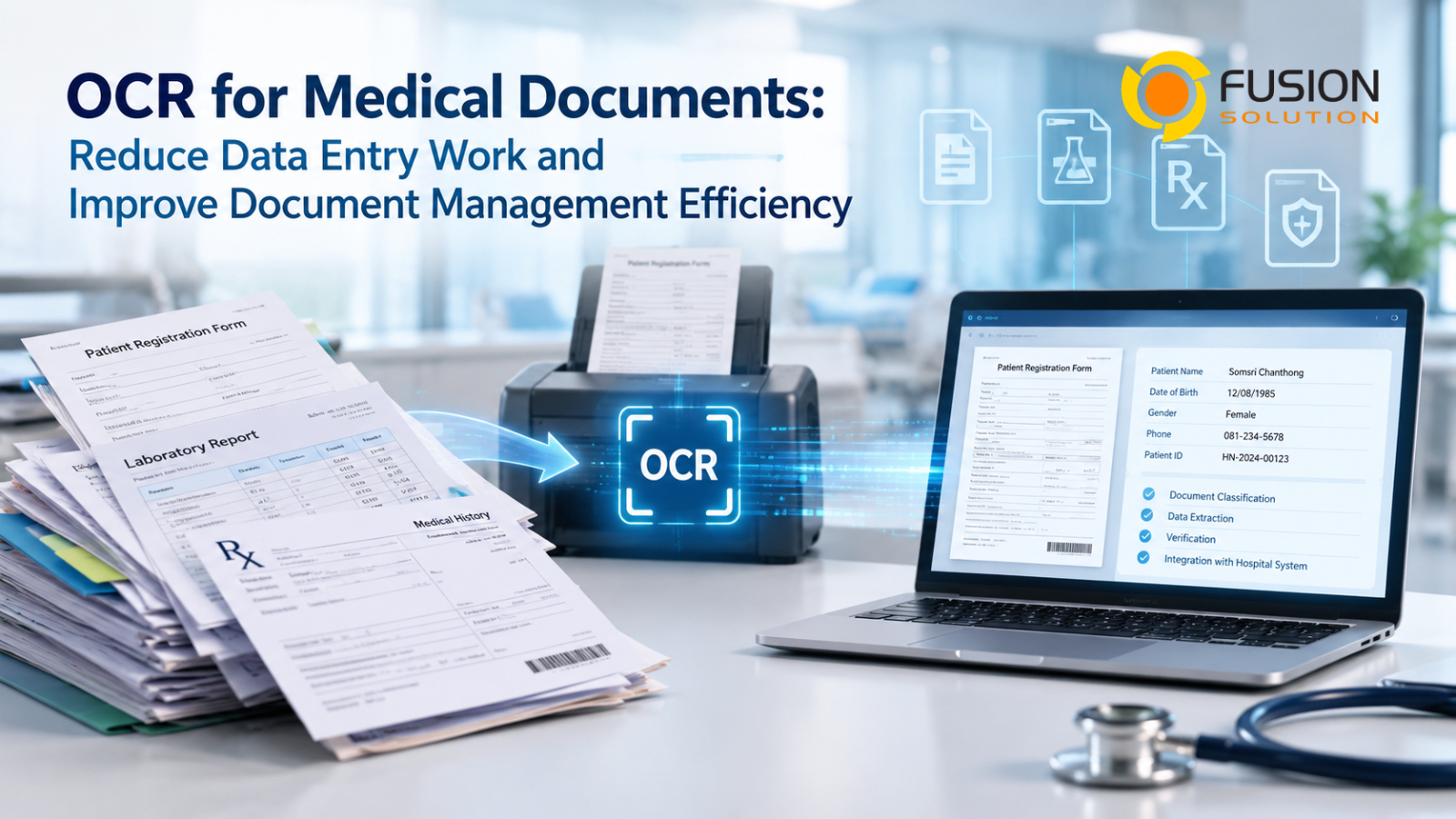
Healthcare professionals handle a large volume of documents every day, including patient registration forms, laboratory reports, medical histories, prescriptions, insurance claims, and discharge summaries. Many of these records are received as scanned documents, images, or PDFs, requiring staff to manually enter information into hospital systems or other databases.
This repetitive work consumes valuable time that could be spent supporting patient care. It also increases administrative workloads and the risk of data entry errors. OCR เอกสารทางการแพทย์ offers a way to reduce these challenges by converting text in scanned documents into machine-readable data that can be processed more efficiently.
Why Manual Data Entry Is a Challenge in Healthcare
Medical documents often contain different formats, layouts, and types of information. Staff may need to locate patient details, dates, test results, medication information, and other relevant fields before entering them into the appropriate systems.
When this process is performed manually, several problems can occur. Repeated typing takes time, particularly when document volumes are high. Inconsistent formatting can make information difficult to organize, while typing mistakes or overlooked fields may require additional verification and correction.
These issues can slow down administrative workflows and make it harder for healthcare organizations to manage records consistently. Although manual review remains important for medical information, staff should not have to perform every data entry task from scratch.
How OCR Helps Process Medical Documents?
Optical Character Recognition (OCR) identifies text within scanned documents, images, and PDFs, then converts it into machine-readable text. Instead of requiring employees to retype all the information, OCR allows digital systems to capture and process the recognized content.
For example, a healthcare organization could use OCR to extract text from scanned patient forms or laboratory reports. Depending on the solution, document structure, and implementation, the extracted information may then be organized into fields for review, exported for further processing, or transferred to other business systems.
OCR can support several stages of document handling:
- Text recognition: Convert printed text in scanned medical documents into searchable, reusable digital text.
- Data extraction: Identify relevant information, such as patient details, dates, or report values, when supported by the document structure and extraction configuration.
- Document organization: Make digitized records easier to search, classify, and process.
- Workflow integration: Pass extracted data to databases or connected systems, subject to available integrations and validation requirements.
OCR does not independently determine whether medical information is clinically correct. Its role is to help capture information more efficiently, while appropriate validation and professional oversight remain essential.
Benefits of OCR in Medical Document Management
Reduce administrative workload.
By automating parts of text recognition and data extraction, OCR can reduce the amount of information staff need to enter manually. This is especially useful for organizations that regularly process large numbers of forms, reports, and supporting documents.
Employees can spend less time on repetitive transcription and more time reviewing records, resolving exceptions, and supporting essential administrative tasks.
Improve Data Consistency and Reduce Entry Errors
Manual data extraction can lead to errors, such as incorrect dates, missing fields, or typos in numerical data. OCR eliminates the need for manual data entry, thereby reducing the likelihood of such errors.
However, OCR results are not always accurate. The quality of the scanned image, handwriting, unfamiliar document layouts, and characters that look similar can all affect the accuracy of text recognition.
Medical organizations should therefore establish procedures for verifying critical data before incorporating it into medical records or using it to inform operational decision-making.
Make Documents Easier to Search and Process
Scanned documents are often difficult to search if their entire content is stored merely as images. OCR (Optical Character Recognition) converts recognized text into a computer-readable format, making it easier to search for specific information and reuse the content within the documents.
When combined with appropriate document classification and filing guidelines, OCR helps make medical record management more systematic and reduces the time spent searching for required documents.
Support More Efficient Digital Workflows
OCR can form part of a broader digital document workflow, connecting document intake, data extraction, verification, storage, and system integration. With suitable configuration, information can move between these stages with less repetitive manual handling.
This can help healthcare organizations manage document volumes more consistently without assuming that every document can be processed completely without human intervention.
What Healthcare Organizations Should Consider Before Implementing OCR
Selecting an OCR solution requires more than checking whether it can recognize text. Medical documents may contain sensitive personal and health information, so organizations should evaluate both technical performance and data protection requirements.
First, test the solution with representative documents, including different scan qualities, layouts, and languages. Measure recognition accuracy for the fields that matter most, rather than relying only on a general accuracy claim.
Second, determine how extracted information will be verified. Patient identifiers, medication details, and laboratory values may require additional checks before being transferred into operational systems.
Finally, review security, access controls, data retention, and integration requirements. The chosen solution should fit the organization's existing processes and applicable privacy obligations. A pilot project using a limited set of document types can help identify limitations before wider deployment.
Summary
Medical staff should not have to spend unnecessary time retyping information from scanned records. OCR provides a practical way to convert document text into machine-readable data, reduce repetitive administrative work, and make records easier to search and process.
By implementing OCR เอกสารทางการแพทย์ with suitable verification, security controls, and system integration, healthcare organizations can improve document workflows while maintaining the oversight needed for sensitive medical information. The most effective approach is to automate repetitive tasks while keeping qualified staff involved wherever accuracy and patient safety are essential.