AI agents are becoming increasingly capable of helping businesses automate tasks, analyze information, and make decisions. However, having access to powerful AI models does not automatically mean that agents understand how an organization operates.
Every business has its own knowledge, processes, customer relationships, internal documents, and operational data. Without access to this context, AI agents may struggle to provide relevant answers or perform tasks according to business requirements.
To address this challenge, Microsoft introduced Microsoft IQ, an enterprise context management platform designed to bring an organization's knowledge, data, and expertise into AI agents. Announced at Microsoft Ignite 2026, it aims to help businesses build more useful, trustworthy, and organization-aware AI experiences.
What Is Microsoft IQ?
Microsoft IQ is a platform that connects an organization's business knowledge, operational data, work activities, and external information to provide context for AI agents.
Instead of treating every AI interaction as an isolated request, Microsoft IQ helps agents understand how the organization works, what information is authoritative, and which business rules should guide their actions.
It brings together four complementary capabilities:
- Work IQ: Understands how people work through documents, conversations, collaboration activities, and previous decisions.
- Fabric IQ: Provides business context through governed data, business entities, relationships, and business rules.
- Foundry IQ: Connects AI agents with organizational knowledge, including internal policies, documents, and trusted information sources.
- Web IQ: Provides relevant external information from the internet, including news, images, videos, and other real-world information.
Together, these capabilities create a more complete understanding of the organization that AI agents can reuse across different business applications.
How the Four IQ Components Work Together ?
Each component provides a different type of intelligence, but their real value comes from working together.
Work IQ: Understanding How Employees Work
Work IQ provides AI agents with context about people's daily activities and business interactions.
It can use information from Microsoft 365 documents, meetings, conversations, and collaboration activities to help agents understand ongoing work.
For example, an agent assisting with a sales activity could use previous meeting discussions, customer communications, and relevant documents to understand the background of a customer relationship.
Microsoft is also expanding Work IQ with business application data from CRM and ERP systems, giving agents a broader understanding of business operations.
Fabric IQ: Understanding Business Data
Fabric IQ connects AI experiences with trusted business data and its underlying relationships.
For example, a manager asking about sales performance needs more than a collection of numbers. The AI should understand what revenue means, how sales targets are defined, and how different business entities relate to one another.
Fabric IQ uses governed data and semantic models to help provide more consistent business insights.
This helps employees and AI agents work with shared definitions rather than interpreting business information differently across applications.
Foundry IQ: Connecting Organizational Knowledge
Foundry IQ helps AI agents retrieve relevant information from an organization's internal knowledge sources.
These sources can include policies, official documents, technical information, and other institutional knowledge.
Its purpose is to help agents provide more accurate answers based on trusted organizational information rather than relying only on general AI model knowledge.
New capabilities include knowledge graphs, which help agents understand relationships between information across different documents and applications.
Web IQ: Bringing in External Information
Businesses also need information beyond their internal systems.
Web IQ provides AI agents with relevant external context from the internet, including news, images, videos, places, and weather information.
For example, an agent supporting market research could combine internal sales information with current external market developments to provide more useful analysis.
Microsoft announced that Web IQ is available to Azure customers, with additional search and retrieval capabilities designed to simplify web grounding for AI applications.
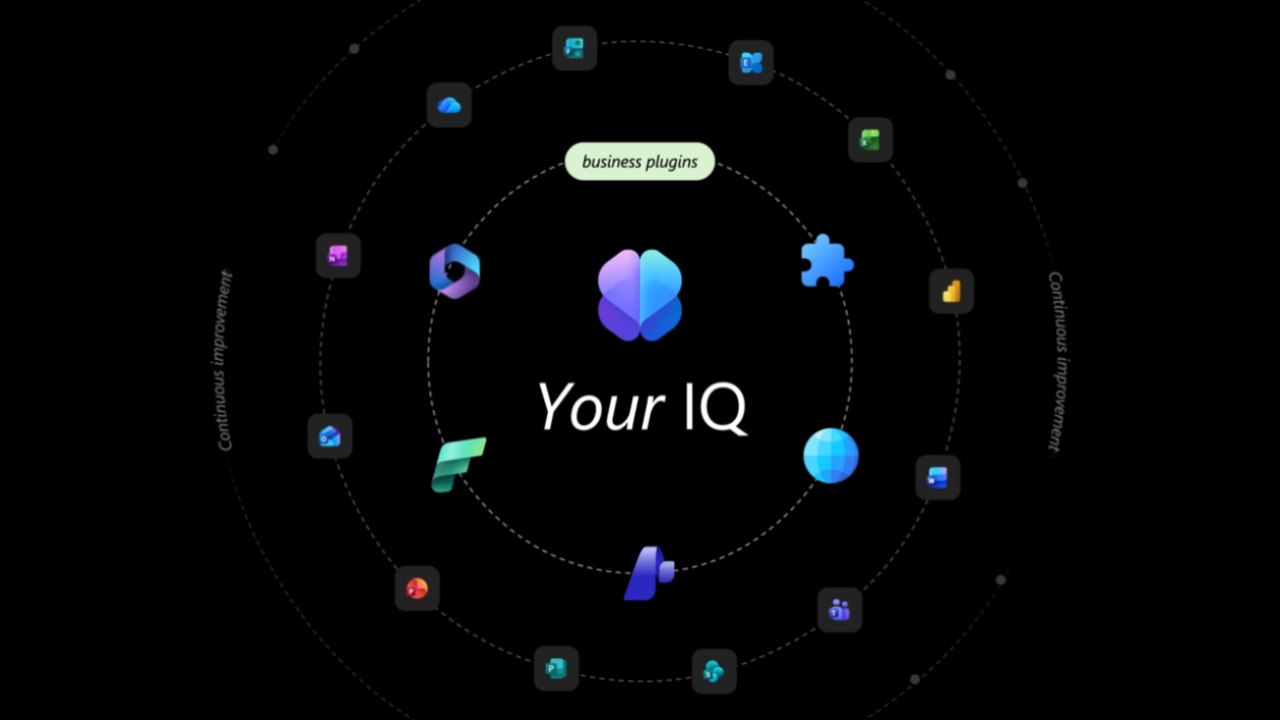
Business Plugins: Making Organizational Knowledge Reusable
One of the important additions to Microsoft IQ is the introduction of business plugins.
Business plugins allow organizations to package their business context, skills, tools, and authoritative information sources into reusable components.
Instead of configuring every AI agent separately, organizations can create a governed business plugin that multiple agents can use.
For example:
- A manufacturing company can provide agents with maintenance procedures and quality-control knowledge.
- A supply chain team can give agents access to supplier information and disruption-response processes.
- A financial organization can provide agents with approved policies and relevant operational guidelines.
These plugins can be used across Microsoft Copilot, GitHub Copilot, Microsoft Foundry through Model Context Protocol (MCP), and supported third-party AI assistants, including ChatGPT and Claude.
Microsoft also announced support for more than 350 third-party connectors to help organizations bring information from different systems into their enterprise context.
How Microsoft IQ Benefits Businesses?
Microsoft IQ is designed to help organizations move beyond individual AI tools toward a more connected AI environment.
More Relevant AI Assistance
Agents can use organizational knowledge and business context to provide responses that better match actual business requirements.
Reduced Repeated Configuration
Reusable business plugins allow teams to share knowledge and workflows across multiple agents instead of rebuilding the same foundations.
Better Business Decisions
Combining internal operational data with external information helps employees make more informed decisions.
Improved AI Governance
Organizations can manage authoritative information sources, permissions, and business rules to support more controlled AI adoption.
Continuous Improvement
Businesses can evaluate agent performance using real production signals and improve configurations over time.
What Does Microsoft IQ Mean for Business Owners, Managers, and Employees?
For business owners, Microsoft IQ offers an opportunity to turn existing organizational knowledge into a reusable business advantage. Instead of investing in disconnected AI tools, businesses can build a more consistent foundation for AI adoption.
For managers, it can help connect business information, team knowledge, and operational processes, making it easier to use AI for analysis and daily decision-making.
For frontier workers, AI agents can become more useful assistants by understanding the context of their work, accessing relevant information, and helping complete multi-step tasks.
However, organizations still need to establish appropriate access permissions, governance policies, and human approval procedures for important decisions and actions.
Summary
Microsoft IQ represents Microsoft's approach to making AI agents more aware of the organizations they serve. By combining Work IQ, Fabric IQ, Foundry IQ, and Web IQ, businesses can connect employee activities, operational data, institutional knowledge, and external information within a shared enterprise context.
With reusable business plugins and support for multiple AI platforms, organizations can make their knowledge available across more workflows without repeatedly building the same foundations.
As businesses move toward agent-driven operations, Microsoft IQ provides a foundation for creating AI agents that do more than answer questions: they understand the business context and help put organizational intelligence to work.