Artificial intelligence is moving beyond being just a simple conversational tool to a system capable of handling complex and multi-step tasks that historically required significant human effort. Microsoft has launched its latest innovation, Copilot Cowork, to support this new era of AI-powered productivity. Unlike traditional AI assistants that respond to commands one at a time, Copilot Cowork acts as a digital colleague capable of handling long-term tasks, coordinating between different tools, gathering data, and delivering comprehensive results. Understanding Copilot Cowork Tasks Types is essential for organizations that want to maximize productivity while effectively managing AI costs and usage.
What Is Copilot Cowork?
Copilot Cowork is Microsoft's agentic AI system designed to handle complex business tasks across Microsoft 365 and connected business systems.
Rather than simply responding to individual questions, Copilot Cowork is capable of carrying out meaningful work on behalf of users. It can research information from multiple sources, analyze business data, coordinate workflows, utilize various tools during task execution, and generate deliverables such as reports and presentations. It is also designed to manage long-running assignments with minimal supervision, allowing employees to delegate substantial portions of their work while maintaining visibility and control throughout the process.
The goal is to help employees delegate work to AI while maintaining visibility and control over the process.
What Makes Copilot Cowork Different?
Traditional AI assistants are typically designed for single interactions. A user asks a question, receives an answer, and then starts a new conversation.
Copilot Cowork introduces a more advanced approach by enabling AI to execute multi-step tasks that may span extended periods of time. It combines deep reasoning capabilities with the ability to orchestrate multiple tools, retrieve context from Microsoft 365 data, and generate several outputs from a single request. This allows the system to move beyond simple question-and-answer interactions and support more sophisticated business processes.
Rather than acting as a chatbot, Copilot Cowork behaves more like an AI teammate that can independently work through complex assignments.
How Many Copilot Cowork Tasks Types Are There?
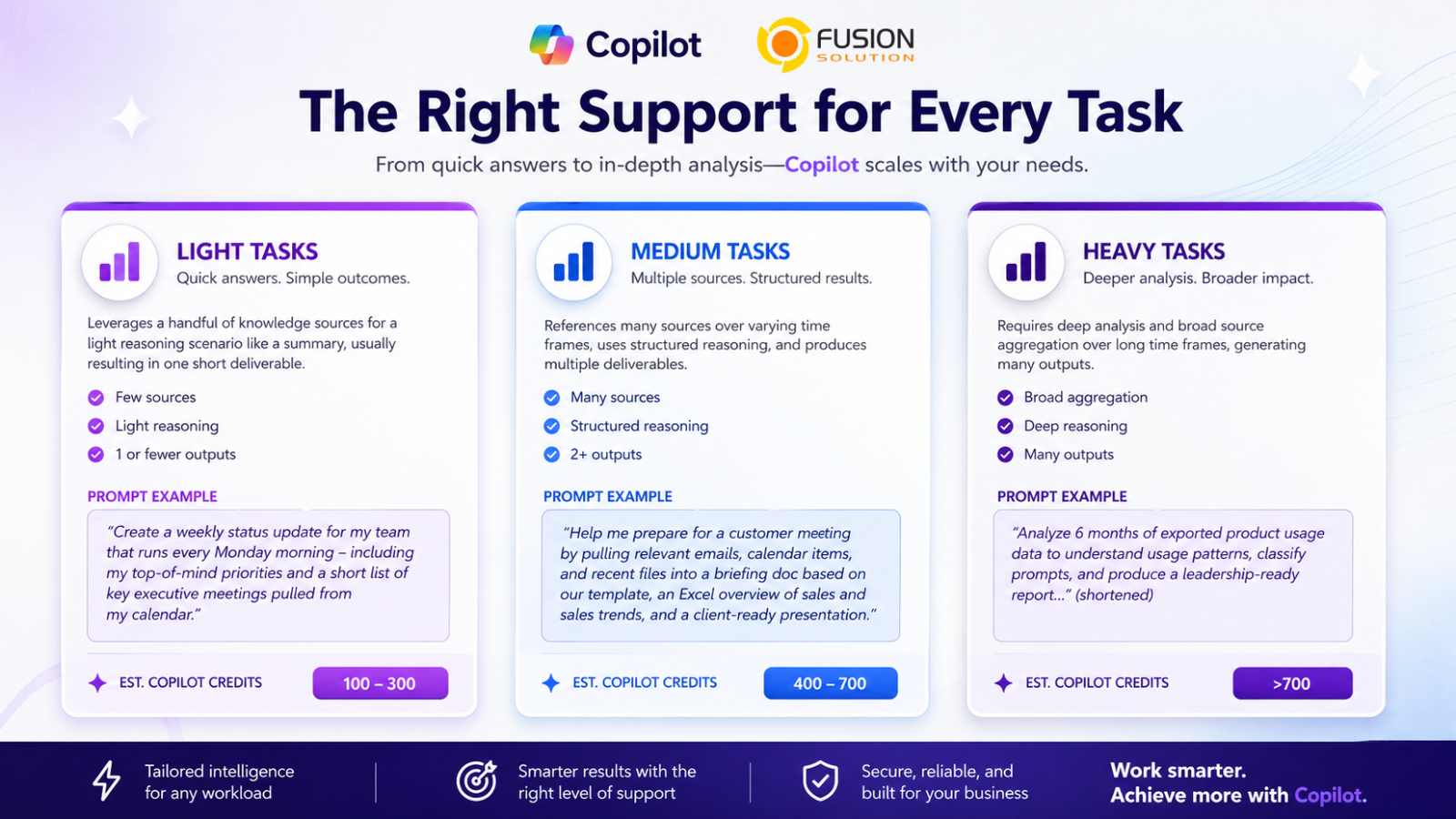
Microsoft categorizes Copilot Cowork tasks into three levels based on complexity, reasoning, and output volume:
- Light Tasks
Simple tasks that use limited context and reasoning, typically producing a single output. Examples include summarizing documents, drafting emails, or extracting meeting highlights. - Medium Tasks
Tasks that require multiple information sources and structured analysis, often generating multiple outputs. Examples include creating reports, preparing project updates, or comparing business data. - Heavy Tasks
Complex tasks that aggregate information from many sources, apply deep reasoning, and produce multiple deliverables. Examples include market research, strategic analysis, project planning, and executive reporting. As task complexity increases from Light to Heavy, resource consumption and execution time also increase.
Pricing Model
To use Copilot Cowork, organizations must first have a Microsoft 365 Copilot User Subscription License (USL).
The Microsoft 365 Copilot USL already includes:
- Copilot Chat
- Copilot in Word
- Copilot in Excel
- Copilot in PowerPoint
- Copilot in Outlook
- Copilot in Teams
- Work IQ Context Engine
- Multi-model AI intelligence
- Built-in agents such as Researcher and Analyst
- Custom agents created with Agent Builder
These capabilities are included within a predictable per-user monthly subscription.
How Copilot Cowork Is Billed
Copilot Cowork introduces a separate usage-based pricing model.
Instead of charging a fixed fee for task execution, usage is measured using Copilot Credits.
The cost of each task is calculated using four primary factors:
- Model Usage – AI model resources consumed during execution.
- Context Retrieval – Information gathered from Microsoft 365 and connected systems.
- Tool Calls – Actions performed across applications and services.
- Runtime – How long the task runs and consumes compute resources.
This allows organizations to pay based on actual usage rather than a fixed workload assumption.
Cost Management in Copilot Cowork
To help organizations manage AI spending, Microsoft provides cost management capabilities across three areas: Control, Visibility, and Efficiency.
Control
Organizations can control how Copilot Cowork is deployed and used through:
- Admin-controlled activation and user access
- Spending limits at tenant, group, and user levels
- Custom usage alerts
- User requests for additional credits
Visibility
Microsoft provides detailed insights into AI consumption, including:
- Tenant, group, and user-level usage reporting
- Feature-specific consumption tracking
- Task-level cost visibility (coming soon)
This helps organizations monitor usage, measure ROI, and identify high-value use cases.
Efficiency
Microsoft also provides options for optimizing AI spending.
Flexible Payment Options
Organizations can choose between:
- Pay-As-You-Go (PayGo) for maximum flexibility
- P3 Commitment Plans for discounted pricing based on committed usage
PayGo pricing is currently set at $0.01 per Copilot Credit.
Benefits of Copilot Cowork
Organizations adopting Copilot Cowork can gain several advantages:
- Increased productivity through task delegation
- Faster research and analysis
- Reduced manual effort
- Improved decision-making
- Better collaboration across Microsoft 365 applications
- Greater scalability for knowledge work
By automating complex workflows, employees can focus more on strategic initiatives and less on repetitive administrative activities.
Summary
The launch of Copilot Cowork Tasks Types represents a significant evolution in workplace AI. Rather than acting as a simple assistant, Copilot Cowork functions as an intelligent digital coworker capable of handling increasingly sophisticated business tasks.
Understanding the differences between Light, Medium, and Heavy tasks helps organizations select the right approach for their workloads while controlling costs and maximizing value. Combined with Microsoft's flexible credit-based pricing model and comprehensive cost management tools, Copilot Cowork provides businesses with a scalable framework for adopting agentic AI at enterprise scale.
As AI continues to evolve, systems like Copilot Cowork will play an increasingly important role in transforming how work gets done across modern organizations.