Many businesses rely on CRM and ERP systems to manage customers, sales, finances, and daily operations. However, employees often need to switch between multiple applications to find information, update records, prepare reports, and complete business tasks.
Microsoft is changing how employees interact with these systems by bringing Dynamics 365 capabilities directly into Microsoft Copilot.
Announced at Microsoft Ignite 2026, Dynamics 365 in Copilot introduces a new way to access business information and perform tasks through AI-powered experiences. Instead of constantly switching between business applications, employees can use Copilot to access relevant information and complete work within the tools they already use, including Microsoft Teams, Excel, and PowerPoint.
What Is Dynamics 365 in Copilot?
Dynamics 365 in Copilot brings CRM and ERP capabilities into the Copilot experience through specialized plugins.
These plugins provide business-specific knowledge, tools, and actions that help Copilot perform tasks related to sales, customer service, finance, and operations.
For example, a sales representative can ask Copilot to prepare for a customer meeting using relevant customer information, previous interactions, and current deal progress.
Similarly, a finance employee can use Copilot to work with purchasing information or manage purchase orders without manually navigating multiple applications.
The idea is simple: employees can interact with business systems using natural language while Dynamics 365 continues to manage the underlying business records and processes.
Key Capabilities of Dynamics 365 in Copilot
Microsoft is introducing several capabilities that bring everyday business activities closer to employees.
Sales Management with the Sales Plugin
The updated Dynamics 365 Sales plugin brings sales-related skills directly into Copilot.
Sales teams can use it to:
- Build Customer Account Plans
- Prepare for upcoming customer meetings.
- Review customer relationships and ongoing deals.
- Prioritize sales opportunities.
- Monitor progress against quarterly forecasts.
- Identify decision-makers and engagement gaps.
- Detect potential deal risks that require attention.
The plugin also supports PowerPoint-related tasks. Sales representatives can create presentations, adapt existing presentations for different customers, refresh slide data, and check approval and sharing requirements.
These capabilities help sales teams spend less time preparing information and more time building customer relationships.
Microsoft also shared results from its internal sales team, reporting more than 25% less effort spent on account planning, meeting preparation, and proposal building, alongside a 9% improvement in deal closure velocity.
Customer Service Through Copilot
Customer service capabilities are also becoming available through the Customer Service plugin.
By bringing customer experience skills into Copilot, employees can access relevant customer information and perform supported service-related tasks within their existing workflow.
Together, Microsoft's customer experience plugins provide more than 57 business skills across sales and service.
For businesses, this creates opportunities to improve customer interactions while reducing the need to move between separate applications to find information.
Finance and Operations with the ERP Plugin
Microsoft is also updating its Dynamics 365 ERP apps plugin with more than 39 finance and operations skills.
These capabilities bring ERP information and business actions into Copilot, including expanded connectivity with Excel.
One example is the Source-to-Pay process, which covers activities from purchasing requests through supplier payment.
A sourcing employee can use Copilot to:
- Create purchase requisitions.
- Prepare requests for quotations (RFQs).
- Manage purchase orders.
- Work with finance and operational information.
This can help finance and procurement teams simplify repetitive administrative activities and work more efficiently with business data.
How Microsoft IQ Makes Copilot More Business-Aware
An AI assistant becomes more useful when it understands the organization it supports.
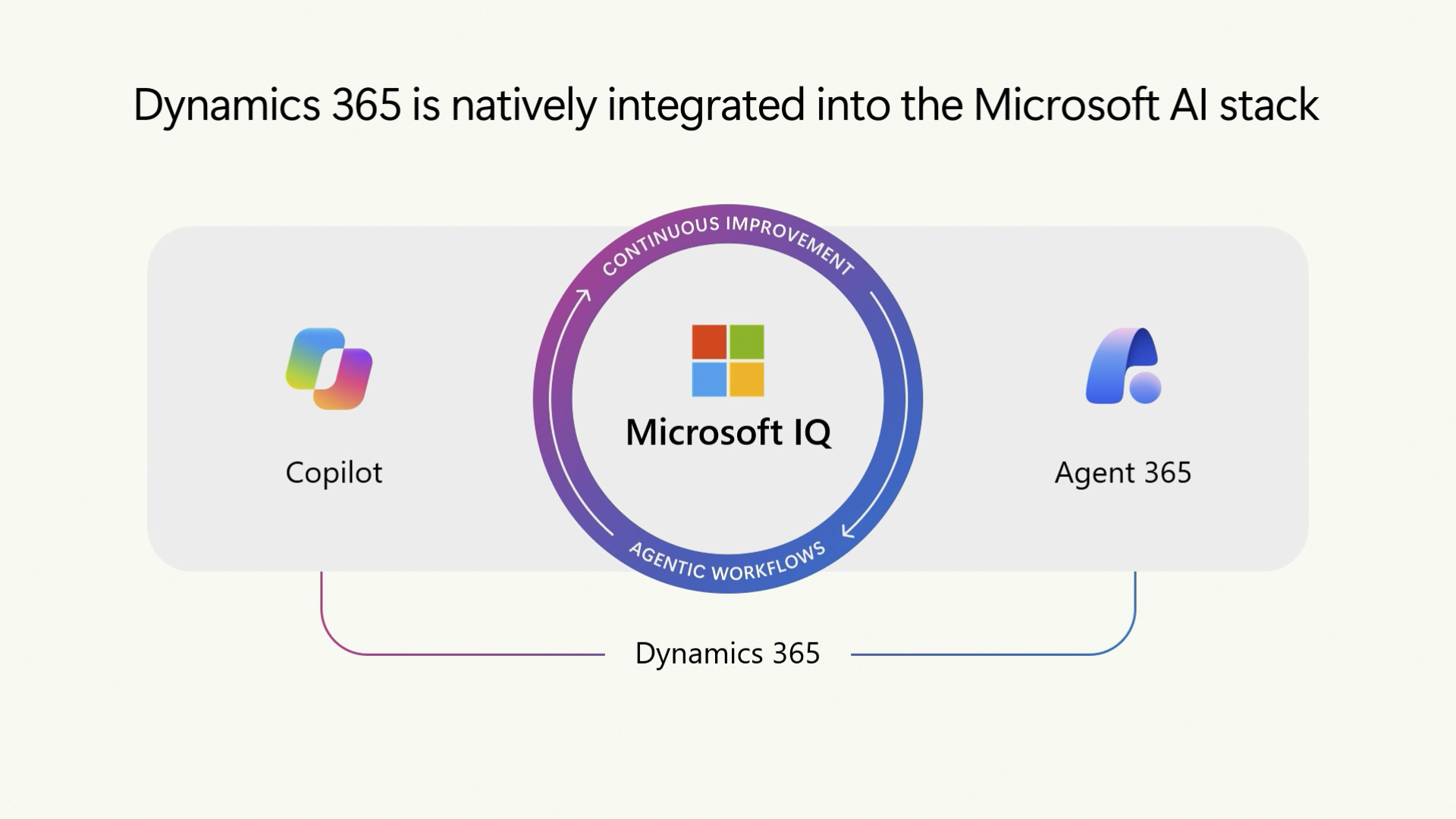
This is where Microsoft IQ and Work IQ play an important role.
Microsoft IQ provides organizational context, while Work IQ helps connect information about how employees work with business data and processes.
With Dynamics 365 data natively integrated into Work IQ, Copilot can combine productivity information with business application data.
For example, an employee could use natural language to update customer records or prepare journal entries while respecting existing permissions and governance controls.
This connection helps Copilot move beyond answering general questions toward assisting with actual business activities based on organizational context.
Copilot Studio: Build AI Agents for Business Processes
Beyond using existing Copilot capabilities, businesses can create their own AI agents with Microsoft Copilot Studio.
Copilot Studio provides tools to build and automate business processes across agents, workflows, and applications.
For example, an organization could develop an agent that helps manage customer inquiries, supports internal approval processes, or coordinates purchasing activities.
Microsoft also introduced an updated Copilot harness in Copilot Studio, designed to improve agent performance.
According to Microsoft's internal evaluations, the new harness improved knowledge quality by more than 20 points, more than doubled code analysis quality, and increased file analysis pass rates to over 90%.
These improvements aim to make agents more capable and efficient when handling complex business tasks.
Agent 365: Manage AI Agents and Their Costs
As organizations deploy more AI agents, managing their usage, security, and spending becomes increasingly important.
Microsoft Agent 365 provides centralized capabilities to monitor, manage, and optimize AI agents.
Its Cost Management capabilities, available through the Microsoft 365 admin center, help organizations monitor usage-based AI services, including Copilot Studio, Copilot Managed Runtime, and Dynamics 365 agents.
Key capabilities include:
- Spending Policies
- Usage Limits
- Alerts
- Departmental Chargeback
For business owners and managers, this provides better visibility into AI-related expenses and helps organizations manage their AI investments more responsibly.
What Does Dynamics 365 in Copilot Mean for SMBs and SMEs?
For small and medium-sized businesses, Dynamics 365 in Copilot offers an opportunity to make existing business applications easier to use.
Sales teams can spend less time preparing customer information. Finance and procurement teams can simplify repetitive tasks. Managers can access business information through natural language and make decisions with better context.
However, businesses should remember that successful adoption requires more than enabling AI features.
Organizations should identify suitable business processes, review data quality, establish access permissions, and provide employees with appropriate training.
Starting with a specific workflow, such as sales meeting preparation or purchase order management, can help businesses understand the benefits before expanding AI adoption across the organization.
Summary
Dynamics 365 in Copilot represents a shift in how employees interact with CRM and ERP applications. By bringing business skills and data into Copilot, Microsoft aims to make everyday business tasks more accessible through natural language and AI-powered assistance.
Combined with Microsoft IQ, Copilot Studio, and Agent 365, these capabilities create a connected environment where employees can access business knowledge, use AI agents, and complete work more efficiently.
For SMBs and SMEs looking to improve productivity and modernize business operations, this development offers an important opportunity to explore how AI can become part of everyday work rather than another separate application.