AI is rapidly becoming a crucial tool for modern businesses. Employees use AI to write emails, summarize documents, analyze data, create presentations, brainstorm, and improve work efficiency. However, when employees begin using AI tools without organizational approval or oversight, a hidden security challenge can arise: Shadow AI
Unlike officially provided and approved AI solutions, unauthorized AI tools may operate outside the scope of an organization's data security, privacy, and governance policies. Employees may opt for public AI services simply for convenience, unaware that sensitive business data may be exposed, or that the organization has limitations on how that data is stored or used.
For business owners and IT leaders, understanding this issue is becoming increasingly important. The goal doesn't necessarily have to be to ban employees from using AI, but rather to provide secure and approved AI tools so that employees can fully leverage AI, while maintaining appropriate security and governance.
What is Shadow AI?
Shadow AI refers to an employee using AI tools, applications, or services without the organization's knowledge, approval, or oversight.
This concept is similar to "Shadow IT," which refers to employees using unauthorized software or technology in their work. However, AI may add another layer of risk, as users might directly input business data into the AI system to create or analyze content.
For example, employees might use a public AI chatbot to:
- Summary of internal business documents.
- Write a new email to a customer containing confidential information.
- Analyze sales data or financial data.
- Create a business proposal.
- Generate code for an internal application.
- Translate internal company documents.
- Upload a spreadsheet to analyze business performance.
From an employee's perspective, these actions may simply be a convenient way to get work done faster. However, from an organization's perspective, such practices could raise concerns about security, privacy, compliance, and data governance.
Why are employees using AI tools without permission?
Generally, Shadow AI doesn't arise because employees intentionally circumvent security policies. In many cases, employees choose to use AI because they need to solve problems or complete tasks quickly.
Common causes include:
- Lack of approved AI tools Employees may not have access to an AI assistant provided by the organization.
- Performance pressure: Employees may discover that AI can complete certain tasks significantly faster.
- Easily accessible: Many AI services can be accessed through a web browser with minimal setup.
- Limited awareness: Employees may not understand what information should or should not be entered into an AI service.
- Different user needs: Employees across departments may find specialized AI tools that appear better suited to their individual tasks.
This means organizations should address the underlying need for AI rather than simply blocking every AI service.
Risks of Using Shadow AI
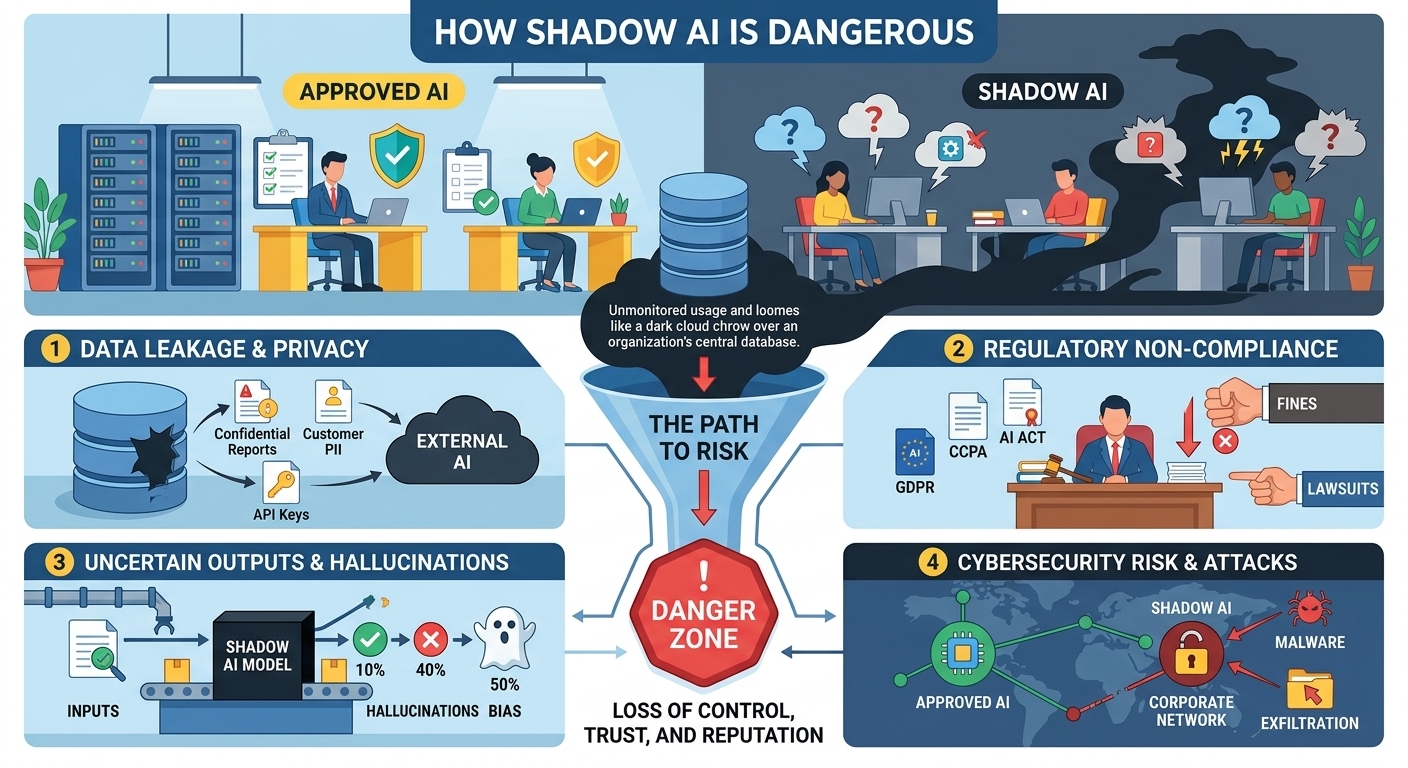
The biggest risk of Shadow AI is not AI itself—it's using AI tools without your organization's visibility, security, or governance.
- Sensitive Data Exposure
Employees may accidentally upload confidential business information—such as customer data, financial reports, contracts, or source code—to public AI tools. Once shared, the organization may lose control over how that data is stored or used.
- Privacy and Compliance Risks
Unauthorized AI tools may not meet company policies or regulatory requirements, creating potential privacy and compliance issues when handling sensitive data.
- Lack of Data Governance
IT teams cannot easily see which AI tools employees are using, what data is being shared, or where that information is stored, making risk management much more difficult.
- Intellectual Property Risks
Uploading product plans, research, marketing strategies, or proprietary code to unapproved AI platforms may expose valuable business intellectual property.
- Inaccurate AI Output
AI can generate incorrect or misleading information. If employees use AI-generated content without reviewing it, mistakes can affect business decisions and customer communications.
- Security vulnerabilities
Some AI tools connect to browsers, apps, or third-party services. Weak security controls can increase the risk of data leaks or cyberattacks.
- Hidden Costs and Operational Risks
Different teams may purchase and use multiple AI tools independently, leading to duplicate costs, inconsistent workflows, and limited organizational oversight.
How to reduce the risk from Shadow AI
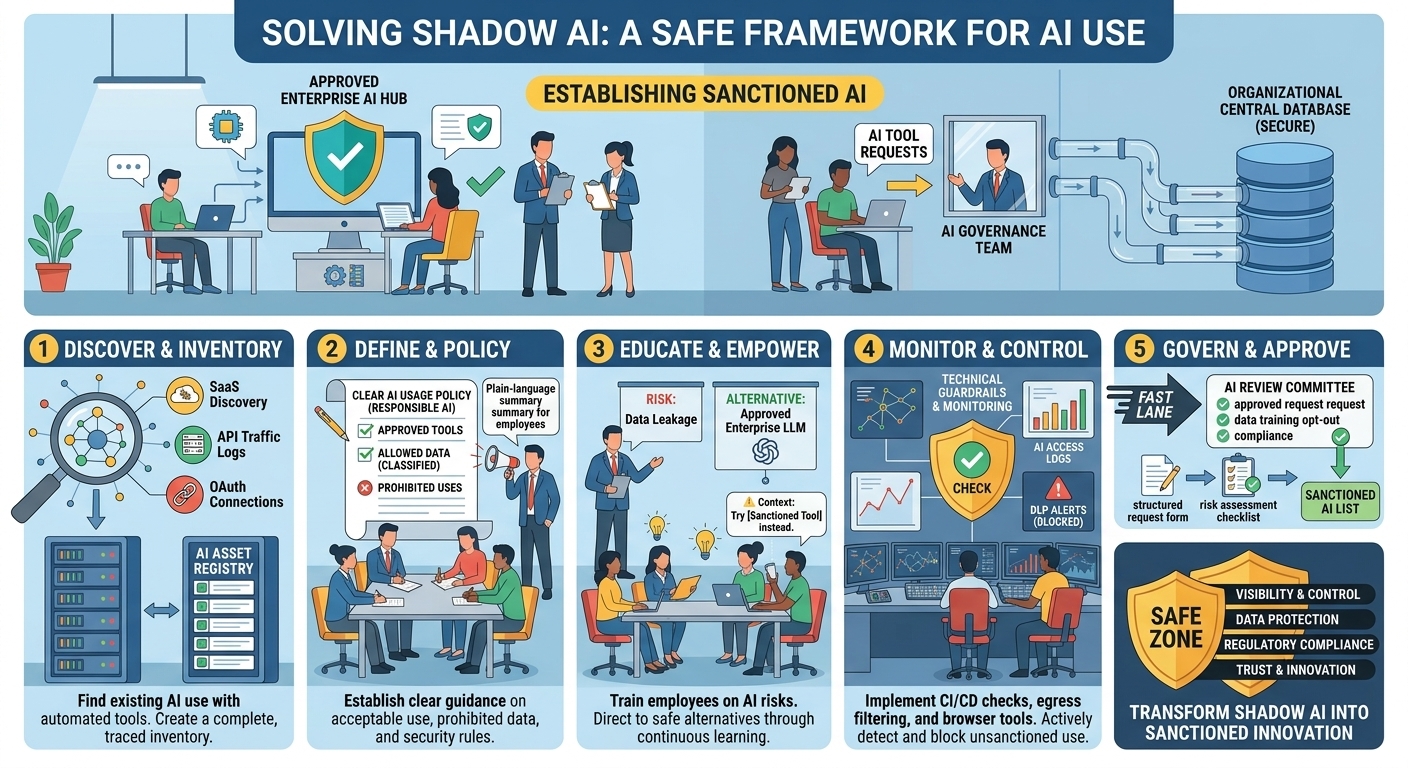
Instead of banning AI, organizations should provide secure AI tools and clear governance.
- Create a Clear AI Policy
Define which AI tools are approved, what information can be shared, and how employees should use AI responsibly.
- Provide Approved AI Tools
Give employees access to secure, company-approved AI solutions so they don't need to rely on public AI services.
Microsoft 365 Copilot provides AI within your organization's Microsoft 365 environment, with enterprise security, identity management, compliance, and governance controls.
- Train Employees on AI Security
Teach employees what data should never be entered into public AI tools and how to use AI safely in daily work.
- Monitor AI Usage
Give IT and security teams visibility into approved AI usage so they can identify risks and ensure compliance with company policies.
- Establish AI Governance
Create a governance framework covering approved AI tools, data protection, access controls, compliance, and ongoing AI risk management.
Why Licensed Microsoft Copilot Is a Safer Choice
Organizations looking to leverage AI while maintaining security and governance should consider Microsoft Copilot as an enterprise-ready solution.
Unlike consumer-grade AI tools, licensed Microsoft Copilot is designed to operate within an organization's existing security, compliance, and identity frameworks.
Key advantages include:
- Enterprise-grade security controls
- Access management through Microsoft Entra ID
- Data protection and compliance capabilities
- Governance and auditing support
- Integration with Microsoft 365 applications
- Reduced risk of unauthorized data exposure
By providing employees with an approved AI assistant that aligns with organizational security requirements, businesses can encourage AI adoption while significantly reducing the risks associated with Shadow AI.
Summary
Shadow AI is emerging as one of the most important security and governance challenges in the AI era. While employees are often motivated by productivity and efficiency, the use of unauthorized AI tools can create serious risks involving data leakage, compliance violations, intellectual property exposure, and reduced organizational visibility.
The goal should not be to prevent AI adoption. Instead, organizations should focus on enabling secure, governed, and responsible AI usage. By implementing clear AI policies, educating employees, monitoring AI activity, and providing secure solutions such as licensed Microsoft Copilot, businesses can unlock the benefits of AI while maintaining the security, compliance, and governance needed for long-term success.