Ransomware attacks are currently occurring rapidly. In many cases, by the time users notice their files being encrypted, attackers may have already gained access to the system, stolen credentials, and moved them laterally within the network.
Traditional security tools often focus on detecting attacks after suspicious activity has begun. However, Microsoft is introducing a more proactive approach with Predictive shielding in Defender a capability designed to identify and block ransomware attacks before encryption begins.
Based on Microsoft's case study involving a Group Policy Object (GPO)-based ransomware attack, this technology demonstrates how security platforms are evolving from reactive defense to predictive protection.
What is Predictive Shielding in Defender?
Predictive shielding in Defender is a security capability that uses AI, threat intelligence, behavioral analysis, and attack pattern detection to predict malicious activity before ransomware begins to operate.
Instead of waiting for the files to be encrypted, the system searches for early warning signs that clearly indicate an impending attack.
Examples of these signals include:
- Suspicious use of administrative tools
- Abnormal Group Policy changes
- Credential abuse
- Lateral movement behavior
- Ransomware deployment patterns
- Known attacker techniques
When the platform determines that the behavior matches a high-confidence attack pattern, it can take protective actions immediately.
Why This Matters?
One of the biggest challenges with ransomware is that detection often comes too late.
Even a few minutes of delay can result in:
- Thousands of encrypted files
- Business downtime
- Backup compromise
- Domain-wide impact
- Financial and reputational damage
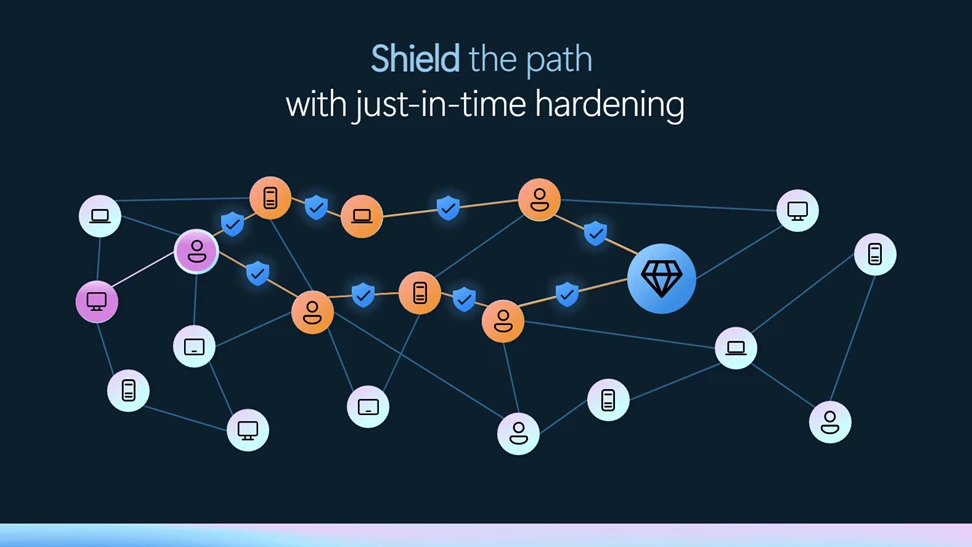
Predictive shielding in Defender aims to reduce this window of exposure by stopping the attack during its preparation stage rather than during the destruction stage.
The GPO-Based Ransomware Case Study
Microsoft highlighted a real-world scenario where attackers attempted to deploy ransomware through Group Policy Objects (GPOs)
GPOs are legitimate administrative tools used to manage Windows environments. Because they are trusted and widely used, attackers often abuse them to distribute malicious payloads across many machines simultaneously.
In this case, Microsoft Defender identified the attack pattern before the ransomware execution phase and blocked the deployment, preventing widespread encryption across the environment.
How Predictive Shielding Works?
At a high level, the capability combines several security signals:
- Behavioral Analysis
Defender monitors how users, devices, and administrative tools behave over time. Activities that significantly deviate from normal patterns can be flagged for further analysis.
- Threat Intelligence
Microsoft continuously collects global threat intelligence from billions of security signals. This helps identify known attacker techniques and emerging ransomware campaigns.
- Attack Correlation
Rather than analyzing events individually, Defender XDR correlates activities across endpoints, identities, email, and cloud services to understand the broader attack story.
- Predictive Decision-Making
When multiple high-confidence indicators appear together, the system predicts that a ransomware attack is likely imminent and can trigger protective actions automatically.
Key Benefits of Predictive Shielding
Earlier Threat Detection
Identify attacks during the preparation phase instead of waiting for encryption to begin.
Reduced Business Impact
Stop ransomware before it spreads across servers, shared folders, and critical systems.
Automated Protection
Use AI-driven analysis to respond faster than manual investigation alone.
Cross-Domain Visibility
Correlate signals from endpoints, identities, email, and cloud applications through Microsoft Defender XDR.
More Time for Security Teams
Contain attacks quickly and give analysts additional time to investigate and remediate.
Predictive Shielding vs Traditional Detection
Traditional Detection | Predictive Shielding |
Detects after malicious activity begins | Attempts to detect before ransomware executes |
Focuses on known malicious actions | Focuses on attack patterns and intent |
May allow initial damage | Aims to prevent damage entirely |
Often requires manual investigation first | Can trigger automated protection |
Best Practices for Organizations
While Predictive shielding provides powerful protection, organizations should still follow core security practices:
- Enable Microsoft Defender XDR capabilities
- Use multifactor authentication (MFA)
- Limit privileged accounts
- Monitor Group Policy changes
- Maintain offline or immutable backups
- Regularly patch systems
- Conduct incident response exercises
Predictive protection works best as part of a broader defense-in-depth strategy.
The Future of Ransomware Defense
Cybersecurity is increasingly moving from reactive detection to predictive prevention.
Instead of asking "How quickly can we detect ransomware?" organizations are beginning to ask "Can we stop ransomware before it starts?"
Predictive shielding represents an important step in that direction, using AI and cross-domain security intelligence to identify attacker behavior before encryption occurs.
Summary
The Microsoft case study demonstrates that modern ransomware defense is no longer limited to detecting encrypted files. By analyzing behavior, correlating signals, and predicting attacker intent, Predictive shielding in Defender helps organizations move toward a more proactive security posture.
As ransomware attacks continue to evolve, capabilities that can identify and interrupt attacks before they cause damage may become one of the most valuable layers of enterprise cybersecurity.