
Modern project management is becoming increasingly complex. Organizations need to coordinate sales, project planning, resource management, budgeting, collaboration, and financial tracking across multiple teams and systems. For many businesses, especially SMEs and service-driven organizations, fragmented workflows often lead to delays, budget overruns, and reduced visibility into project performance.
This is why Dynamics 365 Project Operations has become a key solution. Developed by Microsoft, this platform integrates project management, resource planning, financial management, and business operations capabilities into a single system, designed specifically for project-driven organizations.
For Project Managers, SME Executives, and Sales Managers, Dynamics 365 Project Operations helps improve efficiency throughout the project lifecycle, from sales opportunities and planning to execution and financial reporting.
What is Dynamics 365 Project Operations?
Dynamics 365 Project Operations is an application within the Microsoft Dynamics 365 ecosystem that helps organizations manage projects more efficiently across all departments.
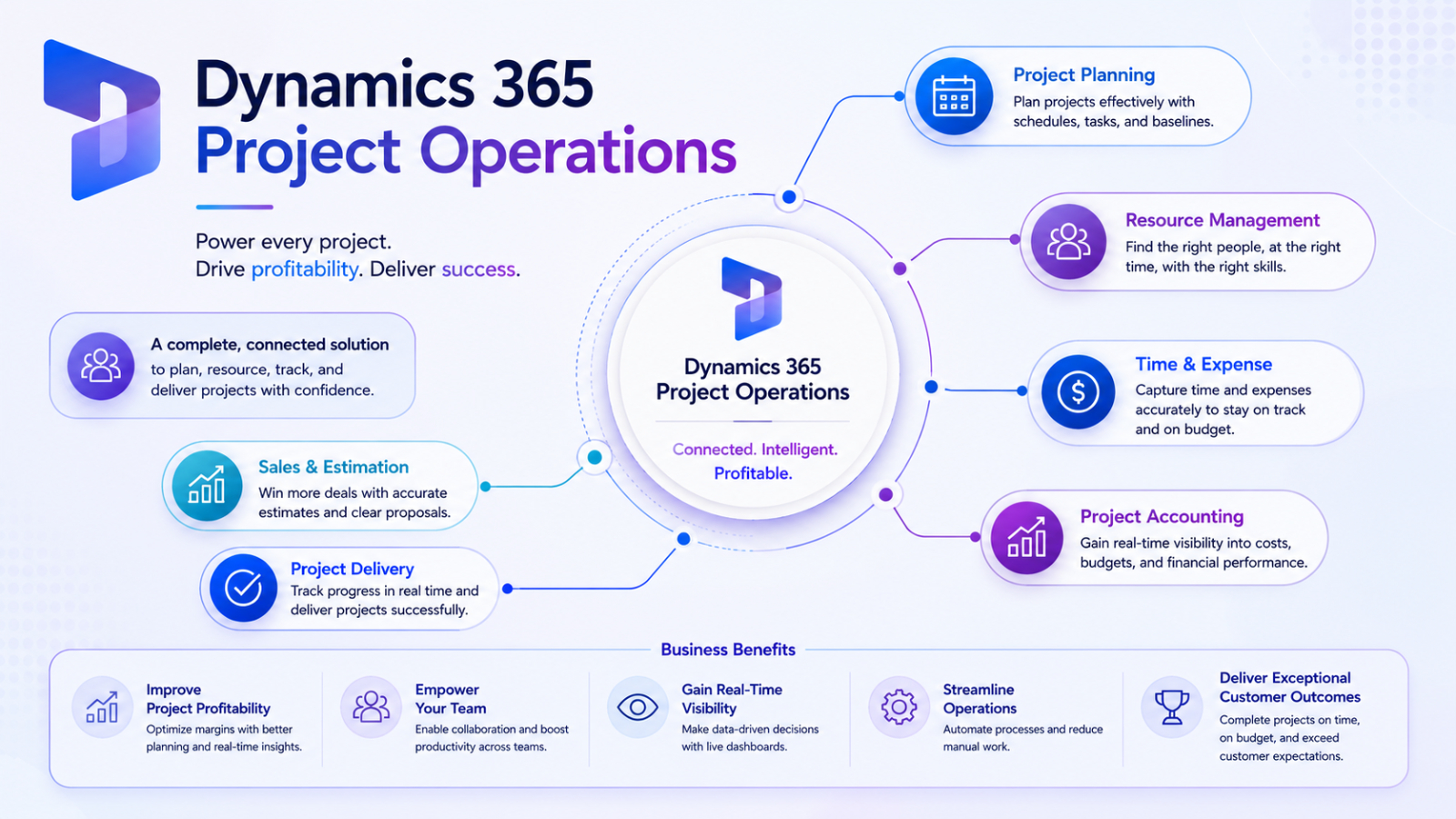
This platform is designed to connect:
- Sales process
- Project planning
- Resource management
- Tracking Time and Expenses
- Financial Operations
- Project Delivery Workflow
Instead of relying on separate tools for CRM, project management, and finance, organizations can manage everything within a centralized environment.
The solution is especially useful for:
- Consulting firms
- IT service providers
- Engineering companies
- Professional services organizations
- SMEs managing client-based projects
Why Businesses Need Better Project Operations
Many organizations still manage projects using disconnected spreadsheets, emails, and standalone project management tools. While this approach may work for smaller teams initially, it often creates operational challenges as businesses grow.
Common problems include:
Challenge | Business Impact |
Poor resource visibility | Overloaded or underutilized teams |
Manual financial tracking | Budget inaccuracies |
Limited project forecasting | Missed deadlines |
Disconnected sales and delivery teams | Communication gaps |
Lack of Real-Time reporting | Slow decision-making |
Dynamics 365 Project Operations addresses these challenges by providing end-to-end visibility across project workflows.
Key Features of Dynamics 365 Project Operations
Project Planning and Scheduling
One of the biggest strengths of Dynamics 365 Project Operations is its ability to simplify project planning and execution. Project managers can create timelines, define tasks and milestones, assign resources, and monitor project progress within a centralized system. This helps teams stay aligned while giving leadership better visibility into ongoing operations.
Resource Management and Allocation
Managing resources efficiently is critical for project-based businesses. Dynamics 365 Project Operations helps managers view team availability, match employee skills to projects, and allocate resources more effectively. This improves utilization rates, prevents overbooking, and supports more consistent project delivery.
Financial Management and Budget Tracking
The platform also provides strong financial management capabilities by helping organizations track project budgets, cost estimates, billing processes, and revenue forecasting in real time. Better financial visibility allows managers to make faster decisions and reduce the risk of budget overruns.
Sales and Project Integration
A key advantage of Dynamics 365 Project Operations is the connection between sales and project delivery teams. Sales opportunities can flow directly into project workflows, helping teams align customer expectations, estimate costs earlier, and improve collaboration from project kickoff to delivery.
AI and Automation Features
By connecting to Microsoft's AI ecosystem, organizations can use Intelligent Automation to help improve prediction, automate repetitive tasks, analyze resource usage, and detect project risks in advance.
Connecting with Microsoft Copilot also helps increase productivity through AI-Assisted Insights and conversational data interaction.
Integration with Microsoft Ecosystem
Dynamics 365 Project Operations integrates seamlessly with other Microsoft solutions, including:
Microsoft Solution | Purpose |
Microsoft Teams | Collaboration |
Power BI | Reporting and Analytics |
Dynamics 365 Sales | CRM and Sales Management |
Microsoft Copilot | AI Assistance |
Power Platform | Workflow Automation |
Microsoft Excel and Microsoft Outlook | Productivity Tools |
This connectivity allows organizations to maintain familiar workflows while enhancing cross-departmental operational efficiency.
Benefits of Dynamics 365 Project Operations
Dynamics 365 Project Operations delivers key benefits to Project Managers, SME Executives, and Sales Managers by increasing visibility, collaboration, and operational efficiency within a single platform.
For Project Managers, the system simplifies project tracking, resource allocation, reporting, and financial monitoring, allowing teams to focus more on project delivery and strategic planning, instead of wasting time on manual tasks.
SME executives benefit from centralized business operations, improved cross-departmental data visibility, reduced manual workflows, and more accurate profit tracking. Integrating multiple business functions into a single system allows organizations to operate more efficiently with fewer fragmented tools.
For Sales Managers, the system helps improve coordination between sales and delivery teams through more accurate project estimations, visibility into delivery team capacity, better financial forecasting, and alignment with customer expectations. This enables businesses to manage projects more efficiently from sales to execution.
Who should use Dynamics 365 Project Operations?
This platform is ideal for organizations managing client projects, service delivery, or resource-intensive operations.
Industries suitable for this system include:
- IT services
- Consulting business
- Construction
- Engineering
- Marketing agencies
- Professional Services
- Managed Service Providers
Any organization struggling with disconnected project workflows may benefit from a unified project operations platform.
Summary
As businesses continue managing increasingly complex projects, having disconnected systems for sales, delivery, finance, and resource management can create operational inefficiencies and reduce visibility across the organization.
Dynamics 365 Project Operations provides a unified platform that helps project managers, SME leaders, and sales managers manage projects more effectively from planning to financial reporting.
By combining project operations, resource management, sales integration, and AI-powered insights within a single ecosystem, Microsoft is helping organizations modernize how projects are planned, delivered, and optimized for long-term business growth.