AI agents are becoming an important part of enterprise automation. Unlike traditional chatbots that primarily respond to questions, AI agents can interpret goals, plan tasks, interact with business systems, and execute multi-step workflows with varying levels of autonomy.
Businesses can use AI agents to automate document processing, customer support, internal knowledge retrieval, data analysis, and repetitive administrative tasks. However, successful deployment requires more than choosing an AI model or connecting an API.
Without a clear implementation strategy, organizations may face security vulnerabilities, integration difficulties, inconsistent outputs, limited employee adoption, and unexpected operational costs.
Before investing in AI agent implementation, businesses should understand the challenges involved and establish a practical approach to managing them.
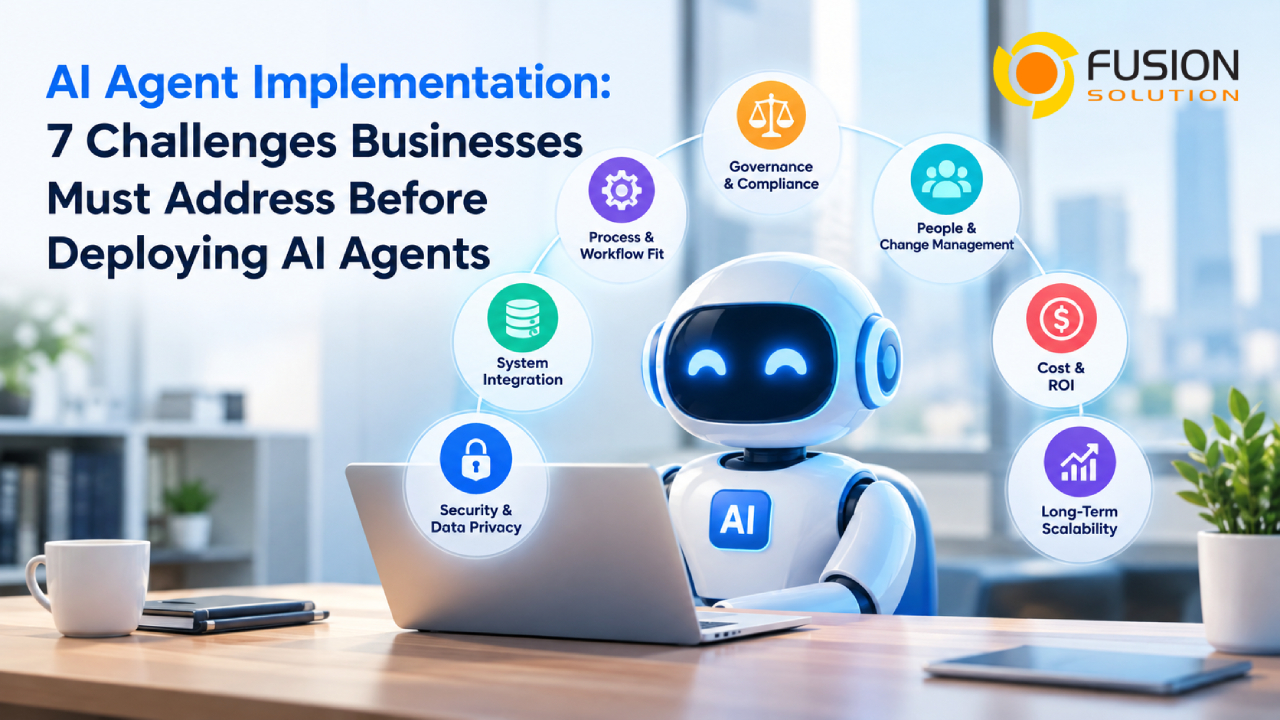
7 Challenges Businesses Must Address Before Implementing AI Agents
Defining the Right Use Cases and Business Objectives
One of the first challenges is identifying where AI agents can deliver measurable business value.
Organizations may be tempted to introduce AI agents across multiple departments without determining whether the underlying workflows are suitable for automation. This can lead to unnecessary complexity and disappointing results.
Not every task requires an autonomous AI agent. Some processes may be handled more efficiently by conventional automation, predefined workflows, or simpler AI assistants.
Things Businesses should Consider
Before deployment, organizations should evaluate potential use cases based on:
- Business impact: Will the solution reduce processing time, operational costs, or manual errors?
- Workflow complexity: Does the task require decision-making across multiple steps or systems?
- Data availability: Can the agent access accurate and relevant information?
- Risk level: What happens if the agent makes an incorrect decision or takes an unintended action?
- Measurable outcomes: How will the organization determine whether implementation is successful?
For example, an AI agent that classifies incoming documents and routes them to the appropriate department may be a suitable starting point. An agent authorized to approve financial transactions without human review would require substantially stronger controls.
Recommended approach: Start with a clearly defined, relatively low-risk use case. Establish baseline performance metrics before deployment and expand only when the initial implementation demonstrates reliable results.
Protecting Data and Managing Security Risks
Security is one of the most important considerations in AI agent implementation because agents may access sensitive information and interact directly with business applications.
Traditional software generally follows predefined instructions. AI agents, by contrast, may interpret ambiguous requests, select tools, and determine their next actions based on changing context. This creates additional risks that must be addressed through technical controls and operational policies.
Potential security concerns include unauthorized data access, prompt injection, sensitive information exposure, excessive permissions, and unintended actions.
For example, an agent designed to summarize internal documents could expose confidential information if it retrieves files beyond the requesting employee's access rights.

Things Businesses should Consider
Organizations should implement security measures such as:
- Least-privilege access: Grant agents only the permissions required for their assigned tasks.
- Identity and authentication controls: Authenticate agents and the systems they access.
- Data protection: Apply encryption, access restrictions, and appropriate retention policies.
- Input and output validation: Check requests and results for potentially unsafe content or unauthorized disclosures.
- Action restrictions: Limit which operations an agent can execute without approval.
- Monitoring and audit logs: Record relevant decisions, tool calls, and actions for investigation.
Businesses should also assess how their AI providers handle prompts, business data, model training, and data retention.
Recommended approach: Treat an AI agent as a software identity with defined permissions, not as a trusted employee with unrestricted access. Conduct security testing before production deployment and review permissions regularly.
Integrating AI Agents with Existing Business Systems
An AI agent delivers limited value if it cannot access the information and applications needed to complete its assigned tasks.
Many organizations rely on multiple systems, including ERP, CRM, document management platforms, databases, collaboration tools, and internal applications. These systems may use different data formats, authentication mechanisms, and integration standards.
Connecting an AI agent to these environments can introduce technical complexity and operational dependencies.
For example, an agent responsible for processing a customer request may need to retrieve customer information from a CRM, verify an order in an ERP system, and create a service ticket in another application.
If one integration fails or returns outdated information, the entire workflow may produce an incorrect result.
Things Businesses should Consider
Before integration, evaluate:
- API availability: Can the agent securely access required business functions?
- Data consistency: Are records accurate, current, and standardized across systems?
- Permission management: Can existing access policies be enforced at the integration layer?
- Error handling: What happens when an application is unavailable or returns unexpected data?
- System compatibility: Will integration introduce latency, maintenance overhead, or performance issues?
- Workflow continuity: Can the process recover safely from partial failures?
Organizations should also distinguish between systems that only provide information and systems that allow changes to business records or trigger external actions.
Recommended approach: Map the complete workflow before development. Begin with read-only integrations where practical, then introduce write permissions and automated actions after testing and approval controls are established.
Establishing Governance and Human Oversight
AI agents can make decisions and execute actions with limited human involvement. Without clear governance, organizations may struggle to determine who is accountable when an agent produces an incorrect result or performs an unauthorized action.
Governance should define the agent's responsibilities, operating boundaries, approval requirements, and escalation procedures.
It should also establish how organizations evaluate performance and respond when an agent behaves unexpectedly.
Things Businesses should Consider
An effective AI governance framework should address:
- Ownership: Which team is responsible for the agent throughout its lifecycle?
- Decision authority: Which actions can the agent perform independently?
- Human approval: Which decisions require review before execution?
- Accountability: Who investigates errors and approves corrective actions?
- Compliance: Which legal, regulatory, contractual, and internal requirements apply?
- Auditability: Can the organization reconstruct important actions and decisions?
Human oversight should reflect the consequences of potential errors.
For instance, an agent that organizes internal knowledge articles may operate with limited supervision. An agent that changes supplier payment details or approves high-value transactions should require stronger verification and explicit authorization.
Recommended approach: Create an AI agent governance policy before production deployment. Define risk categories, approval thresholds, escalation paths, and procedures for disabling an agent when necessary.
Managing Reliability and Unexpected Agent Behavior
AI agents do not always produce consistent results. Their behavior may vary depending on the input, available context, model characteristics, and external tools.
An agent may misunderstand a request, select an inappropriate tool, repeat an action, or fail to recognize that a task has not been completed successfully.
These problems become more significant when an agent performs multi-step operations across several applications.
Things Businesses should Consider
Organizations should test agents against realistic operating conditions, including:
- Incomplete or ambiguous user requests.
- Incorrect, outdated, or conflicting data.
- API timeouts and application failures.
- Unexpected outputs from connected systems.
- Unauthorized requests and prompt injection attempts.
- Repeated actions that could create duplicate transactions.
- Tasks that exceed the AI Agent's permissions or capabilities.
Testing should also examine whether the agent can identify uncertainty and escalate tasks rather than inventing missing information or continuing without sufficient evidence.
Recommended approach: Combine pre-deployment testing with production monitoring. Use validation rules, bounded execution steps, retry limits, duplicate-action prevention, and rollback procedures wherever appropriate.
Define measurable service-level targets for task completion, error rates, response time, and escalation frequency.
เตรียมพนักงานและส่งเสริมการยอมรับเทคโนโลยี
ความพร้อมทางเทคนิคไม่ได้รับประกันว่าการนำระบบไปใช้งานจะประสบความสำเร็จ พนักงานอาจลังเลที่จะใช้ AI Agent เพราะไม่เข้าใจวิธีการทำงานของเทคโนโลยี ไม่มั่นใจในความแม่นยำ หรือกังวลเกี่ยวกับการเปลี่ยนแปลงหน้าที่ความรับผิดชอบ
หากระบบใหม่เพิ่มขั้นตอนการอนุมัติ ทำให้พนักงานต้องแก้ไขข้อผิดพลาดบ่อยครั้ง หรือสร้างอินเทอร์เฟซที่แยกจากระบบเดิม การยอมรับจากผู้ใช้อาจยังอยู่ในระดับต่ำ
เป้าหมายควรเป็นการปรับปรุงเวิร์กโฟลว์ที่มีอยู่ ไม่ใช่เพียงการเพิ่มเครื่องมือ AI อีกหนึ่งรายการ
Things Businesses should Consider
กลยุทธ์การนำไปใช้งานที่เหมาะสมควรประกอบด้วย
- การสื่อสารกับพนักงาน: อธิบายเหตุผลที่นำ AI Agent มาใช้และปัญหาที่ต้องการแก้ไข
- การฝึกอบรมตามบทบาท: สอนพนักงานให้กำหนดคำสั่ง ตรวจสอบผลลัพธ์ และระบุข้อผิดพลาดที่อาจเกิดขึ้น
- การออกแบบเวิร์กโฟลว์: ผสาน AI Agent เข้ากับเครื่องมือและกระบวนการที่มีอยู่เมื่อเป็นไปได้
- ช่องทางรับข้อเสนอแนะ: เปิดโอกาสให้พนักงานรายงานข้อผิดพลาดและเสนอแนวทางปรับปรุง
- ความรับผิดชอบของมนุษย์: อธิบายว่าการตัดสินใจใดยังคงอยู่ภายใต้การควบคุมของพนักงาน
- การบริหารการเปลี่ยนแปลง: ให้ทีมที่เกี่ยวข้องมีส่วนร่วมในการออกแบบ ทดสอบ และนำระบบไปใช้งาน
องค์กรควรวัดการยอมรับของพนักงานควบคู่ไปกับประสิทธิภาพทางเทคนิค ตัวชี้วัดที่เป็นประโยชน์ ได้แก่ การใช้งานจริง การทำงานสำเร็จ ความพึงพอใจของผู้ใช้ อัตราการแก้ไขข้อมูล และเวลาที่ประหยัดได้
แนวทางที่แนะนำ: เริ่มโครงการนำร่องกับพนักงานที่เข้าใจกระบวนการทำงานที่เลือก รวบรวมข้อเสนอแนะ แก้ไขปัญหาด้านการใช้งาน และแสดงให้เห็นถึงการปรับปรุงที่วัดผลได้ก่อนขยายการใช้งาน
ประเมินต้นทุน ความสามารถในการขยายระบบ และ ROI
AI Agent Implementation มีต้นทุนมากกว่าค่าการใช้งานโมเดล ค่าใช้จ่ายทั้งหมดอาจรวมถึงการพัฒนาการเชื่อมต่อระบบ การเตรียมข้อมูล โครงสร้างพื้นฐาน การทดสอบความปลอดภัย การติดตามระบบ ค่าไลเซนส์ การฝึกอบรมพนักงาน และการบำรุงรักษาอย่างต่อเนื่อง
โซลูชันที่ทำงานได้ดีในโครงการนำร่องขนาดเล็กอาจมีค่าใช้จ่ายสูงหรือจัดการได้ยากเมื่อนำไปใช้ในหลายแผนก
องค์กรจึงจำเป็นต้องประเมินทั้งต้นทุนเริ่มต้นและข้อกำหนดในการดำเนินงานระยะยาว
Things Businesses should Consider
การประเมินต้นทุนอย่างสมจริงควรครอบคลุม
- ค่าใช้จ่ายในการใช้งาน AI Model และ API
- การพัฒนาและเชื่อมต่อแอปพลิเคชัน
- โครงสร้างพื้นฐานและการจัดการข้อมูล
- กิจกรรมด้านความปลอดภัย Governance และ Compliance
- การติดตาม บำรุงรักษา และรับมือเหตุการณ์ผิดปกติ
- การฝึกอบรมพนักงานและการปรับปรุงกระบวนการ
- ต้นทุนที่เกิดจากข้อผิดพลาด การตรวจสอบโดยมนุษย์ และการทำงานซ้ำ
การวัด ROI ควรอ้างอิงจากปัญหาทางธุรกิจที่ต้องการแก้ไข
ตัวอย่างเช่น องค์กรที่ทำระบบจัดประเภทเอกสารอัตโนมัติสามารถเปรียบเทียบระยะเวลาประมวลผล ความต้องการแรงงาน ความแม่นยำในการจัดประเภท อัตราข้อยกเว้น และต้นทุนต่อเอกสารก่อนและหลังการนำระบบไปใช้งาน
อย่างไรก็ตาม เวลาที่ประหยัดได้ไม่ได้หมายความว่าจะเกิดการประหยัดทางการเงินโดยอัตโนมัติ ธุรกิจควรแยกให้ชัดเจนระหว่างการเพิ่มขีดความสามารถในการทำงาน การลดต้นทุนจริง และการสร้างรายได้เพิ่มเติม
แนวทางที่แนะนำ: จัดทำ Business Case โดยใช้สมมติฐานที่สมจริง ติดตามต้นทุนรวมในการเป็นเจ้าของระบบ (Total Cost of Ownership) และประโยชน์จากการดำเนินงานในช่วงโครงการนำร่อง จากนั้นประเมิน ROI ใหม่ก่อนตัดสินใจขยายการใช้งาน
การเลือกพาร์ทเนอร์ที่เหมาะสมสำหรับการนำ AI Agent ไปใช้งาน
ความสำเร็จในการนำ AI Agent Implementation มาใช้งานไม่ได้ขึ้นอยู่กับเทคโนโลยี AI ที่ล้ำสมัยเพียงอย่างเดียว แต่ธุรกิจยังต้องการพาร์ทเนอร์ที่เข้าใจระบบที่ใช้งานอยู่ในปัจจุบัน ความท้าทายในการดำเนินงาน และเป้าหมายทางธุรกิจในระยะยาว
Fusion Solution ช่วยให้องค์กรสามารถเปลี่ยนศักยภาพของ AI ให้เป็นโซลูชันที่ใช้งานได้จริงทางธุรกิจ โดยผสานความเชี่ยวชาญด้าน AI การบูรณาการระบบ และระบบอัตโนมัติสำหรับเวิร์กโฟลว์เข้าด้วยกัน
ในการประเมินพาร์ทเนอร์สำหรับการนำ AI มาใช้งาน ธุรกิจควรพิจารณาปัจจัยต่อไปนี้
- การบูรณาการระบบระดับองค์กร (Enterprise Integration): เชื่อมต่อ AI Agent เข้ากับแอปพลิเคชันทางธุรกิจและเวิร์กโฟลว์ที่มีอยู่เดิม
- ความปลอดภัยและธรรมาภิบาล (Security and Governance): ปกป้องข้อมูลสำคัญและกำหนดการควบคุมสิทธิ์การเข้าถึงให้เหมาะสม
- ระบบอัตโนมัติที่เชื่อถือได้ (Reliable Automation): นำระบบติดตามตรวจสอบ การทดสอบ และการกำกับดูแลโดยมนุษย์มาใช้ เพื่อสนับสนุนการดำเนินงานที่มีความน่าเชื่อถือ
- คุณค่าทางธุรกิจ (Business Value): มุ่งเน้นการปรับปรุงที่วัดผลได้ในด้านผลิตภาพ ประสิทธิภาพ และต้นทุนการดำเนินงาน
ด้วยกลยุทธ์การนำ AI Agent ไปใช้งานที่เหมาะสม องค์กรจะสามารถก้าวข้ามการทดลองใช้ AI และพัฒนาโซลูชันที่สนับสนุนการดำเนินงานทางธุรกิจได้อย่างแท้จริง
Summary
AI Agent Implementation เปิดโอกาสให้ธุรกิจเพิ่มประสิทธิภาพการทำงาน ปรับปรุงเวิร์กโฟลว์ และลดงานที่ต้องทำด้วยตนเองซ้ำ ๆ อย่างไรก็ตาม การสร้างผลลัพธ์เหล่านี้ต้องอาศัยมากกว่าการนำ AI Model มาใช้งาน
องค์กรจำเป็นต้องจัดการความปลอดภัย การเชื่อมต่อระบบ Governance ความน่าเชื่อถือ การยอมรับจากพนักงาน และต้นทุนระยะยาว โดยมองปัจจัยทั้งหมดเป็นส่วนหนึ่งของกลยุทธ์การนำระบบไปใช้งานเดียวกัน
แนวทางที่มีประสิทธิภาพที่สุดคือ เริ่มจากปัญหาทางธุรกิจที่ชัดเจน กำหนดเป้าหมายที่วัดผลได้ ทดสอบภายใต้ขอบเขตที่ควบคุมได้ และขยายการใช้งานเมื่อผลลัพธ์แสดงให้เห็นถึงความคุ้มค่า
สำหรับธุรกิจที่กำลังประเมิน AI Agent คำถามสำคัญไม่ใช่เพียงเทคโนโลยีสามารถทำงานได้หรือไม่ แต่คือองค์กรสามารถนำระบบไปใช้งาน ควบคุม บำรุงรักษา และขยายระบบได้อย่างน่าเชื่อถือหรือไม่
กลยุทธ์ AI Agent Implementation ที่วางแผนอย่างรอบคอบ จะช่วยเปลี่ยนการทดลองใช้ AI ให้กลายเป็นความสามารถทางธุรกิจที่บริหารจัดการได้อย่างมีประสิทธิภาพ