Today, many businesses rely on Microsoft 365 to manage email, documents, Microsoft Teams conversations, SharePoint websites, and files on OneDrive for their daily operations. If unforeseen events occur, such as ransomware attacks, accidental data deletion, or data corruption, every minute of disruption can impact organizational productivity and revenue.
Microsoft 365 Backup provides organizations with a fast and secure way to restore business-critical data, helping companies recover from disruptions and continue operating with minimal downtime. Instead of relying solely on traditional backup methods, organizations can leverage Microsoft's cloud-native backup solution designed specifically for Microsoft 365 workloads.
What is Microsoft 365 Backup?
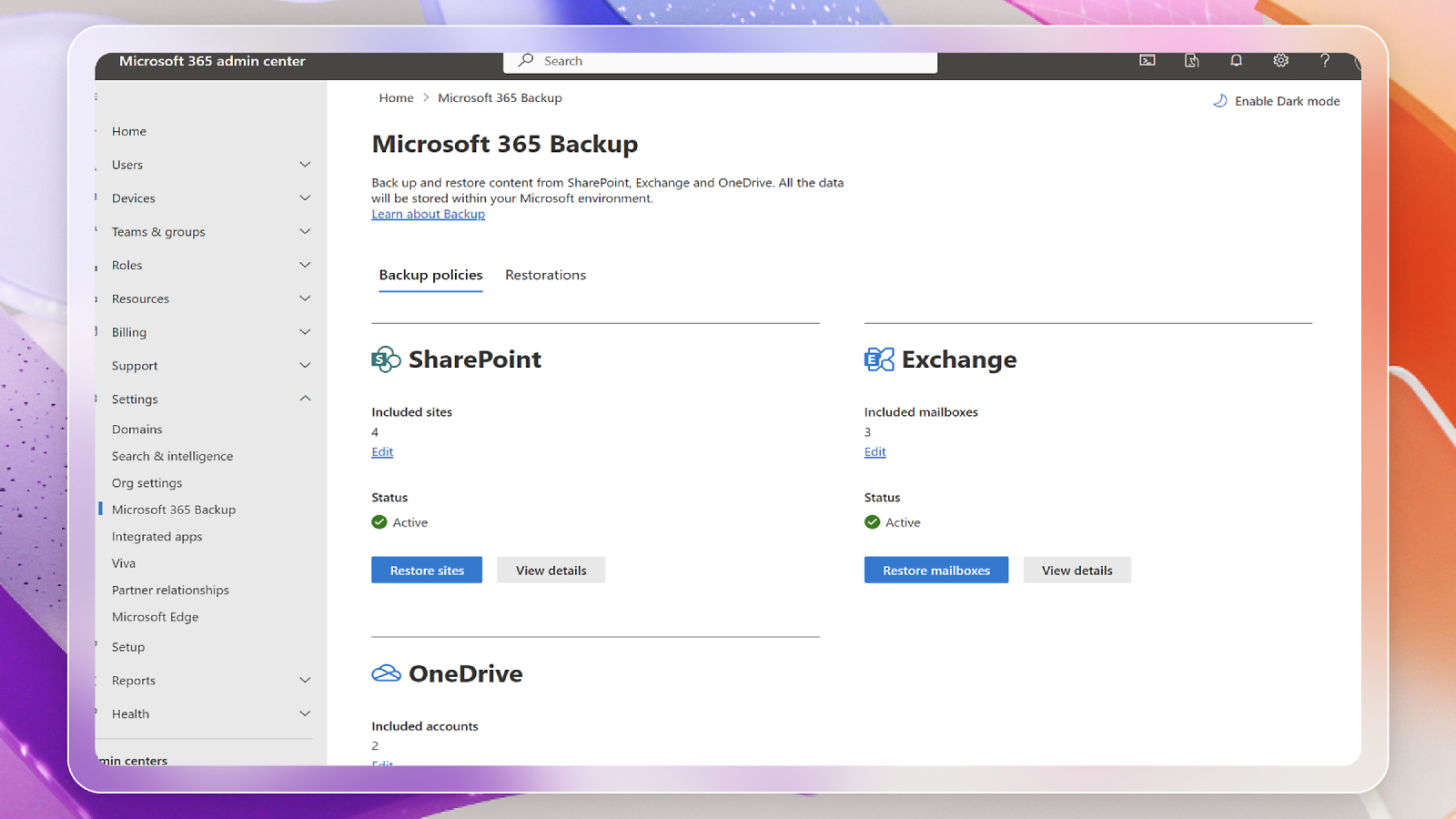
Microsoft 365 Backup is Microsoft's native backup and recovery service designed to protect data on Microsoft 365 services, including:
- Exchange Online
- OneDrive for Business
- SharePoint Online
Unlike traditional backup solutions that often copy data to external storage, Microsoft 365 Backup operates within Microsoft's trusted cloud infrastructure. This architecture enables significantly faster backup and restore operations while maintaining enterprise-grade security and compliance.
The service is built to help organizations recover quickly after cyberattacks, accidental deletions, insider threats, or operational mistakes without requiring complex infrastructure management.
Why Businesses Need Microsoft 365 Backup
Many organizations assume that cloud services automatically provide complete protection against every data loss scenario. While Microsoft 365 includes high availability and recycle bins, businesses still face risks such as:
- Ransomware encrypting large amounts of business data
- Employees accidentally deleting important files
- Malicious insiders removing business information
- Large-scale data corruption
- Recovery after security incidents
Having a dedicated backup solution provides an additional layer of protection, allowing organizations to restore clean copies of critical data when needed.
Key features of Microsoft 365 Backup
Fast Backup and Recovery
Microsoft 365 Backup is designed for high-speed recovery, allowing organizations to restore large volumes of data much faster than many traditional backup solutions. This minimizes downtime and helps employees return to work quickly.
Native Integration with Microsoft 365
Because the service is built by Microsoft, it integrates directly with Microsoft 365 without requiring additional backup infrastructure or complex deployment.
Benefits include:
- Simplified management
- Consistent security model
- Reliable performance
- Microsoft-managed infrastructure
Flexible Granular Recovery
Administrators can recover individual items or restore larger datasets depending on the recovery scenario, making it easier to respond to both small mistakes and major incidents.
Enterprise-Grade Security
Microsoft 365 Backup inherits Microsoft's enterprise-grade security standards, helping organizations maintain data integrity throughout the backup and recovery process.
Bulk Recovery After Malicious Attacks
One of the biggest advantages of Microsoft 365 Backup is its ability to perform bulk recovery following ransomware or other malicious attacks.
When thousands—or even millions—of files become encrypted or corrupted, manually restoring each item would take an enormous amount of time.
Microsoft 365 Backup enables organizations to:
- Restore large numbers of files efficiently
- Recover SharePoint sites
- Restore OneDrive content
- Recover Exchange Online mailboxes
- Reduce business downtime after cyber incidents
This capability is especially valuable for organizations with strict business continuity requirements.

Microsoft 365 Backup vs Traditional Backup Solutions
Feature | Microsoft 365 Backup | Traditional Backup Solutions |
Built for Microsoft 365 | ✔ | Usually requires connectors |
Backup Infrastructure | Microsoft-managed | Customer or vendor-managed |
Recovery Speed | Very fast | Varies depending on storage |
Large-scale Recovery | Excellent | Often slower |
Installation | Simple | Can require additional infrastructure |
Security Integration | Native Microsoft security | Depends on vendor |
Maintenance | Minimal | Often requires ongoing management |
Traditional backup platforms still have value for organizations protecting multiple environments. However, businesses primarily focused on Microsoft 365 can benefit from the simplicity and speed of Microsoft's native solution.
Benefits for Businesses
Minimize Downtime
Fast restoration helps employees regain access to critical business information quickly, reducing interruptions to daily operations.
Improve Business Continuity
Organizations can recover important emails, files, and collaboration data after unexpected incidents, helping maintain normal business operations.
Strengthen Cyber Resilience
A reliable backup strategy serves as an additional defense layer against ransomware, accidental deletion, and insider threats.
Simplify IT Operations
Since Microsoft manages the backup infrastructure, IT teams spend less time maintaining backup systems and more time focusing on strategic initiatives.
Scalable Protection
Whether your organization has hundreds or hundreds of thousands of users, Microsoft 365 Backup scales alongside your Microsoft 365 environment.
Best Practices for Using Microsoft 365 Backup
To maximize the effectiveness of Microsoft 365 Backup, organizations should follow several best practices:
Identify Critical Data
Prioritize business-critical SharePoint sites, Exchange mailboxes, and OneDrive accounts that require protection.
Develop a Recovery Plan
Document recovery procedures before an incident occurs so IT teams can respond quickly during emergencies.
Test Recovery Regularly
Perform periodic restore tests to verify backup integrity and ensure recovery processes meet business requirements.
Combine with Microsoft Security Solutions
Microsoft 365 Backup works best alongside solutions such as
- Microsoft Defender
- Microsoft Sentinel
- Microsoft Purview
To create a comprehensive cybersecurity strategy.
Monitor Backup Coverage
Review protected workloads regularly to ensure newly created users and sites are included in your backup plan.
Pay Only for What You Protect
A key advantage of Microsoft 365 Backup is its pricing model, Pay-as-you-use
Organizations only pay for the amount of backup storage they actually use, allowing businesses to align costs with their protection needs rather than purchasing oversized backup infrastructure.
This consumption-based approach makes the solution suitable for businesses of various sizes while providing predictable scalability as data grows.
A Safety Net Even After You Turn It Off
If your organization decides to stop using Microsoft 365 Backup, your protected backup data is not immediately removed.
Microsoft retains backup copies for a limited retention period after the service is turned off, providing a valuable safety net in case you need to recover important information shortly after cancellation.
This additional protection helps reduce the risk of permanent data loss during service transitions or licensing changes.
Is Microsoft 365 Backup Right for Your Organization?
Microsoft 365 Backup is particularly beneficial for organizations that:
- Store critical business data in Microsoft 365
- Need rapid recovery after ransomware attacks
- Require simplified backup management
- Want Microsoft's native backup solution
- Prioritize business continuity and operational resilience
As cyber threats continue to evolve, having a dedicated Microsoft-native backup solution helps organizations recover more quickly and confidently.
Summary
Data loss can occur for many reasons, from accidental deletion to sophisticated ransomware attacks. While Microsoft 365 provides a highly available cloud platform, organizations still need a reliable recovery strategy for business-critical information.
Microsoft 365 Backup delivers fast, secure, and scalable protection for Exchange Online, SharePoint Online, and OneDrive. With native Microsoft integration, rapid bulk recovery capabilities, simplified management, and a pay-for-what-you-protect pricing model, it helps businesses minimize downtime and maintain continuity when unexpected incidents occur.
For organizations seeking a modern cloud-native backup solution, Microsoft 365 Backup offers an effective way to protect valuable business data while ensuring operations can resume quickly after disruptions.