Artificial intelligence (AI) is transforming the software development industry in a leap forward, and... Is GitHub Copilot worth it? This is a question many developers are wondering about. GitHub Copilot is one of the most exciting AI tools for developers today. It's designed to be an intelligent coding assistant that helps developers... write code faster, reduce redundancy, and improve efficiency.
However, does it truly improve coding efficiency, or is it merely an AI tool with limitations? In this article, we'll delve deeper Features, advantages, and disadvantages of GitHub Copilot's tools can help you decide if it's right for your needs.
What really is GitHub Copilot?
GitHub Copilot is an intelligent coding assistant developed by... GitHub and OpenAI using an advanced language model GPT-4 for real-time code analysis and recommending appropriate code, such as: code blocks, functions, and classes.
Copilot is compatible with popular code editors such asVisual Studio Code, JetBrains IDEs and NeovimIt acts as an AI developer partner, helping you write code faster and reduce errors.
How does GitHub Copilot work?
- Introducing real-time code. – Analyze and suggest relevant code within the context of the code being developed.
- Automatic code completion – Automatically completes entire lines of code or entire functions.
- รองรับหลายภาษาโปรแกรม – ใช้งานได้กับ Python, JavaScript, TypeScript, C++, Java, Ruby และภาษาอื่นๆ
- เข้าใจโครงสร้างโค้ด – วิเคราะห์คอมเมนต์ ฟังก์ชัน และโค้ดที่อยู่รอบๆ เพื่อให้คำแนะนำที่แม่นยำ
- ทำงานร่วมกับเครื่องมือยอดนิยม – รองรับโปรแกรมแก้ไขโค้ดที่ใช้กันอย่างแพร่หลาย ทำให้ผสานเข้ากับ Workflow ได้อย่างง่ายดาย
ฟีเจอร์เด่นของ GitHub Copilot
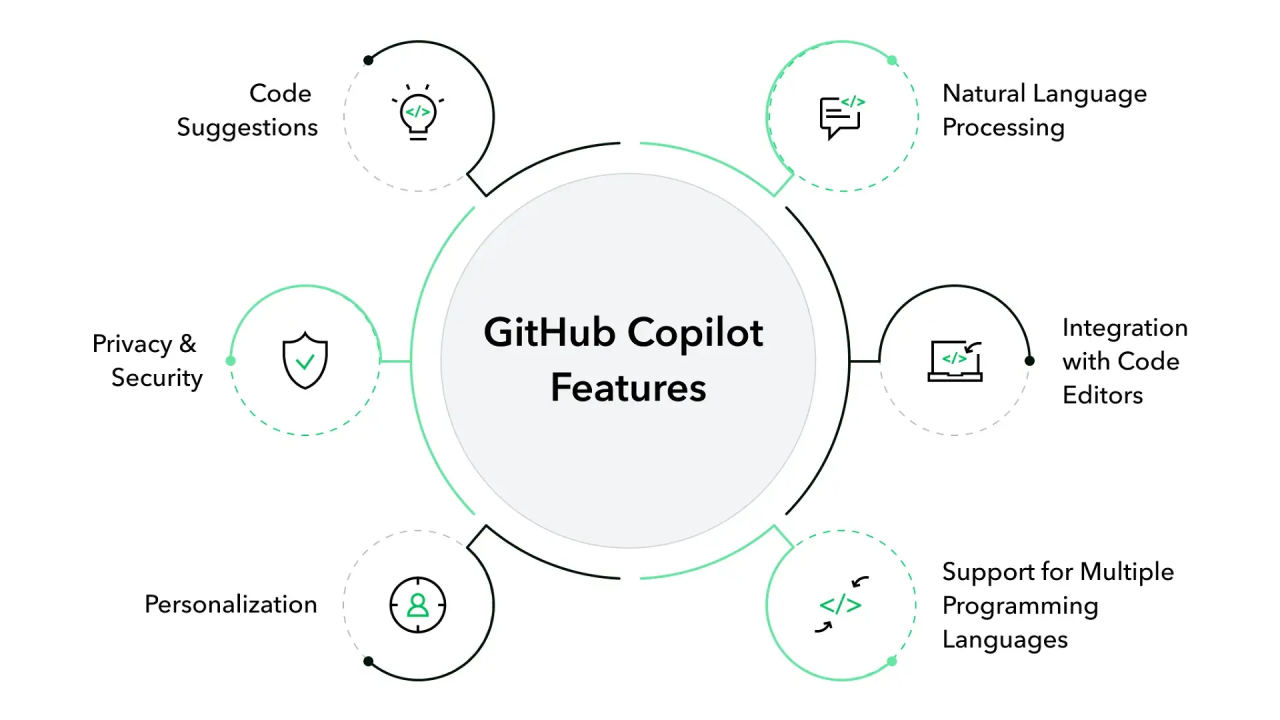
การแนะนำโค้ดด้วย AI อัจฉริยะ
GitHub Copilot ช่วย ลดงานเขียนโค้ดซ้ำซ้อน โดยสามารถแนะนำโค้ดที่เหมาะสมกับโปรเจ็กต์ได้ เช่น สร้างฟังก์ชัน ใช้ไลบรารี หรือโครงสร้างอัลกอริทึมที่ซับซ้อน ซึ่งช่วยให้การพัฒนาเป็นไปอย่างมีประสิทธิภาพมากขึ้น
เติมโค้ดตามบริบท (Context-Aware Auto-Completion)
แตกต่างจากระบบเติมโค้ดทั่วไป Copilot วิเคราะห์โค้ดที่เกี่ยวข้องทั้งไฟล์และโปรเจ็กต์ เพื่อให้คำแนะนำที่เหมาะสมกับไลบรารีหรือเฟรมเวิร์กที่คุณใช้งาน
รองรับการเขียนโค้ดหลายภาษา
หนึ่งในจุดแข็งของ GitHub Copilot คือรองรับการเขียนโค้ดในหลายภาษา ไม่ว่าจะเป็น Python, JavaScript, TypeScript, C++, Go, Ruby, PHP, Rust หรือภาษาอื่นๆ
ช่วยเขียนเอกสารโค้ดและคอมเมนต์อัตโนมัติ
หากคุณมีปัญหาในการเขียนคอมเมนต์หรือเอกสารประกอบโค้ด Copilot สามารถ แนะนำ Docstring และคอมเมนต์ เพื่อช่วยให้โค้ดของคุณอ่านง่ายขึ้น และทำให้โปรเจ็กต์มีความเป็นมืออาชีพมากขึ้น
ผสานการทำงานกับเครื่องมือยอดนิยม
GitHub Copilot รองรับการใช้งานร่วมกับโปรแกรมแก้ไขโค้ดยอดนิยม ได้แก่:
- Visual Studio Code (VS Code)
- JetBrains IDEs (IntelliJ IDEA, PyCharm, WebStorm ฯลฯ)
- Neovim
- GitHub Codespaces
ช่วยแก้บั๊กและลดข้อผิดพลาดในการเขียนโค้ด
แม้ว่า GitHub Copilot จะไม่ใช่เครื่องมือสำหรับ Debugging โดยตรง แต่สามารถแนะนำโค้ดที่มีโครงสร้างดีขึ้น และช่วยให้คุณพบแนวทางที่เหมาะสมในการแก้ไขปัญหาของโค้ดได้เร็วขึ้น
GitHub Copilot: ราคาแพ็กเกจ
Features | Free Access Plan | Copilot Business | Copilot Business | Copilot Enterprise |
Price | Free | $10/month | $19/user/month | $39/user/month |
Code suggestions with AI | ✅ Yes | ✅ Yes | ✅ Yes | ✅ Yes |
Code editor support | Same as Individual | VS Code, JetBrains, Neovim, Visual Studio | Same as Individual | Same as Business |
Recommended use | Education and participation in open source. | Personal code development | Teamwork and organizational work. | Enterprise-level safety and compliance. |
Administrator control | ❌ No | ❌ No | ✅ Centralized user management | ✅ Establishing organizational policies. |
Data control and privacy. | ❌ Can't customize | ❌ Can't customize | ✅ Data collection administrator | ✅ Advanced settings and usage log. |
Public code filter | ✅ Can be turned on/off. | ✅ Can be turned on/off. | ✅ The administrator sets the policy. | ✅ According to organizational policy |
SSO login | ❌ No | ❌ No | ✅ Supports Azure AD and SSO | ✅ Advanced identification system |
License management | ❌ No | ❌ No | ✅ Rights can be assigned and revoked. | ✅ Capable of managing large licenses. |
Connecting to a GitHub organization. | ❌ No | ❌ No | ✅ Yes | ✅ Advanced version |
Safety | ❌ Basic | ❌ Basic | ✅ Business-level data policy | ✅ Enterprise-level protection (coming soon) |
Application features | Verified students and open-source developers. | everyone | Every GitHub organization | Large organizations in industries requiring high levels of security. |
Free trial | ❌ Not necessary | ✅ 30-day free trial | ❌ No | ❌ Not launched yet |
ใครสามารถใช้ GitHub Copilot ฟรีได้บ้าง?
- นักเรียนและอาจารย์ (ผ่าน GitHub Education Pack)
- ผู้ดูแลโครงการโอเพ่นซอร์ส
GitHub Copilot: ข้อดีและข้อเสีย
✅ ข้อดี (Advantages)
✔️ ช่วยให้การเขียนโค้ดเร็วขึ้น – ลดเวลาทำงานซ้ำซ้อน และช่วยให้ Workflow มีประสิทธิภาพมากขึ้น
✔️ ลดข้อผิดพลาดของ Syntax – การแนะนำโค้ดจาก AI ช่วยลดข้อผิดพลาดที่เกิดจากมนุษย์
✔️ Supports multiple languages – ใช้งานได้กับภาษาโปรแกรมที่หลากหลาย
✔️ ช่วยนักพัฒนามือใหม่เรียนรู้ Syntax และ Best Practices – เหมาะสำหรับผู้ที่ต้องการพัฒนาทักษะการเขียนโค้ด
✔️ ผสานการทำงานกับ IDE ยอดนิยม – ใช้งานร่วมกับ VS Code, JetBrains, และ Neovim smoothly
❌ ข้อเสีย (Disadvantages)
❌ ไม่แม่นยำ 100% – บางครั้ง AI อาจแนะนำโค้ดที่ต้องมีการแก้ไขหรือปรับปรุงเพิ่มเติม
❌ ไม่มีการตรวจสอบความปลอดภัยของโค้ดในตัว – อาจแนะนำโค้ดที่ไม่ปลอดภัยได้ หากไม่มีการตรวจสอบโดยมนุษย์
❌ มีข้อจำกัดในการปรับแต่ง – ไม่สามารถปรับให้เข้ากับสไตล์การเขียนโค้ดเฉพาะทางได้เสมอไป
❌ ต้องเสียเงินเพื่อใช้ฟีเจอร์เต็มรูปแบบ – ฟีเจอร์ขั้นสูงต้องสมัครสมาชิกแบบรายเดือนหรือรายปี
GitHub Copilot คุ้มค่าหรือไม่? ใครควรใช้?
GitHub Copilot เหมาะสำหรับ:
- นักพัฒนาที่ต้องการเพิ่ม Productivity และลดงานซ้ำซ้อน
- นักเรียนและมือใหม่ที่ต้องการเรียนรู้แนวทาง Best Practices ของการเขียนโค้ด
- วิศวกรซอฟต์แวร์ที่ทำงานกับหลายภาษาและเฟรมเวิร์ก
- ทีมพัฒนาที่ต้องการเร่งความเร็วในการพัฒนาโค้ด และลดข้อผิดพลาด
GitHub Copilot อาจไม่คุ้มค่าสำหรับ:
- นักพัฒนาที่ต้องการควบคุมโค้ดทุกบรรทัดด้วยตัวเอง
- โปรเจ็กต์ที่ต้องการมาตรฐานความปลอดภัยและ Compliance ที่เข้มงวด
- ผู้ที่ไม่ต้องการจ่ายเงินเพื่อใช้ AI ช่วยเขียนโค้ด
How to start using it
It's very easy to use:
- Install Extension – If you are using Visual Studio Code, download the extension from the Marketplace.
- Log in with GitHub. – You need an active GitHub account.
- Enable hints – Start coding and it will provide real-time suggestions.
- Accept or modify the suggestion. – You can choose to accept, reject, or modify the code suggested by the AI.
Pricing and availability of GitHub Copilot.

It is a paid, subscription-based service. Although there is a free trial, users will need to subscribe to continue accessing the service. GitHub also offers a free plan for students and those working with open-source code.
ข้อสรุป: GitHub Copilot คุ้มค่าหรือไม่?
Is GitHub Copilot worth it? คำตอบขึ้นอยู่กับความต้องการของคุณ หากคุณกำลังมองหา ผู้ช่วยเขียนโค้ดที่ช่วยเพิ่มประสิทธิภาพ ลดงานซ้ำซ้อน และช่วยให้คุณเขียนโค้ดได้ดีขึ้นและเร็วขึ้น GitHub Copilot ถือเป็นการลงทุนที่คุ้มค่า
อย่างไรก็ตาม หากคุณต้องการ ความปลอดภัยสูงสุด การปรับแต่งแบบเต็มรูปแบบ และการควบคุมโค้ดด้วยตนเอง การพึ่งพา Copilot เพียงอย่างเดียวอาจไม่ใช่ตัวเลือกที่ดีที่สุด เพราะเช่นเดียวกับเครื่องมือ AI อื่นๆ Copilot เป็นเพียงเครื่องมือช่วย ไม่สามารถแทนที่นักพัฒนามนุษย์ได้อย่างสมบูรณ์
หากคุณยังไม่แน่ใจ สามารถทดลองใช้งานฟรี และดูว่าเหมาะกับ Workflow ของคุณหรือไม่ ก่อนตัดสินใจสมัครใช้งานแบบเสียเงิน!
หากคุณต้องการเรียนรู้เพิ่มเติมเกี่ยวกับ GitHub Copilot และฟีเจอร์ทั้งหมดของมัน คุณสามารถเข้าไปดูรายละเอียดเพิ่มเติมได้ที่ GitHub Copilot อย่างเป็นทางการ.
Explore our digital tools
If you are interested in implementing a knowledge management system in your organization, contact SeedKM for more information on enterprise knowledge management systems, or explore other products such as Jarviz for online timekeeping, OPTIMISTIC for workforce management. HRM-Payroll, Veracity for digital document signing, and CloudAccount for online accounting.
Read more articles about knowledge management systems and other management tools at Fusionsol Blog, IP Phone Blog, Chat Framework Blog, and OpenAI Blog.