Azure OCR API: How to Integrate Document-Reading Capabilities into Business Applications
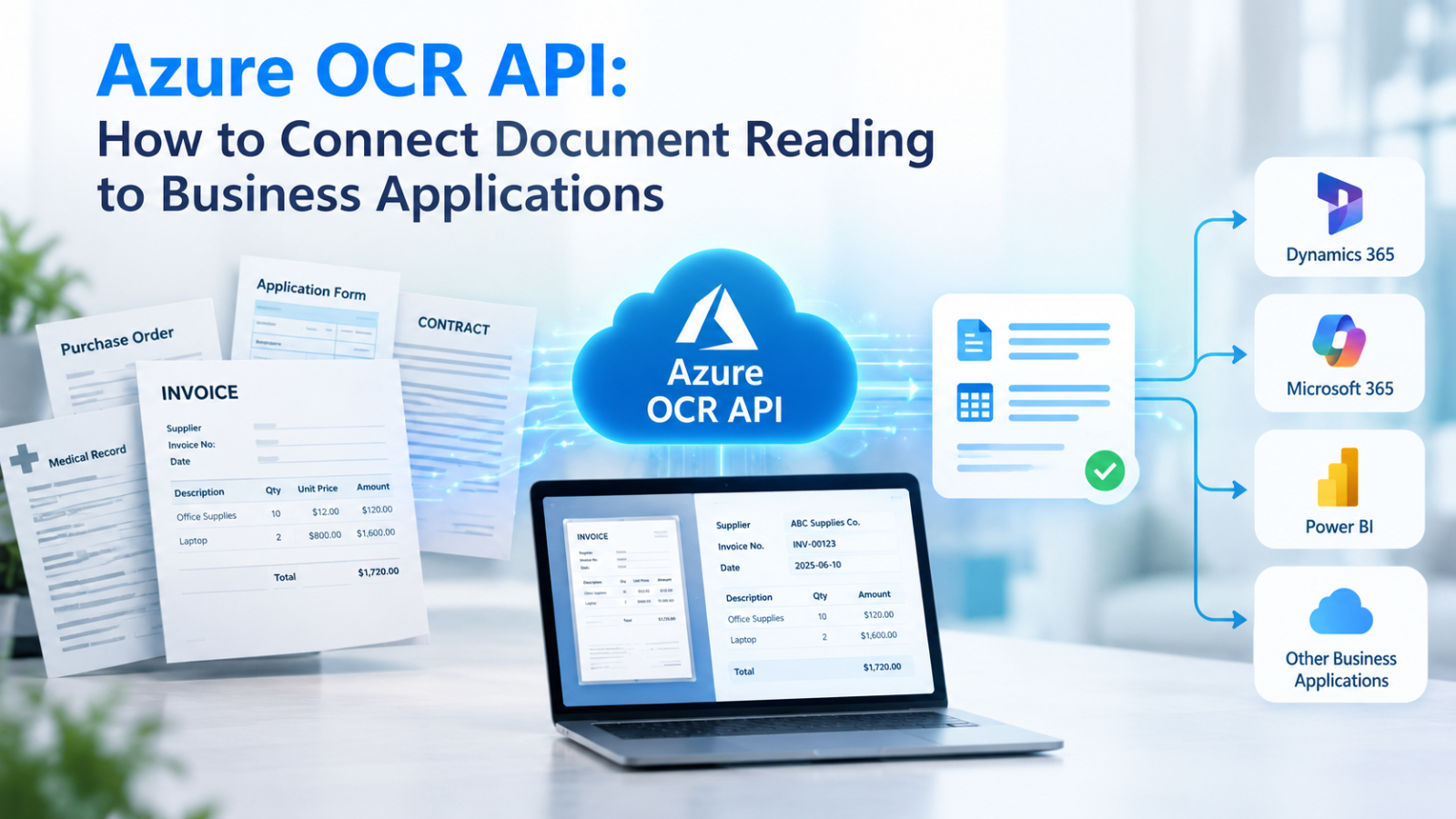
Businesses handle documents across nearly every department. Finance teams process invoices and receipts, HR departments manage application forms and employee records, and operations teams work with purchase orders, delivery documents, and contracts. When this information arrives as scanned PDFs or images, employees often have to enter the same data into business applications manually.
An Azure OCR API integration can help automate this process by converting document content into machine-readable data. Instead of treating every document as a file that someone must open and review, businesses can build workflows that extract information and pass it to the systems where it is needed.
What Is an Azure OCR API?
An Azure OCR API allows applications to use Microsoft's cloud-based text recognition capabilities to extract text from images and documents. Depending on the service selected, businesses can recognize printed text, process scanned PDFs, and obtain information about text lines, words, and their positions.
For document-heavy workflows, Azure AI Document Intelligence provides OCR capabilities and additional features for understanding document layouts and extracting structured information. Developers can integrate these capabilities through REST APIs or supported software development kits.
For example, when a supplier sends an invoice as a scanned PDF, an OCR service can recognize text such as the supplier name, invoice number, date, and total amount. The application can then use the extracted information as the starting point for further processing.
It is important to distinguish text recognition from data extraction. OCR identifies text in a document, but a business application may also need to determine which value represents the invoice number, validate the total, and identify the correct supplier record. Those steps may require document understanding, business rules, or additional application logic.
How Azure OCR API Integration Works ?
A typical integration connects the document source, OCR service, application logic, and destination system into one workflow.
- Capture Documents from Business Applications
The process begins when a document enters the organization. It might be uploaded through a web application, received by email, scanned at an office, or submitted through a customer portal.
The application should store the original file securely and create a document-processing request. It can also record essential information such as the submission date, document type, department, and processing status.
For high-volume environments, a queue or background processing service can help prevent document processing from slowing down the main application.
- Send the Document to the OCR Service
The application sends the document to the appropriate Azure OCR endpoint using an authenticated API request.
The implementation depends on the selected service and document type. Azure AI Document Intelligence supports document-focused processing through its Read model and other models designed for specific extraction tasks.
For supported asynchronous analysis operations, the application submits a request and receives an operation reference. It then checks the processing status and retrieves the results when analysis is complete.
Developers should follow the current API version's documentation rather than assuming every OCR endpoint uses the same request format or processing method.
- Convert OCR Results into Structured Data
OCR output is not always ready to use directly in a business system. A document may contain many lines of text, but the destination application usually needs specific fields.
Consider a purchase invoice containing the following information:
Field | Example extracted value |
Supplier name | ABC Manufacturing |
Invoice number | INV-2026-0158 |
Invoice date | 15 October 2026 |
Total amount | 25,500.00 |
Currency | THB |
The integration layer maps the recognized information to the fields required by the destination system. Depending on the document and service, this may involve layout analysis, a prebuilt extraction model, a custom model, or business-specific rules.
Applications should format dates, numbers, currencies, and other data to align with the formats supported by the destination system; this prevents discrepancies in data formatting across documents, which could otherwise lead to data inconsistency within the system.
- Verify the accuracy of the extracted data
Text recognized via OCR should not automatically be considered accurate business data.
An effective workflow should validate required fields, verify data formats, cross-reference supplier codes against existing data, and check calculations as appropriate. Additionally, confidence scores from the recognition process can be used in conjunction with business rules to determine whether the data is ready for automated processing.
Documents containing incomplete information, unclear text, or inconsistent data should be referred to staff for review—particularly in areas such as finance, legal matters, and other functions where errors could have significant consequences.
- Send data to the destination application
Once the accuracy has been verified, the integration layer transmits the structured data to the relevant business systems.
The destination system could be an ERP platform, accounting software, an HR application, a database, a document management system, or an internal web application, depending on the specific system architecture of each business.
The destination system can then generate a draft invoice, update information, initiate an approval process, or make the extracted data available for searching and reporting.
Furthermore, the original source documents should be linked to the processed data entries, allowing staff to verify the data's origin whenever necessary.
Example: Implementing an automated invoice processing system using the Azure OCR API
Imagine your finance team having to process hundreds of invoices each month. Instead of manually copying data from PDF files into accounting software, an OCR-powered workflow can automate most of these routine tasks.
The workflow is as follows:
- Document Capture: Receive invoices via email or file upload.
- Extract: Identify the supplier name, invoice number, date, and total amount.
- Validate: Check required fields and match supplier data.
- Integrate: Send verified data to an accounting or ERP system.
- Approve: Route the invoice for approval or flag exceptions for human review.
The result? Less manual data entry, fewer repetitive tasks, and a smoother invoice approval process. The same approach can also automate receipts, purchase orders, and customer forms.
Key factors to consider when integrating the Azure OCR API
Integrating OCR into business applications requires more than just text recognition capabilities. The following four factors can make the difference between a merely functional system and a reliable business solution.
Choose an appropriate OCR model.
Select a service that aligns with the type of documents you need to process. General text recognition may suffice for documents with simple structures, whereas invoices and forms might require specialized data extraction capabilities. Always conduct tests using actual documents—including those containing both Thai and English—if the solution is intended for organizational use.
Keep Data Secure
Protect API credentials, control access, and apply appropriate data retention and encryption policies. This is especially important when processing financial records or personal information.
Plan for Errors and Scale
Poor-quality scans, network failures, and duplicate submissions can disrupt workflows. Use error handling, retry mechanisms, and processing-status tracking to keep documents moving reliably.
Measure actual outcomes
Track extraction accuracy, processing time, manual review rates, and hours saved. These metrics reveal whether automation is genuinely improving your operations.
Azure OCR API vs Complete Document Processing Solution
An OCR API provides the technology to recognize text, but a complete business workflow may also need data validation, document classification, approval routing, and system integration.
Building everything yourself offers flexibility but requires development and ongoing maintenance. A more integrated solution can reduce that workload by bringing document processing capabilities together.
The key is to choose an approach that turns documents into usable business data—not simply readable text.
Simplify Document Integration with DOVA OCR
For businesses that want to automate document processing without building every component from scratch, DOVA OCR offers an AI-powered document intelligence platform built on Microsoft Azure.
DOVA supports Thai and English recognition alongside other languages, document text and data extraction, and connections to external systems through its External Connector. It also includes a human validation stage to help users review extracted information before it moves further through a workflow. These capabilities can support document-intensive processes across finance, HR, and operations.
Rather than focusing only on converting images into text, businesses can use DOVA as part of a broader approach to transforming documents into structured information that is easier to validate, manage, and integrate into existing applications.
If your organization is looking to reduce manual data entry, improve document handling, and connect document information with business workflows, explore DOVA OCR to learn how its document intelligence capabilities can support your digital transformation goals.
Interested in Microsoft products and services? Send us a message here.
Explore our digital tools
If you are interested in implementing a knowledge management system in your organization, contact SeedKM for more information on enterprise knowledge management systems, or explore other products such as Jarviz for online timekeeping, OPTIMISTIC for workforce management. HRM-Payroll, Veracity for digital document signing, and CloudAccount for online accounting.
Read more articles about knowledge management systems and other management tools at Fusionsol Blog, IP Phone Blog, Chat Framework Blog, and OpenAI Blog.
New Gemini Tools For Educators: Empowering Teaching with AI
If you want to stay up-to-date with the latest technology and AI news, check out this website It's updated daily!
Fusionsol Blog in Vietnamese
- What is Microsoft 365?
- What is Copilot?What is Copilot?
- Sell Goods AI
- What is Power BI?
- What is Chatbot?
- What is cloud storage?
Related Articles
Frequently Asked Questions (FAQ)
What types of documents does DOVA OCR support?
DOVA OCR can assist in processing business documents—such as invoices, receipts, forms, and scanned files—making data management more convenient and efficient.
How does DOVA OCR help reduce the steps in employees' workflows?
A system that reads text and extracts key information from documents, reducing the need for manual data entry and allowing employees to dedicate more time to verifying data and performing tasks that require decision-making.
How accurate is the data read by the system?
Accuracy depends on the quality of the documents, the font styles, and the complexity of the information. You should verify the results before use, especially when dealing with financial data or critical organizational information.
Can DOVA OCR be integrated with an organization's existing systems?
DOVA OCR offers features such as data export to CSV, database storage, and a RESTful API, which can be used to integrate with other systems depending on the specific deployment requirements.
How should a business prepare before starting to use DOVA OCR?
You should begin by identifying the types of documents to be processed, preparing actual document samples, and testing the accuracy of data extraction. Additionally, evaluate security requirements and system integration needs to ensure the chosen solution is well-suited to your organization.