Thai OCR Software – DOVA OCR
Businesses in Thailand handle vast amounts of documentation daily—ranging from invoices, receipts, purchase orders, application forms, and contracts to internal corporate documents. Although many organizations have adopted digital systems, a significant volume of critical data remains trapped in formats such as scanned documents, photographs, and PDFs. Consequently, employees are forced to manually read these documents and input the data into spreadsheets, databases, or business applications. This process is time-consuming, drives up operational costs, and increases the risk of human error.
Thai OCR software addresses this challenge by recognizing Thai characters in images and scanned documents and converting them into text that computers can read and process. Integrating OCR with document data extraction and automation systems enables organizations to reduce repetitive tasks, enhance document processing efficiency, and facilitate easier data search and management.
What is Thai OCR software?
Optical Character Recognition (OCR) is a technology used to convert text within images into digital text that computers can read and process. Instead of treating a scanned document merely as a static image, OCR analyzes and identifies characters, enabling the text to be searched, copied, processed, or transmitted to other systems.
Thai OCR software must accommodate the specific characteristics of the Thai writing system, which comprises consonants, vowels positioned above or below consonants, tone marks, and characters with tight spacing. These features can complicate text recognition, particularly when dealing with low-resolution documents, unfamiliar fonts, faint print, or complex layouts.
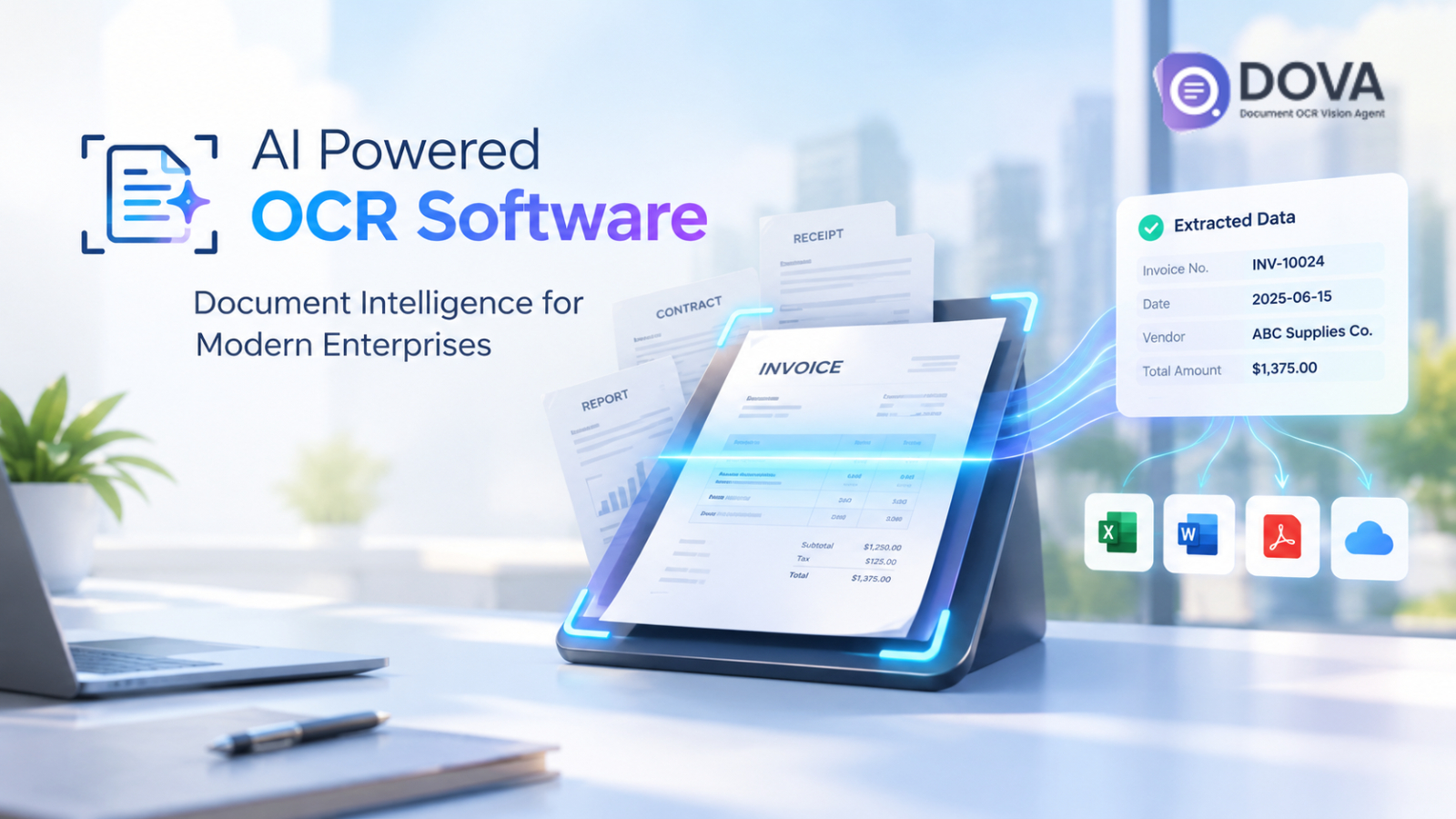
For example, with a scanned Thai invoice, an employee might otherwise have to manually read the vendor name, invoice number, issue date, and total amount. However, by using OCR, the software recognizes the printed text in the document and prepares the data for the next stage of processing.
Modern document processing solutions go beyond simple text recognition; they can classify documents, extract data from specific fields, organize information into structured formats, and integrate the results with the business applications an organization already uses.
Why Thai businesses need to use OCR technology?
Manual document processing is time-consuming and increases the risk of errors. OCR technology enables businesses to convert documents into digital data, reducing repetitive tasks and enhancing operational efficiency.
- Reduce manual data entry
OCR converts printed text in documents into digital data, helping to reduce the time employees spend on manual data entry. - Enhance the convenience of document searching
OCR enables text search within scanned documents, allowing employees to locate information in invoices, contracts, and business records more quickly. - Enhance Data Accuracy
OCR reduces the need for manual transcription, while validation and staff review of the results help identify potential errors before the data is put to use. - Support the digital transition
OCR helps convert data from paper documents into digital format, serving as a crucial foundation for implementing automation in business workflows.
Key features to look for in Thai OCR software
When selecting OCR software, businesses should consider the following key capabilities:
- Thai and multilingual recognition: Capable of recognizing Thai and English text in business documents.
- Image Preprocessing: Improves text recognition performance for documents that are skewed, have faint characters, or contain image noise.
- Structured Data Extraction: You can extract specific data, such as invoice numbers, dates, and total amounts.
- Document Classification and Verification: It can classify documents and allow users to verify the extracted information.
- Business System Integration: Data can be exported in CSV format or connected to databases and APIs.
These capabilities enable organizations to move beyond the limitations of standard text recognition toward more efficient document processing.
How does DOVA OCR help automate document processing?
DOVA OCR is an AI-powered Document Intelligence solution that enables organizations to convert documents into actionable digital data.
- Recognize Thai and English documents.
Supports multilingual document processing, enabling businesses to more conveniently manage both domestic and international documents. - Extract structured data
Helps extract key information from documents to reduce manual data entry and streamline downstream processing. - Classify and verify documents
It helps organize documents by category and includes verification capabilities, allowing users to review the extracted information. - Connect and export data
Supports data export to CSV files, database storage, RESTful API integration, and document processing from folders, helping to link document data with existing workflows. - Supports high-volume document processing
DOVA utilizes cloud processing built on Microsoft Azure technology, enabling organizations to effectively develop strategies for managing increasing volumes of documents.
Before actual implementation, businesses should evaluate text recognition quality, security requirements, system integration options, and document processing volumes to ensure they align with organizational needs.
Examples of OCR usage in Thai businesses
The benefits of OCR become even more apparent when applied to an organization's day-to-day workflows.
Accounting and Finance
Accounting and finance teams can use OCR to capture data from invoices, receipts, and other financial documents. The extracted data can be used to prepare entries for accounting systems, support expense management, and reduce repetitive data entry tasks.
For example, a company receiving invoices from multiple vendors can use an OCR workflow to extract invoice numbers, dates, and amounts before having employees verify the accuracy of the data.
Human Resources
Human Resources departments must manage application forms, employee records, and other documents containing information in specific formats. OCR helps convert these documents into digital data, making it easier to search for and organize the content.
If documents contain personal data, the organization should establish access rights, data retention policies, and appropriate data protection measures alongside the implementation of the system.
Purchasing and Supply Chain
Procurement teams regularly need to process purchase orders, delivery documents, supplier invoices, and related paperwork. OCR helps extract reference numbers, product details, quantities, and other information printed on these documents.
When connected to active systems, the extracted data can facilitate document matching and exception handling, reducing the need for manual data transfer across all fields.
Medical and Administrative Documents
Hospitals, clinics, and other service-oriented organizations may need to digitize their historical forms, reports, and documents. OCR facilitates easier access to and searching of information printed within these documents.
For medical documents, OCR results should be carefully verified before being used to support clinical decision-making, billing, or administrative processes. Furthermore, sensitive information must be protected by appropriate security systems and access controls.
Document Storage and Digital Document Archiving
Organizations with large volumes of scanned documents can use OCR to create a digital document repository with searchable content, enabling employees to locate relevant documents more quickly without relying solely on file names or folder structures.
A searchable document repository also supports document browsing, internal knowledge management, and long-term record retention.
How to Choose the Right OCR Solution
When selecting an OCR solution, factors such as document types, processing requirements, and organizational business goals should be considered. It is advisable to conduct trials using actual documents—including low-quality scans and those containing both Thai and English text—to evaluate text recognition accuracy and data extraction quality.
Before deciding to use a solution, you should verify whether it can perform the following actions.
- Accurately recognize text in Thai documents.
- Extract data from the desired fields and support result verification.
- Connects with existing business systems.
- Supports organizational security requirements and document volumes.
- Suitable for the installation and maintenance budget.
Conducting a pilot project allows an organization to evaluate whether a solution truly meets its needs before rolling it out across the entire organization.
Summary
Managing Thai-language documents remains a challenge for organizations that rely on scanned files, paper forms, and manual data entry. OCR technology converts these documents into text that computers can read and process, while Document Intelligence and workflow automation systems build upon this by extracting, organizing, and routing data into business systems.
An effective Thai OCR program should go beyond mere character recognition; it must support organizational document formats, possess data validation capabilities, integrate with existing workflows, and tangibly reduce repetitive administrative tasks.
DOVA OCR integrates document recognition with capabilities for data extraction, classification, verification, and system connectivity. For organizations seeking to streamline document-intensive workflows, DOVA OCR is a solution worth testing and evaluating, using actual documents and internal workflow requirements as the basis for decision-making.
Interested in Microsoft products and services? Send us a message here.
Explore our digital tools
If you are interested in implementing a knowledge management system in your organization, contact SeedKM for more information on enterprise knowledge management systems, or explore other products such as Jarviz for online timekeeping, OPTIMISTIC for workforce management. HRM-Payroll, Veracity for digital document signing, and CloudAccount for online accounting.
Read more articles about knowledge management systems and other management tools at Fusionsol Blog, IP Phone Blog, Chat Framework Blog, and OpenAI Blog.
New Gemini Tools For Educators: Empowering Teaching with AI
If you want to stay up-to-date with the latest technology and AI news, check out this website It's updated daily!
Fusionsol Blog in Vietnamese
- What is Microsoft 365?
- What is Copilot?What is Copilot?
- Sell Goods AI
- What is Power BI?
- What is Chatbot?
- What is cloud storage?
Related Articles
Frequently Asked Questions (FAQ)
What is Microsoft Copilot?
Microsoft Copilot is an AI-powered assistant feature that helps you work within Microsoft 365 apps like Word, Excel, PowerPoint, Outlook, and Teams by summarizing, writing, analyzing, and organizing information.
Which apps does Copilot work with?
Copilot currently supports Microsoft Word, Excel, PowerPoint, Outlook, Teams, OneNote, and others in the Microsoft 365 family.
Do I need an internet connection to use Copilot?
An internet connection is required as Copilot works with cloud-based AI models to provide accurate and up-to-date results.
How can I use Copilot to help me write documents or emails?
Users can type commands like “summarize report in one paragraph” or “write formal email response to client” and Copilot will generate the message accordingly.
Is Copilot safe for personal data?
Yes, Copilot is designed with security and privacy in mind. User data is never used to train AI models, and access rights are strictly controlled.