
Spreadsheets remain one of the most widely used tools for financial analysis, business planning, and data modeling. From budgeting and forecasting to complex valuation models, many professionals use spreadsheets daily to aid in critical decision-making. ChatGPT for Excel offers a new way to work with spreadsheets, integrating AI directly into Excel files, allowing users to create, analyze, and refine models using natural language.
This feature is currently available in beta testing. It's a new Excel add-in that brings advanced AI capabilities from GPT-5.4 into the spreadsheet environment. Instead of spending hours creating formulas, debugging models, or sifting through data across multiple sheets, users can describe what they need in plain language and have the AI create or improve models directly within Excel.
This innovation aims to help professionals spend less time on manual spreadsheet tasks and more time analyzing data, generating insights, and making business decisions.
What is ChatGPT for Excel?
Understanding ChatGPT for Excel and AI-powered spreadsheets
ChatGPT for Excel is an Excel add-in that integrates AI directly into spreadsheets, allowing users to interact with their data models in a conversational manner while remaining active within the familiar Excel environment that the team already uses.
Instead of having to create formulas or restructure spreadsheets manually, users can issue commands such as:
- Create a financial model
- Update calculations in the spreadsheet
- Scenario Analysis
- Create a report from the existing data
- Explain the formulas and logic of a spreadsheet
Because all calculations occur directly within Excel, users retain full control and monitoring of the results. This allows for traceability and verification of accuracy, a key requirement for finance teams and analysts.
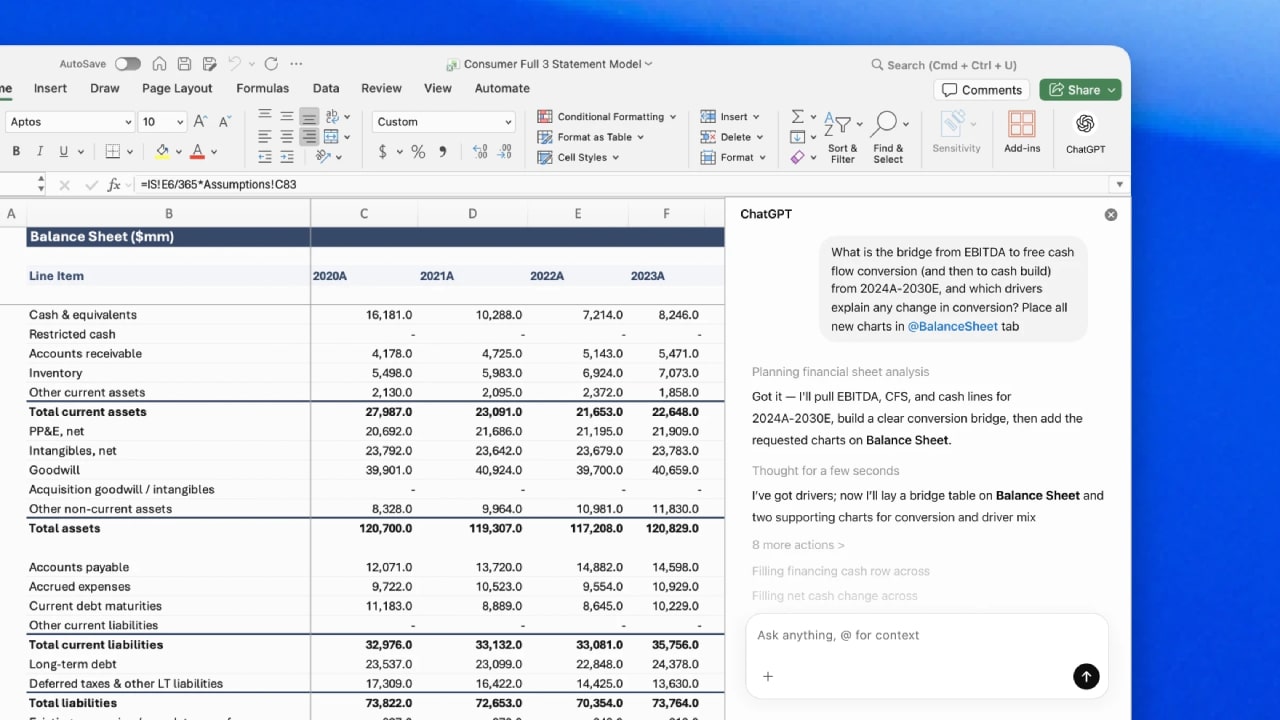
Key features of ChatGPT for Excel
Integrating AI into Excel offers several capabilities designed to increase productivity and reduce manual tasks.
- Creating spreadsheet models is faster
Creating complex spreadsheet models can take hours or days, especially when involving financial forecasting or large datasets.
With this AI-powered add-in, users simply describe the desired model, and the system can automatically generate formulas, structure worksheets, and create calculation frameworks within the file.
Task | Traditional Workflow | With AI Assistance |
Financial modeling | Create your own recipe | Automatic model creation |
Scenario analysis | Solve complex formulas | Use natural language commands |
Data calculations | Link data manually | Create an automated structure |
This significantly speeds up the spreadsheet development process and also reduces the risk of errors in formulas.
- Intelligent analysis of large workbooks
Many organizations have large spreadsheets containing numerous sheets, complex formulas, and interconnected data.
Understanding these models can be challenging, especially when users are working with files created by others. Integrating AI helps solve this problem by analyzing the workbook's structure.
The system can...
- Understand the relationship between sheets and formulas.
- Explain how to calculate the result
- An error or inconsistency in the data has been detected
- Track how changing the assumptions affects the results
This capability allows analysts to quickly understand existing spreadsheets without having to examine each formula individually.
- Transparent and verifiable results
Reliability is crucial when using AI in finance or analytics, so the system clearly demonstrates the workflow when working with spreadsheets.
Transparency features include:
- Link the description to the relevant cells and formulas
- Show how the result is calculated
- Please ask for permission before modifying the information
- Allows users to easily revert changes
These features allow users to retain full control of the spreadsheet while benefiting from the assistance of AI.
Integrating financial data into ChatGPT
In addition to integration with spreadsheets, new financial data connections have been added to ChatGPT. These connections allow users to access reliable financial datasets directly within AI-driven workflows.
The supported data providers include leading financial data platforms used by professionals worldwide.
Examples of integrated data sources include:
Data Provider | Typical Use Case |
Financial market database | Market research and investment analysis |
Financial information provider company | Evaluating the company's performance |
Research platform | Industry reports and strategic information |
Data retrieval tool | Collecting financial data |
Combining reliable financial data with AI analytics allows teams to conduct research and build models more efficiently.

Improving financial research processes and data verification
Financial experts often spend a lot of time gathering information from multiple sources, such as:
- Company financial report
- Earnings transcripts
- Investor presentations
- Market research reports
- Financial databases
AI-powered research tools simplify this process by consolidating these sources into a single workflow.
Users can generate structured outputs such as:
- Earnings summaries
- Valuation snapshots
- Credit analysis reports
- Investment research documents
These outputs can then be exported directly to formats like Microsoft Word or PDF, making them easier to share with colleagues or stakeholders.
How AI Is Changing Financial Workflows
The introduction of AI-powered tools in spreadsheet environments represents a major shift in how financial professionals work.
Traditionally, analysts spend a large portion of their time on repetitive tasks such as:
- Building spreadsheet formulas
- Cleaning and organizing data
- Reconciling financial models
- Updating assumptions across models
AI systems can automate much of this work, enabling professionals to focus more on interpretation, strategy, and decision-making.
This shift could significantly increase productivity across industries such as:
- Investment banking
- Corporate finance
- Consulting
- Accounting
- Financial research
Current limitations
As with many early-stage AI tools, the Excel integration is currently in beta and still evolving.
Some known limitations include:
- Certain responses may take longer while the system processes large spreadsheets
- Generated spreadsheet layouts may require formatting adjustments
- Very complex formulas may still need manual refinement
User feedback during the beta phase will help improve performance and functionality over time.
Availability
The new spreadsheet integration is gradually being rolled out to selected user groups.
Currently, the beta version is available to:
- ChatGPT Business users
- Enterprise users
- Education institutions
- Teachers and academic organizations
- Pro and Plus subscribers in supported regions
Support for Google Sheets is expected to be introduced in the future, expanding AI-powered spreadsheet capabilities beyond Excel.
Summary
Spreadsheets have been essential tools for business and financial analysis for decades. Integrating AI into these environments has the potential to significantly improve how we model data, analyze it, and conduct research.
ChatGPT for Excel allows users to interact with spreadsheets using natural language, making the creation and management of complex models more efficient while maintaining data transparency and control.
Combined with new financial data connectivity, this technology can significantly improve the workflow of financial analysts, accountants, and researchers.
As AI is increasingly integrated with traditional productivity tools, the future of financial analytics will be faster, smarter, and more collaborative.