Claude and the Codex on GitHub are now available for Copilot Business & Pro
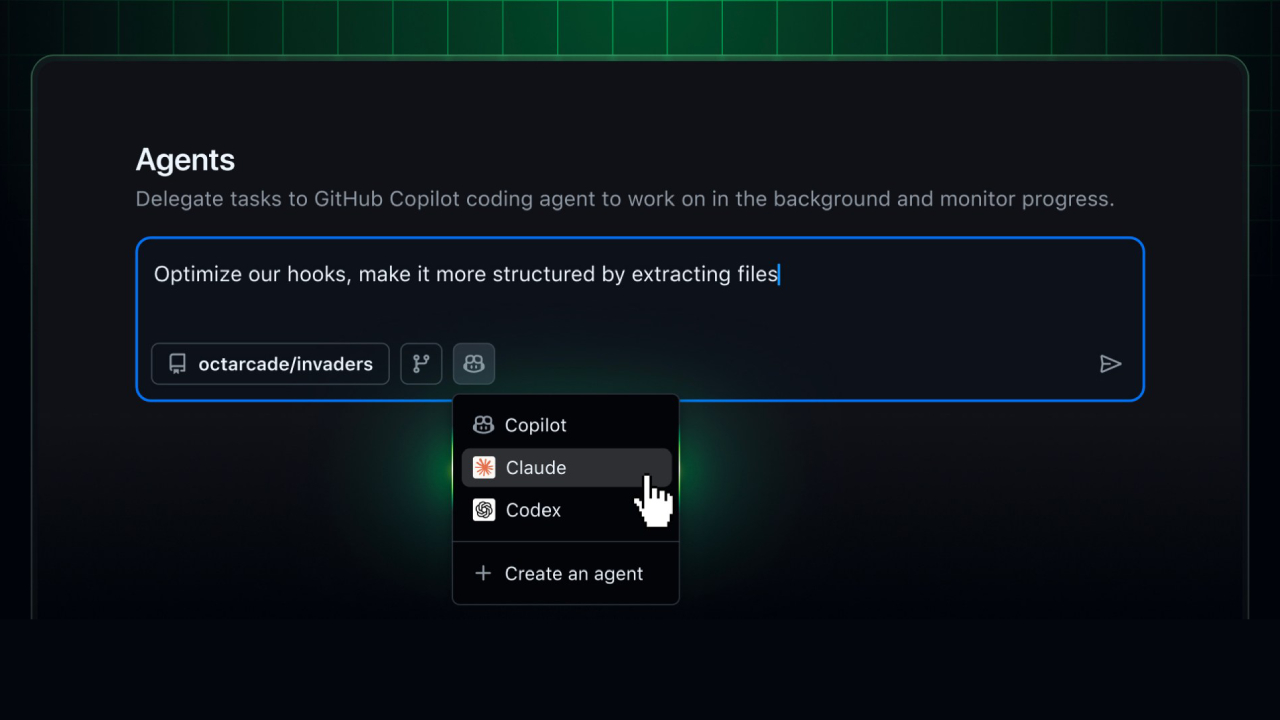
The AI landscape for coding within GitHub has expanded significantly.
Claude and Codex on GitHub are now officially available as coding agents for Copilot Business and Copilot Pro customers. Previously available to Enterprise and Pro+ users earlier this month, access has now been expanded to a larger number of development teams.
This update allows developers to run several leading AI coding agents directly within their existing GitHub workflow without needing to subscribe to additional services.
What's new?
Users can now run:
- Claude (by Anthropic)
- Codex (by OpenAI)
- GitHub Copilot
Everything works directly within:
- GitHub (web version)
- GitHub Mobile
- Visual Studio Code (VS Code)
The key benefit is a single platform with shared memory, centralized governance, and consistent context across all environments.
There are no workflow disruptions, and no loss of context.
No additional membership is required.
Accessing Claude and the Codex:
- Included in the existing Copilot package.
- Available during Public Preview.
- Each session uses 1 premium request.
It simplifies the process for teams that want to experiment with multiple AI tools without going through the additional purchasing process.
A centralized agent platform within GitHub
Claude, Codex, and Copilot all work on the same agent platform within GitHub.
The agent has access to:
- Code in the repository and commit history
- Issues and Pull Requests
- Copilot Memory
- Repository Orders and Policies
All activities are performed under enterprise-level oversight via the GitHub Agent Control Plane, which is publicly enabled.
together with:
- Centralized activation
- Policy management
- Audit logging
- Enterprise-level controls
This platform enables AI coding agents to operate in compliance with the organization's security scope.
How to enable Claude and Codex in GitHub
For Copilot Pro users
- Go to Copilot coding agent settings.
- Select repositories accessible to agents.
- Toggle “Claude” and/or “Codex” to On.
For Copilot Business Users
An administrator must enable agents at both levels:
Enterprise level
- Navigate to Enterprise AI Controls → Agents
- Under “Partner Agents,” enable Claude and/or Codex
Organization level
- Go to Settings → Copilot → Coding agent
- Under “Partner Agents,” enable Claude and/or Codex
This dual-level activation ensures structured governance across large teams.
How to Use Claude and Codex in GitHub
- Start Agent Sessions (Web & Mobile)
Inside an enabled repository:
- Open the Agents tab
- Use the agents dropdown menu
- On mobile, tap “+” or open the Agents view
- Enter a request
- Select an agent
- Select an agent
Sessions run Asynchronously with:
- Live progress updates
- Detailed execution logs
- Reviewable outputs
- Assign Agents to Issues and Pull Requests
You can:
- Assign an issue to Claude, Codex, Copilot—or multiple agents simultaneously
- Compare different AI approaches to the same problem
- Let agents open Draft Pull Requests
Or mention @copilot, @claude, or @codex in the PR comments.
All outputs appear as draft artifacts within your existing Pull Request workflow—ensuring reviewability and human oversight.
- Using Agent in VS Code
Requirements: VSCode version 1.109 or higher.
Developers can start an agent session from:
- The title bar
- Command Palette
Available operating modes:
- Local → Fast interactive help
- Cloud → Automate your work on a hosted GitHub platform.
- Background → Asynchronous tasks on the machine (Copilot only)
ความยืดหยุ่นนี้รองรับทั้งการทำงานแบบโลคัลและคลาวด์ในสภาพแวดล้อมไฮบริด
Why is multi-agent coding important?
AI models are becoming more specialized.
- Claude → excelled in structured reasoning and analysis.
- Codex → Specializes in creating and understanding code.
- Copilot → Integrated assistance in development workflows
The rollout of Claude and Codex in GitHub , developers are no longer limited to one AI personality or model capability.
They can:
- Compare solutions
- Delegate different subtasks to different models
- Maintain shared memory across interactions
- Operate within enterprise guardrails
Create a more powerful development environment than using a single model.
Built-in corporate governance
All agent operations are managed under GitHub's enterprise-level management structure.
Key features include:
- Centralized administrator control
- Enterprise-level activation.
- Enterprise-level privilege restrictions
- Audit logs
- Centralized policy enforcement
The Agent Control Plane ensures that even partner AI agents like Claude and Codex comply with organizational security requirements.
An overview at the industry level.
The expansion of Claude and Codex in GitHub reflects a significant shift in the industry.
AI tools for developers are being developed from:
Single-model helpers to
สู่
A coordinated multi-agent coding ecosystem.
GitHub therefore became:
- Centralized AI Agent Platform
- A regulated development environment.
- A multi-model development workspace
All within the interfaces developers already use daily.
Interested in Microsoft products and services? Send us a message here.
Explore our digital tools
If you are interested in implementing a knowledge management system in your organization, contact SeedKM for more information on enterprise knowledge management systems, or explore other products such as Jarviz for online timekeeping, OPTIMISTIC for workforce management. HRM-Payroll, Veracity for digital document signing, and CloudAccount for online accounting.
Read more articles about knowledge management systems and other management tools at Fusionsol Blog, IP Phone Blog, Chat Framework Blog, and OpenAI Blog.
New Gemini Tools For Educators: Empowering Teaching with AI
If you want to stay up-to-date with the latest technology and AI news, check out this website It's updated daily!
Fusionsol Blog in Vietnamese
- What is Microsoft 365?
- What is Copilot?What is Copilot?
- Sell Goods AI
- What is Power BI?
- What is Chatbot?
- What is cloud storage?
Related Articles
Frequently Asked Questions (FAQ)
What is Microsoft Copilot?
Microsoft Copilot is an AI-powered assistant feature that helps you work within Microsoft 365 apps like Word, Excel, PowerPoint, Outlook, and Teams by summarizing, writing, analyzing, and organizing information.
Which apps does Copilot work with?
Copilot currently supports Microsoft Word, Excel, PowerPoint, Outlook, Teams, OneNote, and others in the Microsoft 365 family.
Do I need an internet connection to use Copilot?
An internet connection is required as Copilot works with cloud-based AI models to provide accurate and up-to-date results.
How can I use Copilot to help me write documents or emails?
Users can type commands like “summarize report in one paragraph” or “write formal email response to client” and Copilot will generate the message accordingly.
Is Copilot safe for personal data?
Yes, Copilot is designed with security and privacy in mind. User data is never used to train AI models, and access rights are strictly controlled.