In developing modern applications, organizations increasingly require the integration of analytics directly into their software products. Power BI Embedded This is a service on Microsoft Azure designed specifically for this purpose, allowing developers to integrate interactive dashboards and reports into applications without end users needing a personal Power BI license.
This approach enables software vendors, enterprises, and developers to deliver data-driven experiences seamlessly within web or mobile applications, while retaining full control over authentication, branding, and access management.
Power BI Embedded: Key Concepts and Architectures
Essentially, this service separates “analytics usage” from “report creation.” Developers build reports using Power BI Desktop and publish them to a designated capacity on Azure. The applications then securely fetch and display these reports through APIs and SDKs.
The main architectural components include:
- Azure capacity-based model: For scalable performance.
- REST APIs and SDKs: For embedding reports and creating automation systems.
- Application-level verification: Instead of using individual licenses.
- Tenant isolation: For situations involving multiple customers (Multi-customer)
Because the reports are processed within the core application, end users do not need to log in directly to the Power BI service interface.
How Power BI Embedded Works in Practice
Technically, developers authenticate their application using the Azure Active Directory or Service Principals. The application then generates secure “Embed Tokens” to allow users access to specific reports or datasets.
This model supports:
- Highly detailed and precise access control.
- Customize the user interface (UI) and branding as needed.
- Connecting to existing identification systems.
- A SaaS software scenario for multiple customers.
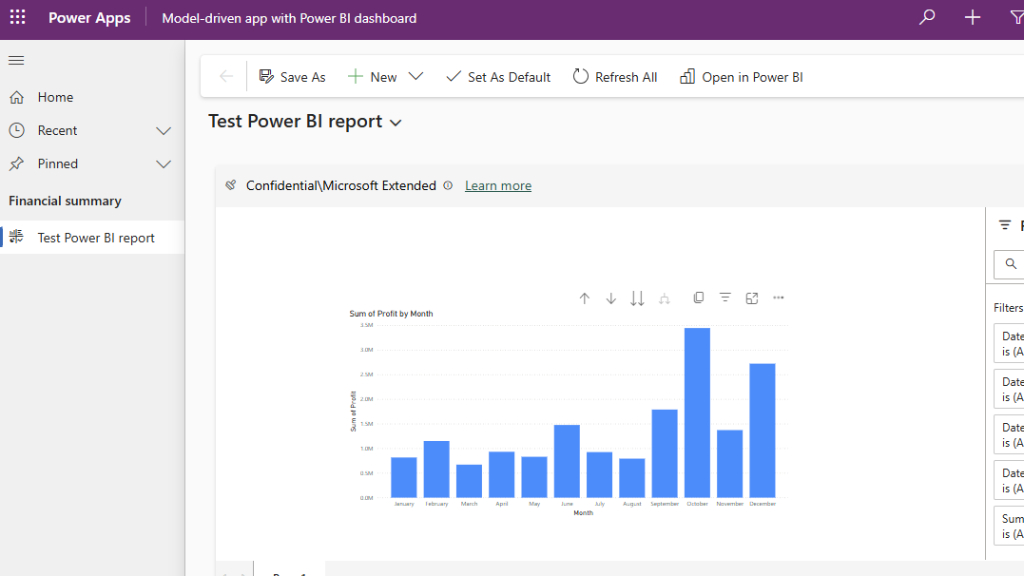
Typical use cases for Embedded Analytics.
- SaaS and ISV applications: Software vendors embed reports into their platforms to add value to their products and differentiate themselves in the market.
- Line of Business (LOB) applications: The organization integrates the dashboard with internal portals for sales, finance, human resources, and operations teams without distributing additional BI tools.
- Portal for customers and partners: The organization provides customers and partners with access to analytics data, with precise control over what data each user sees.
Power BI Embedded: Pricing and Cost Control
This service uses a capacity-based pricing model, which differs from standard Power BI licenses. Costs depend on:
- Capacity size
- Performance requirements
- Period of use
This enables precise cost management without the need to purchase licenses for every viewer. Developers can scale capacity up or down as needed, which is especially useful for applications with variable usage patterns.
A comparison between Power BI Embedded and legacy licenses.
Comparison topics | Embedded version | Traditional version |
User license | ไม่จำเป็น | An individual is required. |
Target group | Application users | In-house analyst |
Deployment model | Embedded in the application | Through Power BI Service. |
Branding | Fully customizable | Use a Microsoft screen. |
System expansions | According to capacity. | According to the number of usage rights |
When should you use Embedded Analytics?
This approach is best suited when:
- Are you building a SaaS application, or an application that customers need to use?
- You want to have complete control over the user experience.
- Is the user group external or is it constantly changing?
- You want predictable pricing based on actual usage.
If an organization focuses solely on internal analytics and self-service BI, a traditional Power BI license might still be a better option.
Conclusion
Embedded Analytics shifts the mode from using separate analytics tools to becoming a core feature of digital products. Integrating analytics directly into applications allows organizations to deliver insights exactly where users need them, without the complexity of license purchases or the hassle of switching screens.
For developers and product teams building data-driven applications. Power BI Embedded It provides the flexibility, scalability, and control necessary to deliver a modern, enterprise-level analytics experience.