In the digital age, extracting text from scanned images and documents is no longer a luxury — but a necessity, whether for tasks such as automated data entry, converting paper documents to digital format, or analyzing invoices. Azure AI Service OCR We provide a powerful cloud-based solution for high-accuracy text and handwriting recognition, with the ability to scale as needed.
This article describes how this service works, its main use cases, supported file formats, and the role of OCR in the overall Azure AI system.
What is OCR and why is it important?
Optical Character Recognition (OCR) is a technology that converts text in images — such as scanned documents, photos, or PDFs — into a format that machines can read and edit, enabling businesses to:
- Automate document work
- Retrieve information from a form or receipt.
- Make the content searchable and indexable.
- Supports access to information via screen readers.
OCR has become an essential tool in a wide range of industries, such as finance, logistics, law, medicine, and government.
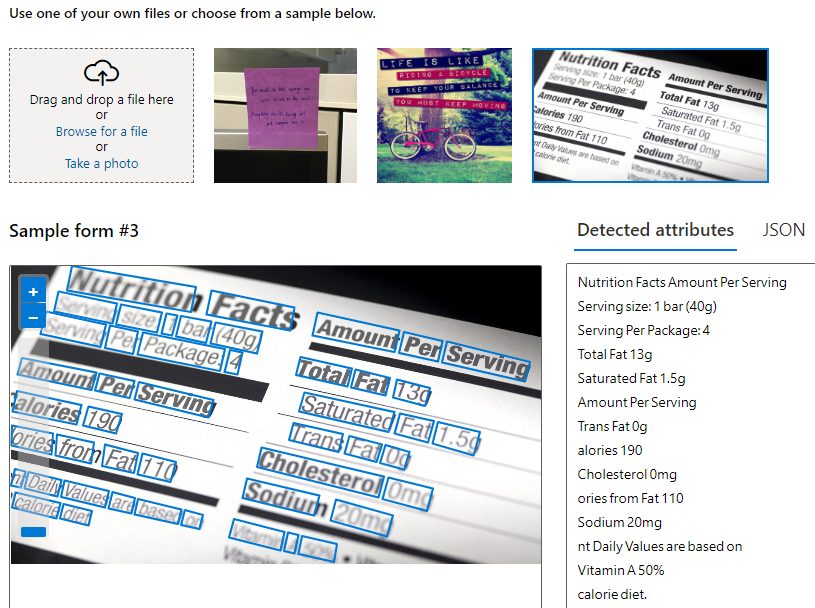
How Azure AI Service OCR works.
OCR is part of Azure Cognitive Services and uses deep learning models to extract text from images and digital documents, whether typed or handwritten.
The main capabilities of the system
Features | Description |
Supports multiple languages | It can recognize text in more than 70 languages, including Thai, Japanese, Arabic, and others. |
Printed & Handwritten Text | Supports both typed and handwritten text. |
multi-page document | Extract text from multiple PDF pages while preserving the document's layout. |
Bounding Boxes | Specify the text location as coordinates for an application with illustrations. |
Used on the cloud or locally. | It can be used via the Azure API or within a container running on the organization's system. |
It can be accessed via REST API, SDK (.NET, Python, Java), or through Azure AI Studio for no-code implementations.
Common use cases of Azure AI OCR.
- Digital conversion of invoices and receipts.
Automatically retrieve product details, total amount, date, and vendor name from scanned receipts into the ERP system. - Make the document searchable.
Convert scanned documents into a searchable and indexable format using OCR in conjunction with Azure Search. - License plate recognition
Used in the transportation or logistics industry to read license plate numbers from CCTV images in real time. - Transcribe the text from a handwritten note.
Suitable for the education and public health sectors, which still use a large number of forms and handwritten records.
How to get started on Azure
Step 1: Create a resource.
Enable Cognitive Services or Computer Vision on Azure Portal.
Step 2: Select the desired file format for import.
Supports JPEG, PNG, BMP, PDF, and TIFF.
Step 3: Call the OCR API.
Use endpoints /vision/v3.2/read/analyze or /formrecognizer Depends on document type
Step 4: Use the results in the application.
The results can be used with Power Automate, Logic Apps, or for automated document routing.
Compared to other OCR tools.
Feature | Azure AI OCR | Tesseract | Google Cloud Vision |
Language support | More than 70 languages | ~100 (but with lower accuracy) | More than 50 languages |
Detect document layout | Supported | Not supported | Supported |
handwriting | High precision | low | moderate |
Cloud & Edge | Both types are supported. | Edge only | Cloud only |
SDK & API | Full SDK support. | Accessed via CLI. | API only |
Azure's advantage lies in its enterprise readiness, scalability, and integration with other Azure services such as Form Recognizer, Translator, and Azure Search.
Summary
Whether you're creating workflows for intelligent document processing or digitizing enterprise content. Azure AI Service OCR It is a precise solution, easily scalable, and supports a wide range of application scenarios.
It supports handwriting, multiple languages, and can operate both on the cloud and on-premises machines, making it ideal for deployment in AI-driven automation systems.
Interested in Microsoft products and services? Send us a message here.
Explore our digital tools
If you are interested in implementing a knowledge management system in your organization, contact SeedKM for more information on enterprise knowledge management systems, or explore other products such as Jarviz for online timekeeping, OPTIMISTIC for workforce management. HRM-Payroll, Veracity for digital document signing, and CloudAccount for online accounting.
Read more articles about knowledge management systems and other management tools at Fusionsol Blog, IP Phone Blog, Chat Framework Blog, and OpenAI Blog.
New Gemini Tools For Educators: Empowering Teaching with AI
If you want to stay up-to-date with the latest technology and AI news, check out this website It's updated daily!
Fusionsol Blog in Vietnamese
- Giải pháp lưu trữ đám mây cho doanh nghiệp hiện đại
- 5 lý do doanh nghiệp cần ứng dụng AI ngay hôm nay