
In this era where AI plays a role in every aspect of work and business, many people have probably wondered... What is Copilot? And why are so many organizations widely adopting this technology? This article will provide a comprehensive explanation of what Copilot can do, its benefits and limitations, and real-world examples of its use in various professions, so you can apply it effectively in your work.
What is a copilot? Why is it important in this day and age?
Copilot is a virtual assistant or AI assistant that uses AI and Machine Learning technology to help guide or perform tasks for users in a variety of ways, whether it's coding, content creation, data analysis, or even holding meetings. Copilot is designed to help reduce repetitive tasks and increase the efficiency of automated work.
Microsoft, GitHub, Google, and other platforms have integrated Copilot into their products, such as GitHub Copilot for developers or Microsoft 365 Copilot, which assists with documents, presentations, and emails.
The main benefit of using a copilot.
Having a copilot in the workplace or in business development processes can offer significant advantages, including:
- Increase speed and reduce time spent on routine tasks.
Copilot can help you write code, create documentation, or manage tasks 30-50% faster, reducing repetitive work time.
- Reduce human error.
Copilot has a system that detects and suggests solutions to help you reduce errors in your work, especially in coding or data analysis.
- Help create new ideas
A copilot can offer new ideas or alternative solutions to problems, helping your team work in a more creative way.
- Suitable for everyone
Copilot isn't just for programmers or technology experts; it's also suitable for writers, data analysts, sales personnel, or even HR.
Limitations of a copilot you should know.
While the copilot has many advantages, it also has some drawbacks:
- It depends on the quality of the data. – If the data used is incomplete, Copilot may suggest inaccurate solutions.
- It cannot completely replace humans. – Copilots can help to improve or reduce work time, but human monitoring and decision-making are still required.
- There is an additional cost. – Some of Copilot's services have fees that may not be suitable for small organizations.
Examples of Copilot usage in various industries.
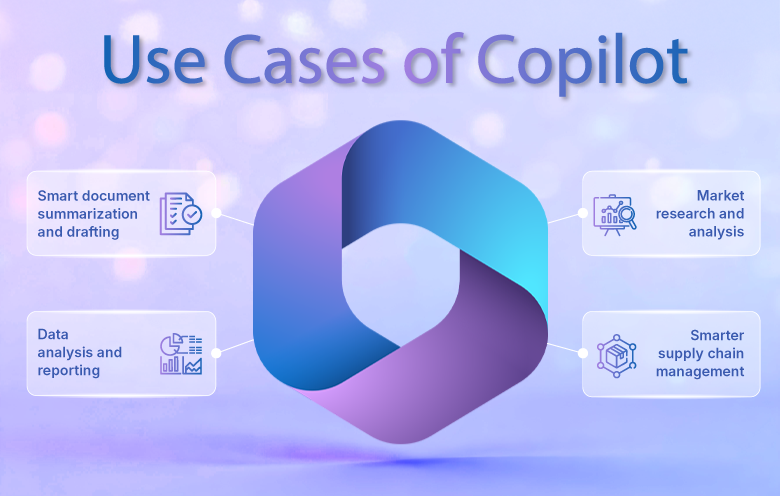
From the perspective of the software developer.
- Write and edit automated code.
- Introducing best practices for coding.
- Create test cases or unit tests.
From a marketing perspective (Marketer)
- Create Social Media content
- Write an SEO-Friendly Article
- Analyze marketing trends from raw data.
From the perspective of a data analyst.
- Write SQL queries automatically.
- Summarize and interpret the data into a report.
- Introducing trends from big datasets.
Business and Management
- Write emails and reports quickly.
- Create a PowerPoint presentation in minutes.
- Strategic data analysis
Comparison table of advantages and limitations of Copilot.
Advantages of a copilot | Copilot limitations |
It saves time and reduces redundant tasks. | It may not be accurate in some complex tasks. |
This requires checking the results from users. | This requires checking the results from users. |
Boost creativity and explore new options. | There may be additional charges on some platforms. |
Suitable for a wide range of professions, not just tech. | It relies solely on user-defined information and commands. |
It relies solely on user-defined information and commands.
Although Copilot is a popular AI, the market also has other AI chatbots that perform similar functions, such as ChatGPT, Google Bard, or Claude from Anthropic. Below is a comparison of the strengths of each system.
Feature | Microsoft Copilot | ChatGPT (OpenAI) | Google Bard | Claude (Anthropic) |
Key Strengths | Connect to Microsoft 365 & Azure. | Focus on creating flexible text and code. | Connects with Google services such as Gmail and Docs. | Focus on providing a highly safe response. |
Usage | Assistance with Office documents, PowerPoint, Excel, Teams, and general business tasks. | Assistance with Office documents, PowerPoint, Excel, Teams, and general business tasks. | Create content and retrieve information from search instantly. | Used in businesses that require a high level of data security. |
connection | Seamlessly integrated into the Microsoft Ecosystem. | Accessible via API or Chat Interface. | Connects with Google Workspace and Search. | Focusing on B2B APIs and highly secure systems. |
Learning from inside data. | You can use organizational data in Microsoft Graph and SharePoint. | Use information from the prompt and API integration. | Data can be retrieved from Google Search in real-time. | Highly secure; no customer data is stored outside the system. |
Price | Does this need to be purchased separately or included with a Microsoft 365 Plan? | There are both free and paid plans.s | Free to use in many areas. | Set pricing specific to your organization. |
Copilot pricing table (approximate for Microsoft 365 Copilot)
Package | Details | Starting price per user/month* |
Copilot for Microsoft 365 | Use Copilot in Word, Excel, PowerPoint, Outlook, and Teams. | Starting at $30 |
Copilot with Azure Integration | Use Copilot in conjunction with Azure services and on-premises systems. | Pay-as-you-go |
Copilot for Business Users | For organizations that need Copilot to assist with business process tasks. | Adjust prices for organizations |
Copilot Add-on | Purchase this as an add-on for the original Microsoft 365. | Starting at $20 – $30 |
*Prices may vary depending on the country and Microsoft promotions.
You can use Copilot for free with just a Microsoft account. To sign up for a free Microsoft account, please see the details at this link >> Microsoft 365 Login
Copilot Pro and the extension of Microsoft AI capabilities.
For users requiring advanced features, Copilot Pro is the choice that unlocks new capabilities of Microsoft AI, whether collaborating on large documents, creating complex presentations, or leveraging data from multiple sources simultaneously. Copilot Pro is designed for professionals and organizations that demand greater flexibility and speed than the basic package.
AI Copilot: An intelligent assistant for everyday tasks.
Many organizations are beginning to refer to Copilot in a broader sense as AI Copilot because it's not just an add-on feature, but a "digital assistant" that can integrate into every aspect of work, such as managing emails, conducting strategic analysis, or even helping to create brand-aligned content.
Copilot PCs: The new generation of computers equipped with AI.
Microsoft has launched Copilot PCs, computers with AI embedded at the hardware level. Their key features include faster AI processing, reduced reliance on the cloud, and real-time responsiveness. They are ideal for organizations requiring data privacy and high-performance capabilities.
Summary
By now you probably know that... What is Copilot? And how can it help improve work efficiency? Whether you're a developer, marketer, data analyst, or business owner, choosing the right Copilot can help you work faster, more accurately, and with higher quality, while keeping up with the ever-changing challenges of the digital age.
For more information, please visit Microsoft Copilot.
Interested in Microsoft products and services? Send us a message here.
Explore our digital tools
If you are interested in implementing a knowledge management system in your organization, contact SeedKM for more information on enterprise knowledge management systems, or explore other products such as Jarviz for online timekeeping, OPTIMISTIC for workforce management. HRM-Payroll, Veracity for digital document signing, and CloudAccount for online accounting.
Read more articles about knowledge management systems and other management tools at Fusionsol Blog, IP Phone Blog, Chat Framework Blog, and OpenAI Blog.