
OCR : Optical Character Recognition
Font converter
Fusion Solution provides system development, consulting, and installation services for OCR from Technogoly, the latest from Microsoft that supports Thai language (Azure Cognitive Service), including document management systems according to Abbyy and CMMi 3 standards. We also provide development services for connecting document systems with SAP or Office 365.
OCR stands for Optical Character Recognition (OCR). It is a method of converting printed data into text and then saving the text or letters and numbers in a format that can be further analyzed, such as a database, Excel, or Word. The work is automatic, eliminating the need for people to sit and read and re-key, which creates redundant work.
การทำงานของระบบไม่ต้องมีการติดตั้ง Software ใน Server ระบบทั้งหมดทำงานบน Cloud Service ของ Azure รองรับการใช้งานแบบ online ocr ที่สามารถประมวลผลเอกสารได้ทุกที่ทุกเวลา
Automate document classifying, sorting and data capturing solutions
ประมวลผลดึงข้อมูลที่อยู่ในเนื้อหาเอกสารที่มีลักษณะโครงสร้างตายตัว, แบบกึ่งมีโครงสร้าง และแบบไม่มี โครงสร้างอย่าง อัตโนมัติ เช่น เอกสารจํานอง, รายการธุรกรรมของบัญชีเงินฝาก, แบบฟอร์มภาษี, แบบสอบถาม, แบบฟอร์มใบ สมัคร, เอกสารสัญญา และใบแจ้งหนี้ เป็นต้น โดยสามารถจัดเก็บข้อมูลเป็น extracted text สำหรับนำไปวิเคราะห์หรือเชื่อมต่อระบบอื่น
Power Automate AI is a document image processing system that can automatically classify, categorize, and read data from document images. With the capabilities of Microsoft 365's AI Builder, it can capture data from document images to develop automated document and data management processes for organizations. It can capture data from both formatted and unformatted document images.
เทคโนโลยี Online OCR และการเชื่อมต่อระบบผ่าน OCR API
นอกจากนี้ เทคโนโลยี online ocr ในปัจจุบันช่วยให้องค์กรสามารถอัปโหลด image files เช่น ไฟล์สแกน PDF รูปถ่ายเอกสาร หรือเอกสารที่ถ่ายผ่านมือถือเข้าสู่ระบบ Cloud ได้โดยตรง โดยไม่ต้องติดตั้งโครงสร้างพื้นฐานที่ซับซ้อน ระบบสามารถประมวลผลข้อมูลและแปลงภาพเอกสารให้เป็น extracted text ที่พร้อมนำไปใช้งานต่อได้ทันที อีกทั้งยังรองรับการเชื่อมต่อผ่าน ocr api เพื่อบูรณาการเข้ากับระบบองค์กรเดิม เช่น ERP, ระบบบัญชี, ระบบจัดการเอกสาร หรือ Workflow Automation ทำให้สามารถทำงานแบบอัตโนมัติแบบเรียลไทม์ ลดขั้นตอนการทำงานซ้ำซ้อน เพิ่มความถูกต้องของข้อมูล และรองรับการประมวลผลเอกสารปริมาณมากได้อย่างมีประสิทธิภาพ ช่วยผลักดันการทำ Digital Transformation ขององค์กรในทุกแผนกอย่างยั่งยืน
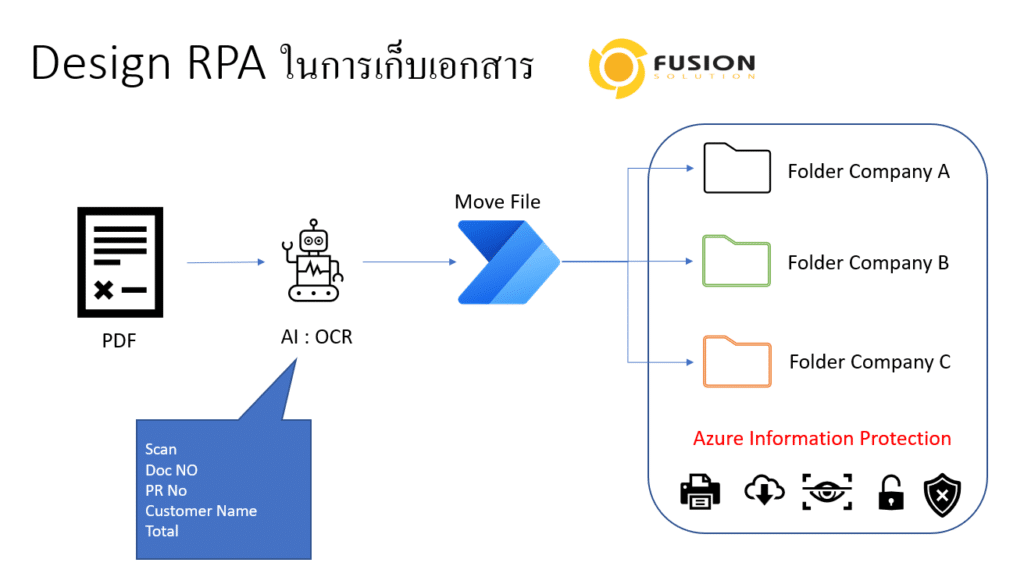
Highly accurate in capturing data from both Thai and English document images. Can be processed quickly with scalable data processing.
- Data Capture for All Types of Documents
- Automated Document Separation and Classification
- High performance and responsiveness
- Flexible export options
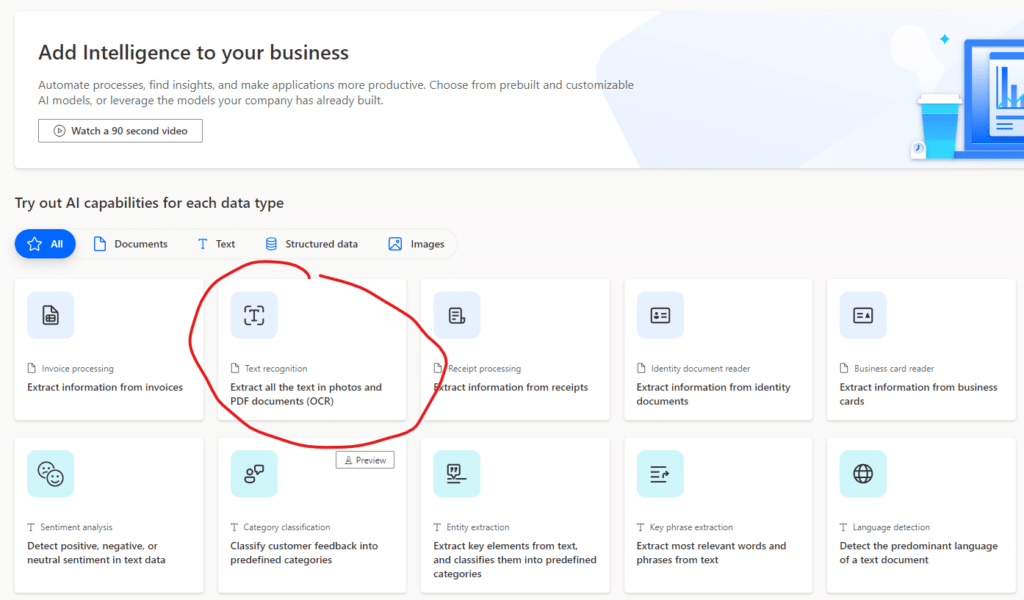
OCR Main Features
- Import document images for processing via Watch/Hot Folder, Web Servicer (RESTful API)
- Supports BMP, DCX, DjVu, GIF, JBIG2, JPEG, JPEG 2000, PCX, PNG, PDF, TIFF and multi TIFF image files.
- มีความสามารถด้านการประมวลผลภาพแบบอัตโนมัติ (Image Processing Automated) ประกอบด้วย image de- skewing, despeckling (image clean-up การทำให้ภาพมีความคมชัดขึ้น), mirroring and inverting และ color filtering ก่อนนำภาพไป OCR
- Documents can be separated and classified (Separation and Classification) by reading the pattern and information in the document image.
- Able to capture printed data on document images with OCR: Optical Character Recognition technology for Thai, English and other languages, totaling 200 languages.
- It can capture hand-printed data on document images with ICR (Intelligent Character Recognition) technology for English language, in Fields, Frames, Underlined fields, Boxes and Comb-style fields, etc.
- Can read check marks, crosses and circles using OMR: Optical Mark Recognition technology.
- Can read Bar Code and QR Code data using OBR: Optical Bar-code Recognition technology.
- There is Verification Station, a program for checking the readable data in document images.
- Verify according to Rules-based verification conditions, such as setting the verification to be based on the level of data accuracy (Recognition Confidential Level).
- There is a Task system for dividing work among data auditors.
- Install on Windows 7 and above
- Data can be exported (Data Output) to CSV and saved to the database.
- The processed images can be exported as PDF, Searchable PDF or PDF/A, and PDF and PDF/A files can be compressed to smaller sizes with MRC: Mixed Raster Content.
- There is a report to follow up on the work results at every step.
- ส่งไฟล์เอกสารและข้อมูลเก็บที่ SharePoint และ One Drive
- Can be further developed to connect with other work processes and systems.
- Supports connection to Robotic Process Automation (RPA)
Questions about OCR Solution With Microsoft Power Automate (AI Builder)
- How many types of OCR pricing are there?
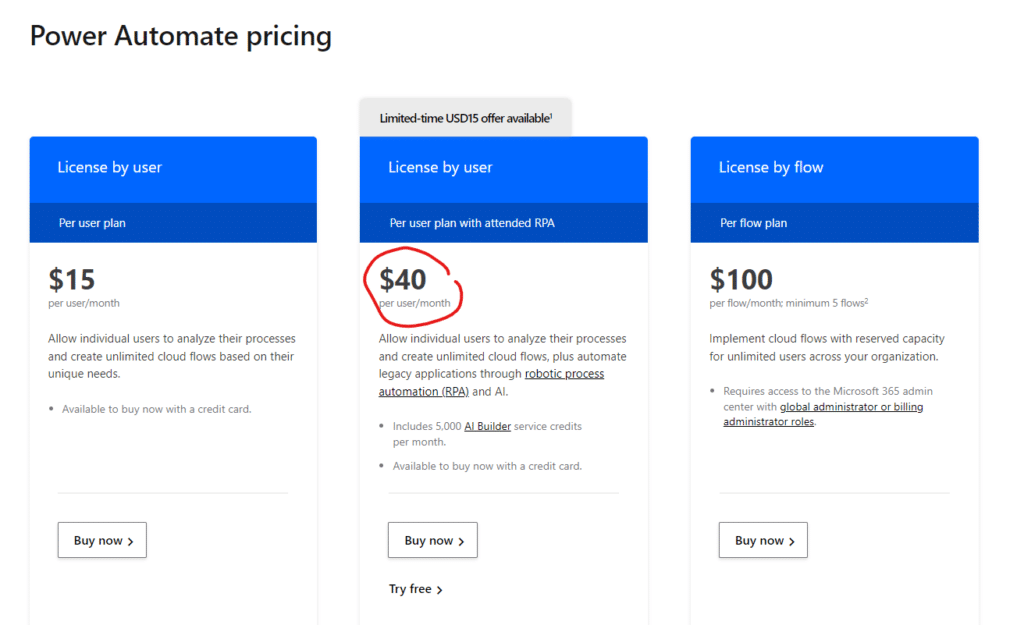
- Microsoft does not charge per OCR because OCR is a feature included in the Power Automate license, so to perform OCR you must purchase a Power Automate license.
- The starting price starts at $40 user/month and can perform 5000 OCR calls.
- You can use the tool to calculate the cost from this link.
- What services does the Solution include?
- Software OCR : English, Thai, Chinese (simplified and traditional), Japanese, Korean and Vietnamese etc
- Searchable PDF export
- One-year SMUA (Software Maintenance Upgrade and Assurance)
- Support Incidents and Troubleshooting 5×8
- Correctness of conversion to characters
- Thai language, approximately 80%
- The number 100%
- English about 95%
- Accuracy also depends on the quality of the file.
- In the case that the system does not read Thai correctly, what steps are there to support it?
- The system will evaluate the accuracy of the reading. If the estimated accuracy is lower than the specified value, it will be sent to the staff for further verification.
