The arrival of GPT-5.2 in Copilot demonstrates Microsoft's commitment to expanding AI capabilities to support real-world business operations—not just content creation, but also rational analysis, strategic planning, and decision support in daily workflows. This latest version delivers significant leaps forward in contextual understanding, data analysis, and transforming scattered work data into actionable insights.
Unlike earlier AI integrations that focused solely on productivity tasks, GPT-5.2 in Copilot is specifically designed for modern work environments, filled with meetings, emails, documents, and collaboration tools that constantly generate massive amounts of data. By combining advanced reasoning models with Microsoft Work IQ, Copilot becomes a strategic partner, not just a general assistant.
What makes GPT-5.2 different for different operating situations?
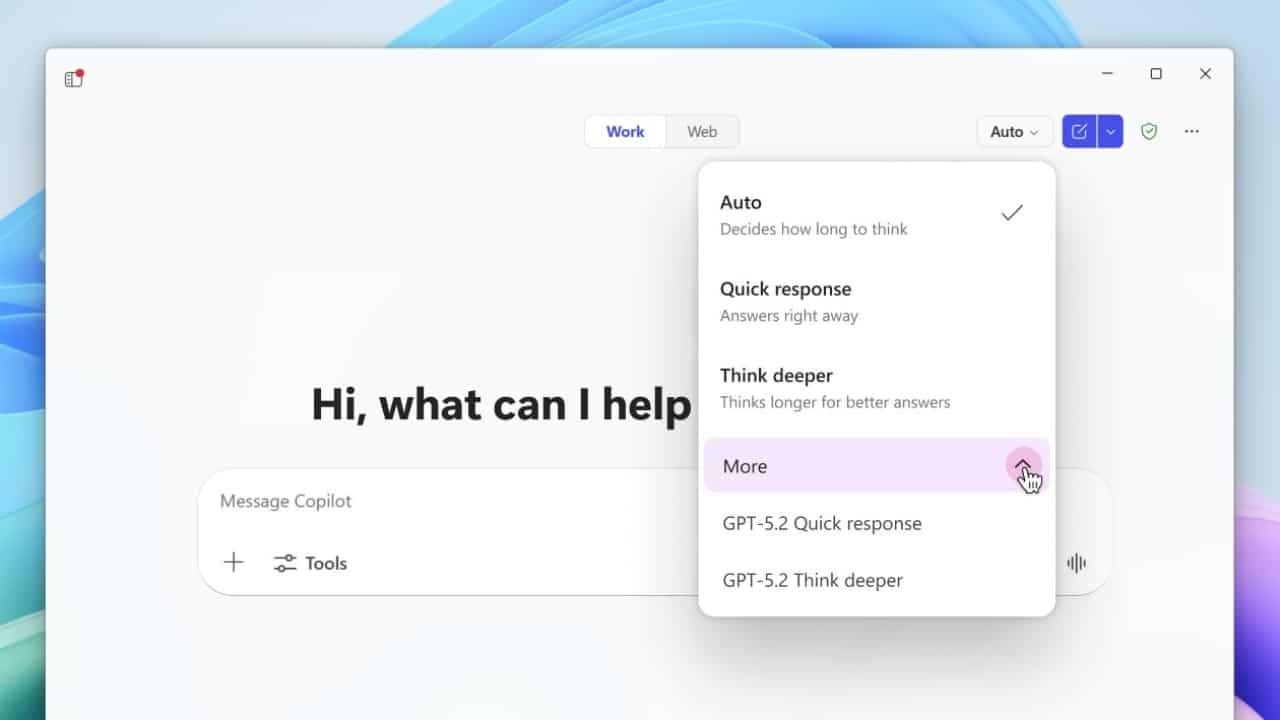
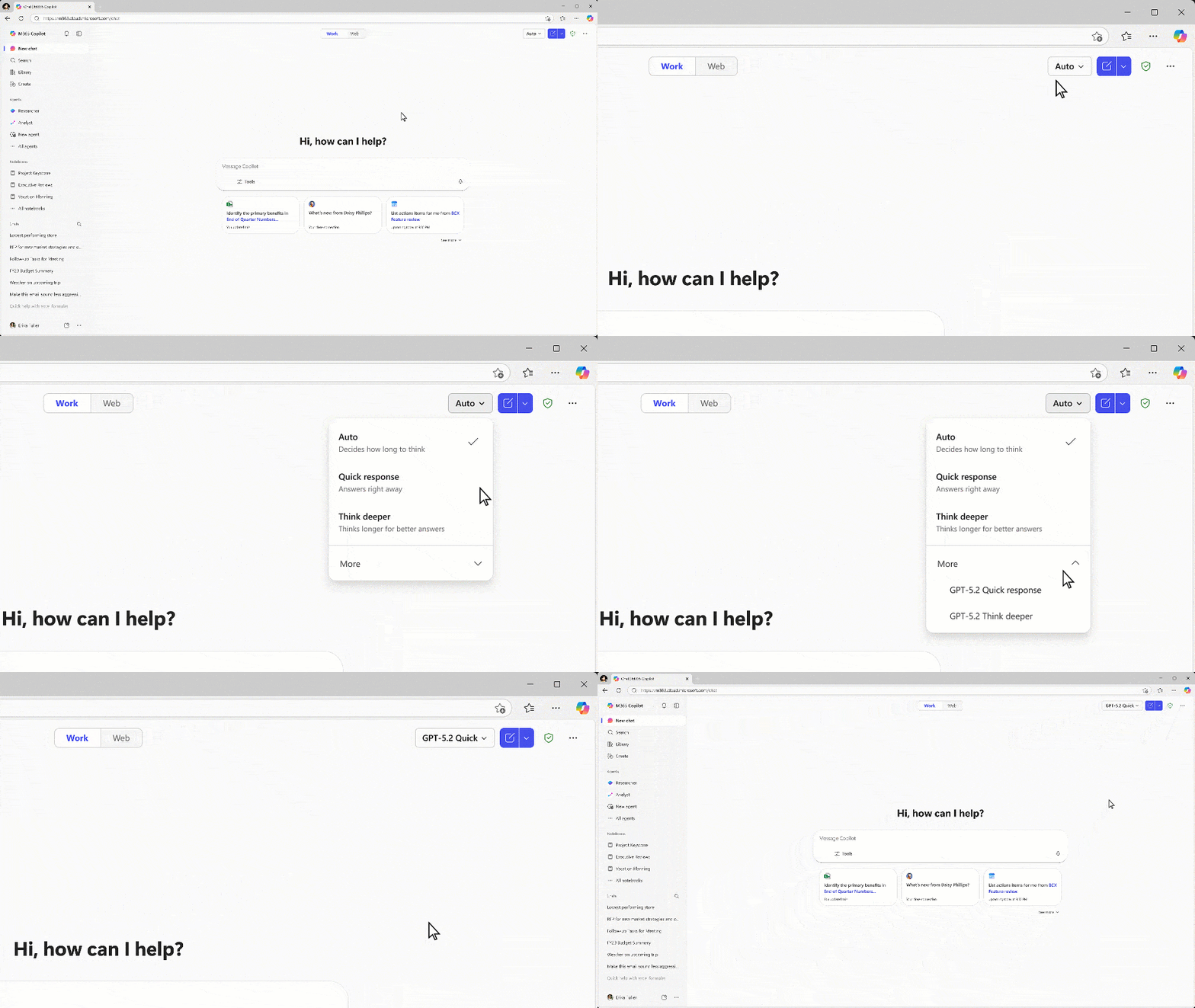
GPT-5.2 integrates two specialized capabilities to support different tasks, allowing organizations to choose the level of intelligence that best suits each situation.
GPT-5.2 Thinking
This is Microsoft's most advanced reasoning model for complex tasks, suitable for:
- Strategic analysis and long-term planning.
- Market research and competitor comparison.
- Justifications can be provided across meeting documents, emails, and reports.
- Executive summary and supporting decision-making information.
GPT-5.2 Thinking takes more time to process and analyze complex problems, making it suitable for executive meetings, planning cycles, and high-impact decision-making.
GPT-5.2 Instant
This model is optimized for speed and efficiency, suitable for:
- Daily writing tasks and drafting emails.
- Language translation and text rewriting.
- Learning and skills development work.
- Summarizing information quickly and structuring content.
The Instant Model enables the copilot to respond quickly to routine tasks while maintaining accuracy and clarity.
When working together, the two models enable Copilot to intelligently adapt to user intent, whether the task requires in-depth analysis or rapid action.
Why is GPT-5.2 in Copilot important for operation?
The real change comes from Copilot linking this intelligence to real-world organizational data. By integrating GPT-5.2 in Copilot with Microsoft Work IQ, Copilot can reason based on real-time context, such as calendars, meetings, emails, documents, and collaboration history.
This opens up use cases such as:
- Identifying priorities before the meeting based on previous conversations.
- Linking insights from multiple conversations to create strategic themes.
- Analyzing trends from a large number of documents without having to combine the data yourself.
- Transforming unstructured records into measurable, business-oriented data.
For example, instead of having to read entire meeting summaries manually, Copilot can automatically extract the most important strategic signals and link them to existing goals and milestones. This reduces the mental burden and allows the team to focus on action rather than data synthesis.
How does GPT-5.2 in Copilot work?
GPT-5.2 is directly available through the model selection feature within Copilot Chat and Microsoft Copilot Studio, providing users with flexibility and control based on task complexity, while developers can leverage GPT-5.2 to create more capable agents.
In Copilot Studio, GPT-5.2 allows:
- Agents can provide insightful reasoning based on organizational-level data.
- Natural and goal-driven conversation.
- Higher quality results for customer service, operations, and analytics.
- An agent who can analyze and take action, not just answer questions.
These capabilities make GPT-5.2 ideally suited for organizations looking to create customized copilots to support internal processes, regulatory requirements, or specific industries.
An example prompt demonstrating the capabilities of GPT-5.2.
Microsoft recommends testing GPT-5.2 with prompts that require synthesis and reasoning, such as:
- Summarizing the strategic priorities for the upcoming meeting.
- Comparing past market changes and industry leadership.
- Extracting insights from meetings and linking them to business goals.
These situations illustrate the true difference of GPT-5.2: its ability to reason across time periods, contexts, and multiple sources, not just to construct text.
Safety, compliance, and reliability by design.
One of the most significant advantages of using GPT-5.2 within Microsoft 365 Copilot is that it operates within Microsoft's enterprise-level security, privacy, and compliance framework. Customer data remains protected, governed, and access segregated according to each organization's policies.
This allows organizations to confidently utilize advanced AI without compromising confidentiality, regulatory compliance, or data ownership—critical factors for enterprise-level AI adoption.
The Bigger Picture: Alternative Models for the Future of Work
The release of GPT-5.2 reflects Microsoft's vision of providing a choice of AI models within Copilot. By integrating leading models from global AI providers, organizations can choose the tool best suited for each task, while maintaining a consistent and secure user experience.
As AI becomes part of daily work, models like GPT-5.2 represent the transition from automation to intelligent AI collaboration, enabling teams to think better, plan more accurately, and act faster.
Conclusion
GPT-5.2 is a significant step in Microsoft's vision for AI in the workplace. By combining advanced reasoning, performance enhancements for routine tasks, and deep contextual engagement, Copilot evolves into a true knowledge partner for organizations seeking smarter insights, greater consistency, and faster strategic implementation. This upgrade clearly sets a new standard for AI in the modern workplace.