ในยุคของการทำงานสมัยใหม่ที่ต้องการเครื่องมือที่ชาญฉลาดมากขึ้น การทำงานที่รวดเร็วขึ้น และข้อมูลเชิงลึกที่แม่นยำมากขึ้น Microsoft 365 Business Plan with Copilot คือคำตอบสำหรับธุรกิจขนาดเล็กและกลางที่ต้องการปลดล็อกพลังของ AI เชิงสร้างสรรค์ในแอปที่ใช้งานอยู่ทุกวัน เพื่อเพิ่มประสิทธิภาพในการทำงานและการตัดสินใจอย่างที่ไม่เคยมีมาก่อน
บทความนี้จะพาคุณสำรวจฟีเจอร์ ราคา ประโยชน์ และกรณีการใช้งานจริงของ Microsoft 365 Business Plan
ภาพรวมของ Microsoft 365 Business Plan
Microsoft 365 Business ถูกออกแบบมาสำหรับธุรกิจ SMB (สูงสุด 300 ผู้ใช้) โดยรวมแอปทำงานพื้นฐานดังนี้:
- Outlook, Word, Excel, PowerPoint, OneNote
- Teams สำหรับการทำงานร่วมกัน
- SharePoint และ OneDrive สำหรับจัดการเอกสาร
- Intune และ Defender สำหรับการจัดการอุปกรณ์และความปลอดภัย
ราคา Microsoft 365 Business Plan พร้อม Copilot Add-on
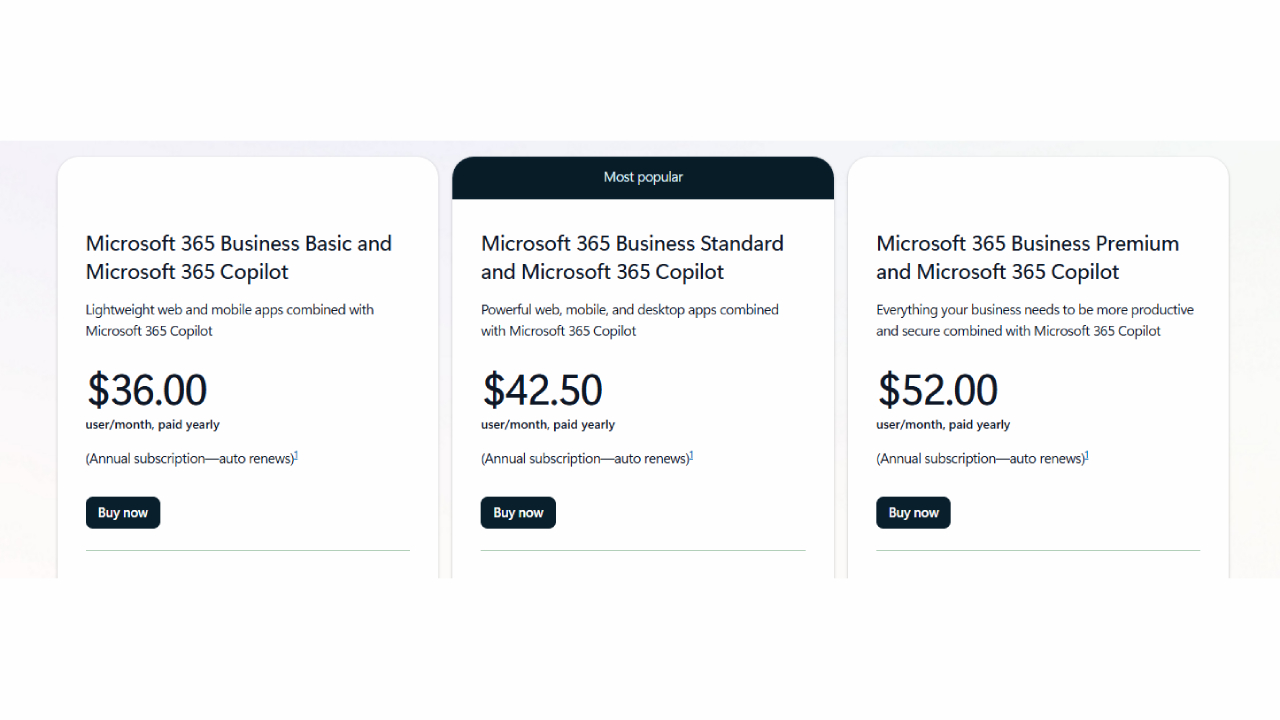
Plan | แอปที่รวมมา | Featured features | ใช้ Copilot ได้หรือไม่ | ราคาพื้นฐาน (ต่อผู้ใช้/เดือน) | ราคา Copilot Add-on (ต่อผู้ใช้/เดือน) | รวมทั้งหมด (ต่อผู้ใช้/เดือน) |
Business Basic | Office เวอร์ชันเว็บและมือถือ | อีเมล, OneDrive 1 TB, Teams | ✅ ได้ | $6 | $30 | $36 |
Business Standard | Office ทั้งเว็บและเดสก์ท็อป | อีเมล, แชร์ไฟล์, Teams, SharePoint | ✅ ได้ | $12.50 | $30 | $42.50 |
Business Premium | Standard + Intune + Defender | ความปลอดภัยขั้นสูง, จัดการอุปกรณ์ | ✅ ได้ | $22 | $30 | $52 |
💡 หมายเหตุ: ราคาเป็นสกุล USD และอาจแตกต่างกันไปตามภูมิภาค Copilot เป็น Add-on ที่ต้องซื้อแยกต่างหากสำหรับแต่ละผู้ใช้
มีอะไรใน Microsoft 365 Business Plan บ้าง?
Copilot คือผู้ช่วย AI ของ Microsoft ที่ฝังอยู่ในแอปต่าง ๆ เช่น Word, Excel, Outlook และ Teams โดยแผน Business Plan ประกอบด้วยการทำงานดังนี้:
App | ฟังก์ชันที่ Copilot ทำได้ |
Word | สร้างร่างเนื้อหาใหม่, เขียนใหม่, สรุปเอกสาร |
Excel | วิเคราะห์แนวโน้ม, แนะนำสูตร, สร้างกราฟ |
Outlook | ร่างอีเมล, สรุปการสนทนา |
Teams | สรุปการประชุม, แนะนำงาน, สกัด Action Items |
PowerPoint | แปลงเอกสารเป็นสไลด์, ปรับโทนการนำเสนอ |
การเข้าถึง Copilot ต้องมี:
- แผน Microsoft 365 Business Basic, Standard หรือ Premium
- ซื้อ License Copilot เพิ่ม ($30 ต่อผู้ใช้/เดือน)
ประโยชน์สำคัญจาก Microsoft 365 Business Plan with Copilot
ประสิทธิภาพด้วยพลัง AI
งานที่เคยใช้เวลาหลายชั่วโมง เช่น การจัดทำรายงานหรือวิเคราะห์ข้อมูล สามารถทำได้ในไม่กี่นาที ทำให้ทีมสามารถโฟกัสกับการตัดสินใจมากกว่างานซ้ำ ๆ
การสื่อสารที่ดียิ่งขึ้น
Copilot ใน Outlook และ Teams ช่วยให้การสื่อสารภายในและภายนอกองค์กรชัดเจน รวดเร็ว และสม่ำเสมอ
ข้อมูลเชิงลึกแบบเรียลไทม์
Copilot เข้าถึง Microsoft Graph เพื่อนำข้อมูลในองค์กรมาใช้งาน เช่น ค้นหาไฟล์ อีเมลลูกค้า และ Timeline โครงการได้ทันที
ปลอดภัยตามมาตรฐาน Microsoft
Copilot ทำงานภายใต้ระบบ Microsoft ข้อมูลของคุณจะไม่ถูกแชร์กับ OpenAI และถูกควบคุมตามนโยบายความปลอดภัยที่เข้มงวด
กรณีใช้งาน Microsoft 365 Copilot
Sales team
- สร้างข้อเสนออัตโนมัติใน Word
- วิเคราะห์ข้อมูล CRM ด้วย Excel
- ติดตามลูกค้าหลังประชุมใน Teams
ทีมการเงิน
- คาดการณ์รายได้ด้วยสูตรใน Excel
- สรุปงบการเงิน
- สร้างสไลด์การนำเสนอทางการเงินโดยใช้ AI
ฝ่ายทรัพยากรบุคคล (HR)
- ร่างนโยบายภายในองค์กร
- สรุปใบสมัครงาน
- ตอบคำถามพนักงานที่พบบ่อยทาง Outlook
เหมาะกับธุรกิจขนาดเล็กหรือไม่?
แม้ค่าใช้จ่าย $30 ต่อผู้ใช้ต่อเดือนสำหรับ Copilot อาจดูสูง แต่เมื่อพิจารณาจากเวลาที่ประหยัดได้ ก็คุ้มค่าอย่างมาก:
งาน | วิธีดั้งเดิม | ใช้ Copilot |
เขียนรายงาน | 2-3 ชั่วโมง | 15 นาที |
สรุปอีเมล | 20 นาที/เธรด | immediately |
Meeting Summary | จดมือ | สรุปอัตโนมัติด้วย AI |
หากธุรกิจของคุณเน้นการเพิ่มประสิทธิภาพ การทำงานอัตโนมัติ และความแม่นยำในการตัดสินใจ Microsoft 365 Copilot คือการลงทุนที่คุ้มค่า
How to get started
- เลือกแผนพื้นฐาน: Business Basic, Standard หรือ Premium
- เพิ่ม License Copilot: ผ่าน Microsoft Admin Center หรือ Partner Portal
- ฝึกอบรมทีม: Microsoft มีคู่มือและตัวอย่าง Prompt ให้ใช้งาน
- ตรวจสอบการใช้งาน: ด้วยรายงานและ Feedback Loop จาก Microsoft 365
Summary
Microsoft 365 Business Plan with Copilot ไม่ใช่แค่การอัปเกรดเทคโนโลยี แต่เป็นเครื่องมือเชิงกลยุทธ์ที่จะช่วยให้ธุรกิจสามารถแข่งขันได้ในยุคใหม่ ด้วยการฝัง AI อัจฉริยะลงในแอปประจำวัน Microsoft ช่วยให้ทีมของคุณทำงานได้อย่างชาญฉลาดมากขึ้น
ไม่ว่าคุณจะอยู่ในสายงานขาย การเงิน HR หรือฝ่ายปฏิบัติการ Copilot สามารถเปลี่ยนรูปแบบการทำงานของคุณ และช่วยให้คุณสร้างผลงานที่รวดเร็วและมีคุณภาพมากขึ้น
Interested in Microsoft products and services? Send us a message here.
Explore our digital tools
If you are interested in implementing a knowledge management system in your organization, contact SeedKM for more information on enterprise knowledge management systems, or explore other products such as Jarviz for online timekeeping, OPTIMISTIC for workforce management. HRM-Payroll, Veracity for digital document signing, and CloudAccount for online accounting.
Read more articles about knowledge management systems and other management tools at Fusionsol Blog, IP Phone Blog, Chat Framework Blog, and OpenAI Blog.
Best AI Image Generator Compared: Full Review
If you want to keep up with the latest trending technology and AI news every day, check out this website . . There are new updates every day to keep up with!
Related Articles
- What is Microsoft 365?
- Grok 3 on Azure AI Foundry is now fully available
- Azure AI Foundry Pricing Explained: Cost Structure and Getting Started
- Comparing Top AI Coding Agents: Google Jules vs AutoGPT vs Devin
- Microsoft Build 2025 Part 7: Windows
- SRE Agents Comparison: Detailed Information