Microsoft Copilot Studio has officially made Computer-using Agents capabilities available at General Availability, marking another significant step in Microsoft's vision for agentic AI for enterprise.
This launch reflects a significant shift occurring in the AI industry. AI is no longer limited to generating text, summarizing data, or answering questions; it's moving towards direct interaction with software, performing multitasking, and using applications in a manner similar to that of real employees.
With Computer-using Agents, Microsoft is pushing AI from an “assistant” to a “real-world worker.”
What are computer-using agents?
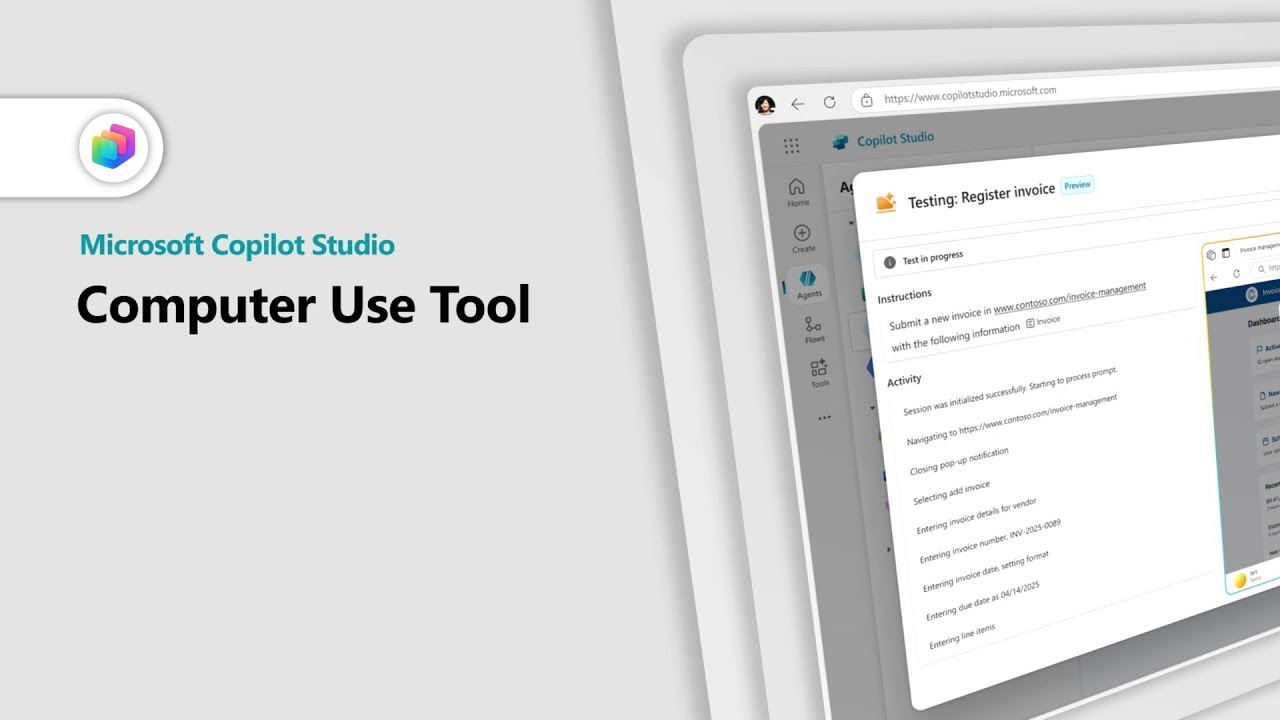
Computer-using agents are AI agents that can interact with graphical user interfaces (GUIs), such as websites, desktop applications, enterprise systems, and legacy software. Instead of relying solely on APIs or custom connections, the agent can operate the software through a virtual screen using a virtual mouse and keyboard.
This system integrates the following:
- Computer vision
- Reasoning models
- Workflow orchestration
- Natural language instructions
This allows organizations to describe tasks in natural language, while the AI agent performs the operational tasks autonomously.
Microsoft explains that this technology can press buttons, select menus, fill out forms, retrieve data, and navigate within applications in the same way a human employee.
One of the most important aspects of this approach is "flexibility." Because the Agent works through the visual interface layer, it can still function even without an API or in the case of older legacy applications.
Moving beyond Traditional Automation
Traditional Robotic Process Automation (RPA) systems often rely on rigidly structured workflows and are prone to failure when the interface changes.
Minor changes, such as a new layout, renamed buttons, or moved menu items, often require reconfiguring the system.
Computer-using agents were developed to overcome these limitations.
Microsoft states that the AI model can dynamically adapt to interface changes and continue working even if the layout or button positions change, making the system far more flexible than many traditional automation tools.
This capability also helps reduce the technical barriers to automation. Instead of having to create workflows through complex code or scripting, users can describe the desired results directly in natural language.
This represents a significant evolution, moving from automation-focused systems to intelligence-driven systems in real-world workflow operations.
Designed for real-world enterprise workflows
Microsoft positions Computer-using Agents as ideally suited for repetitive, time-consuming operational tasks that require a large number of employees.
Examples of usage include:
- Automated data entry
- Invoice processing
- Information extraction
- Cross-system updates
- Web portal interactions
- Legacy application workflows
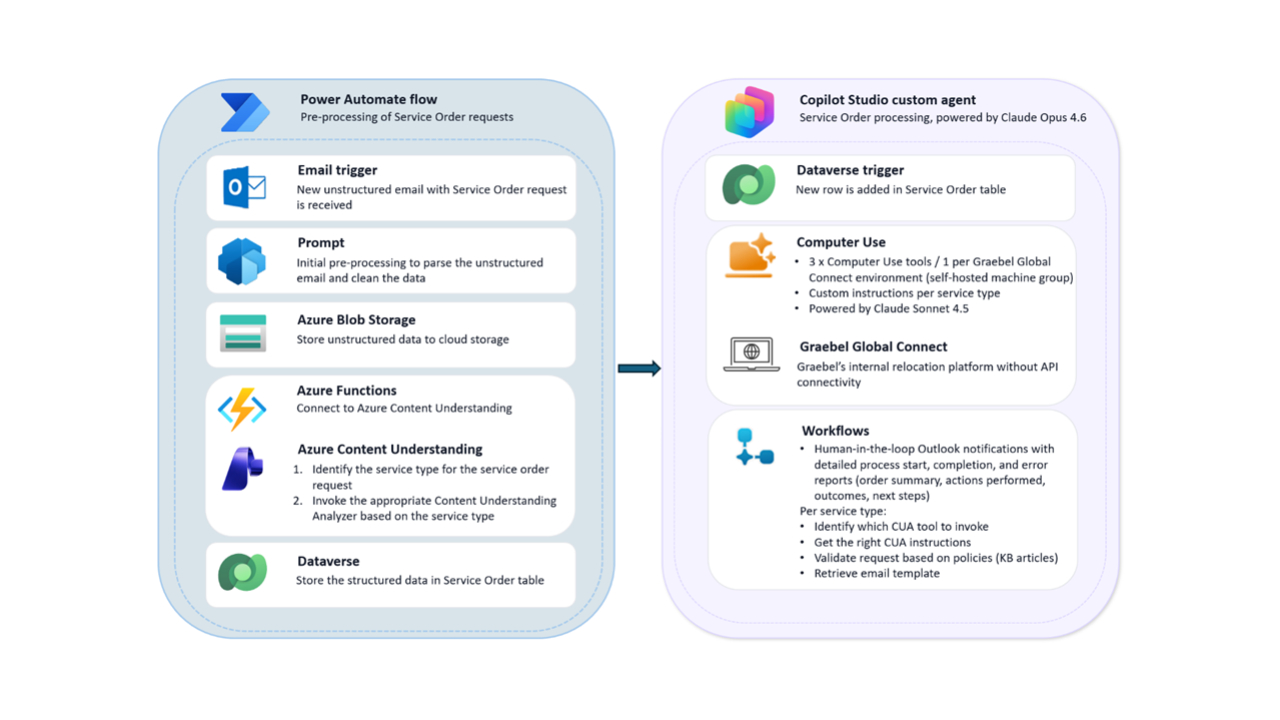
Because AI agents can interact with both websites and desktop applications, organizations can automate processes even if the systems are not directly connected.
This is particularly important for large organizations that still rely heavily on legacy software systems that were not originally designed to directly support AI connectivity.
Part of Microsoft's larger Agentic AI strategy
The launch of Computer-using Agents aligns closely with Microsoft's rapidly expanding agentic AI ecosystem.
Over the past few months, Microsoft has launched:
- Agent 365 for AI governance
- Copilot Cowork for multi-step AI workflows
- AI workflows within Microsoft 365
- Enhanced orchestration capabilities in Copilot Studio
Taken together, these technologies reflect Microsoft's larger vision for AI to transform from a passive assistant into an automated collaborator capable of seamlessly completing tasks within an enterprise environment.
Instead of waiting for direct commands, future AI agents are expected to be able to:
- Understanding workflows
- Coordinate across different systems
- Conducting practical operations
- Participate in automating business processes
Computer-using agents are one of the key components of this vision.
Why is this important for businesses?
For many organizations, one of the biggest obstacles to adopting AI is "the complexity of system connectivity."
Although many modern SaaS platforms offer APIs, many businesses still rely on:
- Legacy ERP system
- On-premises desktop applications
- Specialized software for each industry
- Older operational tools without modern integration support
Computer-using Agents reduce the need for deep technical integration by allowing AI to interact directly through the user interface itself.
This could significantly accelerate enterprise automation initiatives while reducing development overhead.
It also expands automation opportunities beyond IT teams. Since workflows can be described using natural language, business users may eventually automate operational tasks without requiring extensive coding expertise.
Security and Governance Will Become Critical
As AI agents gain the ability to operate software environments directly, governance and security become increasingly important.
Microsoft has already been expanding enterprise controls across:
- Agent governance
- Identity management
- Security monitoring
- Compliance workflows
- Shadow AI detection
through platforms such as Agent 365 and Microsoft security services.
This becomes essential because Computer-using Agents may eventually gain access to:
- Enterprise applications
- Sensitive business systems
- Financial workflows
- Customer information
- Operational infrastructure
Organizations adopting these capabilities will need clear governance policies, monitoring systems, and permission boundaries to ensure AI agents operate safely and responsibly.
How to get started
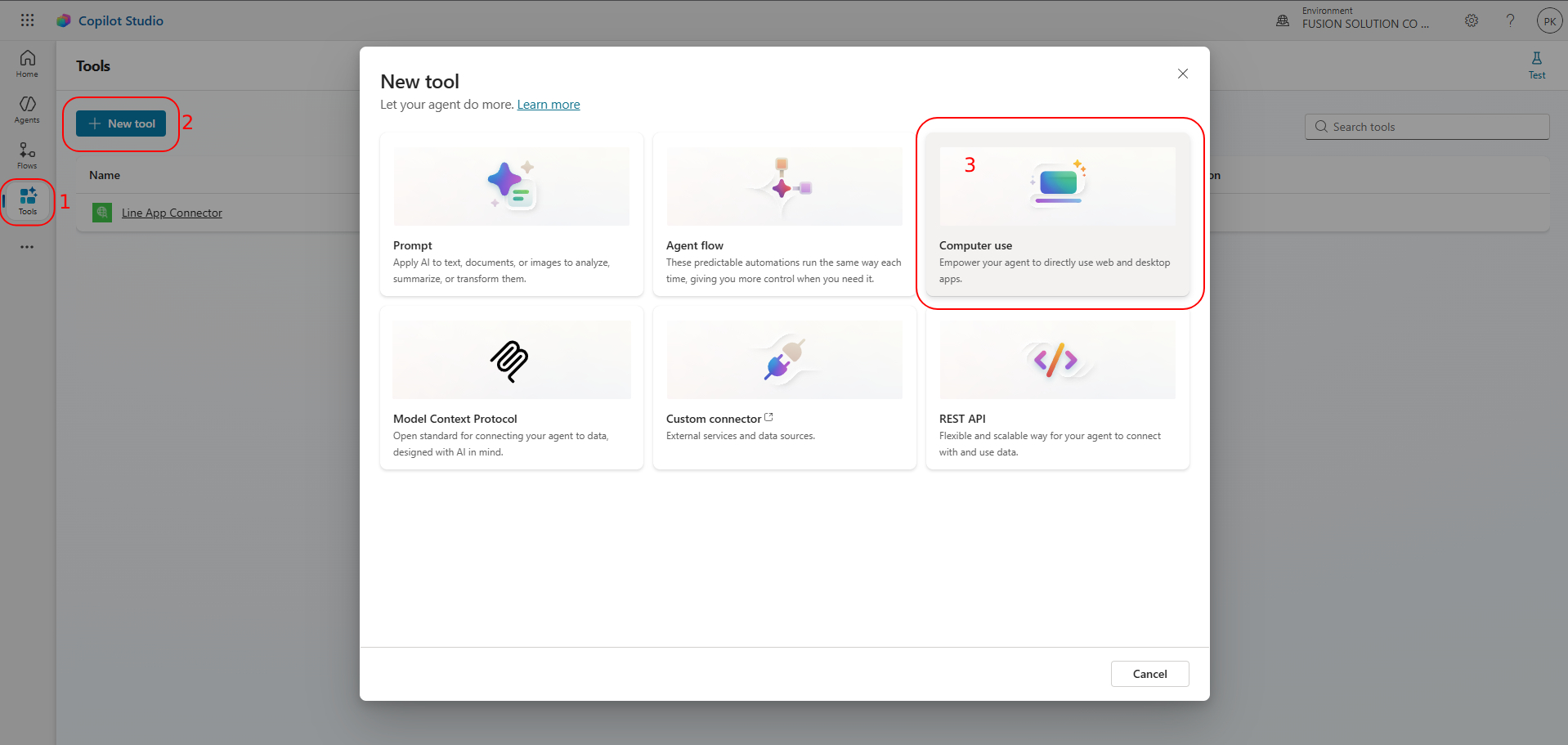
Ready to try computer‑using agents in Copilot Studio?
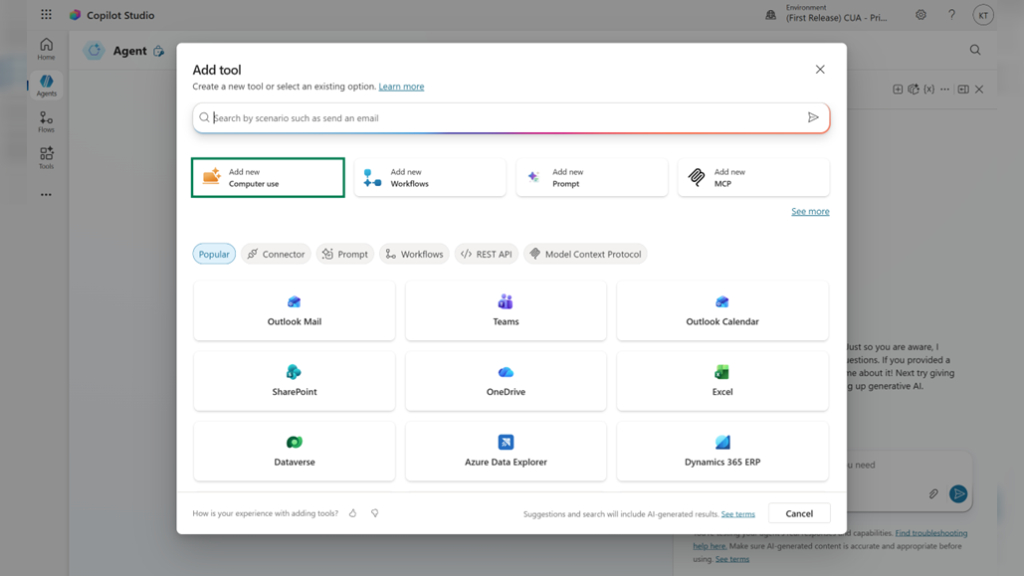
- Create or open an agent in Microsoft Copilot Studio.
- Go to Tools → Add tool → Add new computer use.
- Describe the task you want the agent to perform in natural language.
From there, the experience becomes highly natural and conversational. Instead of building complex automation scripts, users simply describe the task they want the agent to perform using plain language. The AI agent can then interpret those instructions and begin interacting with applications, websites, or workflows on the user’s behalf.
The Evolution from Copilot to Autonomous Execution
The launch of Computer-using Agents highlights how rapidly enterprise AI is evolving.
Earlier generations of AI copilots focused mainly on:
- Content generation
- Summarization
- Chat-based assistance
- Productivity support
Now the industry is shifting toward execution-oriented AI systems capable of performing work directly.
Microsoft’s broader strategy increasingly focuses on turning AI into an operational layer across the workplace rather than simply a conversational interface.
This evolution mirrors the growing industry transition from “AI that helps” toward “AI that acts.”
Final Thoughts
The General Availability release of Computer-using Agents in Microsoft Copilot Studio represents one of Microsoft’s most significant moves yet into autonomous AI operations.
By enabling AI systems to interact directly with websites, desktop applications, and enterprise workflows, Microsoft is expanding AI from informational assistance into real-world execution. The ability to automate GUI-based tasks without relying entirely on APIs could dramatically increase automation opportunities across industries.
As organizations continue adopting agentic AI systems, Computer-using Agents may become a foundational technology for the next generation of digital work—where AI not only understands workflows, but actively participates in completing them.