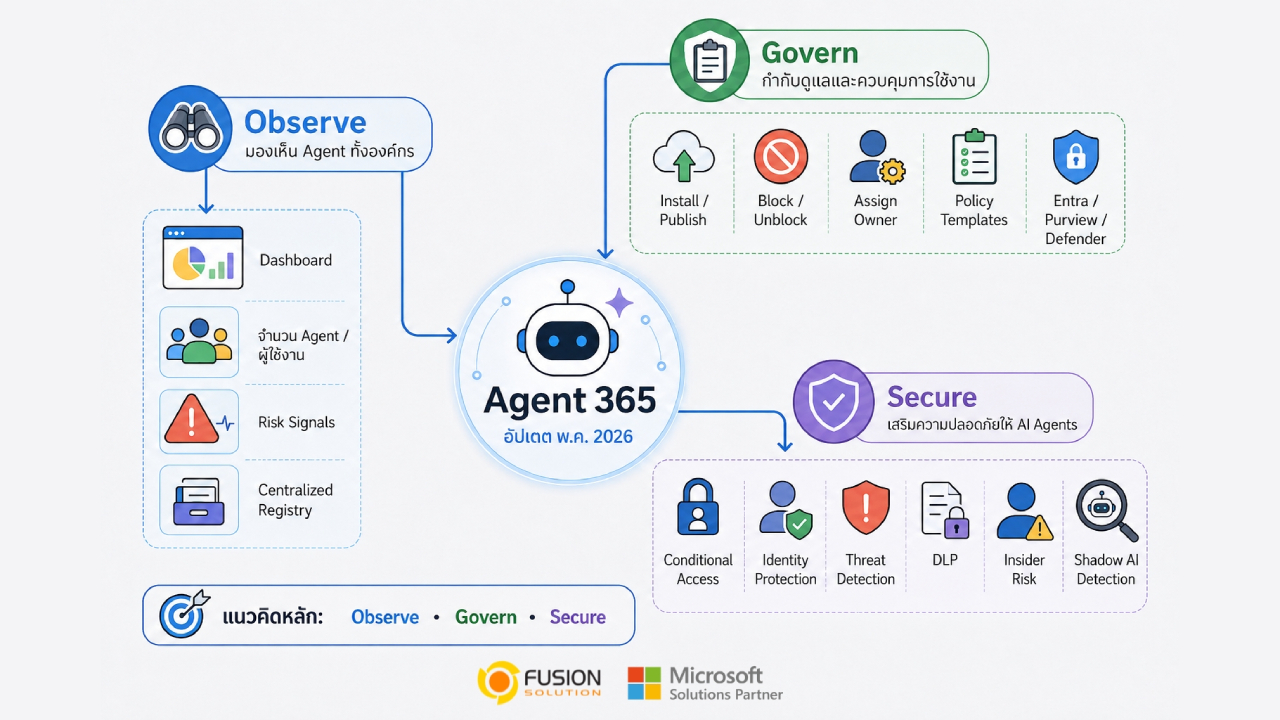
Microsoft continues to advance its vision for enterprise AI management with a major update to Agent 365 in May 2026. As organizations increasingly deploy AI agents in workflows, applications, and cloud environments, the key challenge is no longer just building AI systems, but rather governing and securing AI at the enterprise level.
The latest update to Agent 365 focuses heavily on Visibility, Governance, Compliance, and Security, with Microsoft positioning the platform as a central control hub for managing the growing AI agent ecosystem within modern organizations.
By closely connecting with services like Microsoft Defender, Microsoft Entra, and Microsoft Purview, Agent 365 is becoming a unified platform for monitoring and controlling AI operations across the organization.
The increasing demand for AI Agent Governance
As businesses increasingly adopt autonomous AI systems, managing AI agents distributed across multiple applications, cloud platforms, and devices is becoming a significant operational challenge.
Organizations are no longer managing just a few AI assistants handling specific tasks, but rather a large ecosystem of AI agents working concurrently across workflows, data environments, and collaboration systems.
To address this increasing complexity, Microsoft is positioning Agent 365 as a centralized control plane for enterprise-level AI management. The platform is deeply integrated into Microsoft's security and governance ecosystem, including Microsoft Defender, Microsoft Entra, and Microsoft Purview.
Integrating these services into a single experience provides organizations with stronger visibility, governance, and security control for managing AI agents across the entire organization.
Observe: Real-time AI Agent visibility
One of the most significant updates to Agent 365 is its expanded ability to provide real-time visibility into an enterprise's AI environment.
As organizations increasingly deploy AI agents across workflows and cloud platforms, Microsoft is focusing on providing a central hub for administrators to monitor, assess risks, and maintain operational controls.
Agent 365's new dashboard
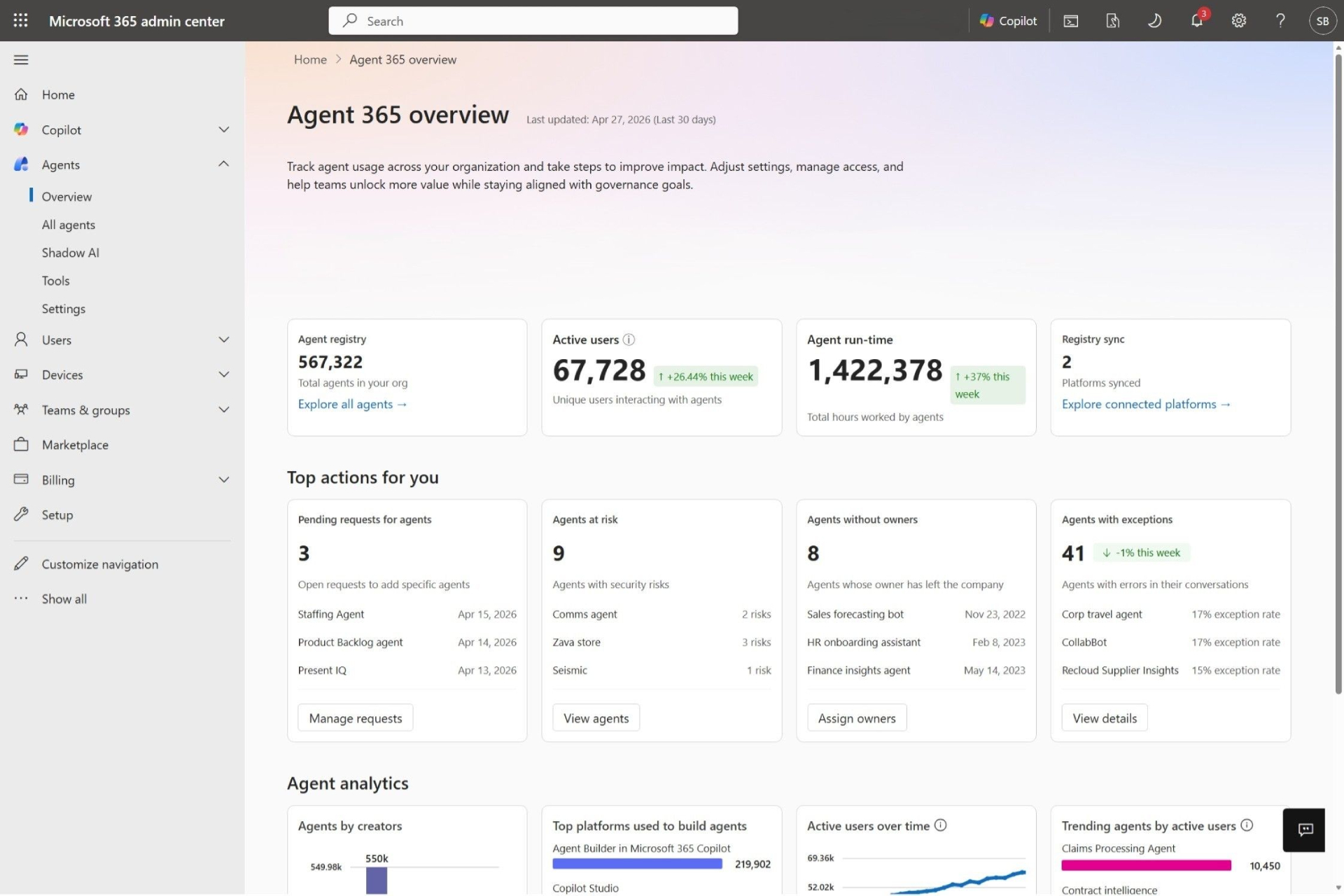
Microsoft has launched a new Overview Dashboard within Microsoft 365 Admin Center, which allows administrators to see the organization's AI agent ecosystem in real-time from a single central location.
Instead of having to track deployments one by one, administrators can monitor the overall AI environment through a single interface that displays key information such as operational trends, runtime activity, connected systems, and emerging risks.
This dashboard can also help identify governance issues, such as:
- Agent awaiting approval
- Agent without an Owner
- Agents who may be at risk or malfunctioning
This level of visibility allows organizations to shift from reactive management to more proactive AI governance.
Unified Registry for all AI Agents
Agent 365 also adds a Centralized Registry, which serves as the primary data recording system for all AI Agents within the organization.
This Registry can track:
- Microsoft-built Agents
- Internal Enterprise Agents
- Third-party Ecosystem Agents
Each agent will have detailed operational and governance metadata, such as:
- Ownership and Permission Structure
- Deployment Status and Security Posture
- Compliance Information, Tool Access, and Usage Analytics
Consolidating all data in one place reduces blind spots and provides organizations with a clearer overall understanding of AI usage within the organization.
Shadow AI Detection expands visibility at the enterprise level
Microsoft is also beginning to address one of the fastest growing concerns in Enterprise AI: Shadow AI.
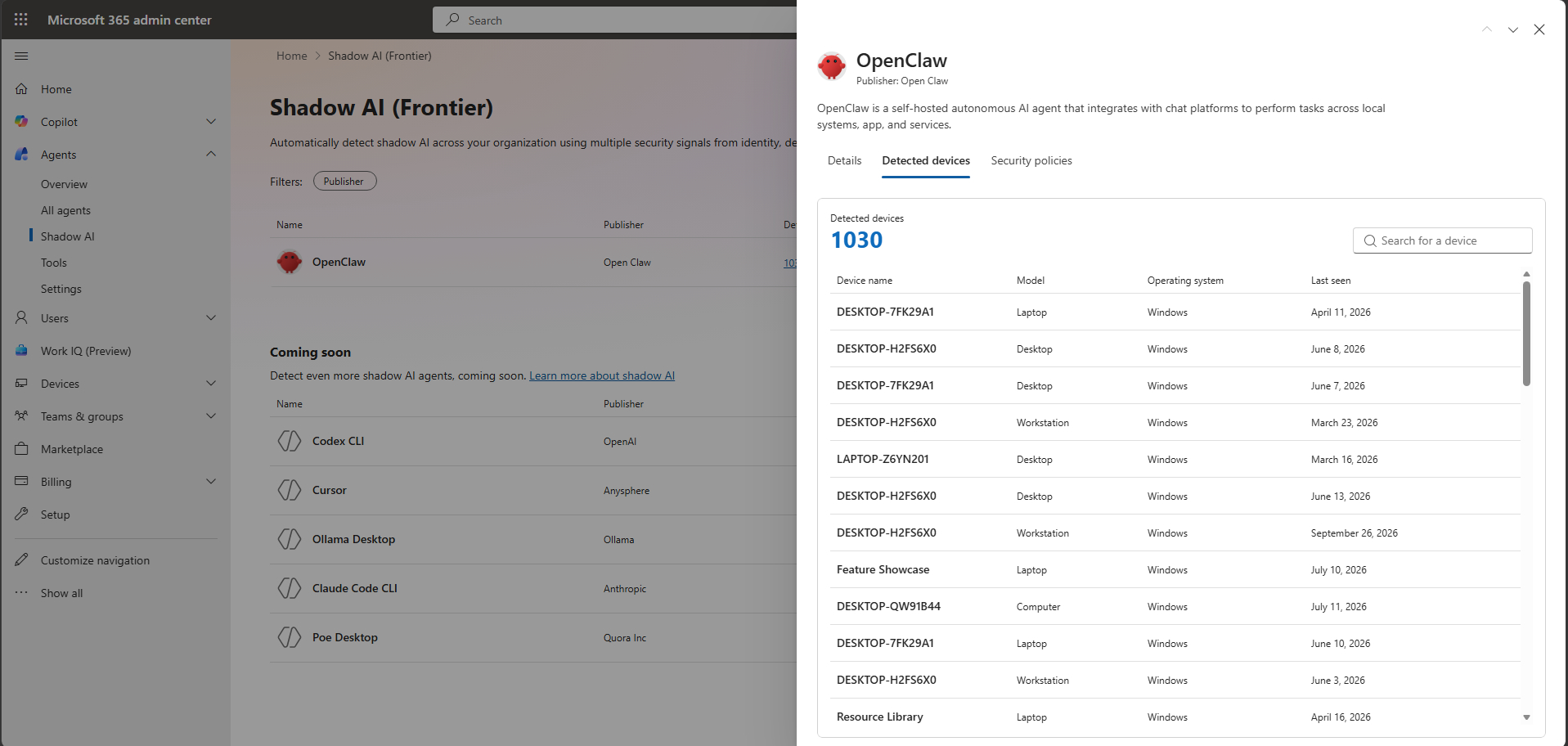
Agent 365 supports the ability to detect and block AI agents running locally without official IT oversight.
These tools can pose significant risks because they can:
- Read local files and important organizational data.
- Execute code or connect to a protected system.
- Operating without governance, monitoring, or compliance control.
The first detection system to be supported is OpenClaw, and Microsoft plans to support additional tools in the future, such as GitHub Copilot CLI and Claude Code.
When integrated with Microsoft Defender and Microsoft Intune, Agent 365 helps organizations detect unauthorized AI agents, enforce endpoint restrictions, and block uncertified workflows.
All of this reflects Microsoft's efforts to help organizations maintain visibility and control, even as autonomous AI tools become more widely used.
Govern: Enterprise-level controls for AI Agents
Microsoft is significantly expanding the governance capabilities of Agent 365 to help organizations manage AI agents more systematically as deployment expands across the enterprise. The latest update focuses on providing administrators with stronger control throughout the AI lifecycle, from deployment and approval to compliance monitoring and automated policy enforcement.
Lifecycle and Governance Actions
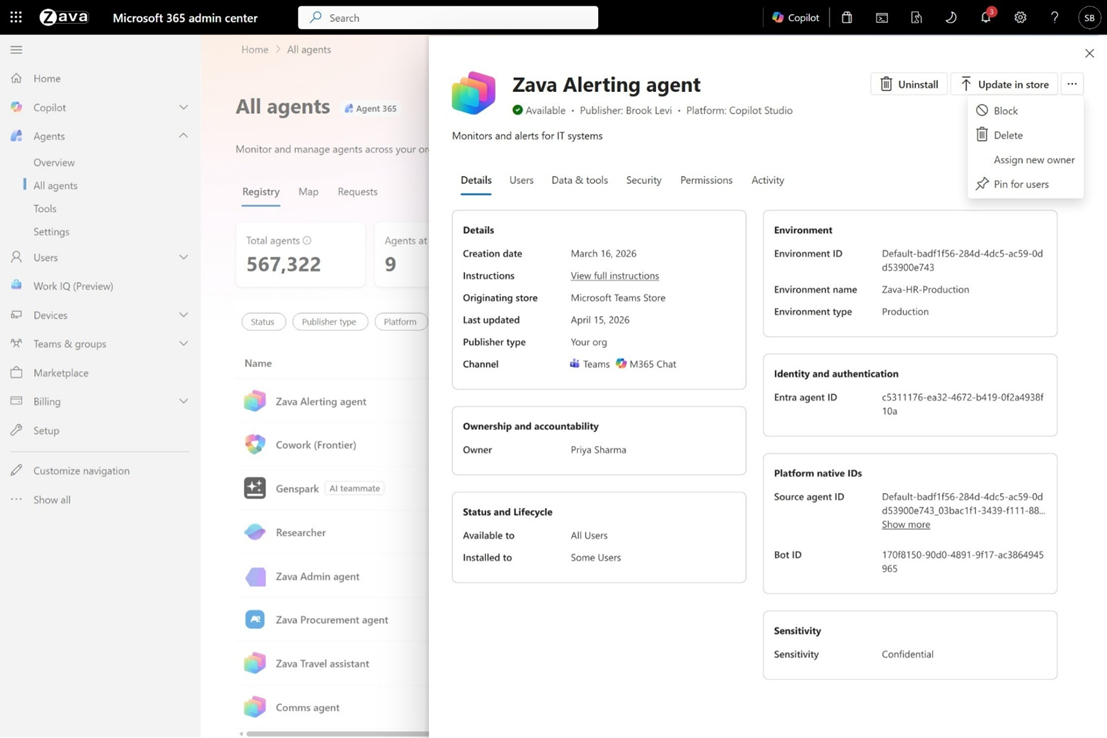
Agent 365 now allows administrators to manage AI Agents directly from a centralized Registry, instead of having to manage governance tasks across multiple separate systems. Organizations can control agent deployment ownership, availability, and status from a single interface.
This centralized approach simplifies governance workflows as organizations begin managing more autonomous AI systems. Administrators can quickly respond to operational issues, adjust access rights, or remove agents that don't meet organizational requirements.
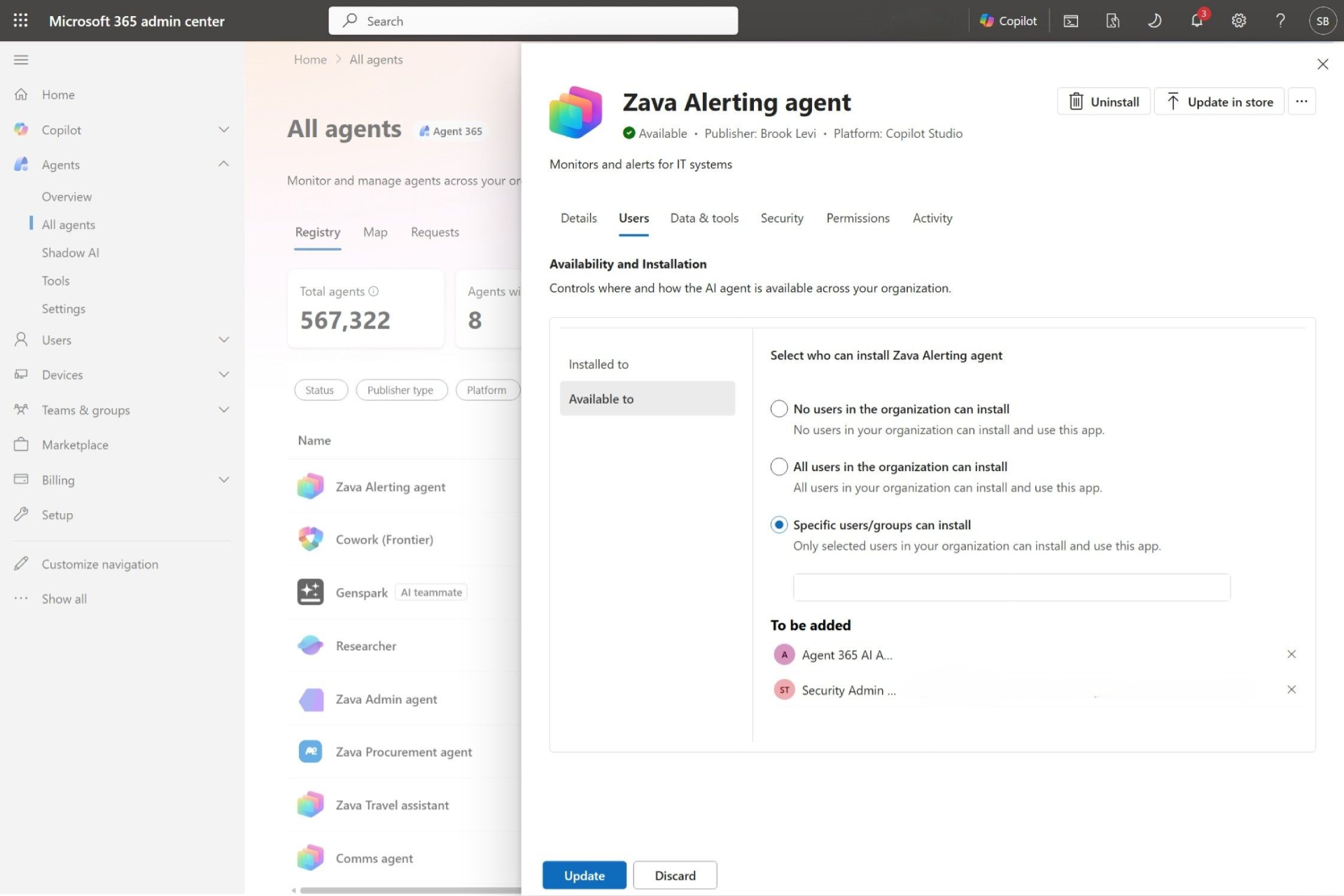
Distribution and Availability Controls
Microsoft is also adding more granular control over how AI agents are distributed within the organization. Businesses can clearly define which departments, teams, or users can access each agent.
This allows organizations to gradually and strategically roll out AI capabilities, rather than making all agents available across the entire organization at once. Some agents may be restricted to specific teams, while others can be deployed enterprise-wide based on operational readiness and governance policies.
The result is a safer and more controlled approach to AI deployment, aligning better with business goals and security requirements.
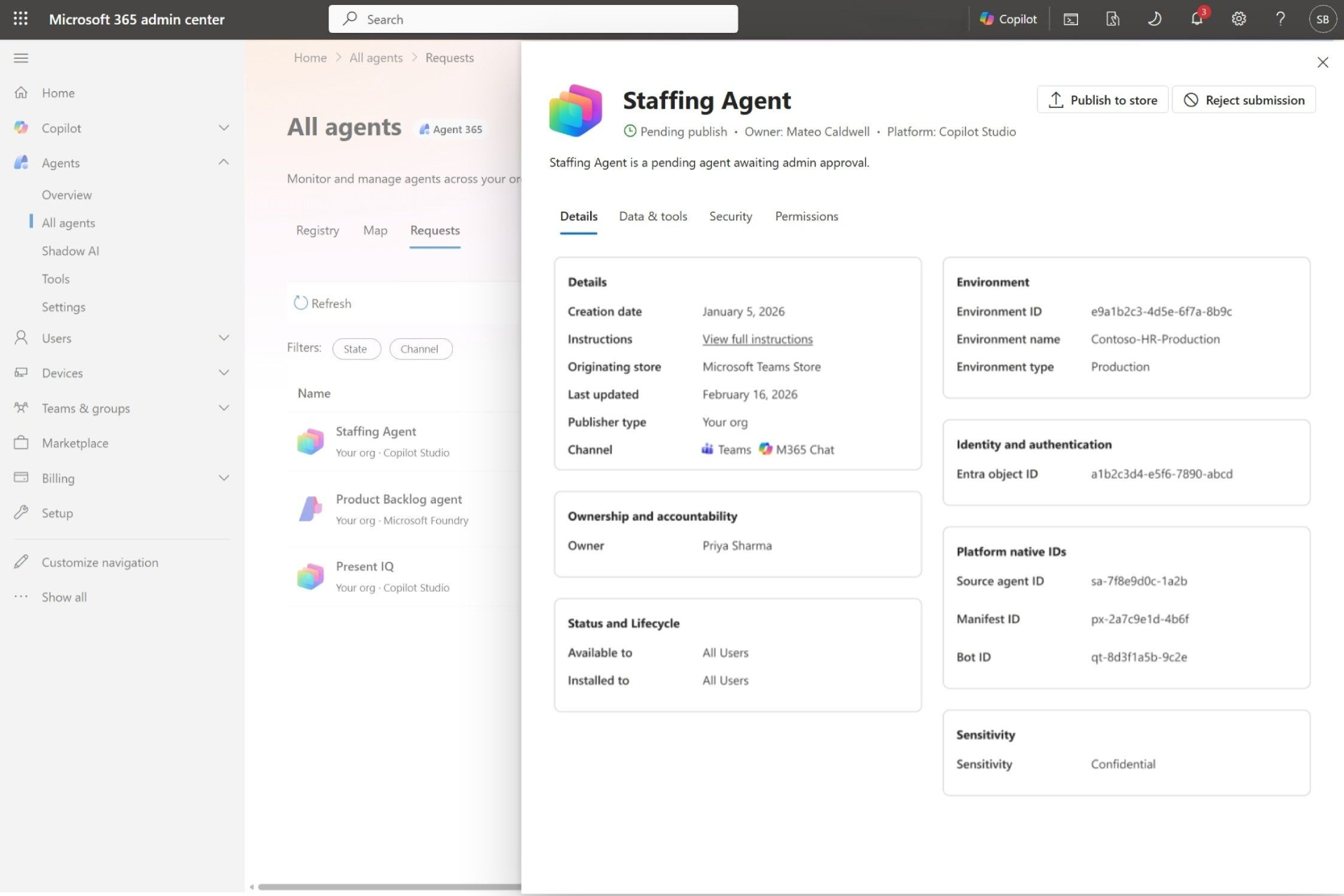
Admin Approval Workflow for AI Agents
The workflow for approval and republishing helps to streamline the centralized review process before the agent is ready for user access.
The system administrator can evaluate:
- Permissions
- Scope of data access
- Security posture
- Compliance
Before approving or rejecting a Deploy request.
This capability supports governance that includes:
- Microsoft Copilot Studio
- Azure AI Foundry
- And other connected AI ecosystems
Automated Governance Rules
To help organizations expand governance more effectively, Agent 365 now supports rules-based automation for administration tasks. Instead of relying entirely on manual monitoring, organizations can configure the system to automate governance tasks based on predefined conditions.
For example, inactive agents can automatically expire, agents without an owner can be reassigned, and high-risk agents can have their usage restricted without direct intervention from an administrator. This automation reduces operational burden and ensures consistent governance as the AI ecosystem continues to expand.
Security and Compliance Become Core AI Requirements
As AI systems become more autonomous and integrated more into organizational workflows, Microsoft is positioning security and compliance as fundamental requirements, rather than merely optional features.
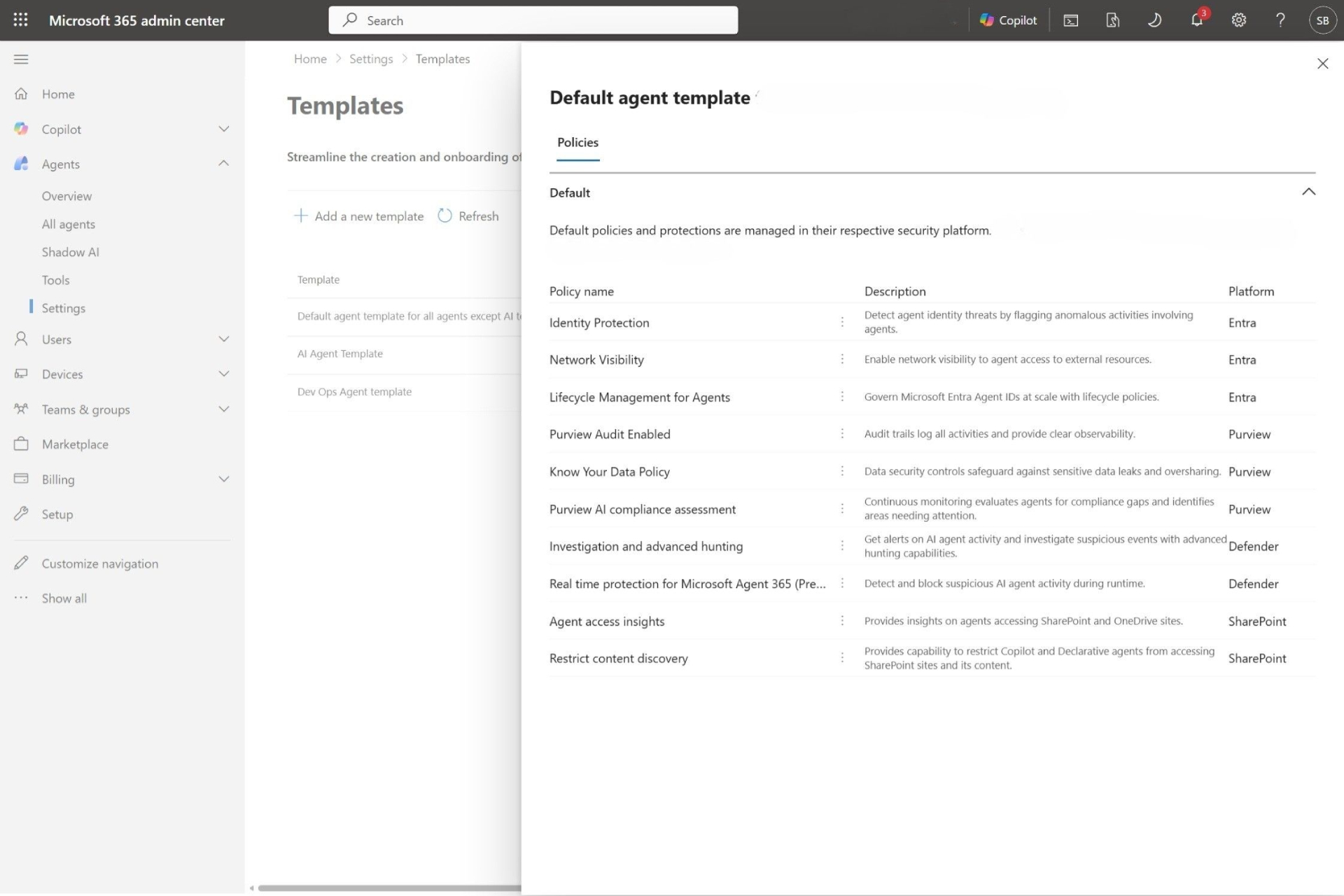
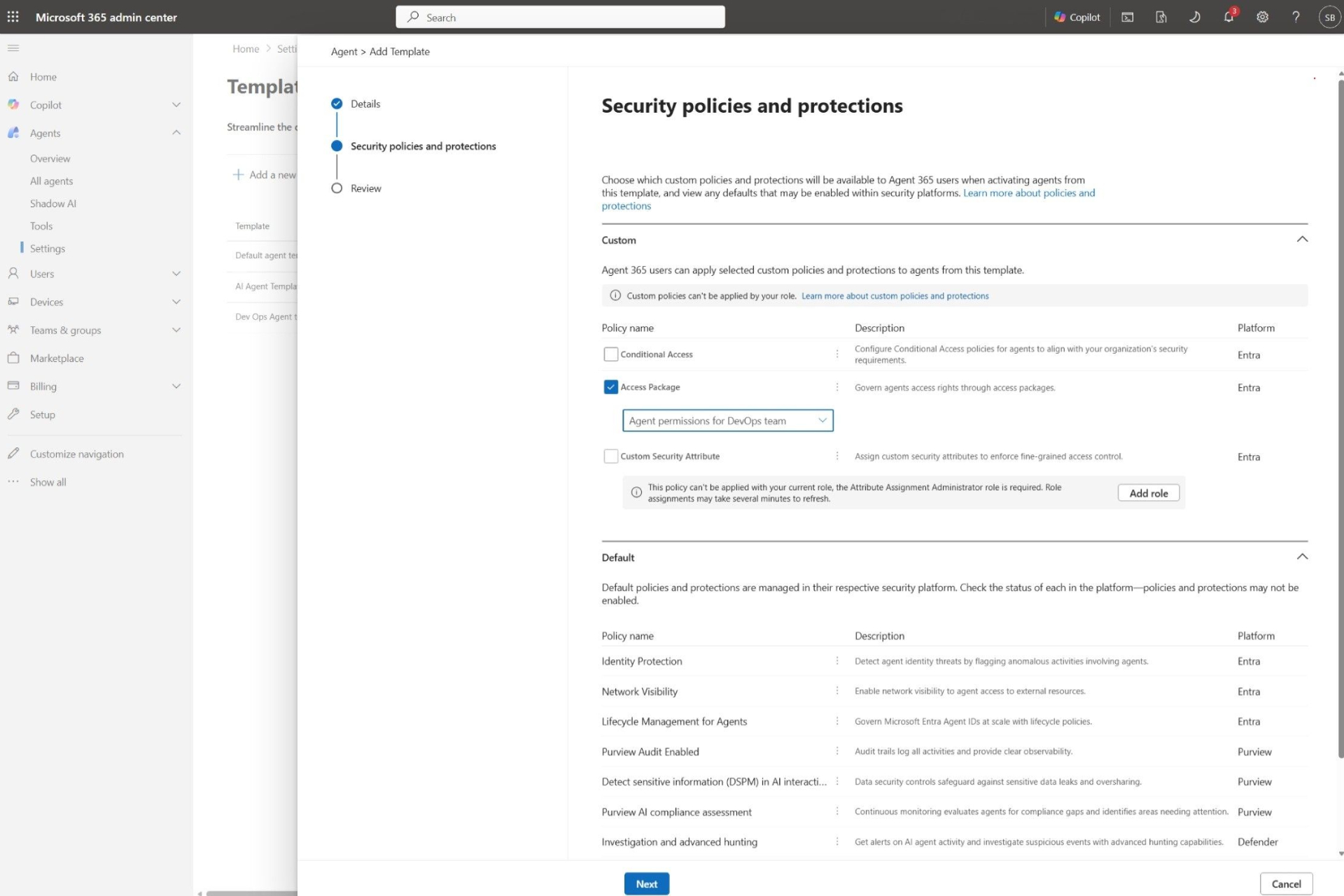
Policy Templates Across Microsoft Security Stack
Microsoft now helps organizations use reusable governance templates that include controls from:
- Microsoft Entra
- Microsoft Purview
- Microsoft Defender
- Microsoft SharePoint
This makes it easier for organizations to implement consistent governance policies across multiple agents.
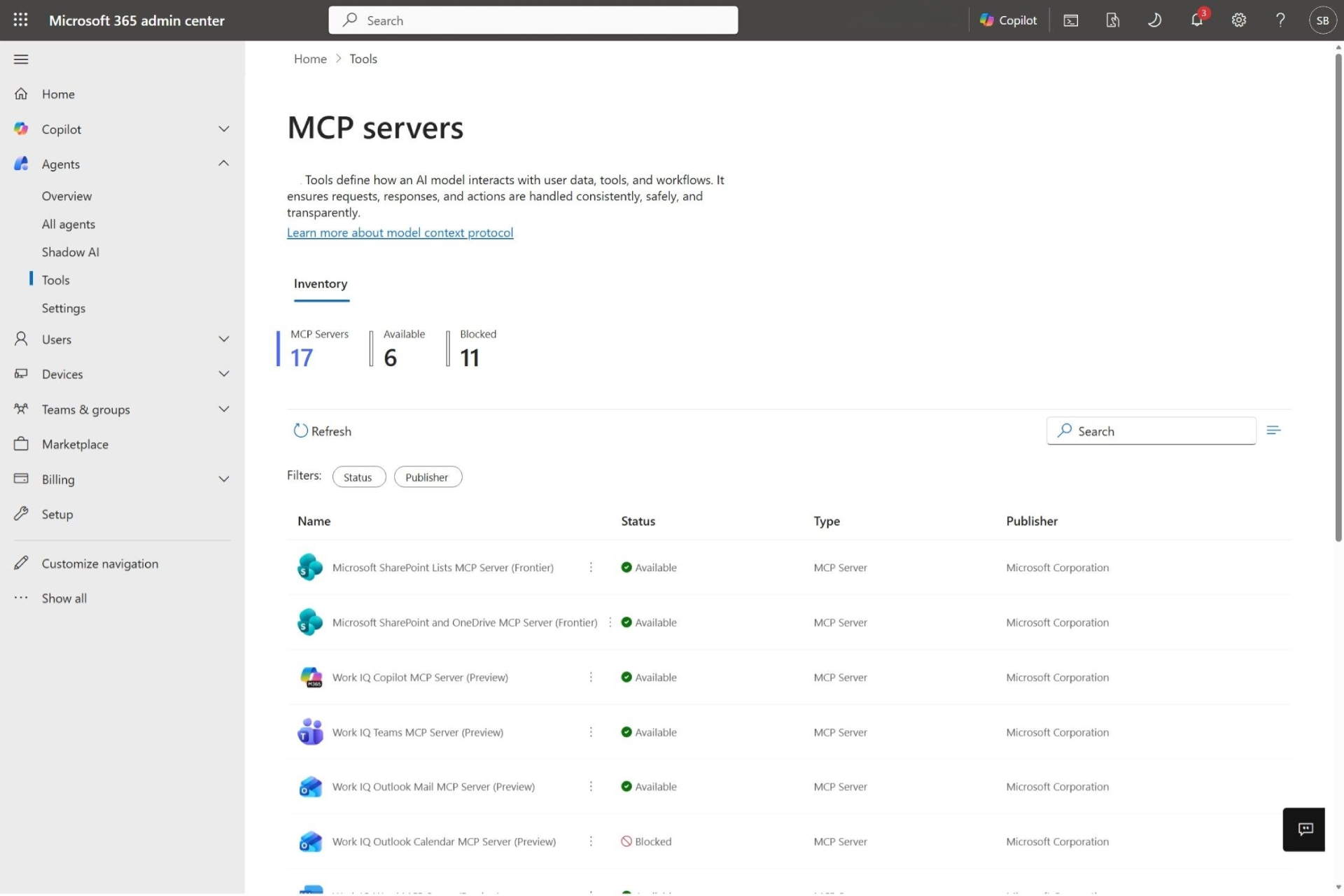
Tools Management for MCP Servers
Microsoft is also expanding centralized control over the Tools and MCP Servers used by AI Agents. As Agents gain greater access to enterprise systems and integrate with third parties, organizations require stricter governance over the tools Agents are permitted to use.
Agent 365 enables administrators to directly manage these integrations, reducing the risk from unauthorized tools or uncontrolled external connections. This becomes even more crucial as AI agents evolve into more capable autonomous systems that work across multiple platforms.
Identity Governance for Agents
Identity Governance is extended directly to AI Agents through Microsoft Entra ID Governance. Organizations can manage permissions, define access packages, track ownership, and maintain accountability for AI identities.
This allows AI agents to operate within clearly defined access boundaries and remain compliant with organizational security policies as the agent's roles and responsibilities increase.
Data Lifecycle Management and Compliance
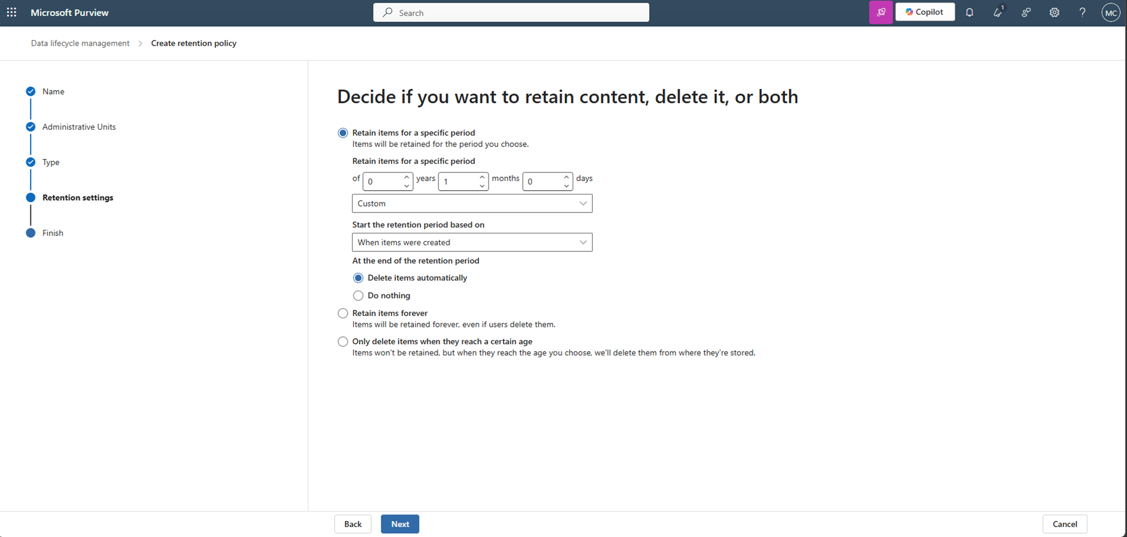
Microsoft is also strengthening compliance for AI-generated interactions through deeper Microsoft Purview integration. Organizations can apply retention policies, data deletion policies, compliance audits, and eDiscovery capabilities to AI-related activity.
Importantly, governance now encompasses not only human-to-human communication; organizations can manage both human-to-agent and agent-to-human interactions under the same compliance framework. This is particularly crucial for industries with stringent legal or regulatory requirements regarding data retention and verification.
Communication Compliance and Risk Monitoring
Agent 365 now supports Communication Compliance checking for AI interaction.
The organization can detect:
- Inappropriate behavior
- Policy violation
- Inappropriate response
- Risky interaction
This helps create greater accountability and governance as AI systems begin to interact with users more autonomously.
Secure: Applying Zero Trust to AI Agents
Microsoft is expanding its Zero Trust security model directly into the world of Enterprise AI through the latest update to Agent 365. As AI agents become more autonomous and gain broader access to enterprise systems, organizations require a stronger approach to risk detection, policy enforcement, and security governance, without compromising the pace of innovation.
Risk Flags and Security Signals
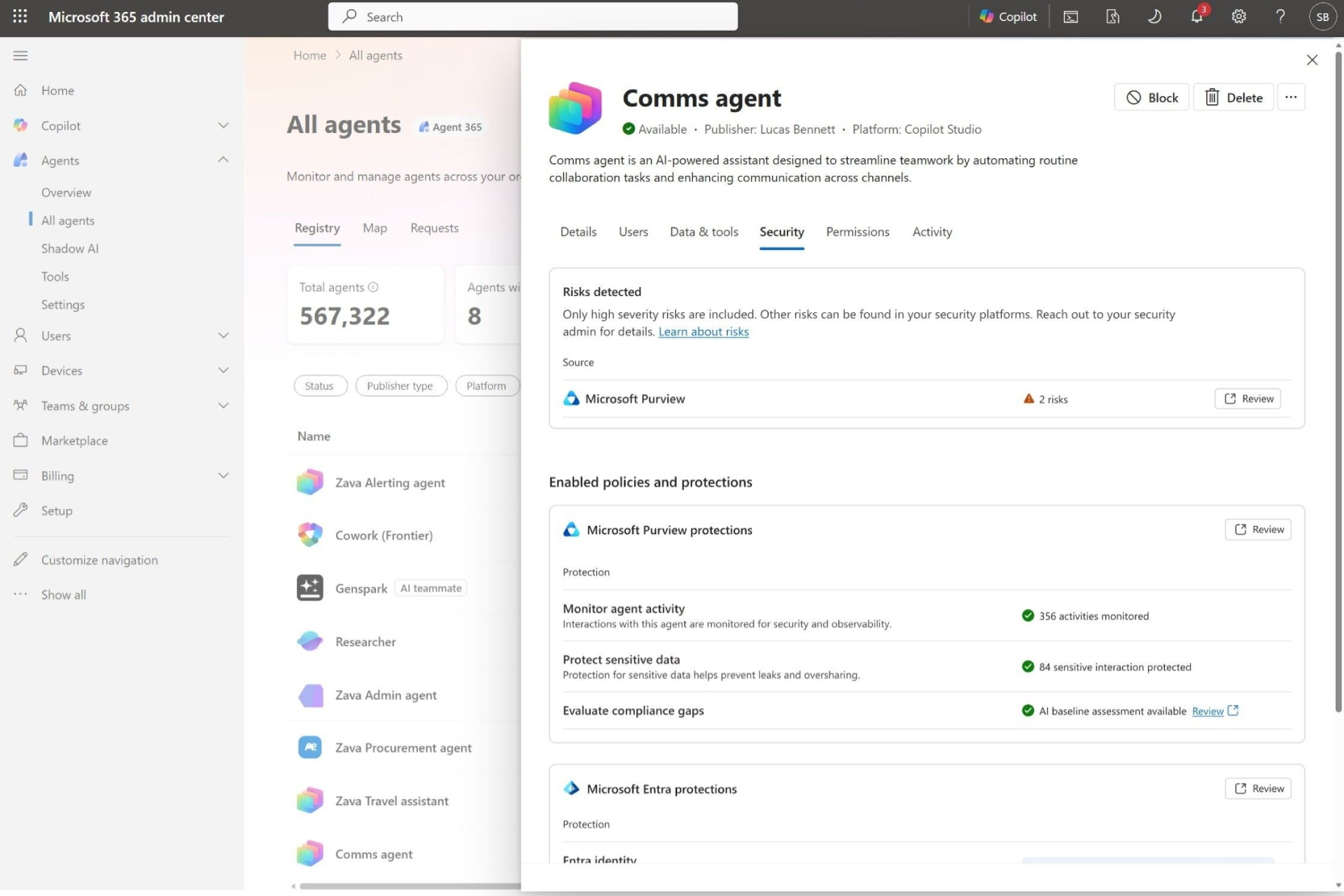
Agent 365 integrates Security Signals from Microsoft Defender, Entra, and Purview into a unified management experience.
The system administrator can specify:
- Risky agents
- Compliance violations
- Suspicious activities
And respond immediately from within the platform.
Conditional Access for AI Agents
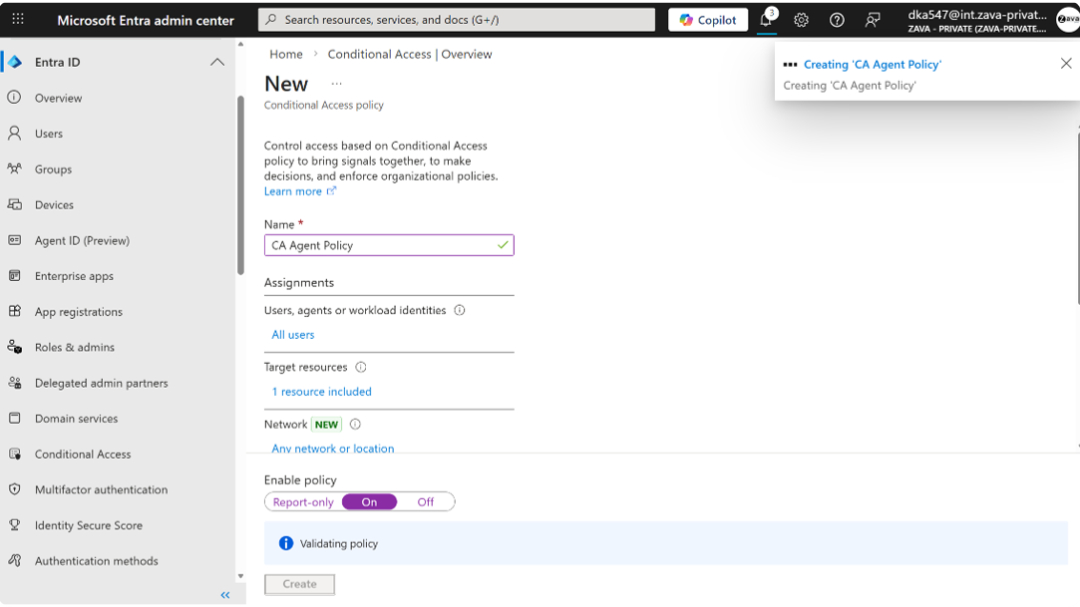
Microsoft is extending the Zero Trust principle directly to AI Agents through its Conditional Access policy.
This includes:
- Delegated access agents (Generally Available)
- Own-access agents (Public Preview)
The policy will be evaluated dynamically based on:
- Risk context
- User identity
- Access conditions
Before an agent can access organizational resources.
Why is Agent 365 important?
Agent 365 reflects Microsoft's overall vision for the workplace of the future—an environment where autonomous AI agents collaborate with employees at an enterprise scale. As organizations begin deploying more capable AI systems across business processes, the complexity of managing security, governance, and compliance increases dramatically.
Microsoft's approach focuses on helping organizations observe AI activity, govern AI deployment, and secure AI operations through a unified platform experience, rather than viewing governance as an obstacle to innovation. Agent 365 is designed to provide the operational controls organizations need while also enabling them to accelerate AI adoption.
This makes Agent 365 more than just a management tool; Microsoft is building it into the core infrastructure for Enterprise AI Operations to help organizations prepare for a future where AI agents are deeply integrated into daily business workflows.
Final thoughts
The May 2026 update significantly expanded the capabilities of Agent 365, covering Visibility, Governance, Security, and Compliance. Microsoft is preparing organizations for a future where AI Agents will be embedded deep within workflows, collaboration systems, and business operations.
As the adoption of autonomous AI accelerates, platforms like Agent 365 may become essential for maintaining control, mitigating the risks of Shadow AI, and building responsible enterprise-level AI deployments in the long term.