Artificial intelligence (AI) has become a key component in improving organizational productivity, making it easier for users to create documents, analyze data, summarize meetings, and automate repetitive tasks. As AI capabilities continue to evolve, Microsoft is committed to integrating the latest technology into the tools people use in their daily lives.
With the introduction of GPT-5.6 in Microsoft 365 Copilot , Microsoft 365 users can now benefit from OpenAI's latest frontier model across familiar applications like Word, Excel, PowerPoint, Outlook, Teams, and Microsoft 365 Copilot Chat. The upgrade delivers stronger reasoning, improved writing quality, deeper contextual understanding, and more reliable responses—making AI an even more valuable partner for knowledge workers.
This article will introduce you to the capabilities of GPT-5.6 in Copilot, including key improvements and how businesses can leverage these new features to improve operational efficiency.
What is GPT-5.6 in Microsoft 365 Copilot?
GPT-5.6 in Microsoft 365 Copilot is the latest AI model integration that powers Microsoft's intelligent workplace assistant. Built on OpenAI's newest frontier model, GPT-5.6 enhances Copilot's ability to understand complex requests, generate high-quality content, reason through business problems, and assist with day-to-day work.
Rather than changing how users interact with Copilot, GPT-5.6 improves the quality of the experience behind the scenes. Existing prompts become more effective, responses become more accurate, and Copilot is better equipped to handle sophisticated business tasks.
The model is available to Microsoft 365 Copilot customers without requiring users to learn a new interface or workflow.
Why Microsoft Chose GPT-5.6
Microsoft and OpenAI have worked together for years to advance AI-powered productivity. With GPT-5.6, Microsoft continues that collaboration by bringing OpenAI's latest model into the Microsoft 365 ecosystem.
GPT-5.6 was selected because it offers improvements in several areas that directly impact workplace productivity:
- Stronger reasoning
- Better writing and editing
- Improved coding capabilities
- Higher response reliability
- Better understanding of business context
- Enhanced instruction following
These improvements enable Copilot to assist with increasingly complex tasks while maintaining a natural conversational experience.
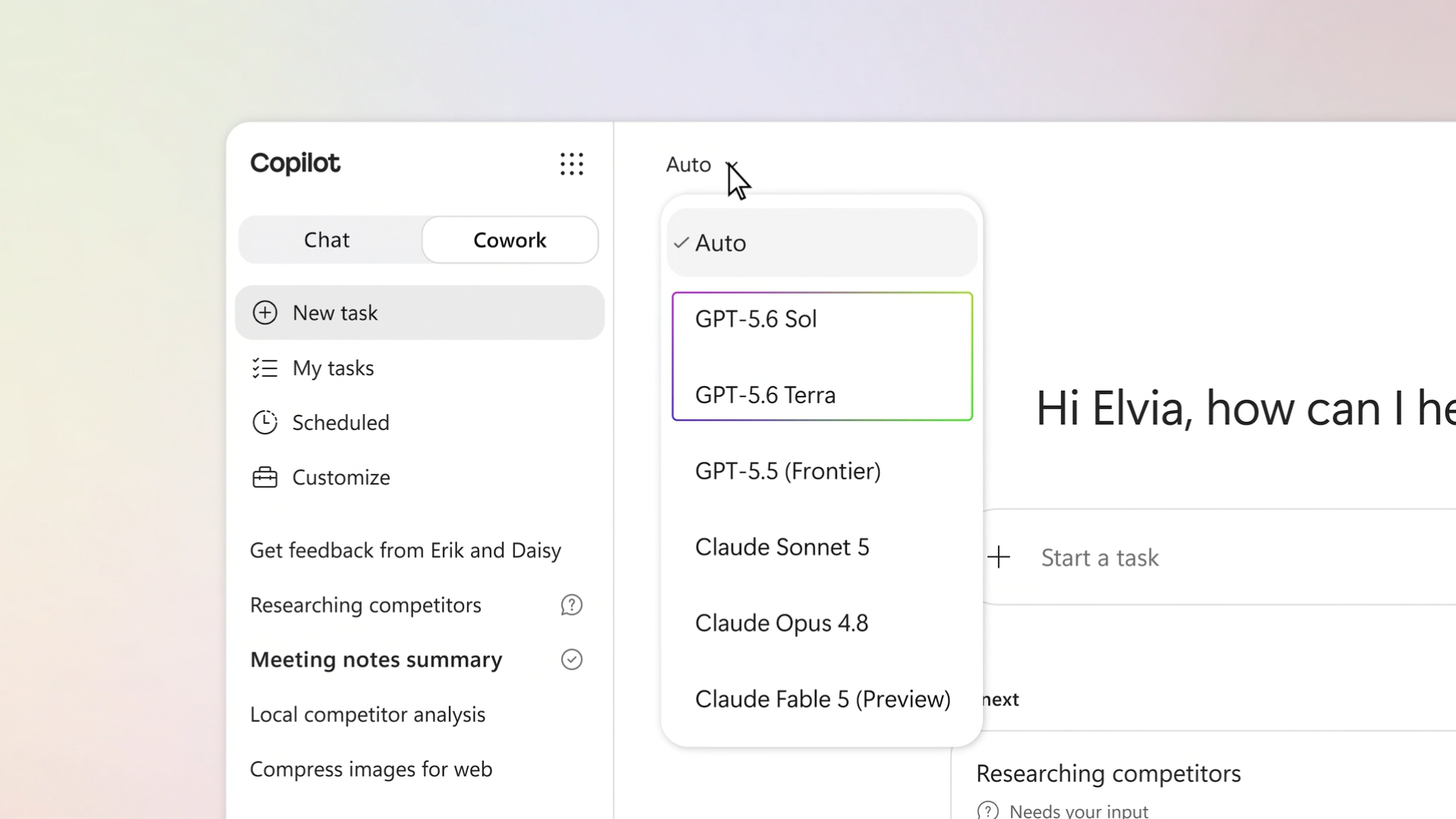
Significant improvements to GPT-5.6 in Microsoft 365 Copilot
- Creating and editing higher quality content
One of the most noticeable changes is the quality of AI-generated writing
GPT-5.6 helps users create:
- Business reports
- Executive Summary
- Project proposals
- Marketing content
- Emails
- Meeting notes
- Documentation
Compared to previous models, GPT-5.6 produces writing that is more coherent, context-aware, and aligned with the user's intent.
Whether drafting a customer proposal in Word or composing an email in Outlook, users spend less time editing and more time focusing on meaningful work.
- Stronger Business Reasoning
Business decision-making is not just about gathering information; it also requires logical analysis and comparison.
GPT-5.6 improves Copilot's ability to:
- Analyze complex business scenarios
- Compare multiple options
- Organize information logically
- Generate strategic recommendations
- Explain reasoning clearly
This makes Copilot a more effective assistant for planning, research, and decision support.
For executives, managers, and analysts, stronger reasoning translates into faster and more informed decision-making.
- Improved Productivity Across Microsoft Applications
GPT-5.6 enhances productivity throughout the Microsoft 365 suite.
Microsoft Word
Users can:
- Draft reports
- Rewrite content
- Improve readability
- Generate summaries
- Create structured documents
Microsoft Excel
Copilot can assist with:
- Data analysis
- Formula explanations
- Trend identification
- Create a report
- Business insights
Microsoft PowerPoint
GPT-5.6 helps create:
- Presentation outlines
- Speaker Notes
- Slide summaries
- Content suggestions
Microsoft Outlook
Users benefit from:
- Draft email
- Professional tone adjustments
- Conversation summaries
- Priority recommendations
Microsoft Teams
During meetings, Copilot can:
- Meeting Summary
- Capture action items
- Identify decisions
- Generate follow-up tasks
The result is a more intelligent assistant across every stage of the workday.
More Accurate Responses with Better Context
One of GPT-5.6's greatest strengths is its improved contextual understanding.
Instead of treating prompts as isolated requests, GPT-5.6 maintains stronger awareness of:
- Previous conversation history
- Business terminology
- Document context
- Organizational knowledge
- User instructions
This allows Microsoft 365 Copilot to deliver responses that are more relevant, personalized, and actionable.
For organizations managing large volumes of information, contextual understanding significantly improves the usefulness of AI-generated content.
Enterprise Security Remains a Priority
While GPT-5.6 improves intelligence, Microsoft continues to maintain the enterprise-grade security and compliance that organizations expect from Microsoft 365 Copilot.
Business data remains protected through Microsoft's existing security framework, including:
- Enterprise data protection
- Compliance support
- Identity management
- Access controls
- Responsible AI safeguards
Organizations can adopt GPT-5.6 capabilities while maintaining governance over sensitive business information.
ประโยชน์สำหรับแต่ละแผนกในองค์กร
Microsoft 365 Copilot ถูกออกแบบมาเพื่อรองรับการทำงานของทุกฝ่ายในองค์กร และ GPT-5.6 ช่วยเพิ่มคุณค่าให้กับแต่ละแผนกอย่างชัดเจน
ฝ่ายการตลาด
- สร้างเนื้อหาแคมเปญ
- ร่างบทความ Blog
- เขียนข้อความประชาสัมพันธ์สินค้า
- ปรับปรุงสื่อโฆษณา
ฝ่ายขาย
- จัดทำข้อเสนอการขาย
- ปรับแต่งอีเมลสำหรับลูกค้า
- สรุปการประชุมกับลูกค้า
- วิเคราะห์ข้อมูลการขาย
ฝ่ายการเงิน
- วิเคราะห์รายงานทางการเงิน
- สรุปงบประมาณ
- จัดทำ Executive Summary
- อธิบายแนวโน้มทางการเงิน
ฝ่ายทรัพยากรบุคคล
- เขียน Job Description
- สร้างเอกสาร Onboarding
- สรุปผลการสัมภาษณ์
- จัดทำประกาศภายในองค์กร
ฝ่ายปฏิบัติการ
- จัดทำ Workflow
- Create a report
- ติดตามความคืบหน้าของโครงการ
- วิเคราะห์ข้อมูลการดำเนินงาน
การรองรับงานที่หลากหลายนี้ช่วยให้องค์กรสามารถเพิ่มประสิทธิภาพการทำงานได้ในทุกแผนก
ทำไมธุรกิจจึงควรใช้ Microsoft 365 Copilot
องค์กรที่ต้องการเพิ่มศักยภาพด้าน AI ไม่ควรมอง Microsoft 365 Copilot เป็นเพียงผู้ช่วย AI เท่านั้น
แต่ควรมองว่าเป็นแพลตฟอร์มด้าน Productivity ที่ผสาน
- โมเดล AI รุ่นล่าสุดของ OpenAI
- Microsoft Graph
- แอปพลิเคชัน Microsoft 365
- ความปลอดภัยระดับองค์กร
- การเชื่อมโยงข้อมูลทางธุรกิจ
เมื่อ GPT-5.6 เข้ามาเป็นส่วนหนึ่งของ Copilot ผู้ใช้งานจึงสามารถใช้ AI ที่มีความสามารถสูงขึ้น โดยไม่ต้องเปลี่ยนวิธีการทำงานเดิม
พนักงานยังคงใช้งาน Microsoft Word, Excel, Outlook, PowerPoint และ Teams ที่คุ้นเคย แต่ได้รับประสบการณ์การทำงานที่ชาญฉลาดยิ่งขึ้นจาก AI
The future of working with AI
การมาถึงของ GPT-5.6 ใน Copilot แสดงให้เห็นว่า AI กำลังก้าวจากการเป็นเพียงเครื่องมือสร้างเนื้อหา ไปสู่การเป็นผู้ช่วยอัจฉริยะที่สามารถทำงานร่วมกับมนุษย์ได้อย่างแท้จริง
เมื่อมีการพัฒนาเพิ่มเติมด้านการให้เหตุผล ความสามารถแบบ Multimodal ระบบอัตโนมัติ และ AI Agents Microsoft 365 Copilot มีแนวโน้มที่จะกลายเป็นผู้ช่วยดิจิทัลที่สามารถสนับสนุนการทำงานของพนักงานได้ตลอดทั้งวัน
องค์กรที่เริ่มนำเทคโนโลยีเหล่านี้มาใช้งานตั้งแต่วันนี้ จะมีโอกาสเพิ่มประสิทธิภาพการทำงาน เร่งการสร้างนวัตกรรม และตัดสินใจบนพื้นฐานของข้อมูลได้อย่างรวดเร็วยิ่งขึ้น
Summary
การนำ GPT-5.6 มาใช้งานใน Microsoft 365 Copilot ถือเป็นอีกก้าวสำคัญของการพัฒนา AI ภายในระบบนิเวศของ Microsoft ด้วยการผสานโมเดล AI รุ่นล่าสุดของ OpenAI เข้ากับ Microsoft 365 องค์กรจะได้รับประโยชน์จากการเขียนที่แม่นยำยิ่งขึ้น การวิเคราะห์ที่ชาญฉลาด ความเข้าใจบริบทที่ลึกซึ้ง และการเพิ่มประสิทธิภาพการทำงานในทุกด้าน
ไม่ว่าจะเป็นการสร้างรายงานใน Word การวิเคราะห์ข้อมูลใน Excel การจัดทำงานนำเสนอใน PowerPoint หรือการทำงานร่วมกันผ่าน Teams GPT-5.6 จะช่วยยกระดับ Microsoft 365 Copilot ให้กลายเป็นผู้ช่วย AI ที่ทรงพลังยิ่งกว่าเดิม
สำหรับองค์กรที่ต้องการปลดล็อกศักยภาพของ AI ในการทำงาน GPT-5.6 in Copilot, คือโอกาสสำคัญในการปรับปรุง Workflow เพิ่มศักยภาพให้กับพนักงาน และสร้างผลลัพธ์ทางธุรกิจที่ชาญฉลาดยิ่งขึ้น