How many types of Copilot are there from Microsoft? How do I choose the right one for me?
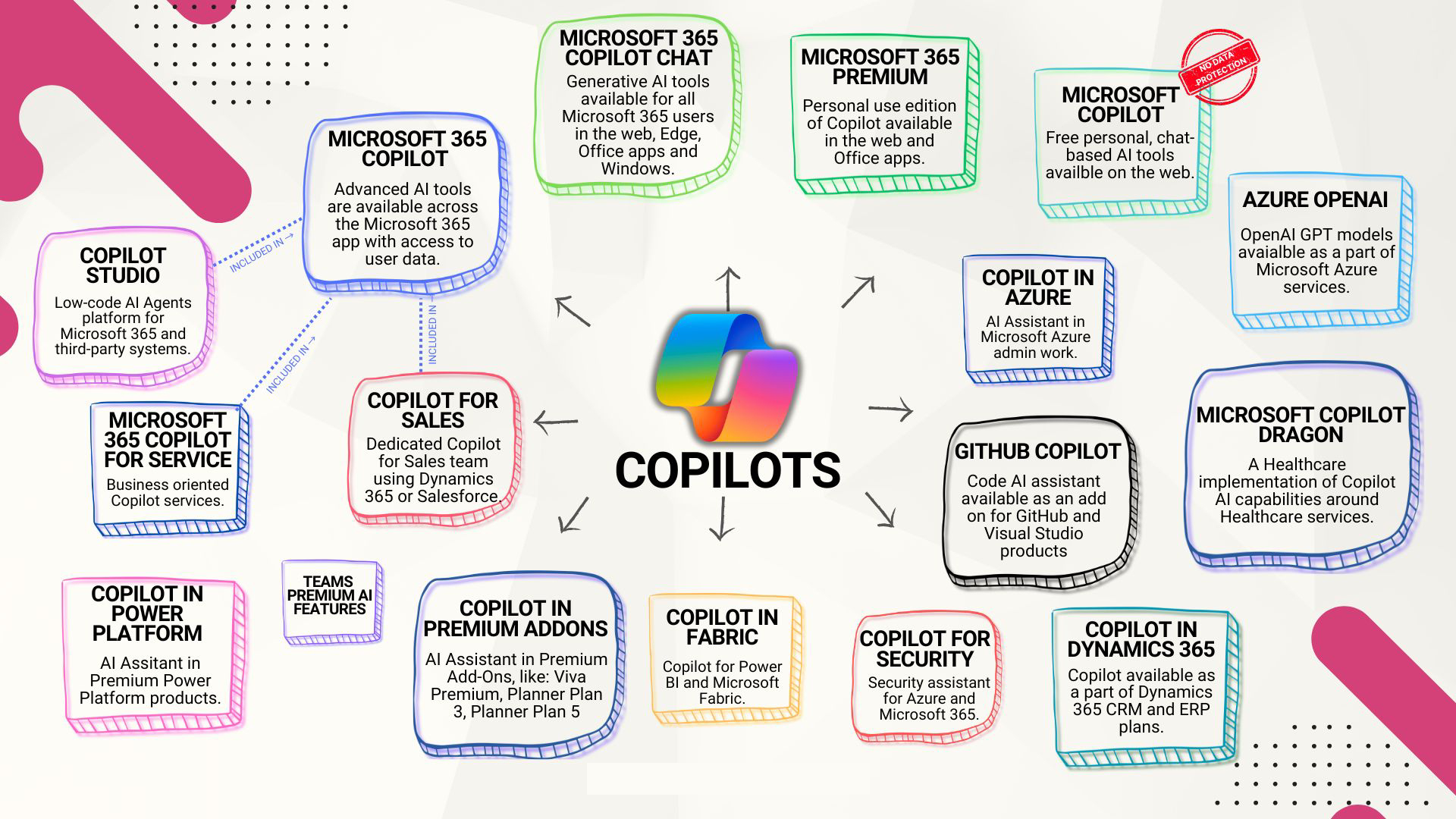
Microsoft Copilot is not just a single AI product, but an ecosystem of AI assistants designed to meet the needs of users, industries, and diverse business scenarios. It spans from office document work and software development to cloud management, security, and even healthcare. Microsoft offers a variety of Copilot solutions, each tailored to specific domain requirements.
This article explains Types of Copilots In an easy-to-understand and SEO-friendly format to help you choose the copilot that best suits your role or organization.
What is a copilot?
Copilot is an AI-powered assistant that can help you browse the web and do much more. This intelligent assistant is designed to inform, empower, and support both personal use and professional work. Whether you ask simple or complex questions, use Copilot AI to start research or creative projects, get help with grammar checking, or request a summary of a work meeting—Copilot is always ready to help, wherever you are.
Copilot takes AI assistance to the next level with features like Copilot Daily, Voice, and Image Creator, making it your trusted AI assistant that can be used anytime, anywhere.
Copilot for productivity and routine tasks.
This Copilot group is designed for general users, knowledge-based employees, and professionals who regularly work with documents, emails, and meetings.
Microsoft 365 Copilot
Embedded directly within Word, Excel, PowerPoint, Outlook, and Microsoft Teams, using Microsoft Graph to securely collaborate with organizational data.
Suitable for:
- Writing documents and emails.
- Meeting summary and discussion.
- Creating presentations and reports
- Analyzing data in Excel
Microsoft 365 Copilot Chat
A secure AI chat experience within Microsoft 365 apps and on the web.
Suitable for:
- Asking questions about a work file.
- Getting answers from AI that are based on enterprise-level data.
- Creating Copilot Pages and Images
Microsoft Copilot (Free)
Copilot for consumers is available via Edge, Windows, and the web.
Suitable for:
- Chatting with a typical AI.
- Researching information on the web
- Assisting with text writing and image creation.
Microsoft 365 Premium (for general users)
Packages for individuals or families, with higher AI usage limits.
Suitable for:
- personal performance
- Research and in-depth analysis.
- Using advanced AI agents for personal tasks.
Copilot for developers, data, and cloud teams.
This Copilot group provides support to technical users such as developers, data engineers, and IT professionals.
GitHub Copilot
An AI coding assistant that works with VS Code, Visual Studio, and GitHub.
Suitable for:
- Writing and improving code
- System debugging and testing.
- Understanding complex code
Azure OpenAI
Accessing enterprise-level OpenAI models via Microsoft Azure.
Suitable for:
- Developing custom AI applications.
- Safe and compliant use of AI.
Copilot in Azure
AI assistant for managing cloud infrastructure.
Suitable for:
- Azure Resource Management
- Troubleshooting cloud services
- Optimizing and controlling cloud costs.
Copilot in Microsoft Fabric
The AI capabilities within Microsoft's integrated data analytics platform.
Suitable for:
- Data engineering and analytics.
- Creating dataflow and data models.
- Creating a query using natural language.
Copilot for business operations and automation.
This group of Copilots focuses on business operations and process optimization.
Microsoft Copilot Studio
A low-code platform for creating custom copilots and AI agents.
Suitable for:
- Creating a chatbot
- Organizational automation
- Connecting various business systems.
Copilot in Power Platform
AI embedded in Power Apps, Power Automate, and Power BI.
Suitable for:
- Building apps using natural language.
- Automating business processes.
- Creating dashboards is faster.
Copilot for Sales
AI for sales and CRM systems.
Suitable for:
- Writing sales emails
- Generating deal insights
- Updating information in CRM.
Copilot for Service
Designed for customer service and support teams.
Suitable for:
- Summary of customer cases
- Troubleshooting improvements
- Automatic answer suggestions
Copilot in Dynamics 365
AI features embedded in ERP and CRM modules.
Suitable for:
- Automated financial and supply chain systems
- Sales Forecast
- Customer service workflow
Copilot for safety and healthcare.
This group of Copilots is designed for highly regulated and impactful industries.
Copilot for Security
AI assistant for Security Operations Center (SOC)
Suitable for:
- Threat Investigation
- Response to events
- Safety record analysis
Microsoft Copilot Dragon (Medical Application)
AI assistant for healthcare professionals.
Suitable for:
- Clinical documentation
- Summarizing the conversation with the patient.
- Reducing the workload of paperwork.
Comparison Table: Types of Microsoft Copilot
Copilot type | Main user group | Main purpose |
Microsoft 365 Copilot | office worker | Documentation, meetings, and efficiency improvement. |
Copilot Chat | Organization users | Secure AI chat with enterprise data. |
GitHub Copilot | Developer | Create and debug code. |
Azure OpenAI | organization | Develop custom AI apps. |
Copilot in Azure | IT and Cloud Team | Manage and optimize the cloud. |
Copilot Studio | Business and IT | Create a custom AI agent. |
Power Platform Copilot | Business users | Applications, automation, and analytics. |
Copilot for Sales | Sales team | CRM insights and sales support. |
Copilot for Service | Support team | Automated customer service system |
Copilot for Security | SOC Team | Detect and respond to threats. |
Copilot Dragon | medical personnel | Clinical documents and summaries |
Summary: Understanding the Types of Copilots
Microsoft Copilot is an ecosystem, not a single tool. Each Copilot type is designed for a specific role, from routine tasks and software development to security and healthcare.
When you understand Types of Copilots Clearly, organizations and individuals can choose the right AI assistant to truly enhance efficiency, improve decision-making, and reduce workload across all aspects of their work.
Interested in Microsoft products and services? Send us a message here.
Explore our digital tools
If you are interested in implementing a knowledge management system in your organization, contact SeedKM for more information on enterprise knowledge management systems, or explore other products such as Jarviz for online timekeeping, OPTIMISTIC for workforce management. HRM-Payroll, Veracity for digital document signing, and CloudAccount for online accounting.
Read more articles about knowledge management systems and other management tools at Fusionsol Blog, IP Phone Blog, Chat Framework Blog, and OpenAI Blog.
New Gemini Tools For Educators: Empowering Teaching with AI
If you want to keep up with the latest trending technology and AI news every day, check out this website . . There are new updates every day to keep up with!
Fusionsol Blog in Vietnamese
- What is Microsoft 365?
- What is Copilot?What is Copilot?
- Sell Goods AI
- What is Power BI?
- What is Chatbot?
- Lưu trữ đám mây là gì?
Related Articles
- What is Microsoft 365?
- What is Azure AI Foundry Labs?
- Power BI Free Plan: A Deep Dive into Microsoft’s BI Solution
- What is a Data Warehouse?
- What is Microsoft Fabric?
- Is GitHub Copilot worth it?
- AI for Business: To Create Real Business Benefits
- Introducing ChatGPT Go: Access to advanced AI at an affordable price
Frequently Asked Questions (FAQ)
What is Microsoft Copilot?
Microsoft Copilot is an AI-powered assistant feature that helps you work within Microsoft 365 apps like Word, Excel, PowerPoint, Outlook, and Teams by summarizing, writing, analyzing, and organizing information.
Which apps does Copilot work with?
Copilot currently supports Microsoft Word, Excel, PowerPoint, Outlook, Teams, OneNote, and others in the Microsoft 365 family.
Do I need an internet connection to use Copilot?
An internet connection is required as Copilot works with cloud-based AI models to provide accurate and up-to-date results.
How can I use Copilot to help me write documents or emails?
Users can type commands like “summarize report in one paragraph” or “write formal email response to client” and Copilot will generate the message accordingly.
Is Copilot safe for personal data?
Yes, Copilot is designed with security and privacy in mind. User data is never used to train AI models, and access rights are strictly controlled.