To transform GitHub Copilot from a single-task coding assistant into a collaborative ecosystem of intelligent agents, GitHub has launched... Agentic Memory System This is an important foundational capability. Instead of Copilot having to start from scratch in every session, agents can now learn continuously from real development workflows, allowing knowledge to persist, evolve, and improve accuracy over time.
This change allows Copilot to better understand the repository, coding conventions, architectural patterns, and operational constraints, eliminating the need for developers to repeatedly explain the same context.
Why cross-agent memory is important in modern development.
Software development is no longer a linear activity. Teams must switch back and forth between coding, reviewing, debugging, security, deployment, and application maintenance. Typically, AI tools operate in silos, making it impossible to transfer insights discovered in one workflow to another.
Cross-agent memory addresses this limitation by allowing insights learned in one stage of development to inform actions in another stage. For example, when an agent writing code identifies important architectural rules while fixing a vulnerability, that knowledge can be reused by a code-review agent to detect rule violations in future pull requests. This creates a compounding effect, where every interaction helps improve future outcomes.
Architecture and design principles of the Agentig Memory System
Agentic Memory System It is designed to address one of the main challenges: “accuracy over time.” Because codebases change rapidly, branches diversify, and assumptions can become outdated, storing information without verification poses more risk than benefit.s
To solve this problem, GitHub created a memory system using... Just-in-Time Verification Instead of storing data statically.
Just-in-Time audit format
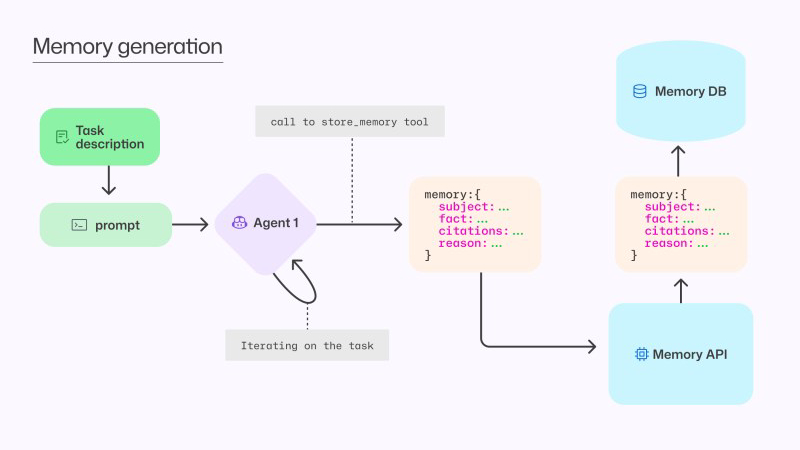
Each part of memory is stored along with... Citations Clearly, this specifies the location of the code that supports that insight before the agent uses memory. The system checks that:
- The referenced code locations still exist.
- The content remains consistent with the stored memory.
- Is that information relevant to the current branch?
If a conflict is detected, the agent immediately updates or replaces that memory with new evidence, enabling the system to be self-correcting and tolerant to outdated or misused data.
Creating memory units as a tool for agents.
Memory creation is implemented in the form of tool calls, where the agent calls it only when it detects reusable knowledge with long-term value.
Real-world usage examples: Synchronizing API versions across client-side code, server-side logic, and documentation: when Copilot detects consistent version updates across multiple files, the system stores a structural memory linking those locations. In subsequent changes, the agent will automatically update all related files or alert if anything is missed during code review, helping prevent hard-to-detect bugs before they reach production.
Privacy, security, and segregation of the repository.
The memory in the copilot is strictly controlled:
- Memory is limited by each repository.
- Only users with write access can create memory.
- Memory can only be used within the same repository.s
- Data leaks between repositories are not permitted.
This model reflects GitHub's existing permission structure to ensure that memory behaves like source code: secure, verifiable, and private.
Measurable impact on developer productivity.
GitHub rigorously evaluated the system under real-world conditions. A/B testing in production revealed statistically significant findings as follows:
- The Merge Pull Request rate has increased. For coding-related work.
- Improved response quality In automated code review.
- trust increases Following the copilot's instructions.
These results confirm that memory-driven agents not only reason better, but also deliver measurable performance.
Summary and path forward
Currently, Repository-level memory is available in Public Preview via Copilot CLI, Copilot Coding Agent, and Copilot Code Review, with plans to add other agents in the future.
By making verified knowledge persist across workflows, GitHub Copilot is evolving into a true multi-agent development partner—a partner that learns alongside the team instead of starting from scratch each time a task is assigned.