
Managing permissions has always been a trade-off between security and productivity. With the introduction of Claude Code Auto Mode developers now have a smarter middle ground—reducing interruptions while maintaining safeguards against risky actions.
This new mode allows developers to run longer, more complex workflows without constant approvals, while still protecting their systems from potentially harmful operations.
What is Claude Code Auto Mode?
Claude Code Auto Mode is a new permissions setting that enables Claude to make decisions on behalf of the user when executing actions such as file writes or terminal commands.
Traditionally, Claude Code uses a strict permission model:
- Every file write requires approval
- Every bash command prompts the user
While secure, this makes it difficult to run long, uninterrupted tasks.
Auto Mode changes this by introducing intelligent automation with built-in safety checks.
How Claude Code Auto Mode Works
Intelligent Permission Handling
Instead of asking for approval every time, Auto Mode uses a classifier system to evaluate actions before they are executed.
Workflow:
- Claude prepares a tool action (e.g., file write, command execution)
- A classifier analyzes the action for potential risks
- Based on the evaluation:
- ✅ Safe actions → executed automatically
- ⚠️️ Risky actions → blocked or redirected
- 🔒 Persistent risky attempts → trigger user approval
Examples of Risk Detection
The system is designed to detect potentially harmful actions such as:
- Mass file deletion
- Sensitive data exfiltration
- Execution of malicious scripts
This ensures a balance between autonomy and control.
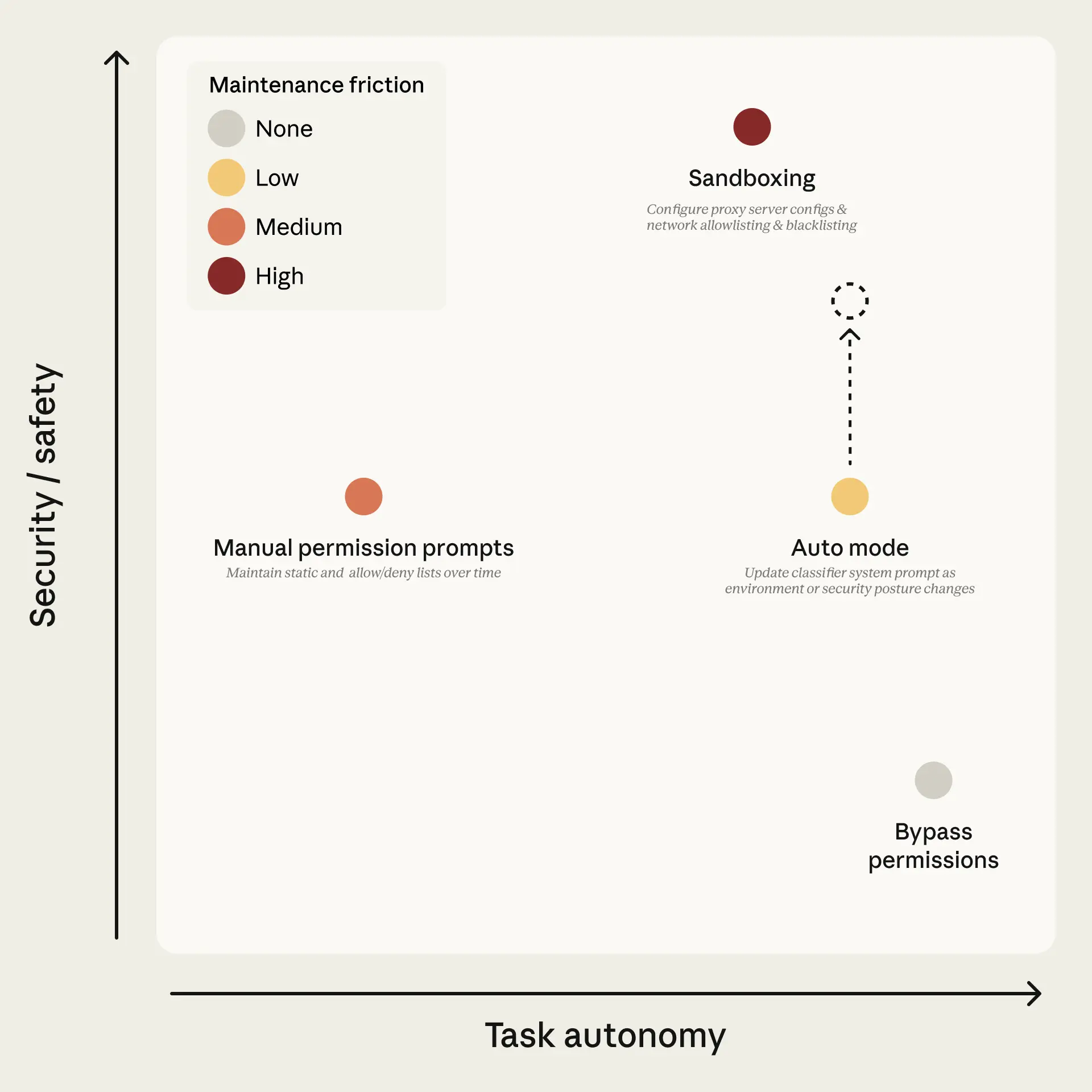
Claude Code Auto Mode vs Skipping Permissions
Feature | Default Mode | Skip Permissions (--dangerously-skip-permissions) | Claude Code Auto Mode |
Safety | High | Very low | Medium to high |
User Interruptions | Frequent | do not have | Minimal |
Risk Level | low | High | Controlled |
Automation | Limit | Full version | Smart Automation |
Unlike completely skipping permissions, Auto Mode provides a safer alternative that still enables automation without exposing systems to unnecessary risks.
What to Expect
While Auto Mode improves the developer experience, it still has some limitations.
Things to consider:
- Not 100% safe: Some risky actions may still go through.
- False positives: Sometimes a safe action may be blocked.
- Contextual limitations: The system may not understand the entire environment.
- Impact on efficiency:
- Use a slightly larger token.
- There is a slight increase in latency.
Therefore, it is recommended to use it in a controlled environment or one that is isolated from the main system.
Getting started with Claude Auto Mode
Usage
- Now enabled in research preview for Team plan users.
- We are about to add support for:
- Enterprise
- API users
Supported models:
- Claude Sonnet 4.6
- Claude Opus 4.6
For developers
Enable via CLI:
claude –enable-auto-mode
- Use Shift + Tab to switch modes.
- Supports CLI, Desktop, and VS Code extension.
For system administrators
- Auto Mode can be managed through the organization settings.
- Disable with:
{
“disableAutoMode”: “disable”
}
- Desktop apps: Disabled by default.
- It can be accessed via: Organization Settings → Claude Code
Why is Claude Auto Mode important?
The link between productivity and safety.
Claude Auto Mode represents a shift from:
- Manual approval → Intelligent automation system
- Fixed security → Adaptive defense
- Interrupted workflow → Resumption of operation
Helping developers:
- Can run long-term projects without interruption.
- Maintain an appropriate level of security.
- Improve overall development efficiency.
Summary
Claude Code Auto Mode introduces a practical solution to one of the biggest pain points in AI-assisted development—permission friction. By combining automation with risk-aware safeguards, it creates a more seamless and efficient coding experience without fully compromising security.
As this feature evolves, it has the potential to become a standard approach for balancing autonomy and control in AI-powered developer tools.