
As AI systems become more capable and connect to the web, enterprise data, and third-party applications, the security landscape is evolving rapidly. Increased capabilities bring increased risks, and one prominent threat is prompt injection attacks.
To address this risk, OpenAI has launched two key safeguards:
- Lockdown Mode in ChatGPT: Optional advanced security setting for high-risk users.
- The label “Elevated Risk” is added for better visibility, as some features may involve additional security considerations.
These two measures are considered important steps towards the responsible use of AI.
Why is Prompt Injection important?
Prompt injection attacks occur when a third party embeds malicious commands into content processed by an AI system, such as web pages, documents, or connected applications.
What is the goal?
To replace the original command, extract sensitive data, or distort system results.
As AI tools increasingly connect to external data sources and applications, organizations need to re-evaluate their traditional safeguards, as basic measures may no longer be sufficient if workflows involve real-time web browsing, APIs, or shared enterprise resources.
This is where Lockdown Mode in ChatGPT comes into play.
What is Lockdown Mode?
Lockdown Mode is an optional, high-security configuration built specifically for:
- Executives at prominent organizations
- Security-sensitive teams
- Users managing confidential or regulated data
- High-risk or high-visibility roles
This feature is not necessary for the average user, but for those facing a high level of cyber risk, the system will add stricter and more clearly defined restrictions to reduce the risk of data breaches.
How It Works
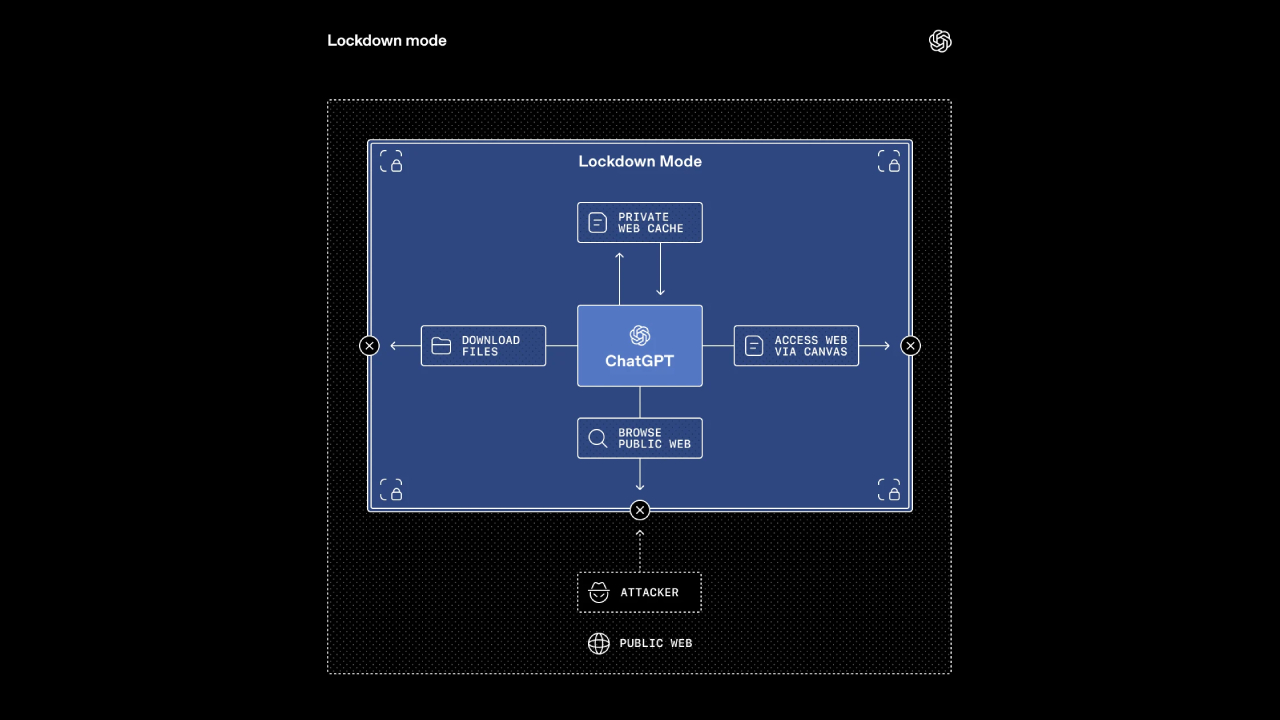
Lockdown Mode carefully limits how ChatGPT interacts with external systems.
- Disable certain tools that might open the door for sensitive information to leak.
- Limit network connectivity.
- Reduce reliance on external apps.
- Add an extra layer of security on top of the existing organizational control system.
For example:
- Web browsing is restricted to cached content only.
- No real-time network requests are generated from the OpenAI control environment.
This approach helps prevent attackers from redirecting sensitive data to malicious destinations.
Features that do not yet have deterministic safety guarantees may be completely disabled.
The result is a tightly controlled working environment to minimize the risk of prompt injection attacks.
Built on the foundation of enterprise-level security.
ChatGPT's business packages already include advanced security features, such as:
- Sandboxing
- Preventing data leakage via URLs.
- Policy monitoring and enforcement.
- Role-based access control
- Audit logs
Lockdown Mode is an enhancement of these systems; it does not replace them.
This feature is currently available for:
- ChatGPT Enterprise
- ChatGPT Edu
- ChatGPT for Healthcare
- ChatGPT for Teachers
Workspace administrators can enable this through Workspace Settings by creating a specific role. Once enabled, it will add additional restrictions beyond the administrator's previously defined settings.
Granular App Controls for Admins
Security often involves trade-offs. Some mission-critical workflows depend on external applications.
To balance usability and protection, administrators can:
- Select exactly which apps remain accessible
- Define specific actions permitted within those apps
- Maintain granular oversight of usage
Additionally, the Compliance API Logs Platform provides detailed visibility into:
- Connected app usage
- Shared data
- External content sources
This ensures organizations retain transparency—even under strict restrictions.
Lockdown Mode for individual consumers is also planned for release in the coming months.
Introducing “Elevated Risk” Labels
While Lockdown Mode is best suited for high-risk users, most AI workflows tend to be of medium risk.
Instead of removing those capabilities, OpenAI added an “Elevated Risk” label to provide clearer information within the product.
This label appears in
- ChatGPT
- ChatGPT Atlas
- Codex
Users will be notified when a feature may increase risks, particularly in terms of network connectivity.
What does the "Elevated Risk" sign mean?
An Elevated Risk label indicates:
- A feature connects to the web or external systems
- Additional risk may be introduced
- Users should make an informed decision before enabling it
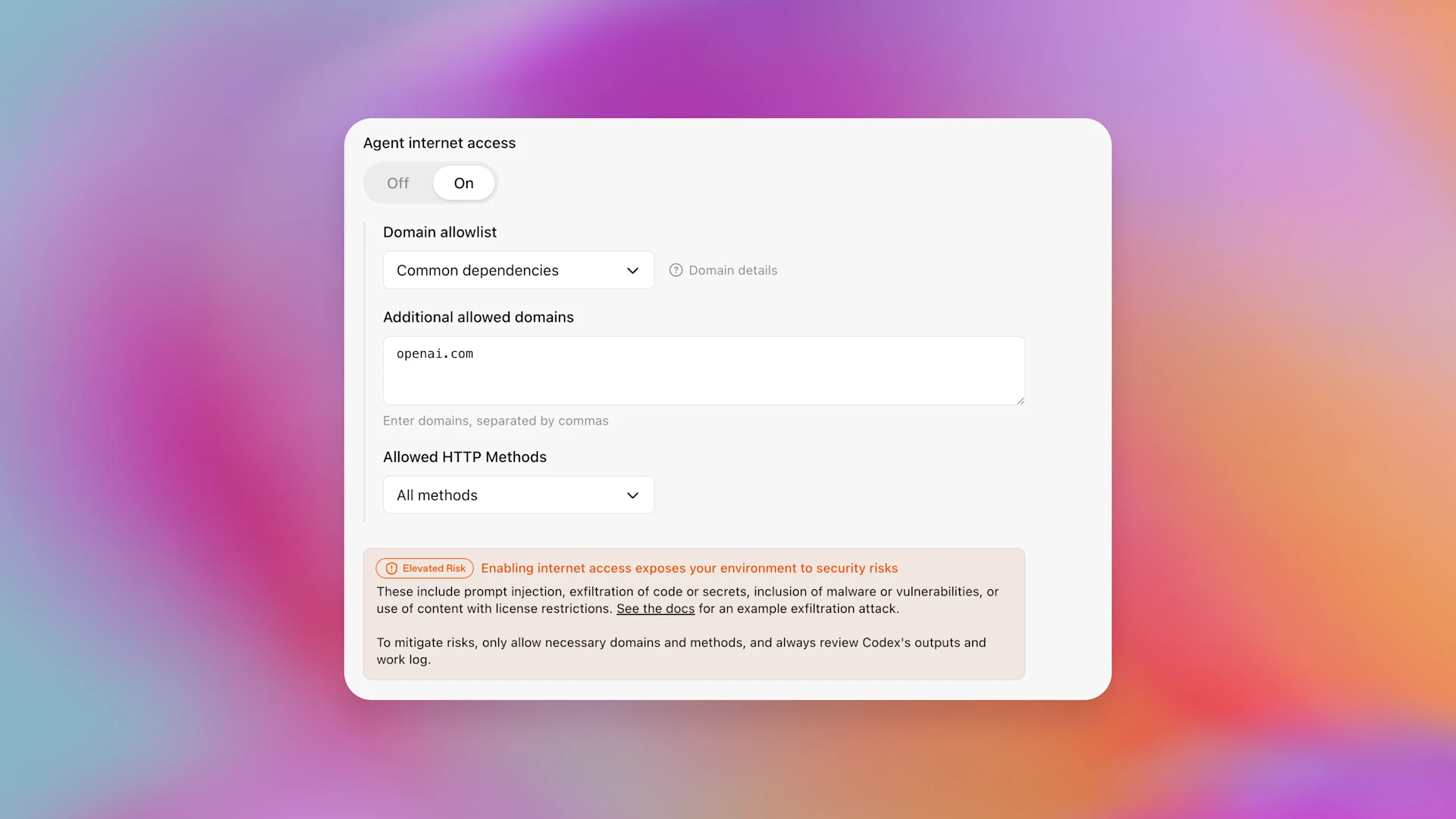
For example, in Codex (OpenAI’s coding assistant), developers can enable network access so it can search documentation online. The relevant settings screen now includes:
- An Elevated Risk label
- A clear explanation of what changes
- A summary of potential risks
- Guidance on when enabling access is appropriate
This transparency empowers users to manage their own risk posture.
A Balanced Approach to AI Security
AI will become more useful when connected to live data, enterprise APIs, and web resources.
But ability should not come at the cost of risks that the user is unaware of.
The introduction of Lockdown Mode in ChatGPT signifies a shift towards...
- Defined safety measures for high-risk users.
- Granular enterprise control
- Transparent risk communication
- Responsible AI deployment
Over time, as safeguards improve and certain risks become fully mitigated, Elevated Risk labels may be removed. The feature list associated with these labels may also evolve as threat landscapes change.
What’s Next?
Security in AI is not static—it evolves alongside emerging threats. As adversaries become more sophisticated, so too must defensive systems.
With Lockdown Mode in ChatGPT and the introduction of Elevated Risk labels, OpenAI is reinforcing its commitment to:
- Practical enterprise security
- User-informed decision-making
- Ongoing mitigation of novel attack vectors
For organizations handling private data, regulated information, or operating in high-risk environments, these updates provide not just improved functionality—but peace of mind.
AI innovation must move forward responsibly. These additions represent an important step in that direction.