Create characters with AI using Microsoft Copilot
Creating compelling characters is the foundation of great storytelling. Whether you are writing a novel, designing a game, building brand personas, or developing marketing campaigns, strong characters make your work memorable. Today, it’s easier than ever to create characters with AI using intelligent tools like Microsoft Copilot.
This guide will walk you step-by-step through how to create characters with AI effectively using Copilot’s writing, brainstorming, and visual generation capabilities.
Why Use AI to Create Characters?
AI speeds up ideation without sacrificing creativity. Instead of staring at a blank page, you can instantly generate structured character concepts and refine them as needed.
Here’s why professionals are using AI for character development:
- Generate original ideas quickly
- Overcome writer’s block
- Expand personality depth and emotional layers
- Maintain consistency across long projects
- Produce visuals alongside written profiles
Microsoft Copilot acts as a creative collaborator. It helps structure raw ideas into detailed profiles while allowing you to iterate and improve output.
Step 1: Start with a Focused Prompt
To create characters with AI successfully, begin with clarity. Your initial prompt sets the direction.
Example Prompts
- “Write and Create a fantasy character with a mysterious past and hidden magical ability.”
Copilot typically returns a structured outline including:
- Name
- Age
- Appearance
- Personality traits
- Strengths and weaknesses
- Backstory
- Core motivations
If the output feels too generic, refine your prompt. Add genre, tone, setting, or personality constraints.
Step 2: Expand into a Full Character Profile
Once you like the concept, ask Copilot to deepen the character.
Example Prompts
- “Turn this into a detailed character sheet with emotional depth.”
- “Describe internal conflicts and long-term goals.”
- “Develop their flaws and psychological triggers.”
Copilot can produce:
- Archetype alignment
- Personality breakdowns
- Personal fears and contradictions
- Relationship dynamics
- Narrative arcs
This transforms a basic concept into a multi-dimensional individual.
Step 3: Generate Character Visuals
Characters become more powerful when visualized. Copilot integrates with Microsoft’s design tools to generate AI-based imagery.
Example Prompts
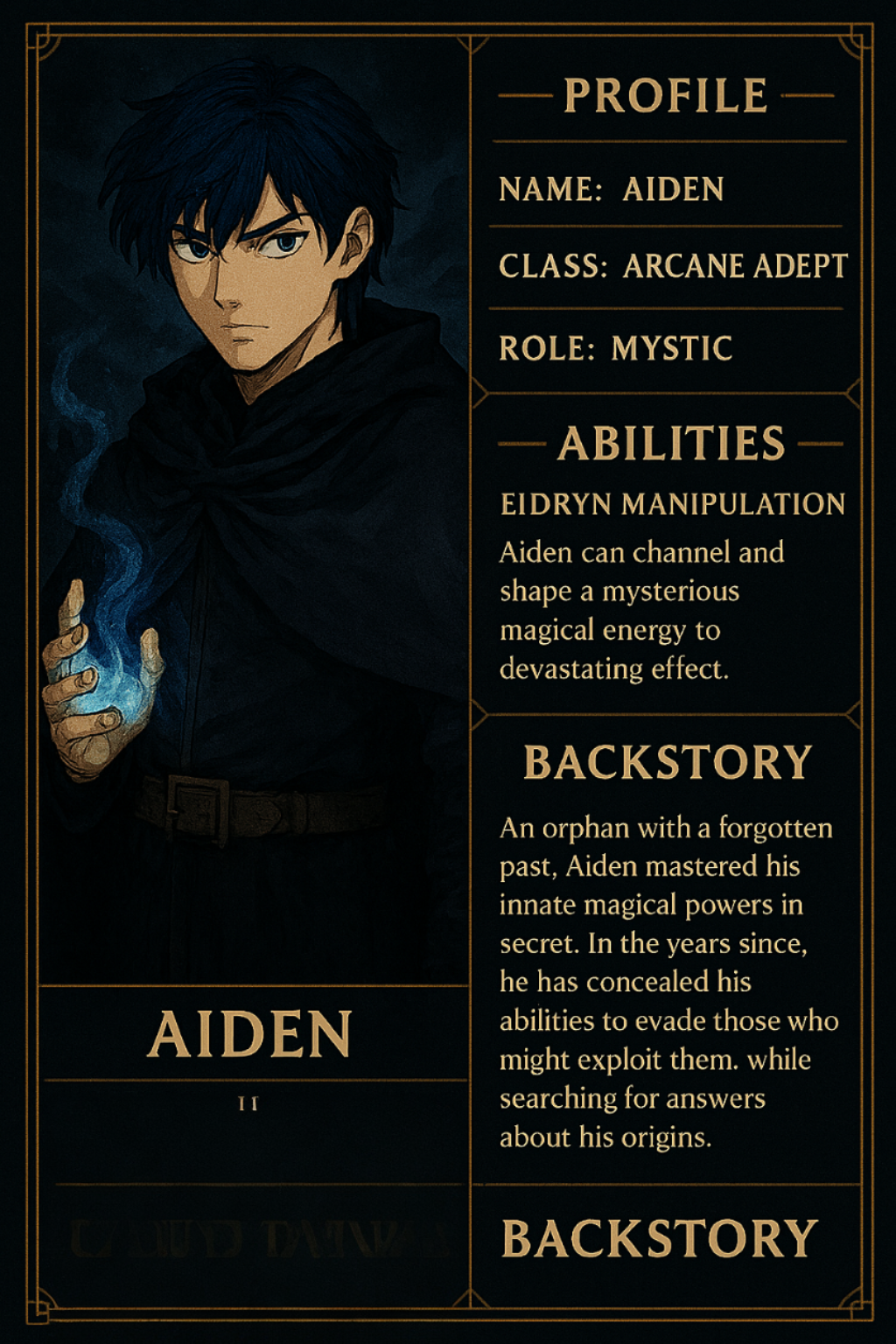
“Generate an image of a fantasy style blue hair anime boy with a mysterious past and hidden magical ability.”
You can refine by specifying:
- Art style (realistic, anime, watercolor, comic)
- Lighting and mood
- Pose and expression
- Clothing and environment
Visual generation is especially valuable for:
- Game development
- Marketing campaigns
- Brand storytelling
- Social media content

Step 4: Build Reusable Templates
For ongoing projects, structure matters. You can ask Copilot to create reusable templates so every new character follows a consistent framework.
Example Prompts
“Create a reusable character development template for fantasy novels.”
Your template might include:
- Core identity
- Personality breakdown
- Internal conflict
- External conflict
- Character growth arc
- Key dialogue style
Using templates ensures continuity across series, campaigns, or collaborative teams.
Step 5: Develop Dialogue and Scene Interaction
Characters become believable through interaction. Copilot can help you simulate scenes and refine dialogue tone.
example:
- “Write a tense conversation between two rivals before a battle.”
- “Create a heartfelt apology scene between siblings.”
- “Write dialogue that reveals hidden resentment without explicitly stating it.”
You can also instruct Copilot to maintain:
- Formal or casual tone
- Sarcastic or emotional style
- Industry-specific language for business scenarios
This strengthens narrative realism and emotional impact.
Step 6: Apply Character Creation in Business Contexts
Learning to create characters with AI is not limited to fiction. Businesses increasingly use AI-generated personas for strategic purposes.
Example of usage:
- Brand ambassador
- Marketing persona
- Customer archetype
- Training simulation characters
- Social media campaign mascots
Example Prompts
“Create a professional yet approachable brand ambassador for a cloud cybersecurity company.”
Copilot can extend this into scripts, bios, branding tone guidelines, and visual concepts.
Tips for Better Results
To maximize effectiveness:
- Be specific about genre and tone
- Provide context about the story world
- Add constraints (e.g., “must have a tragic flaw”)
- Ask for multiple variations
- Refine iteratively instead of accepting first drafts
Remember, AI enhances creativity—but direction comes from you.
Common Mistakes to Avoid
- Using overly vague prompts
- Accepting generic personalities without refinement
- Ignoring character flaws
- Forgetting long-term character growth
- Not maintaining consistency across scenes
The more detailed your instructions, the stronger the output.
Summary
When you create characters with AI using Microsoft Copilot, you unlock faster ideation, deeper character complexity, and improved creative workflow. Whether you're developing fiction, designing digital experiences, or crafting marketing identities, Copilot acts as an intelligent partner that expands your imagination rather than replacing it.
Creative storytelling is no longer limited by time or blank pages. With the right prompts and refinement, you can build rich, memorable characters that connect with your audience—and do it more efficiently than ever before.
Interested in Microsoft products and services? Send us a message here.
Explore our digital tools
If you are interested in implementing a knowledge management system in your organization, contact SeedKM for more information on enterprise knowledge management systems, or explore other products such as Jarviz for online timekeeping, OPTIMISTIC for workforce management. HRM-Payroll, Veracity for digital document signing, and CloudAccount for online accounting.
Read more articles about knowledge management systems and other management tools at Fusionsol Blog, IP Phone Blog, Chat Framework Blog, and OpenAI Blog.
New Gemini Tools For Educators: Empowering Teaching with AI
If you want to stay up-to-date with the latest technology and AI news, check out this website It's updated daily!
Fusionsol Blog in Vietnamese
- What is Microsoft 365?
- What is Copilot?What is Copilot?
- Sell Goods AI
- What is Power BI?
- What is Chatbot?
- What is cloud storage?
Related Articles
Frequently Asked Questions (FAQ)
What is Microsoft Copilot?
Microsoft Copilot is an AI-powered assistant feature that helps you work within Microsoft 365 apps like Word, Excel, PowerPoint, Outlook, and Teams by summarizing, writing, analyzing, and organizing information.
Which apps does Copilot work with?
Copilot currently supports Microsoft Word, Excel, PowerPoint, Outlook, Teams, OneNote, and others in the Microsoft 365 family.
Do I need an internet connection to use Copilot?
An internet connection is required as Copilot works with cloud-based AI models to provide accurate and up-to-date results.
How can I use Copilot to help me write documents or emails?
Users can type commands like “summarize report in one paragraph” or “write formal email response to client” and Copilot will generate the message accordingly.
Is Copilot safe for personal data?
Yes, Copilot is designed with security and privacy in mind. User data is never used to train AI models, and access rights are strictly controlled.