Scientific research is fundamental to modern life, from public health and energy to security and innovation. However, even with rapid advances in artificial intelligence, much of the daily scientific work still relies on fragmented and largely unchanged tools. Writing articles, manuscript manipulation, collaborating with multiple authors, and preparing manuscripts for publication remain time-consuming and disconnected processes. OpenAI Prism is designed to transform these.
Prism is an AI-native, free workspace built specifically for scientific writing and collaboration. Powered by GPT-5.2, it integrates drafting, reasoning, revising, and teamwork into a single environment, allowing researchers to focus on discovery rather than managing complex workflows.
From fragmented tools to integrated scientific workflows.
AI has already demonstrated its potential to accelerate scientific discovery in areas such as advanced mathematical reasoning, biological research, and experimental design. However, in reality, many researchers still have to switch between separate document editors, LaTeX compilers, PDF files, bibliographic management tools, and AI chat.
This constant switching of contexts disrupts concentration and slows down the task.
Prism addresses this problem by integrating advanced AI capabilities directly into the scientific writing process, rather than using AI as a separate assistant. Researchers can collaborate with GPT-5.2 within the same document, where the entire structure, equations, references, and context are readily available.
What is a prism?
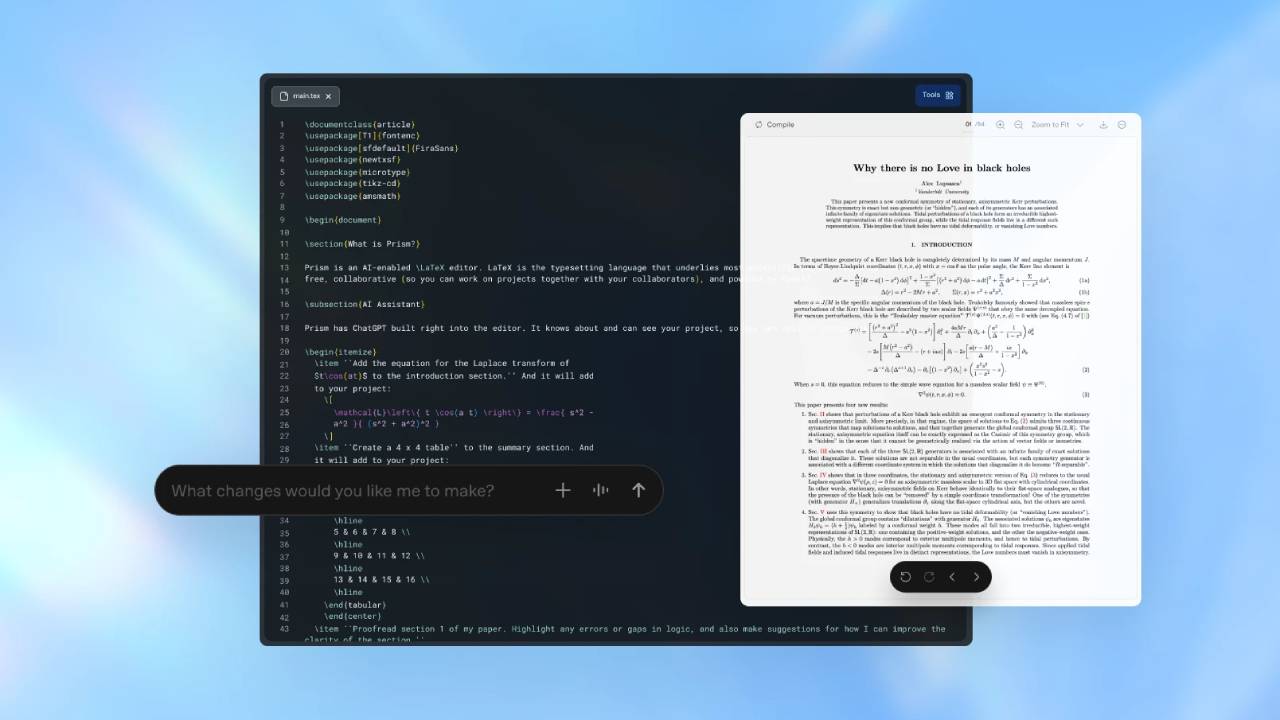
Prism is a LaTeX-native cloud-based workspace for scientific writing and collaboration, built on the foundation of Crixet, a stable online LaTeX platform, and enhanced with AI to support modern research workflows.
Unlike traditional writing tools, Prism embeds AI reasoning capabilities directly into the workspace, enabling researchers to interact with content intelligently and efficiently.
With Prism, researchers can:
- Explore concepts and reason about complex problems with GPT-5.2 Thinking.
- Draft and revise the manuscript, being aware of the document structure, equations, and all references.
- Relevant literature can be found and used directly within the context of the original text.
- Create, edit, and restructure equations, images, and bibliographies with the help of AI.
- Automatically convert handwritten equations or diagrams to LaTeX.
- Edit the document in the same location without switching tools.
- Use voice editing (optional) to quickly adjust your work.
Designed for real-world scientific collaboration.
Research is almost never a solo endeavor; articles are developed in collaboration with colleagues, students, advisors, and reviewers, who are often from different institutions and time zones.
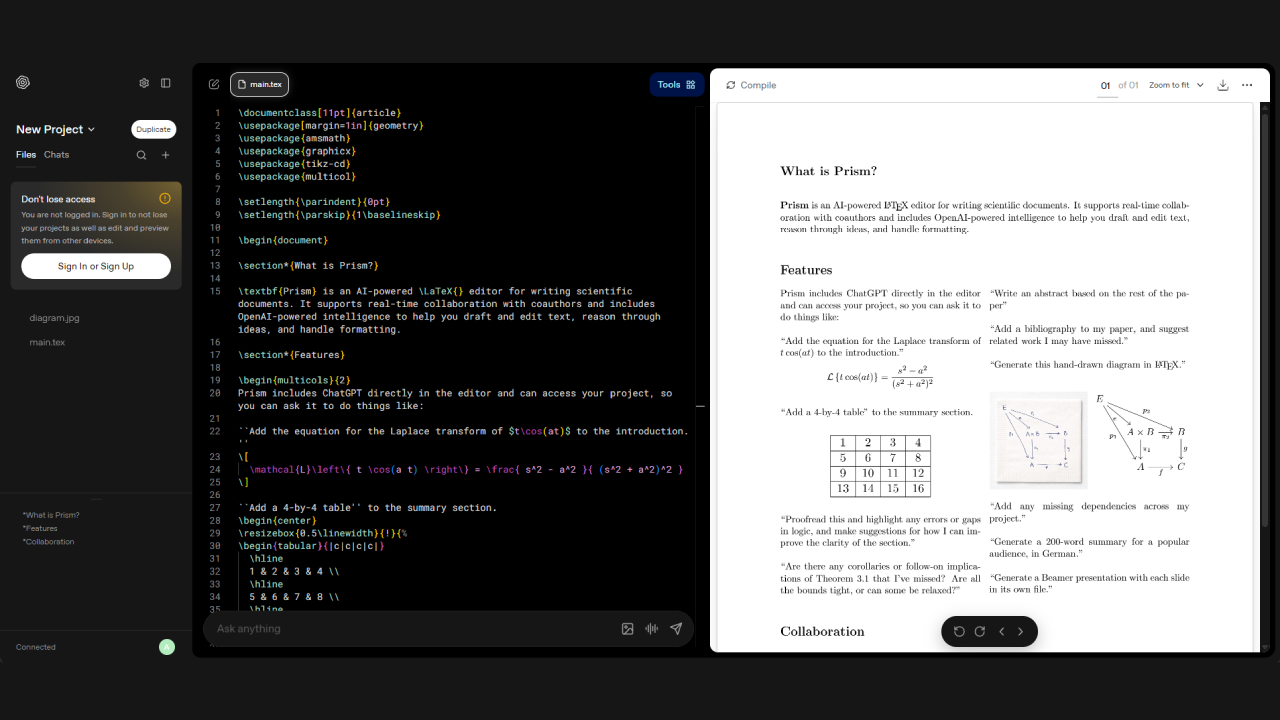
Prism supports this reality with the following features:
- There is no limit on the number of participants, and there are no seating restrictions for users.
- Real-time editing, feedback, and improvements.
- A complete cloud experience without needing to install LaTeX on your machine.
By eliminating version conflicts and managing files manually, Prism enables research teams to collaborate seamlessly and focus on scientific quality rather than documentation.
Expanding access to scientific instruments.
Accessibility is a key principle of OpenAI Prism. The platform is free to use, and anyone with a personal ChatGPT account can start immediately. There are no subscription requirements or limitations on the number of participants.
This approach helps reduce barriers for researchers across all disciplines, institutions, and career paths, supporting equitable access to high-quality scientific writing tools. More advanced AI features will be gradually rolled out through the paid ChatGPT plans for organizations and academic institutions.
Why is OpenAI Prism important right now?
In 2025, AI significantly transformed software development, reducing friction and increasing efficiency. A similar shift is expected in the scientific community in 2026, not only in discoveries but also in making daily tasks more efficient.
Prism is a significant step toward that future, reducing administrative workloads and centralizing scientific workflows, freeing up researchers time to think, experiment, and collaborate—where true progress occurs.