Agents in Microsoft 365 Copilot: Revolutionize workflow with intelligent agents
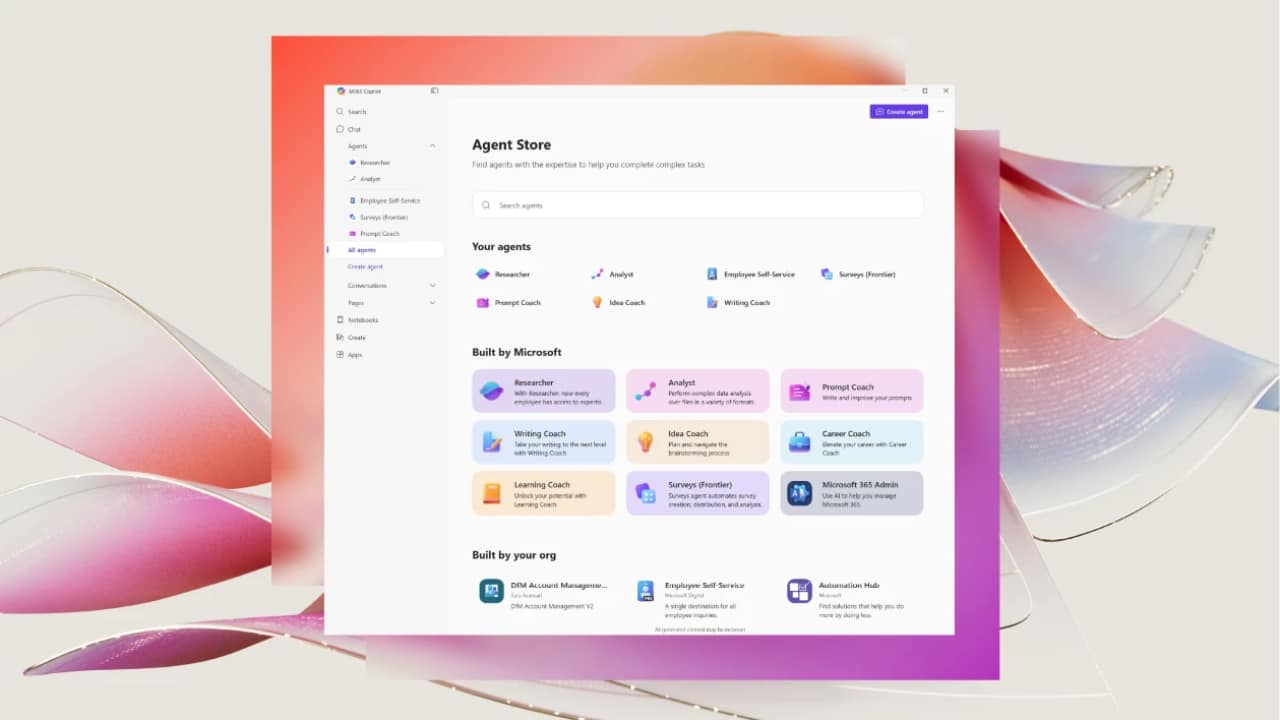
Artificial intelligence (AI) is transforming the way businesses innovate, collaborate, and compete in the digital world — and Agents in Microsoft 365 Copilot are at the heart of this transformation. According to the Microsoft 2025 Work Trend Index, 81% of business leaders plan to deploy AI agents across their organization, but only 24% have deployed them across their organization, reflecting the growing need for a clear strategy, trusted solutions, and seamless integrations to make AI agents a reality for everyday workflows.
To accelerate adoption, Microsoft is launching two key platforms, the Microsoft 365 Agent Store and Microsoft Marketplace, which make it easy for organizations to find, deploy, and manage AI agents designed to work with Microsoft 365 Copilot, helping teams work smarter and faster.
Streamline processes with readily available agents.
Agent Store is embedded directly in Microsoft 365 Copilot to make it easy for employees to find and use AI agents, whether they're doing market research, data analysis, or IT support. These agents can handle repetitive, time-consuming tasks efficiently and accurately.
Ability | Description | Benefit |
Works directly with Microsoft 365 | Integrates with Copilot and Teams | Provides a familiar user experience |
Personal Search | Recommend agents based on each user's work context. | Increase work efficiency directly |
Multi-agent catalog | Includes agents from Microsoft and trusted partners. | Expanding flexibility of use |
Corporate Governance | Administrators can control installations through the Microsoft 365 Admin Center. | Security and compliance |
All third-party AI agents undergo rigorous audits by Microsoft to ensure they meet enterprise-grade security, performance, and compliance standards.
Create and publish custom agents
Organizations can build their own AI agents through Microsoft Copilot Studio and publish them to the Agent Store for use by internal teams, or to specific departments. This allows IT teams and executives to customize agents to fit their specific processes while maintaining centralized control.
Through the Microsoft 365 Admin Center, IT teams can:
- Create a catalog of approved agents
- Set access rights by user or department.
- Check usage rates and impacts through built-in reports.
- Manage the agent lifecycle from publishing to retirement.
This system enables Agents in Microsoft 365 Copilot to not only empower users but also maintain transparency and compliance with organizational regulations.
Partners that drive innovation with Agents
The Microsoft partner ecosystem plays a key role in extending the capabilities of Agents in Microsoft 365 Copilot. The Agent Store includes ready-to-use solutions from multiple partners that integrate directly with Copilot and Teams.
Alliance | Description | Main use cases |
Snowflake Cortex Agents | It enables natural language data retrieval and analysis. | Data analytics |
Asana Agent | Convert team conversations into tasks and automatically update projects. | Project Management |
LexisNexis Protégé™ | Legal assistants using data from LexisNexis | Research and preparation of legal documents |
Meltwater Agent | Extract insights from big data conversationally | News and media analysis |
SAP Joule | Integrate AI for business operations in SAP | Enterprise Resource Management |
Now Assist in Virtual Agent | Process requests and search for articles from ServiceNow | IT service management |
Agents from these partners enable organizations to integrate specialized data into their daily workflows, accelerating data-driven decision-making.
Find Agents through a centralized experience
While the Agent Store is an in-app channel for finding and installing agents, the Microsoft Marketplaceis a centralized web location where users can find, try, and purchase all the AI apps, cloud services, and agents that work with Copilot.
Both platforms use the same catalog, allowing customers to:
- Find solutions online
- Purchase through Microsoft Marketplace
- Install and manage agents directly within Microsoft 365.
This integrated system enables consistent pricing, simplifies sales management, and provides a seamless user experience.
Accelerate transformation with AI
Whether you're starting with your first AI agent or expanding across multiple departments, Microsoft 365 Copilot can address every level of AI adoption. Powered by the Agent Store, Marketplace, and Copilot Studio, businesses can build, find, and manage intelligent agents that fit their workflows.
Visit the Agent Store in the Microsoft 365 Copilot app or explore the Microsoft Marketplace today to start empowering your teams with the new era of Agents in Microsoft 365 Copilot.
Interested in Microsoft products and services? Send us a message here.
Explore our digital tools
If you are interested in implementing a knowledge management system in your organization, contact SeedKM for more information on enterprise knowledge management systems, or explore other products such as Jarviz for online timekeeping, OPTIMISTIC for workforce management. HRM-Payroll, Veracity for digital document signing, and CloudAccount for online accounting.
Read more articles about knowledge management systems and other management tools at Fusionsol Blog, IP Phone Blog, Chat Framework Blog, and OpenAI Blog.
New Gemini Tools For Educators: Empowering Teaching with AI
If you want to keep up with the latest trending technology and AI news every day, check out this website . . There are new updates every day to keep up with!
Fusionsol Blog in Vietnamese
- What is Microsoft 365?
- What is Copilot?What is Copilot?
- Sell Goods AI
- What is Power BI?
- What is Chatbot?
- Lưu trữ đám mây là gì?
Related Articles
Frequently Asked Questions (FAQ)
What is Microsoft Copilot?
Microsoft Copilot is an AI-powered assistant feature that helps you work within Microsoft 365 apps like Word, Excel, PowerPoint, Outlook, and Teams by summarizing, writing, analyzing, and organizing information.
Which apps does Copilot work with?
Copilot currently supports Microsoft Word, Excel, PowerPoint, Outlook, Teams, OneNote, and others in the Microsoft 365 family.
Do I need an internet connection to use Copilot?
An internet connection is required as Copilot works with cloud-based AI models to provide accurate and up-to-date results.
How can I use Copilot to help me write documents or emails?
Users can type commands like “summarize report in one paragraph” or “write formal email response to client” and Copilot will generate the message accordingly.
Is Copilot safe for personal data?
Yes, Copilot is designed with security and privacy in mind. User data is never used to train AI models, and access rights are strictly controlled.