Work securely from anywhere with Intune + Conditional Access. Upgrade to Business Premium.
In an era of flexible work, employees expect to be able to connect and be productive from anywhere — whether working from home, in the office, or on the go. But this flexibility comes with security challenges. How can organizations ensure users have secure access to company data without risking data leakage? The answer is Microsoft Intune and Conditional Access — two key tools that help organizations operate securely and seamlessly in the modern workplace.
To achieve both comprehensive protection and simplified IT management, many organizations choose to upgrade to Business Premium — a plan that combines productivity and security capabilities in a single solution.
Why the modern workplace needs a strong security foundation
Remote and hybrid working patterns have widened the attack surface for businesses. Every device, from laptops to smartphones to cloud-based apps, can become a target for attackers. Traditional security models that rely on perimeter firewalls are no longer sufficient, as users and data are distributed everywhere.
Modern security approaches must therefore be based on “user identity” or Identity-Based Security. Microsoft has introduced the concept of Zero Trust Framework which emphasizes verifying permissions (Verify Explicitly), granting least privilege (Least Privilege Access), and assuming breaches (Assume Breach) — and Intune and Conditional Access are the main tools to apply this concept in practice.
Intune: Simple and powerful device management
Microsoft Intune is a cloud-based endpoint management solution that enables IT administrators to manage devices, applications, and user access from a single central location.
Key benefits of Intune include:
Features | Details |
Support multiple platforms | Manage Windows, macOS, iOS, and Android devices from a single console. |
Enforce security policies | Automatically ensure that all devices meet corporate standards. |
Control devices remotely | Erase or reset your device when it is lost or stolen to protect your data. |
App Protection Policy | Protect your company data within apps like Outlook, Teams, and OneDrive. |
With Intune, IT teams can control security without impacting employee productivity, creating the perfect balance of security and convenience.
Conditional Access: Intelligent Identity Protection
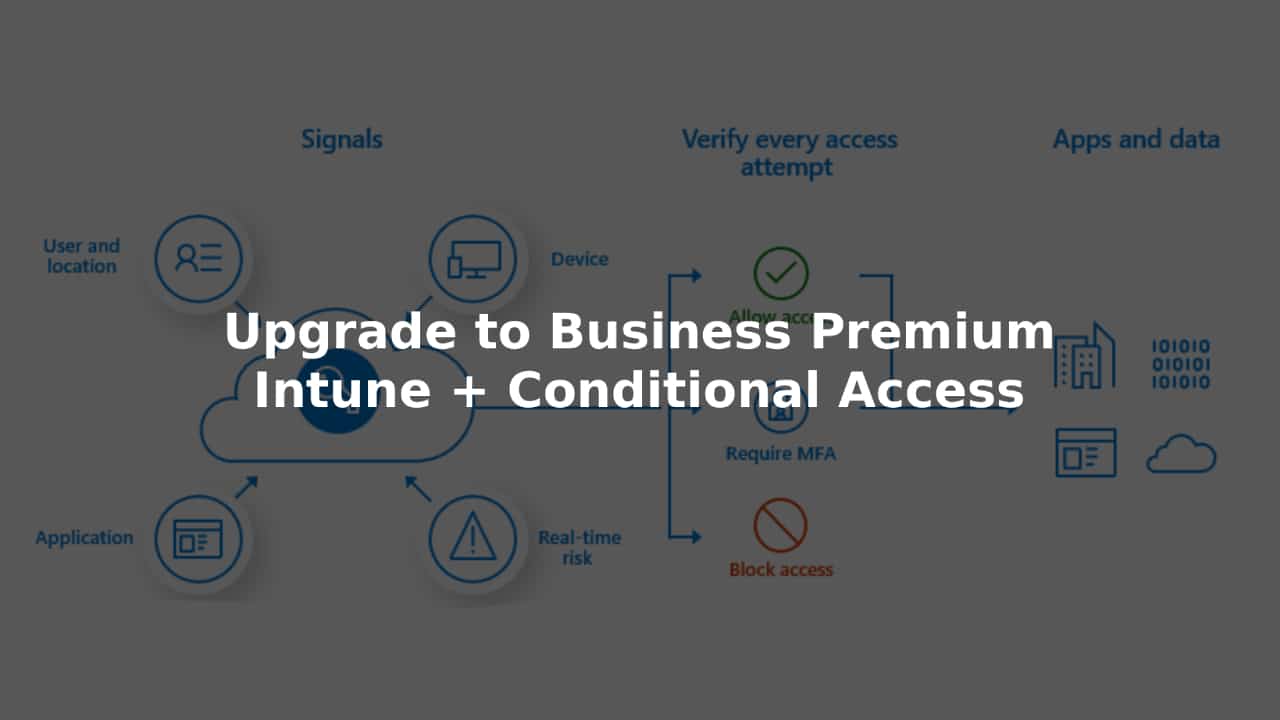
Microsoft Entra Conditional Access is an access control system that uses real-time data, such as user risk, device health, and session context, before granting access to data.
Real-world usage examples:
- High-risk logins: Force multi-factor authentication (MFA) when logging in from an unfamiliar location.
- Enforce qualified devices: Block access from unmanaged or policy-compliant devices.
- App access restrictions: Allow access only to Microsoft 365 Apps, but block unapproved external apps.
- Usage controls: Restrict downloading or sharing of sensitive information.
Conditional Access enables organizations to automatically and flexibly adapt protection based on user behavior.
Enhanced security when you upgrade to Business Premium
When organizations choose to upgrade to Business Premium, they get the Microsoft 365 security suite designed specifically for small and medium-sized businesses, including Intune, Conditional Access, Microsoft Defender for Business, Information Protection, and Exchange Online Protection.
Benefits of Business Premium include:
- Comprehensive device protection – Protect against ransomware, phishing, and malicious files
- Centralized management – Set up security and compliance from a single dashboard
- Easier compliance – Supports industry standards and data privacy requirements
- Seamless collaboration – Employees can securely access Teams, Outlook, and SharePoint from anywhere.
This upgrade not only improves security but also simplifies IT management.
Integrations in the Microsoft 365 Ecosystem
Business Premium works seamlessly with other Microsoft solutions, such as
- Microsoft Defender for Business Automatically detects and remediates threats on your device.
- Entra ID (formerly Azure AD) Manage user identities and Conditional Access policies
- Microsoft 365 Apps (such as Word, Excel, PowerPoint, Teams) are protected with Intune app-level controls
This interconnected system ensures that every user, device and application is continuously monitored and protected.
Comparing Microsoft 365 Business Standard vs. Business Premium
| Features | Business Standard | Business Premium |
|---|---|---|
| Office apps | ✔️ Word, Excel, PowerPoint, Outlook, etc. | ✔️ Word, Excel, PowerPoint, Outlook, etc. |
| Email and calendar | ✔️ Exchange Online | ✔️ Exchange Online |
| Cloud storage | ✔️ 1 TB OneDrive per user | ✔️ 1 TB OneDrive per user |
| Microsoft Teams | ✔️ Already included | ✔️ Already included |
| SharePoint and Yammer | ✔️ Already included | ✔️ Already included |
| Device Management | ❌ No | ✔️ Yes, Microsoft Intune |
| Advanced security | ❌ No | ✔️ Yes, Defender for Business, Azure Information Protection |
| Windows Virtual Desktop | ❌ No | ✔️ Already included |
| Azure AD Premium P1 | ❌ No | ✔️ Already included |
| Price (per user/month) | $12.50 (annual payment) | $22.00 (annual payment) |
| Suitable for | Collaboration and efficiency | Operation + Safety and Equipment Management |
Summary of comparison
Microsoft 365 Business Standard focuses on productivity and collaboration, providing the full suite of core Office tools, email, and collaboration functionality.
While Microsoft 365 Business Premium builds on those features with advanced security, compliance and device management capabilities such as Intune, Conditional Access, and Microsoft Defender for Business.
If your business prioritizes simplicity and collaboration — Business Standard is the right choice.
But if you prioritize security, data protection, and endpoint control — Business Premium offers significantly superior long-term value.
Case Study: Securing Your Remote Sales Team
Imagine a small sales company with 50 employees spread across a region. The IT team can use Intune to ensure all devices are encrypted and comply with company policies. Then, Conditional Access helps authenticate users and enforce MFA before they log into the CRM system.
When organizations upgrade to Business Premium, they also get additional protection from Microsoft Defender for Business, which can block phishing emails and alert administrators to suspicious activity, enabling sales teams to work confidently and securely from anywhere.
Summary
Remote and hybrid working have changed the way businesses operate, but they have also created new security risks. Microsoft Intune and Conditional Access are at the heart of a modern security strategy that combines flexibility with data protection.
When organizations choose to upgrade to Business Premium, they get a full suite of security, compliance, and productivity tools from Microsoft 365 to protect their data, devices, and users, and empower their employees to work seamlessly from anywhere.
Interested in Microsoft products and services? Send us a message here.
Explore our digital tools
If you are interested in implementing a knowledge management system in your organization, contact SeedKM for more information on enterprise knowledge management systems, or explore other products such as Jarviz for online timekeeping, OPTIMISTIC for workforce management. HRM-Payroll, Veracity for digital document signing, and CloudAccount for online accounting.
Read more articles about knowledge management systems and other management tools at Fusionsol Blog, IP Phone Blog, Chat Framework Blog, and OpenAI Blog.
New Gemini Tools For Educators: Empowering Teaching with AI
If you want to stay up-to-date with the latest technology and AI news, check out this website It's updated daily!
Fusionsol Blog in Vietnamese
- What is Microsoft 365?
- What is Copilot?What is Copilot?
- Sell Goods AI
- What is Power BI?
- What is Chatbot?
- What is cloud storage?
Related Articles
Frequently Asked Questions (FAQ)
What is Microsoft Copilot?
Microsoft Copilot is an AI-powered assistant feature that helps you work within Microsoft 365 apps like Word, Excel, PowerPoint, Outlook, and Teams by summarizing, writing, analyzing, and organizing information.
Which apps does Copilot work with?
Copilot currently supports Microsoft Word, Excel, PowerPoint, Outlook, Teams, OneNote, and others in the Microsoft 365 family.
Do I need an internet connection to use Copilot?
An internet connection is required as Copilot works with cloud-based AI models to provide accurate and up-to-date results.
How can I use Copilot to help me write documents or emails?
Users can type commands like “summarize report in one paragraph” or “write formal email response to client” and Copilot will generate the message accordingly.
Is Copilot safe for personal data?
Yes, Copilot is designed with security and privacy in mind. User data is never used to train AI models, and access rights are strictly controlled.