Microsoft Security
Microsoft มีเครื่องมือด้าน Security หลายตัวมาก และ ส่วนมากจะมีให้เป็นพื้นฐานอยู่ใน OS , Server , Azure , Microsoft 365 ดังนั้นในหลายๆเรื่องเราใช้แค่ Microsoft เราก็สามารถทำให้ระบบการทำงานของเราปลอดภัยได้ง่ายๆ ครับ แต่สำหรับรูปแบบบริษัท ที่ต้องมีการจัดการ Security แบบเข้มข้น และ ต้อง Monitor รวมถึงควบคุมได้ เราก็ต้องเลือกบริการเสริม ที่เป็นชุด Business
Microsoft Defender for Endpoint
ชุดเครื่องมือตัวเล็กสุดของ Microsoft ราคา 2.5$/Month/user ในหนึ่งบริษัท เทียบง่ายๆ คือ เอามาแทน Antivirus ที่เราใช้อยู่ได้เลย
- การป้องกันระดับองค์กรบนแล็ปท็อป เดสก์ท็อป และอุปกรณ์เคลื่อนที่ของคุณ
- การจัดการภัยคุกคามและช่องโหว่
- การป้องกันไวรัสรุ่นใหม่
- การตรวจหาและการตอบสนองปลายทาง
- การตรวจสอบและการตอบสนองโดยอัตโนมัติ
และสำหรับบริษัทที่ใช้ Microsoft 365 อยู่แล้ว ถ้าต้องการ Security แบบจัดเต็ม ก็ให้เลือกใช้ Microsoft 365 Business Premium ไปเลยเพราะจะมาพร้อมกับ Security ชุดใหญ่ที่ครอบคลุมความเสี่ยงในหลายประเด็นนอกเหนือจากการป้องกันพื้นฐาน
Microsoft 365 Business Premium
- Defender for Office 365 เพื่อช่วยปกป้องอีเมลจากการโจมตีแบบฟิชชิ่ง
- ความสามารถในการรักษาความปลอดภัยข้อมูลงานบนอุปกรณ์ส่วนตัวด้วย Microsoft Intune
- ความสามารถในการรักษาความปลอดภัยการเข้าถึงแอปงานด้วย Microsoft Entra ID P1
- การป้องกันรหัสผ่านสูญหายหรือถูกขโมยด้วยการรับรองความถูกต้องโดยใช้หลายปัจจัยขั้นสูง
- การป้องกันข้อมูลด้วย Azure Information Protection และการป้องกันการสูญหายของข้อมูล
- การเก็บถาวร eDiscovery และการเก็บข้อมูลเพื่อการดำเนินคดี
- แอป Office ที่ดีที่สุดและบริการ Cloud ที่มีประสิทธิภาพ
- Microsoft Teams ที่เพิ่มศักยภาพให้การทำงานร่วมกันผ่านการแชทและการประชุมออนไลน์
- ที่เก็บข้อมูลบน Cloud ขนาด 1 TB ต่อผู้ใช้บน OneDrive
กฎง่ายๆ 10 ข้อเพื่อช่วยรักษาความปลอดภัยของข้อมูลและปกป้องอุปกรณ์ของคุณ
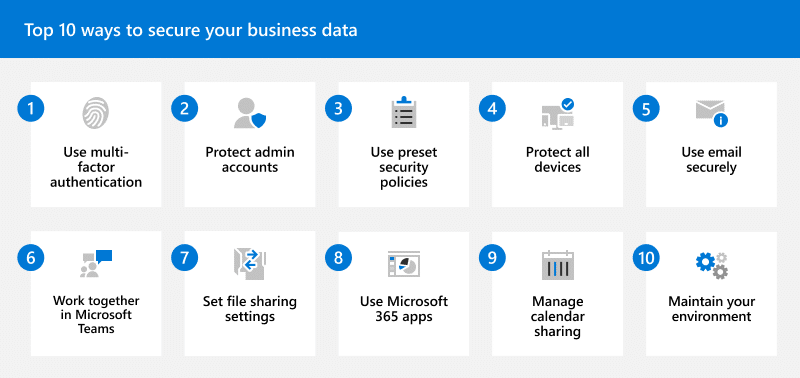
| Best practices and capabilities | Microsoft 365 Business Premium | Microsoft 365 Business Standard | Microsoft 365 Business Basic |
|---|---|---|---|
| 1. Use multi-factor authentication (MFA), also known as two-step verification. |  | | |
| – Security defaults (suitable for most organizations) | | | |
| – Conditional Access (for more stringent requirements) | | ||
| 2. Set up and protect your administrator accounts. See Protect your admin accounts. | | | |
| 3. Use preset security policies to protect email and collaboration content. See Review and apply preset security policies. | | | |
| – Anti-spam, anti-malware, and anti-phishing protection for email | | | |
| – Advanced anti-phishing, spoof settings, impersonation settings, Safe Links, and Safe Attachments for email and Office documents | | ||
| 4. Protect all devices, including personal and company devices. See Secure managed and unmanaged devices. | | ||
| – Microsoft 365 Apps (Word, Excel, PowerPoint, and more) installed on users’ computers, phones, and tablets | | | |
| – Windows 10 or 11 Pro Upgrade from Windows 7 Pro, Windows 8 Pro, or Windows 8.1 Pro | | ||
| – Advanced threat protection for users’ computers, phones, and tablets | | ||
| 5. Train everyone on email best practices. See Protect yourself against phishing and other attacks. | | | |
| – Anti-spam, anti-malware, and anti-phishing protection for email | | | |
| – Advanced threat protection for email and Office documents | | ||
| 6. Use Microsoft Teams for collaboration and sharing. | | | |
| – Microsoft Teams for communication, collaboration, and sharing | | | |
| – Safe Links & Safe Attachments with Microsoft Teams | | ||
| – Sensitivity labels for meetings to protect calendar items, Microsoft Teams meetings, and chat | | ||
| – Data Loss Prevention in Microsoft Teams to safeguard company data | | ||
| 7. Set sharing settings for SharePoint and OneDrive files and folders. | | | |
| – Safe Links and Safe Attachments for SharePoint and OneDrive | | ||
| – Sensitivity labels to mark items as sensitive, confidential. etc. | | ||
| – Data Loss Prevention to safeguard company data | | ||
| 8. Use Microsoft 365 Apps on devices | | | |
| – Outlook and Web/mobile versions of Microsoft 365 Apps for all users | | | |
| – Microsoft 365 Apps installed on users’ devices | | | |
| – Employee quick setup guide to help users get set up and running | | | |
| 9. Manage calendar sharing for your business. | | | |
| – Outlook for email and calendars | | | |
| – Data Loss Prevention to safeguard company data | | ||
| 10. Maintain your environment by performing tasks, such asl adding or removing users and devices. See Maintain your environment. | | | |