Jarviz กับแผนที่ประเทศไทยเกี่ยวข้องกันอย่างไร
“ทุกท่านคงสงสัยใช่มั้ยคะว่า Jarviz มีความเกี่ยวข้องอย่างไรกับ แผนที่ประเทศไทย ? …ถ้าอยากรู้แล้วตามมาดูเลยค่ะ …”
Jarviz มีความเกี่ยวข้องกับ แผนที่ ตรงที่ใน Application นี้มี Feature ที่นำเทคโนโลยีระบบ GPS Tracking มาใช้ระบุพิกัดตำแหน่งการ Check In – Check Out ผ่านอุปกรณ์ติดตามตัวบุคคลอย่าง Smart Phone เพื่อตรวจสอบสถานะการบันทึกลงเวลาเข้า-ออกงาน (Time Attendance) ของพนักงานในองค์กร
เมนู Status Monitor คืออะไร
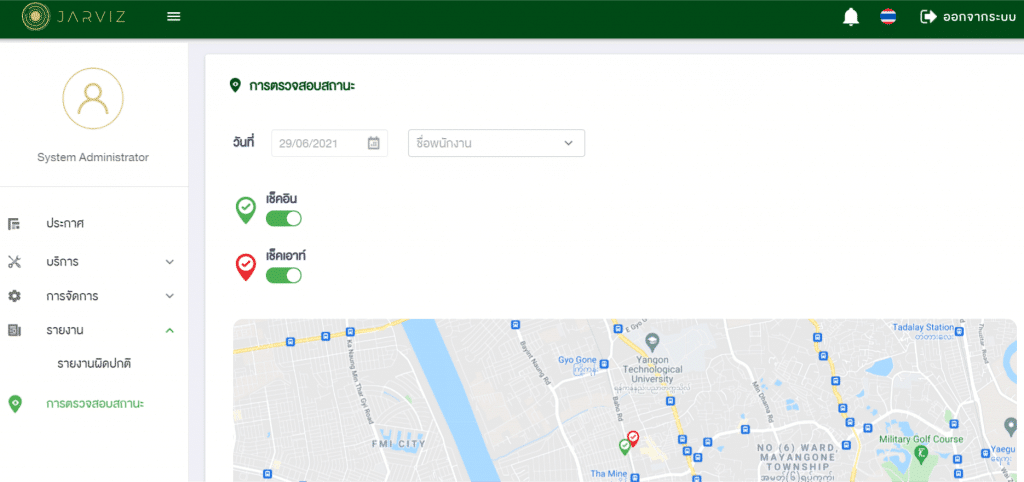
เป็นเมนูสำหรับช่วยเจ้าหน้าที่ HR หรือ Admin ตรวจสอบสถานการณ์บันทึกเวลาเข้าออกงานของพนักงาน ผ่านระบบออนไลน์ หรือหน้า Web Application ซึ่งเป็นอีกหนึ่งช่องทางหนึ่งในการตรวจสอบความถูกต้องและความผิดปกติของพนักงานในองค์กรแต่ละบุคคล ผ่านการแสดงผลในรูปแบบ แผนที่ประเทศไทย โดยข้อมูลจะมีความสัมพันธ์กับจุดที่พนักงานทำการ Check In – Check Out เข้ามา
ประโยชน์ของเมนู Status Monitor
- ช่วยให้เจ้าหน้าที่ HR หรือ Admin ระบบตรวจสอบความผิดปกติของพนักงานผ่านการแสดงในแผนที่
- สามารถดูข้อมูลการ Check In – Check Out ของพนักงานทั้งหมดได้
- สามารถดูข้อมูลการ Check In – Check Out ของพนักงานเฉพาะรายบุคคลได้
- เหมาะกับสถานการณ์โรคระบาด COVID-19 เนื่องจากพนักงานปฏิบัติงานในรูปแบบ Work From Home จึงสามารถตรวจสอบสถานที่ที่พนักงานทำการ Check In – Check Out ได้
- สามารถเชื่อมต่อกับ Power BI ได้
- ป้องกันการทุจริตของพนักงานได้
***แต่เมนู Status Monitor มีอยู่ใน Jarviz แบบ Premium เท่านั้น ซึ่งราคาก็ไม่แพง เพียง 800 บาท/เดือน ไม่จำกัดผู้ใช้, ไม่จำกัดอุปกรณ์, มีการจัดอบรมการใช้งาน และมีการอัพเดตเวอร์ชั่นใหม่ให้เสมอ

โดยรายละเอียดที่ใช้ในการลงทะเบียน มีดังนี้
- Company Name : ชื่อบริษัท
- Email : อีเมล
- Company Telephone No. : เบอร์โทร
- Company Address : ที่อยู่บริษัท
- City : เมือง
- Country : ประเทศ
- Company Code : รหัสบริษัท
How are we different from other systems?
- The GPS detection system is highly stable and detects faster than any other application on the market.
- Roles are defined with multiple levels.
- There are levels of performance reporting.
- Support Power BI connection
- Location verification speed: no more than 1 second
- ระบบอยู่บน Microsoft Cloud Service มันใจได้ถึงความเสถียรของระบบ สามารถใช้งานได้ 24×7
- There is a backup system, ensuring that data will not be lost.
- Abnormal usage summary report
FEATURE เสริม
- Leave system
- Support for leave requests via App
- There is a system for requesting approval and sending requests to the central office for consideration, approval, or cancellation.
- You can check your request immediately from the App page.
- You can set the leave type.
- Can take half-day leave
- Petty cash withdrawal system
- Set up a cash withdrawal request from the app.
- Claimed Amount Calculation System
- There is a system for requesting approval and sending requests to the central office for consideration, approval, or cancellation.
- You can check your request immediately from the App page.
- Work detail recording system
- Record your work in Task mode as a memo to yourself.
- Can be summarized into a report for management without having to waste time making repeated reports.
- Web Time Attendance for Office
- Add or remove staff
- Check employee performance
- Issue daily report
General features of the map system
- The bidder must be the rightful owner of the copyright or be appointed as a distributor by the copyright owner and be able to prove this.
- The mapping system must be able to be installed and used within the organization's intranet.
- It can be used through web browsers on personal computers, including IE10 or higher, Mozilla Firefox version 45 or higher, Chrome version 45 or higher, without installing additional programs.
- สามารถใช้งานผ่านเว็บบราวเซอร์บน Tablet หรือ Smart phone ของระบบปฏิบัติการ IOS และ Android ได้เป็นอย่างน้อย ได้แก่ Safari สำหรับ IOS, Internet สำหรับ Android เป็นต้น
- Support Pan / Zoom In / Zoom Out of the map according to the movement of the mouse device position for personal computers.
- Support Pan / Zoom In / Zoom Out of the map according to the movement of fingers on the screen that supports Multi-Touch for Tablet or Smart Phone.
สามารถดูรายละเอียดเพิ่มเติมได้ Click Here
หรือติดต่อเข้ามาสอบถามเพิ่มเติมที่ บริษัท ฟิวชั่น โซลูชั่น จำกัด เบอร์โทร 02-440-0408

Related articles