What is Microsoft 365 Copilot Connector Checker?

Copilot Connector Checker is a lightweight, self-service validation tool designed to help IT teams and administrators quickly verify that all prerequisites for Copilot connectors are correctly set up before configuring a connector for production. Think of it as a pre-flight check for your connector deployment.
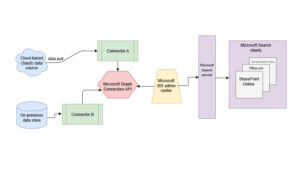
Copilot connectors allow external business systems—such as ServiceNow, Confluence, and other third-party platforms—to be indexed into Microsoft Graph so that Microsoft 365 Copilot and related intelligent experiences can discover and reason over line-of-business data.
Why You Need Copilot Connector Checker
Deploying a Copilot connector often requires configuring:
- Authentication type (Basic or OAuth)
- API access permissions
- Connectivity settings
- Table-level permissions
If even one setting is incorrect, the connector may fail to function without clear warning, or result in the copilot not being able to retrieve all external data.
Copilot Connector Checker reduces guesswork by automatically testing these requirements, allowing problems to be identified early on.
Key Benefits
💡 Fast, guided validation – Check connectivity and setup in minutes.
🔍 Clear diagnostics – Get actionable results without digging through logs.
⚙️ Simple UI – No deep technical knowledge required to run the tests.
📈 Immediate feedback – See where issues exist and recommended next steps.
How Copilot Connector Checker Works
Using the tool is straightforward:
- Open the Copilot Connector Checker web interface.
- Select the authentication type (Basic or OAuth, which is recommended).
- Enter the required connection parameters (e.g., endpoint URL and credentials).
- Click “Perform Test”.
Once executed, the tool will:
- Validate connectivity
- Verify credentials
- Check table-level permissions
- Provide diagnostic summaries
- Recommend next steps if issues are found
This workflow helps administrators identify setup issues before committing to a full connector deployment.
Supported Connectors and Roadmap
At launch, Copilot Connector Checker supports testing the ServiceNow Knowledge Base (KB) connector, with specific instructions for that service.
Microsoft states that it will support more connectors in the future, making this tool more comprehensive across the enterprise ecosystem.
Who should use the Copilot Connector Checker?
This tool is especially helpful for:
- Microsoft 365 administrators preparing to deploy Copilot connectors
- IT professionals validating access and permissions
- Organizations integrating external systems into Microsoft Graph
- Teams planning large-scale Copilot rollouts
By reducing setup errors early, Copilot Connector Checker accelerates deployment and increases confidence that your connectors are ready for production use.
Conclusion
The Copilot Connector Checker is a key component that strengthens the Microsoft 365 Copilot ecosystem by simplifying and systematically verifying potentially complex installation processes
With its fast and clear automated analysis system, this tool enables the team to:
✔ Verify identity and connection.
✔ Analyze configuration issues from the early stages.
✔ Create a stable and reliable AI experience when working with external data.
As more connectors are supported in the future, Copilot Connector Checker will become an essential tool for any organization that wants to efficiently and reliably centralize enterprise-level knowledge through Microsoft 365 Copilot in a production environment.
Interested in Microsoft products and services? Send us a message here.
Explore our digital tools
If you are interested in implementing a knowledge management system in your organization, contact SeedKM for more information on enterprise knowledge management systems, or explore other products such as Jarviz for online timekeeping, OPTIMISTIC for workforce management. HRM-Payroll, Veracity for digital document signing, and CloudAccount for online accounting.
Read more articles about knowledge management systems and other management tools at Fusionsol Blog, IP Phone Blog, Chat Framework Blog, and OpenAI Blog.
New Gemini Tools For Educators: Empowering Teaching with AI
If you want to keep up with the latest trending technology and AI news every day, check out this website . . There are new updates every day to keep up with!
Fusionsol Blog in Vietnamese
- What is Microsoft 365?
- What is Copilot?What is Copilot?
- Sell Goods AI
- What is Power BI?
- What is Chatbot?
- Lưu trữ đám mây là gì?
Related Articles
Frequently Asked Questions (FAQ)
What is Microsoft Copilot?
Microsoft Copilot is an AI-powered assistant feature that helps you work within Microsoft 365 apps like Word, Excel, PowerPoint, Outlook, and Teams by summarizing, writing, analyzing, and organizing information.
Which apps does Copilot work with?
Copilot currently supports Microsoft Word, Excel, PowerPoint, Outlook, Teams, OneNote, and others in the Microsoft 365 family.
Do I need an internet connection to use Copilot?
An internet connection is required as Copilot works with cloud-based AI models to provide accurate and up-to-date results.
How can I use Copilot to help me write documents or emails?
Users can type commands like “summarize report in one paragraph” or “write formal email response to client” and Copilot will generate the message accordingly.
Is Copilot safe for personal data?
Yes, Copilot is designed with security and privacy in mind. User data is never used to train AI models, and access rights are strictly controlled.