
Data Warehouse

What is a Data Warehouse?

A data warehouse is the creation of a central repository for business data, serving as a data storage facility for further analysis. Therefore, it needs to be able to store data from multiple sources and with diverse formats. It also requires tools for managing imported data and filtering out unwanted data before inputting it into the data analysis system.

The foundation of all future systems will require both internal and external data for data analysis.

Currently, we can use Power BI to connect directly to a production database and analyze the data to create a dashboard immediately. However, if we have data from multiple sources and need to create new relationships or perspectives beyond the existing data, then it becomes necessary to create a custom dashboard to ensure the data is more readily available.

This also includes new needs that may arise, such as machine learning and DW (Derivative Warrant) development, which are essential preparations to make in advance.
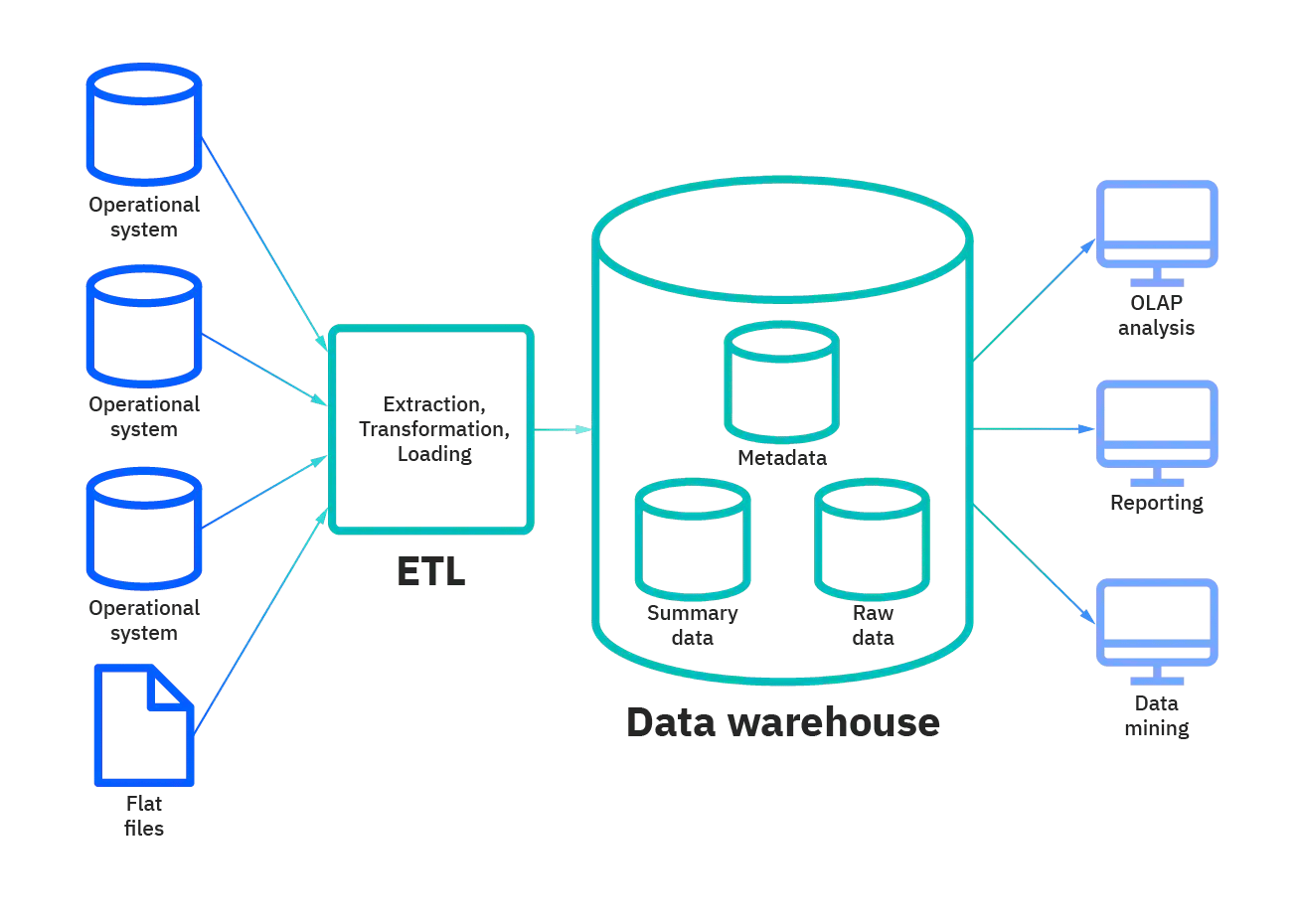
Data Warehouse Pipeline

Cases where a data warehouse should be used.

    • We need to prepare the data so it's ready for use in applications such as BI (Business Intelligence) or other apps that require data connectivity.
    • Use it, or use it as a reference.
      We need to customize or clear the data before using it.
    • I need in-depth, customizable data analytics.
    • We do not want the application to connect directly to the data product because it may cause data corruption.
    • I don't want to be tied to a single BI tool, nor do I need to use multiple BI tools for analysis.

Service by Fusion Solution

Fusion Solution provides consulting, design, installation, and development services. Data Warehouse With over 15 years of experience and developing systems to Microsoft Gold Partner standards, CMMi3 This product is for businesses that need to build a data warehouse for modern data analysis, by collecting data from both internal sources such as accounting systems, human resources systems, and sales systems, and external sources such as reference data for business comparisons, using Microsoft SQL Server as the tool.

    • Install and Implement SQL.
    • Implement HA SQL
    • Design ETL
    • Design
    • Cube Design
    • Design ETL Process
    • Fusion Master Data Management (A ready-to-use application to help manage and prepare data before ETL)


GHB's Data Warehouse Case Study

Server for Data warehouse

    • The server setup for BI can be divided into functions as follows: (System functions can sometimes be consolidated onto a single machine to save costs.)
    • ETL for data import processes.
    • DW is used for importing data from multiple sources and storing it centrally in preparation for input into the data analysis system.s
    • SSDS Server or Cuble Server is a machine used for analyzing and preparing data to be ready for retrieval.
    • A reporting server is used to present information to end users.
    • Performing Data Waging (DW) isn't necessary in every case when developing a Business Intelligence solution, because Power BI can connect to various data sources simultaneously and has built-in cube capabilities.
    • Data compression in SQL typically has a compression ratio of around 1:10, which helps in in-memory execution and significantly speeds up the process.
    • SQL Server and Azure SQL Database are integral to data analytics, utilizing Azure Machine Learning. The data analysis studio provides the capability to extract meaningful and actionable information from large datasets.
      It makes analytical models more efficient, applications, and enables companies to build large databases of assets.
    • Hard disk I/O speed is the slowest performance component; even servers using high-performance SSDs that aren't optimized for SQL Server won't perform well. Using RAM as the primary data storage option would be a better choice, ensuring a good starting point for normal operation. This is expected to happen in the near future.
    • For large systems, increasing RAM on a server increases the amount of data that can be stored. More RAM means increased memory capacity and other capabilities, such as hybrid transaction/analytical processing (HTAP), also known as real-time operations analytics and memory access speeds. The speed also increases as RAM grows.
    • Partitioning: Dividing data into parts is a common optimization technique used in data warehousing. For example, sales data can be segmented by monthly or quarterly details, while customer data can be partitioned by region. Partitioning allows for faster query responses by reducing the size of the queried dataset.
    • Data compression: Compression can significantly reduce storage and I/O bandwidth requirements. The compressed column name indexing technology first introduced in SQL Server 2014 was designed to address the challenges posed by storage and I/O bandwidth constraints in data warehouses.
    • Reducing data latency: A combination of memory-optimized tables for online transaction processing (OLTP) or time-scheduling types can significantly reduce data retrieval times. Adding clustered columnstores via the temporary logic introduced in SQL Server 2016 allows data to be stored in “hot” memory in a highly compressed data format, where clustered column indexes greatly reduce overall maintenance.


Spec Server Data Warehouse

    • Compared to SSDs, servers have lower specifications, especially in terms of CPU; they might only need an 8-core processor to run the system.
    • Regarding memory, the RAM size must be 256 GB or more.
    • It's best to prioritize a large hard disk first, but speed isn't a priority, so a SATA hard disk will work just fine.


Database Tuning

    • Regarding slow report loading, especially reports pulled directly from DWs, there can be several reasons, such as a large number of filters being present.
    • Database tuning for this case may require using a Report Snapshot method, which can be done in two ways.
    • Execution Report Snapshot allows the Report Server to pre-execute a query, perhaps at midnight. When a user opens the server, it will execute the saved query, saving time by avoiding repetitive database processing.
    • History Snapshot is used when a report changes over time, such as an Inventory report. You can save snapshots of older months, and when you open History, it will display the saved past data.


Questions about Data Warehouse

    1. What is DW for?
      • Combine data from multiple systems and use it as raw data for generating reports.
    2. How much does Azure DW cost?
      • You can click on it directly.

Related content






