In the rapidly evolving digital economy, cloud technology has become a cornerstone of modern business operations. Organizations of all sizes are migrating to the cloud to improve efficiency, enhance security, and seamlessly scale operations. However, many companies may wonder about the services... cloud What organization? To best suit their business needs, traditional on-premises servers require significant initial investment, ongoing maintenance, and a dedicated IT team to manage the infrastructure. In contrast, cloud platforms offer a more flexible and cost-effective alternative, making them a crucial tool for businesses seeking to maintain their competitiveness.
What kind of organization is using a cloud?
The demand for cloud solutions is continuously increasing as businesses prioritize agility, security, and cost efficiency. Cloud technology enables organizations to manage data, deploy applications, and scale infrastructure without hardware limitations. Furthermore, cloud services support remote work, ensure business continuity, and open up opportunities for cutting-edge innovations such as artificial intelligence and big data analytics.
Types of cloud services: Public Cloud Service, Private Cloud Service, and Hybrid Cloud Service.
in the system Cloud Enterprise Organizations often choose to use Public Cloud, Private Cloud, or Hybrid Cloud ขึ้นอยู่กับ Safety, scalability, and operational requirements.
1. Public Cloud
Public Cloud It is a cloud system provided by an external service provider, such as Microsoft Azure, AWS, or Google Cloud, where resources are shared among multiple organizations.
Advantages of Public Cloud:
- low cost – Charge a service fee based on usage (pay-as-you-go), reducing upfront investment costs.
- Supports expansion well – You can increase or decrease the size of resources as needed.
- No need to take care of the system yourself – A service provider who manages all infrastructure.
Suitable for:
- business Startup and SaaS Requiring a solution that is easily scalable.
- system Develop and test that require low costs
- Unwanted work Safety or strict compliance with regulations.
📌 example: Microsoft Azure, AWS, Google Cloud
2. Private Cloud
Private Cloud A cloud system is built for use within a single organization. It may be located within the company's data center or hosted by a third-party service provider.
Advantages of Private Cloud:
- High security - Data is stored in a dedicated organizational system, reducing security risks.
- Full control and customization. – We can design infrastructure to meet the specific needs of the business.
- High efficiency – No need to share resources with other organizations.
Suitable for:
- Financial institutions, hospitals, and government agencies. With high safety requirements.
- desired organization Customize infrastructure according to needs
- A company that collects and analyzes data. sensitive information
📌 example: Azure Stack, AWS Outposts, VMware Cloud
3. Hybrid Cloud
Hybrid Cloud is to combine the advantages of Public Cloud and Private Cloud Coming together, so that organizations can... Coming together, so that organizations can... and use Public Cloud for scalable projects.
Advantages of Hybrid Cloud:
- high flexibility - use Private Cloud For important tasks and uses. Public Cloud For general work
- Reduce costs well – Use the resources of Public Cloud When expanding the system, instead of investing in additional infrastructure.
- Keep information secure – Important information remains in Private Cloud
Suitable for:
- Organizations that have Workload that is constantly changing.
- desired business Safety but still want Flexibility and expansion
- Companies that are Migrate from on-premises data center to the cloud.
📌 example: Microsoft Azure Hybrid Cloud, AWS Hybrid Cloud, Google Anthos
Compare three cloud computing options to find the right one for your business.
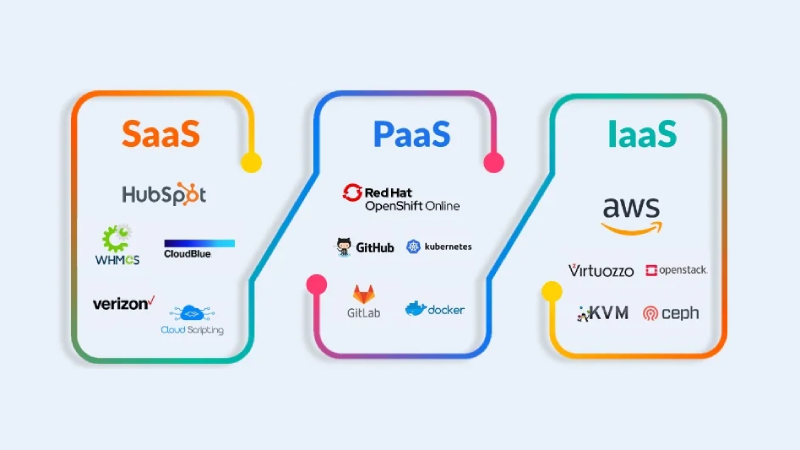
Cloud computing is a technology that allows businesses to use software, services, and infrastructure over the internet, instead of investing in on-premise hardware and software. Cloud computing is generally divided into... 3 main formats namely
- SaaS (Software as a Service) – Ready-made software services
- PaaS (Platform as a Service) – A platform for developers.
- IaaS (Infrastructure as a Service) – Cloud infrastructure
Each type has its own advantages and disadvantages, and is suitable for different uses. Let's look at the details!
What is SaaS (Software as a Service)?
SaaS It is a cloud-based software service that allows users to access and use it via the internet without having to install or maintain the system themselves. For example: Google Workspace, Microsoft 365, Dropbox, Salesforce
Advantages of SaaS
- No need to install the software yourself. – You can access it directly through your web browser.
- Auto update – No need to maintain the system or upgrade the software yourself.
- Access anywhere – Works from any device connected to the internet.
- Reduce IT costs - No need to invest in servers or a system administration team.
❌ Disadvantages of SaaS
- Little control over the system – The software is not very customizable.
- must rely on the internet – If the network is down, it may be unavailable.
- Security limitations All data is stored on the service provider's servers.
📌 Suitable for: Businesses that need off-the-shelf software include: General organizations, small businesses, remote teams.
What is PaaS (Platform as a Service)?
PaaS It is a platform that allows developers to build, test, and deploy applications without having to manage the infrastructure themselves. For example, Google App Engine, Microsoft Azure App Service, AWS Elastic Beanstalk
Advantages of PaaS
- Develop applications faster - There are tools and frameworks available.
- Reduce the burden on developers – No need to maintain servers or operating systems.
- Scalability – Resources can be increased or decreased as needed.
- Supports multiple languages and frameworks. – Supports Node.js, Python, Java, .NET, etc.
❌ Disadvantages of PaaS
- May limit use – Some platforms may not support all languages and frameworks.
- Must rely on service providers – If the platform crashes, it could affect the entire system.
- Costs may increase – If it uses a lot of resources, it may be more expensive than building the structure yourself.
📌 Suitable for: Developers, startups, and businesses that want to build applications without having to maintain infrastructure.
What is IaaS (Infrastructure as a Service)?
IaaS These are cloud-based infrastructure services, such as: Servers, storage, networking. that can be freely customized, for example: AWS EC2, Microsoft Azure Virtual Machines, Google Compute Engine
Advantages of IaaS
- Full control - You can customize the server, operating system, and network.
- Supports system expansion – Resources can be scaled as needed.
- Supports complex applications – Used for applications that require high performance.
- Pay only for actual usage. – Reduce hardware and maintenance costs.
❌ Disadvantages of IaaS
- An IT team is required to maintain it. – You need to set up and maintain the system yourself.
- Costs may be higher. – If resources are used excessively, costs may increase.
- Management complexity – Proper usage planning is necessary.
📌 Suitable for: Large organizations, businesses that want to control their own infrastructure, such as: E-commerce, Big Data, AI & Machine Learning
Comparison table of SaaS vs PaaS vs IaaS
Feature | SaaS (Software as a Service) | PaaS (Platform as a Service) | IaaS (Infrastructure as a Service) |
What services do you provide? | Packaged software | app development platform | cloud infrastructure |
system control | least | moderate | the most |
Do you have to take care of it yourself? | do not need | some | All must be taken care of. |
Initial cost | low | moderate | High |
flexibility | low | moderate | High |
System scalability | Limited by platform | Resilient | Fully customizable |
Who is it suitable for? | General users and SMEs. | Startup developer | Large organizations |
Examples of service providers | Google Workspace, Microsoft 365, Dropbox | Google App Engine, AWS Elastic Beanstalk | AWS EC2, Microsoft Azure VM, Google Compute Engine |
The main benefits ofEnterprise Cloud
- Scalability: Easily expand your business.
One of the key advantages of the cloud is its ability to dynamically scale resources. Organizations can increase or decrease resources as needed, ensuring sufficient performance without over-scalating resources.
For example, during peak usage periods—such as holiday sales or product launches—businesses can instantly scale up server capacity to handle increased traffic. When demand drops, they can scale back down. This helps optimize resource usage and minimize costs. This flexibility is especially beneficial for startups and growing companies that need adaptable IT infrastructure without committing to long-term investments.
- Cost efficiency: Reduce IT expenses and increase return on investment.
Traditional IT infrastructure requires significant investment in servers, data centers, and maintenance costs. The cloud reduces the need for upfront investment by shifting to an operational cost model.
With cloud solutions, organizations pay only for the resources they actually use, based on a billing model. Pay-as-You-Go This flexibility allows businesses to manage their IT budgets more efficiently and reduce costs associated with hardware maintenance, energy expenses, and personnel costs for server administration.
In addition, cloud service providers handle software updates, security patches, and infrastructure improvements, which helps reduce the IT workload for organizations.
- Advanced security: Protecting critical business data.
Security is a top priority for organizations, especially those handling sensitive customer data and proprietary information. Cloud systems provide robust security measures to protect against cyber threats, data breaches, and unauthorized access.
- Data encryption: Cloud service providers use advanced encryption protocols to secure data both during transmission and storage.
- Multifactor authentication (MFA): Add an extra layer of security to prevent unauthorized access.
- AI-powered threat detection: Machine learning algorithms help identify suspicious behavior and reduce the risk of cyber attacks.
- Compliance with industry standards: Leading cloud service providers adhere to security standards such as: GDPR, HIPAA, ISO 27001 และ SOC 2 To ensure that the organization can comply with legal and safety requirements.
With these security measures in place, organizations can confidently store and manage data without the risks associated with their on-premises infrastructure.
- Remote access: Empowering the modern workforce.
The shift to remote and hybrid work models makes cloud computing essential for organizations seeking to maintain productivity. Cloud-based software enables employees to collaborate in real time, securely access company resources, and work from anywhere.
Popular collaboration tools include: Google Workspace, Microsoft 365 และ Slack It can integrate seamlessly into cloud environments, enabling teams to communicate and share documents efficiently. Furthermore, the system... Virtual Desktop Infrastructure (VDI) The cloud also allows employees to securely access their work environment from any device, increasing agility and flexibility in their work.
- Business continuity and disaster recovery.
Data loss can be catastrophic for any organization. Cloud systems mitigate this risk by providing automated data backup and recovery services.
Cloud service providers offer... Disaster Recovery as a Service (DRaaS) and Backup as a Service (BaaS) To ensure that organizations can quickly recover critical data in the event of cyberattacks, system failures, or natural disasters, this helps minimize downtime and ensures business continuity.
การเลือกโซลูชันคลาวด์องค์กรที่เหมาะสม
Choosing a cloud service provider is a strategic decision that requires careful consideration of several factors:
- Performance and reliability
Make sure your cloud provider offers a guaranteed high uptime period. Service Level Agreements (SLAs) Industry leaders such as AWS, Microsoft Azure และ Google Cloud We provide a guarantee. Uptime 99.9% or higher. To ensure that the service does not experience interruptions.
- Safety and compliance
Organizations should prioritize cloud providers that adhere to industry-specific security standards when handling financial transactions, medical records, or government data. Compliance with PCI-DSS, HIPAA, or FedRAMP standards. considered important
- Customization and scalability.
Choose a cloud solution that can scale to meet your business needs, whether it be... Infrastructure as a Service (IaaS), Platform as a Service (PaaS) or Software as a Service (SaaS) Service providers should offer flexible usage plans that align with the organization's growth strategies.
- Integration capabilities
Cloud solutions must be able to integrate with existing systems. Enterprise Resource Planning (ERP), Customer Relationship Management (CRM) และ Business Intelligence (BI) Seamlessly compatible with applications such as... Salesforce, SAP, and Oracle It is important to improve operational efficiency.
- Customer support and managed services.
Reliable technical support ensures that problems are resolved quickly. Choose a service provider that offers this. 24/7 customer support, dedicated account managers, and proactive system audits. To ensure continuity of service.
The future of enterprise cloud systems.
Cloud technology continues to evolve and plays a crucial role in driving digital transformation. Key trends shaping the future of cloud innovation include:
- Artificial intelligence and machine learning in the cloud.
AI-powered cloud services are revolutionizing data analytics. Predictive modeling and business automation. Organizations can use AI-driven insights to optimize operations, personalize customer experiences, and detect anomalies in financial transactions.
- Edge computing for real-time processing.
Edge Computing Bringing cloud resources closer to users, reducing latency, and enabling real-time decision-making, this technology is critically important for industries requiring real-time computing. Low Latency Mention artistic direction: Internet of Things (IoT), autonomous vehicles, and smart cities.
- Multi-Cloud and Hybrid Cloud Strategies
The organization is leading the way Multi-Cloud และ Hybrid Cloud It is used to distribute IT infrastructure. This method helps to increase... Flexibility, cost reduction, and risk management. This allows for the avoidance of vendor lock-in and enhances the system's resilience to failure.
- Serverless computing for cost savings.
Serverless Computing It helps reduce the need for managing underlying infrastructure, allowing organizations to run applications in the model. Pay-Per-Execution which increases expandability And reduce the operational burden.
- Sustainability and Green Cloud Projects
As businesses place greater emphasis on sustainability, cloud service providers are investing in... Energy-efficient data centers, carbon-neutral cloud services, and the use of renewable energy. These projects align with the organization's sustainability goals and help reduce the environmental impact of IT operations.
In summary: What is enterprise cloud?
Migrating to enterprise cloud infrastructure. It's no longer an option, but a necessity. For organizations looking to increase agility, reduce costs, and expand operations efficiently, cloud systems enable businesses to... Optimize IT resources, improve security, and drive digital innovation.
As cloud technology continues to evolve, organizations that adapt to digital transformation will gain a strategic advantage in highly competitive markets, regardless of... Startups, large companies, or global organizations. Cloud solutions form the foundation for... Innovation, expansion, and success. in the digital age
For details about our enterprise cloud platform, please visit: Azure Cloud Services To help your business grow in the digital age.
Interested in Microsoft products and services? Send us a message here.
Explore our digital tools
If you are interested in implementing a knowledge management system in your organization, contact SeedKM for more information on enterprise knowledge management systems, or explore other products such as Jarviz for online timekeeping, OPTIMISTIC for workforce management. HRM-Payroll, Veracity for digital document signing, and CloudAccount for online accounting.
Read more articles about knowledge management systems and other management tools at Fusionsol Blog, IP Phone Blog, Chat Framework Blog, and OpenAI Blog.