OpenAI has just released OpenAI AgentKit, a comprehensive suite of tools designed to help developers and organizations build, deploy, and optimize intelligent agents more effectively than ever before.
If you want to embed an AI-powered agent into your application, AgentKit simplifies the entire process — from workflow design to performance monitoring — within a fully cohesive framework.
What is AgentKit?
AgentKit is designed to simplify the agent development lifecycle, which traditionally required multiple separate tools for orchestration, evaluation, version control, and front-end embedding.
AgentKit core components
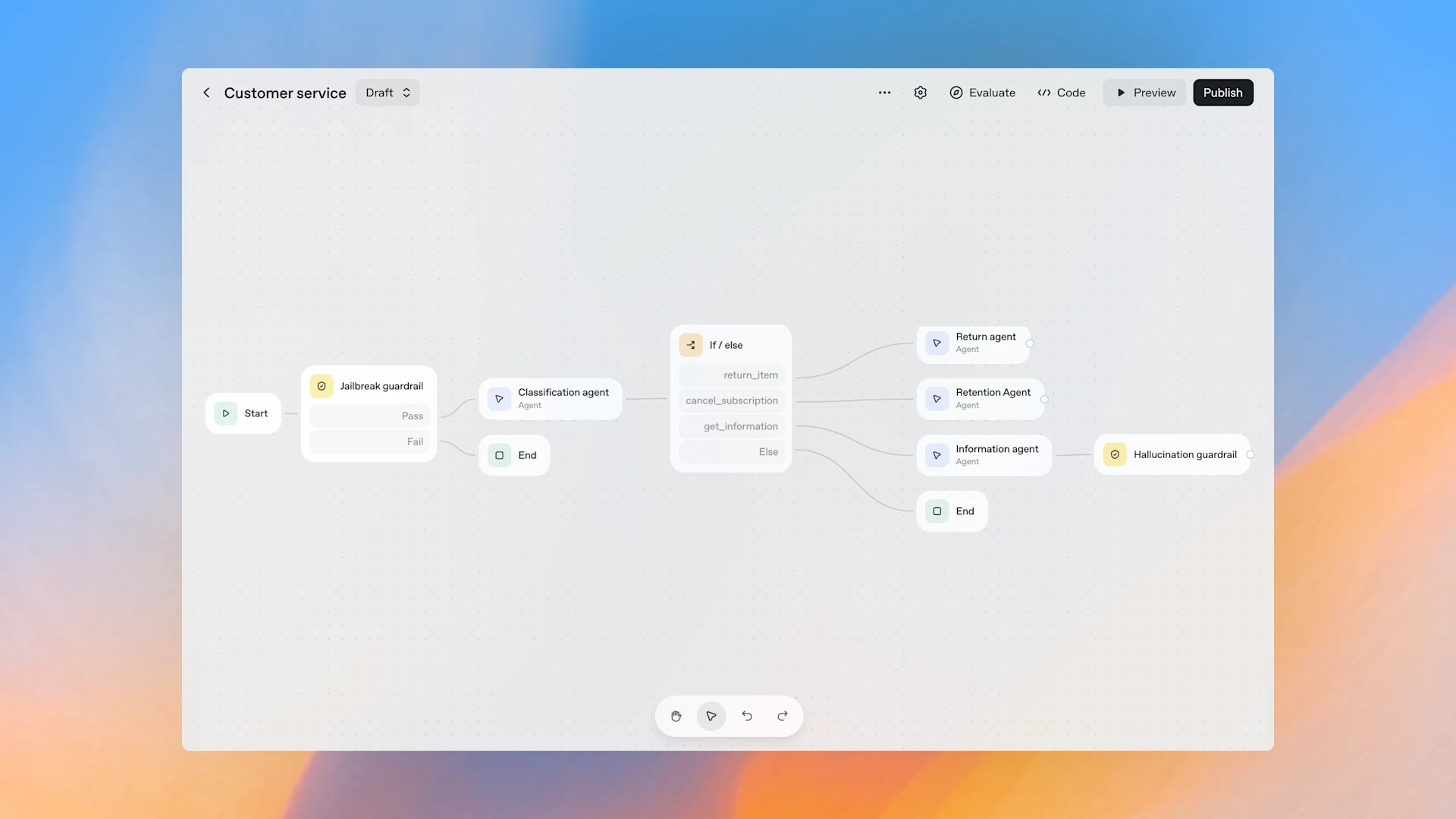
Agent Builder – A visual canvas workspace for designing, versioning, and previewing multi-agent workflows.
- It features drag-and-drop, templates, guardrails, and evaluation tools.
- It allows teams like Ramp and LY Corporation to build agents in just a few hours, instead of months.
Connector Registry – A centralized management hub for connecting data between tools like Google Drive, SharePoint, and Teams.
- It enables organizations to effectively control and secure data connections across each workspace.
- ChatKit – A UI toolkit for embedding chat-based agents directly into your app or website.
- Make it easy to build and deploy conversational systems for customer service, training, or research.
- Companies like Canva and HubSpot are using ChatKit to quickly launch chat agents.
Evals Enhancements – Tools to expand agent evaluation capabilities
- Added functionality such as datasets, trace grading, automatic prompt adjustment, and testing with external models.
- Helps increase accuracy and reliability for enterprise applications
Reinforcement Fine-Tuning (RFT) – Tools for customizing reasoning models (available on o4-mini and currently being tested on GPT-5 beta)
- Added the ability to create custom tool calls and custom graders to provide more granular control over model reasoning and decision making.
These tools greatly reduce the time and complexity from prototyping to real-world deployment.
Why AgentKit is important
Building an agent involves a complex process, from defining logic, connecting data, customizing prompts, and evaluating them in a production environment.
AgentKit combines all these elements into a single system, enabling benefits such as:
- Faster development cycle
Use Agent Builder to quickly design and customize flows without spending weeks writing custom orchestrations. - Consistent Governance and Control
Connector Registry Helps keep all data connections in one auditable system. - Embedded UX
ChatKit enables you to build conversational systems that blend seamlessly with your product, with support for features like message streaming, fallback behavior, and UI theming. - Rigorous evaluation
With trace grading, automatic prompt adjustment, and support for external models, developers can improve agents based on real-world usage data. - High-level model control via RFT
Customize the model to better understand the context of the task and learn how to invoke tools or evaluate them against organizationally defined criteria.
With these features, AgentKit becomes a production-ready environment for organizations that previously used response APIs or agent SDKs.
Real-world examples and success stories
AgentKit is used by many organizations that want to improve the efficiency of their agent systems, such as:
- Automated Customer Service – Klarna uses agents who handle two-thirds of all customer requests.
- Sales Acceleration – Clay reports being able to increase growth by up to 10x by embedding agent workflows in their tools.
- Enterprise Data Assistant – Ramp and LY Corporation use Agent Builder to build a ready-to-use agent from scratch in hours, allowing product, legal, and engineering teams to work seamlessly together.
These cases demonstrate that AgentKit can significantly reduce agent development time and scale to enterprise-level deployments.
Availability and notices
- Agent Builder: In beta
- Connector Registry: Currently available in beta for some users in the API, ChatGPT Enterprise, and Education.
- ChatKit and Evals Enhancements: Now open for general use.
- Price: All AgentKit features are included in the standard pricing structure of API models.
If you're already an OpenAI API user,OpenAI AgentKit is a natural upgrade, with built-in best practices and comprehensive tools.
Summary
The launch of OpenAI AgentKit marks a significant step in the evolution of agent development, as it shifts the paradigm from siloed tools to a single, comprehensive, and flexible framework for building, embedding, and customizing intelligent agents.
With key components like Agent Builder, Connector Registry, ChatKit, Evals Enhancements and Reinforcement Fine-Tuning, developers and organizations can confidently accelerate innovation while maintaining full control over the quality and performance of their systems.